
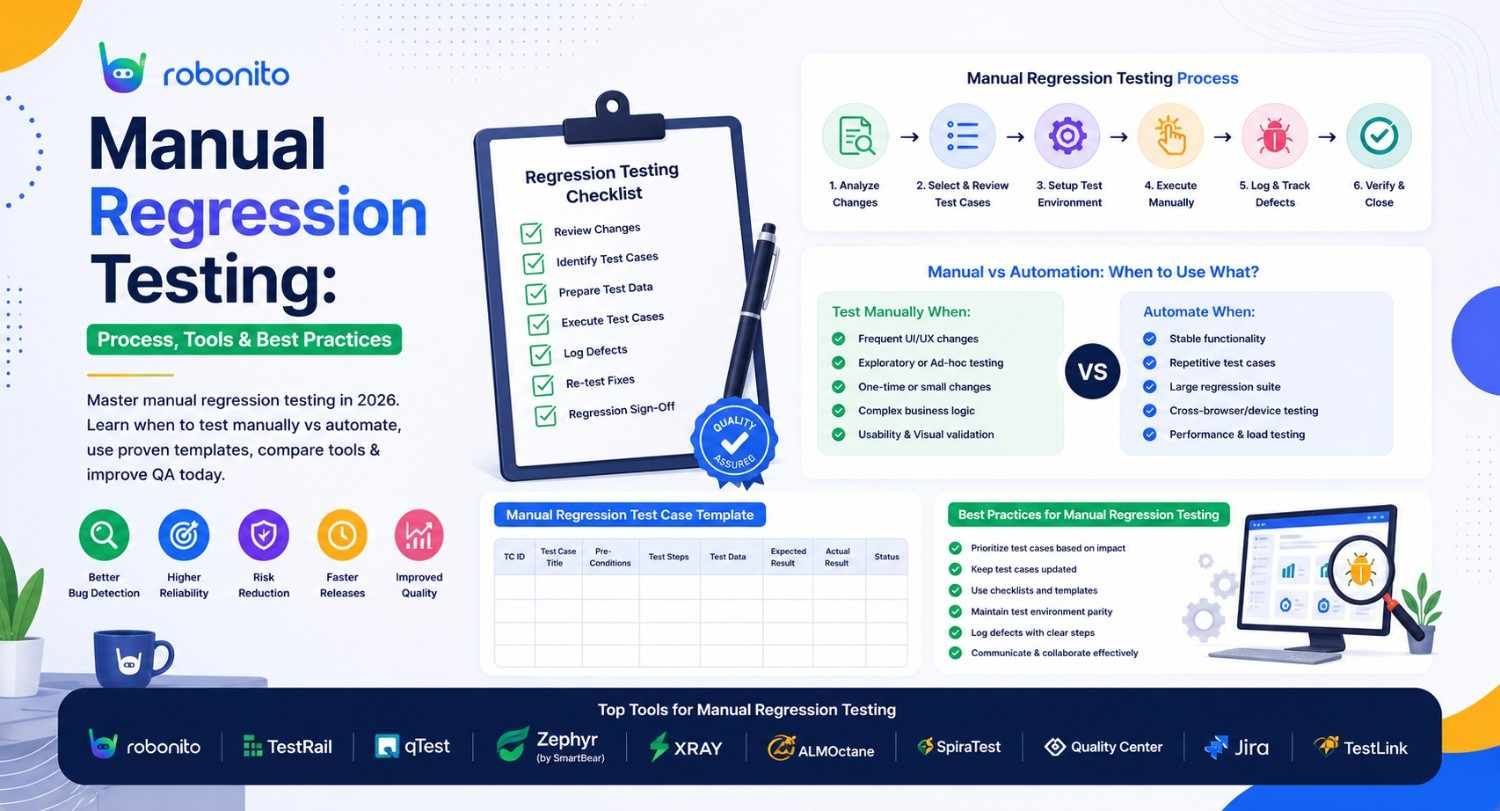
Every time you ship code, you risk breaking something that used to work. Automated tests catch the scenarios you predicted. Manual regression testing catches everything else — the subtle UX change nobody scripted for, the multi-step workflow that fails only in a specific sequence, the edge case that only a human tester's intuition would think to try. This guide covers the full manual regression process, with real templates, tools, and a decision framework for what to keep manual versus automate.
By Robonito Engineering Team · Updated May 2026 · 18 min read
Quick stats
| Fact | Source |
|---|---|
| 46% of production incidents are caused by regression bugs that testing should have caught | Tricentis State of Testing 2025 |
| Manual regression testing finds 25–40% more usability bugs than automated regression | Nielsen Norman Group |
| A regression bug found in production costs 100× more to fix than one found in testing | IBM Systems Sciences Institute |
| Teams combining manual + automated regression reduce defect leakage by up to 70% | Capgemini World Quality Report 2025 |
| Average manual regression cycle takes 3–5 days for medium-complexity applications | Gartner Software Quality Research 2025 |
Table of Contents
- What is manual regression testing?
- Manual vs automated regression — the honest decision framework
- Building a regression test suite
- Test case structure — with real templates
- Test case prioritisation — risk-based approach
- The manual regression testing process step by step
- Defect reporting — templates and best practices
- Tools for manual regression testing
- Exploratory regression testing
- Transitioning manual regression to automation
- Common manual regression testing mistakes
- Pre-release regression testing checklist
- Frequently Asked Questions
Reduce your manual regression cycle from days to hours
Robonito automates the repetitive portion of your regression suite — leaving your manual testers free to focus on exploratory testing and complex scenarios that automation cannot handle. Try Robonito free →
1. What is manual regression testing?
One-sentence definition for featured snippets: Manual regression testing is the process of a human tester re-executing test cases against previously validated software after code changes, to verify the changes have not broken existing functionality or introduced new defects.
Every software release carries the same fundamental risk: the code change that fixed one thing silently broke something else. The payment form that worked perfectly last week fails this week because the developer who updated the address field did not realise it shared a validation function with the payment card field. The search feature that returned correct results now returns results in a different order because an incidental sort change was not caught by any existing test. The mobile layout that displayed correctly on iOS now overflows because a CSS change was only tested on desktop.
These are regression bugs. They are the most common category of production incident. And they share one characteristic: they were preventable by testing the right things before the release went live.
Manual regression testing is the human-led process of systematically re-checking that previously working functionality still works after a change. It is called "regression" because you are testing whether the system has regressed — moved backward — in quality.
The difference between regression testing and retesting
These two terms are frequently confused, and the distinction matters:
Retesting is re-executing a specific test case that previously failed after the associated bug has been fixed. It answers: "Is this specific bug now fixed?"
Regression testing is re-executing tests for unrelated functionality after any change, to verify the change did not introduce new bugs elsewhere. It answers: "Did fixing or adding anything break something that was already working?"
Both are necessary. Retesting verifies the fix. Regression testing verifies the fix did not create new problems.
2. Manual vs automated regression — the honest decision framework
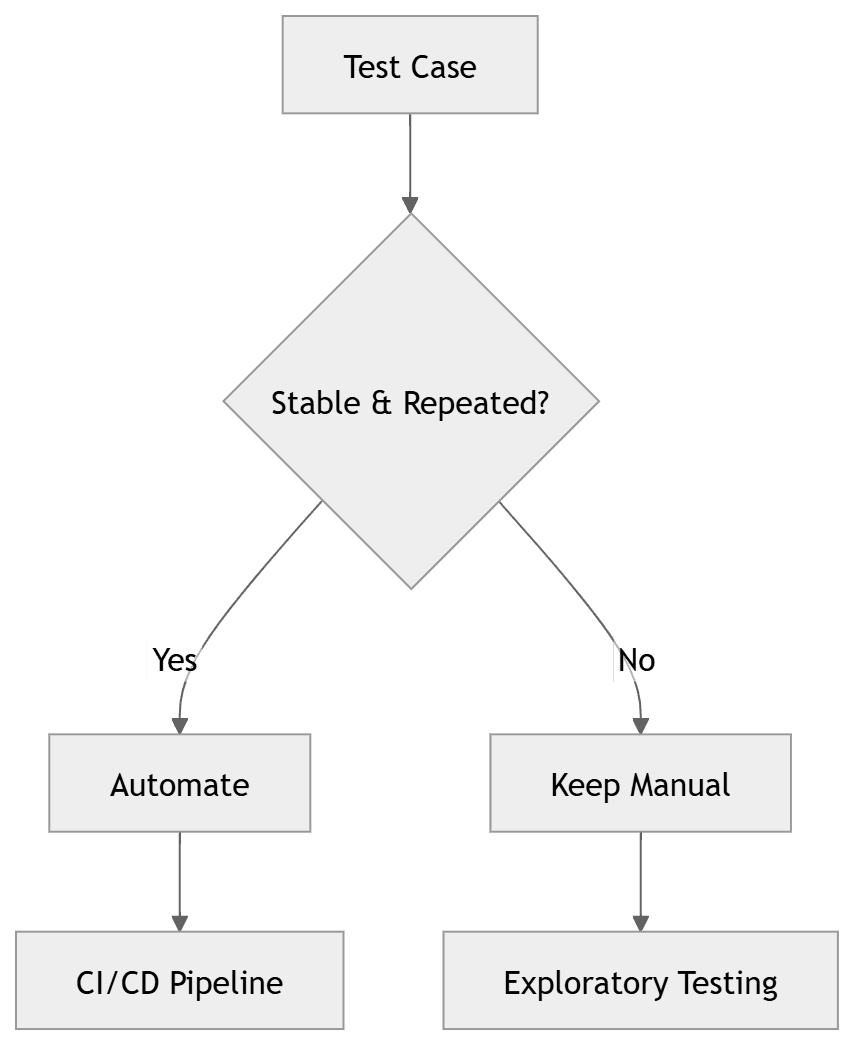
The most important question in regression testing strategy is not "should we automate?" — it is "which specific scenarios should we automate, and which should we keep manual?" Getting this decision wrong in either direction is expensive.
Over-automating creates a fragile suite of UI tests that break with every UI change, consume significant maintenance time, and provide false confidence because they test only deterministic scenarios.
Under-automating creates a manual regression bottleneck that grows with every release, slows delivery, and exhausts QA teams with repetitive work that a script could handle more reliably.
The decision matrix
| Scenario characteristic | Keep manual | Automate |
|---|---|---|
| First-pass testing of a new feature | ✅ | — |
| Exploratory investigation of complex workflows | ✅ | — |
| Usability and UX evaluation | ✅ | — |
| Scenarios requiring subjective human judgment | ✅ | — |
| Accessibility evaluation with real assistive technology | ✅ | — |
| Low-frequency tests (< 4 runs per year) | ✅ | — |
| Stable, deterministic outcomes | — | ✅ |
| High-frequency execution (every release or PR) | — | ✅ |
| Repetitive data-entry scenarios with many inputs | — | ✅ |
| Cross-browser compatibility verification | — | ✅ |
| API response validation | — | ✅ |
| Performance and load testing | — | ✅ |
The automation ROI test
Before automating a manual regression test, verify the maths:
Automate if:
(Number of annual runs × Manual execution time) > (Automation build time + Annual maintenance time)

Example:
- Checkout regression test runs 52× per year (weekly)
- Takes 15 minutes to execute manually
- Takes 4 hours to automate
- Costs 30 minutes/quarter to maintain

Manual annual cost: 52 × 15 min = 780 minutes
Automation annual cost: 240 min build + (4 × 30 min) maintenance = 360 minutes
Net saving year 1: 420 minutes → Automate it

Example (do NOT automate):
- Complex edge-case scenario runs 4× per year
- Takes 20 minutes manually
- Takes 6 hours to automate
- Costs 1 hour/month to maintain (dynamic UI changes frequently)

Manual annual cost: 4 × 20 min = 80 minutes
Automation annual cost: 360 min build + (12 × 60 min) = 1,080 minutes/year
Net loss year 1: 1,000 minutes → Keep manual
3. Building a regression test suite
A regression test suite is only as good as its selection logic. Including too many test cases makes the suite too slow to execute regularly. Including too few leaves critical functionality unprotected.
What belongs in a regression test suite
Include:
- Every critical user flow (login, registration, checkout, core feature workflows)
- Every test case that has ever caught a production regression
- Happy path and primary error path for every high-business-impact feature
- All tests covering recently changed functionality (highest regression risk)
- Integration points with external systems
Exclude:
- Test cases covering features with zero recent changes and zero historical regressions
- Exploratory test scenarios (these belong in exploratory testing sessions, not the regression suite)
- Test cases for deprecated functionality
- Duplicate tests that cover the same code path
Regression suite structure
Organise your regression suite into layers that can be run selectively based on the scope of changes:
Regression Test Suite
│
├── Smoke Regression (15–20 tests)
│   └── Core paths that must work for the application to be usable at all
│   └── Run: Every deployment to every environment
│   └── Target execution time: < 30 minutes
│
├── Critical Regression (50–80 tests)
│   └── All P0/P1 functionality, primary user flows
│   └── Run: Every release candidate
│   └── Target execution time: 2–3 hours
│
├── Full Regression (150–300 tests)
│   └── All significant functionality, edge cases, integration points
│   └── Run: Major releases, significant architecture changes
│   └── Target execution time: 1–2 days (partially automated)
│
└── Area-Specific Regression
    └── Subset of tests for a specific module or feature area
    └── Run: When changes are isolated to a specific module
    └── Target execution time: 1–4 hours
4. Test case structure — with real templates
A test case that lacks sufficient detail is useless to any tester other than the one who wrote it. A good test case must be executable by any competent tester, producing consistent results regardless of who runs it.
Regression test case template
## Test Case: [TC-ID] — [Brief descriptive title]

**Module:** [Application area — e.g., Checkout, Authentication, Search]
**Priority:** P0 / P1 / P2 / P3
**Type:** Regression
**Created by:** [Name]
**Last updated:** [Date]
**Automated equivalent:** [Yes — link to automated test / No — manual only]

---

### Preconditions
(Everything that must be true BEFORE the test starts)
- User is logged in as a registered customer with at least 1 item in cart
- Test product "Widget Pro" is in stock with quantity ≥ 5
- Test environment: staging.yourapp.com
- Browser: Chrome (latest)

---

### Test Steps

| ## | Action | Expected Result |
|---|--------|----------------|
| 1 | Navigate to /cart | Cart page loads, shows 1 item |
| 2 | Click "Proceed to checkout" | Checkout page loads at /checkout |
| 3 | Fill "Full name" with "Test User" | Field accepts input, no validation error |
| 4 | Fill "Email" with "test@example.com" | Field accepts input, no validation error |
| 5 | Fill "Address" with "123 Main St" | Field accepts input |
| 6 | Select "Standard shipping" | Option selected, order summary updates with shipping cost |
| 7 | Click "Place order" | Loading indicator appears |
| 8 | Wait for confirmation | Order confirmation page loads at /orders/[id] |
| 9 | Verify order number displayed | Order number matches format ORD-XXXXXXXX |
| 10 | Check order in user account | Navigate to /account/orders — new order appears with status "Pending" |

---

### Execution Record

| Date | Tester | Build/Version | Result | Defects Logged |
|------|--------|---------------|--------|---------------|
| [Date] | [Name] | v2.1.4 | ✅ Pass | — |
| [Date] | [Name] | v2.2.0 | ❌ Fail | DEF-1247 |

---

### Notes
Any known limitations, environment-specific behaviours, or context that helps interpret results.
What most test cases are missing: the preconditions section
The preconditions section is the most commonly omitted part of a test case and the most common cause of false failures. When a tester executes a checkout test and it fails, was the failure because checkout is broken — or because they did not have a product in their cart (missing precondition)? Without explicit preconditions, you cannot tell.
Every precondition should be:
- Specific: "User is logged in" is insufficient. "User is logged in as customer account test@example.com which has a saved address on file" is specific.
- Achievable: The tester must be able to set up the precondition without the test case for that precondition itself.
- Documented: If the precondition requires specific test data, that data must be available in the test environment.
5. Test case prioritisation — risk-based approach
When time is limited — and it always is — executing regression tests in the wrong order means the most important scenarios are still in progress when the release deadline arrives. Risk-based prioritisation ensures the highest-value tests run first.
Risk scoring model
Score each test case on two dimensions:
Business impact if this feature fails in production:
- 3 — Revenue impact or complete feature unavailability
- 2 — Significant user impact, workaround exists
- 1 — Minor impact, most users unaffected
Probability of regression in this area:
- 3 — Code in this area was changed in this release
- 2 — Code in this area has historical regression issues
- 1 — Stable area, no recent changes, no regression history
Risk score = Impact × Probability
| Risk Score | Priority | Execute |
|---|---|---|
| 9 | Critical | First — no exceptions |
| 6 | High | Second |
| 3–4 | Medium | Third if time allows |
| 1–2 | Low | Final pass or skip if time constrained |
Practical prioritisation example
Release v2.2.0 changes: New payment method added, address form updated

Test case prioritisation for this release:

TC-001: Checkout with credit card (Payment area changed)
  Impact: 3 (Revenue), Probability: 3 (Payment code changed)
  Score: 9 → CRITICAL — Test first

TC-015: Address form validation (Address form changed)
  Impact: 2 (User impact), Probability: 3 (Form code changed)
  Score: 6 → HIGH — Test second

TC-042: New payment method (New feature)
  Impact: 3 (Revenue), Probability: 3 (New code)
  Score: 9 → CRITICAL — Test alongside TC-001

TC-078: User profile picture upload (Unrelated to changes)
  Impact: 1 (Minor), Probability: 1 (No recent changes)
  Score: 1 → LOW — Skip if time constrained

TC-023: Product search and filter (Unrelated to changes)
  Impact: 2 (User impact), Probability: 1 (No recent changes)
  Score: 2 → LOW — Test only in full regression window
6. The manual regression testing process step by step
Step 1: Receive the release scope and change log
Before executing any tests, understand exactly what changed. Review the commit history, the release notes, the user stories completed in this sprint, and any bug fixes included. Changes you do not know about are changes you will not think to regression test around.
Ask the development team directly: "What else might this change have affected?" Developers often know about secondary effects of their changes that are not documented anywhere.
Step 2: Update the regression suite for this release
Add test cases for any new functionality included in the release. Remove or update test cases that are now invalid because of interface changes. Mark test cases as high-priority if the adjacent code was modified.
Step 3: Prioritise test cases using the risk scoring model
Apply the risk scoring model from Section 5. Sequence your execution plan so that if you run out of time, you have already executed the highest-priority tests.
Step 4: Prepare the test environment
Verify the test environment is correctly configured before starting. A failed test caused by a misconfigured environment wastes time and creates false failure records. Confirm:
- Application is deployed to the correct version
- Test database is seeded with required test data
- All required test accounts exist and have expected state
- Third-party sandboxes are accessible and functioning
Step 5: Execute tests methodically
Follow each test case step-by-step, exactly as documented. Resist the temptation to take shortcuts — "I know this step works, I'll skip it." Regression bugs frequently hide in transitions between steps, not in the individual steps themselves.
Record actual results as you go. Do not rely on memory to complete the execution record after the session. When results are unexpected, record exactly what happened — screenshots, the actual value seen vs the expected value, the URL and application state at the moment of failure.
Step 6: Log defects immediately
When a step fails, log the defect before continuing. Do not accumulate defect notes to write up later — context degrades rapidly and important reproduction details get lost.
Step 7: Communicate status throughout
Update your test management tool and communicate progress to stakeholders. A release gate that depends on regression test completion needs visibility into how much of the suite has passed and what is still pending.
Step 8: Conduct a regression session debrief
After completing the regression cycle, document:
- Which test cases passed, failed, were skipped
- Any new bugs discovered outside the scripted test cases
- Any test cases that should be added based on this cycle's findings
- Any test cases that proved redundant or need updating
The debrief output improves the next regression cycle.
7. Defect reporting — templates and best practices
A defect report that does not enable the developer to reproduce the issue is useless. The quality of your defect reports directly determines how quickly bugs get fixed.
Defect report template
## Defect Report: [DEF-ID]

**Title:** [One sentence describing what is broken — include the feature,
           action, and observed outcome]
Example: "Checkout fails with saved payment method — order not created
          after clicking Place Order"

**Severity:** P0 Critical / P1 High / P2 Medium / P3 Low / P4 Cosmetic
**Priority:** Blocker / High / Medium / Low
**Status:** New
**Reported by:** [Tester name]
**Date:** [Date]
**Environment:** Staging — v2.2.0-rc1
**Browser/OS:** Chrome 124, macOS 14.4

---

### Steps to Reproduce
(Must be followed exactly to reproduce the issue)

1. Log in as test@example.com (password: TestPass2026!)
2. Navigate to /products/widget-pro
3. Click "Add to cart"
4. Click "Checkout" in the navigation
5. Select shipping address "123 Main St, San Francisco" from saved addresses
6. Select saved payment method "Visa ending 4242"
7. Click "Place order"

### Expected Result
Order confirmation page loads at /orders/[id] with order number
in format ORD-XXXXXXXX.

### Actual Result
Page displays "Processing payment..." spinner for 8 seconds, then
shows blank white page. No order confirmation. No error message.
Navigating to /account/orders shows no new order created.

### Evidence
- Screenshot: [attached — shows blank white page after spinner]
- Network log: [attached — shows POST /api/v1/orders returns 500]
- Console errors: [attached — shows "TypeError: Cannot read properties
  of null (reading 'payment_method_id')"]

### Additional Context
This issue does NOT occur when using guest checkout (entering card
number manually). Only affects saved payment methods.
Issue reproduced 3/3 attempts.
The three most common defect report failures
Incomplete reproduction steps — "Click checkout and it breaks" is not a reproduction step sequence. Every reproduction step must be specific enough that a developer who has never seen the issue can follow it and reproduce it.
Missing environment details — "Tested on staging" is insufficient. Which version? Which browser? Which operating system? A bug that reproduces on Chrome but not Safari, or on staging v2.2.0 but not v2.1.4, requires that information to be actionable.
No evidence attached — Screenshots, screen recordings, browser console logs, and network logs transform a vague description into an immediately actionable report. Always attach at least a screenshot; attach a video for timing-dependent bugs.
8. Tools for manual regression testing
| Tool category | Options | Best for | Pricing |
|---|---|---|---|
| Test case management | TestRail, Zephyr Scale, Xray, qTest | Organising, executing, and tracking regression test cases | TestRail from $36/mo; Zephyr from $10/user/mo |
| Defect tracking | Jira, Azure DevOps, GitHub Issues, Linear | Logging, tracking, and triaging defects | Jira from $8.15/user/mo; GitHub Issues free |
| Screen recording | Loom, OBS Studio, Kap (macOS) | Capturing video evidence for complex defects | Loom free tier; OBS free |
| Screenshot annotation | CleanShot X, Snagit, browser DevTools | Annotating screenshots for defect reports | CleanShot X $29 one-time |
| Test environment | Docker Compose, Postman, browser DevTools | Setting up and inspecting test conditions | Docker free; Postman free tier |
| Exploratory testing | Rapid Reporter, TestBuddy, Session Tester | Structured note-taking during exploratory sessions | Most free |
TestRail vs Zephyr Scale — the key difference
TestRail is a standalone test management platform — not tied to any specific project management tool. It provides the most comprehensive regression test execution experience with detailed execution tracking, coverage reports, and milestone-based testing cycles. Best for QA teams that want dedicated test management independent of their project management tool.
Zephyr Scale lives inside Jira as a plugin. If your team already uses Jira for everything, Zephyr Scale keeps test cases and defects in the same platform. The integration between test case execution and Jira issue tracking is seamless. Best for teams that are Jira-native and want to minimise tool switching.
9. Exploratory regression testing
Scripted regression tests validate that the software still does what it was tested to do. Exploratory regression testing investigates whether the software does anything it should not do — or fails to do something that was never scripted but a user would reasonably expect.
Every regression cycle should include time-boxed exploratory sessions focused on the areas of highest change. A 90-minute exploratory session by an experienced tester around a changed module consistently finds bugs that a 3-hour scripted regression cycle misses.
Structured exploratory testing with session charters
Exploratory testing works best when it is structured with a session charter — a brief statement defining the focus, time box, and goal of the session.
## Exploratory Regression Session Charter

**Focus area:** Checkout flow — payment section (changed in v2.2.0)
**Time box:** 90 minutes
**Session goal:** Find unexpected behaviours in the payment section
              after the saved payment method feature was added

**Areas to investigate:**
- Saved payment method edge cases (expired card, removed card,
  bank-declined card)
- Interaction between saved payment and new guest checkout path
- Payment state after failed transactions — is the cart preserved?
- Multi-tab behaviour — does opening checkout in two tabs cause issues?
- Mobile payment experience specifically

**Out of scope for this session:**
- Shipping and address functionality (tested in previous session)
- Order confirmation and post-order flow

**Session notes:**
[Tester records observations, questions, and bugs found during session]

**Bugs filed:** [List defect IDs discovered during this session]
**New test cases identified:** [List scenarios worth adding to the scripted suite]
Exploratory sessions should be debriefed — the tester reviews their notes with the team and any discovered scenarios worth permanent scripted coverage get added to the regression suite.
10. Transitioning manual regression to automation
The goal is not to automate everything manual — it is to automate the right manual tests at the right time, freeing manual testers to do what only humans do well.
The right time to automate a manual regression test
Automate when all three conditions are true:
- The test has been stable for at least 3 consecutive cycles (the expected outcome does not change)
- The test runs at least once per sprint (high enough frequency to justify automation ROI)
- The test is fully deterministic — the same input always produces the same output
If any condition is false, keep it manual. An unstable test, an infrequent test, or a non-deterministic test will create more automation maintenance than manual execution time saved.
Migration workflow
Identify candidate for automation
         │
         ▼
Verify stability (3+ cycles stable)
         │
         ▼
Write automated equivalent
         │
         ▼
Run both manual and automated in parallel for 2 cycles
         │
    Both agree?
    /         \
  Yes          No — debug automated test
   │
   ▼
Retire manual version — keep only automated
Robonito supports this migration path by allowing you to record user interactions and convert them into automated regression tests without writing scripts — reducing the transition cost significantly for teams without dedicated automation engineers.
What to keep manual — permanently
Some regression scenarios should remain manual indefinitely:
- New feature first-pass testing — the first time a feature is tested, scripted tests do not yet define the right expected outcomes
- Accessibility with real assistive technology — screen reader behaviour cannot be fully automated
- Visual design fidelity — whether the layout "looks right" requires human aesthetic judgment
- Complex multi-system user journeys — where the expected outcome requires business domain expertise to evaluate
- Competitive benchmarking — comparing your application's behaviour against competitors
11. Common manual regression testing mistakes
Mistake 1: Treating the regression suite as permanent and unchanging
A regression test suite written two years ago and never updated is not a safety net — it is a false sense of security. Test cases that covered features since deprecated, scenarios based on old user flows, and missing coverage for new high-risk areas all accumulate silently. Audit your regression suite every quarter: add tests for new critical functionality, remove tests for retired features, and update tests that reflect changed workflows.
Mistake 2: Running the full suite for every release regardless of scope
A hotfix that changes two lines in the payment module does not need a full 200-test regression cycle. Running the full suite for every change wastes testing time, delays releases, and burns out QA teams with repetitive work. Implement scope-based regression: small changes get the smoke suite and area-specific tests. Major releases get the full suite.
Mistake 3: Executing tests without recording actual results
"I ran all the tests and they passed" is not useful feedback. A test execution record that shows the actual result of each step — not just a pass/fail at the test case level — is the evidence that testing happened and what it found. When a regression bug surfaces in production, the execution record tells you whether the test was actually executed or just marked as passed.
Mistake 4: Logging defects without reproduction steps
A defect reported as "checkout is broken" with no reproduction steps, no environment details, and no screenshots will sit in the backlog for days while developers try to reproduce it. Every minute spent on an under-specified defect report is avoidable overhead. Hold the bar: no defect report is acceptable without a full reproduction sequence and at least one screenshot.
Mistake 5: Skipping the pre-test environment verification
Starting a regression cycle without verifying the environment is correctly configured leads to false failures that consume debugging time and delay the release. Ten minutes of environment verification before starting saves hours of confusion during execution.
12. Pre-release regression testing checklist
Test suite preparation
- Regression suite updated to reflect all changes in this release
- New test cases added for all new features and significant changes
- Risk scores updated based on what changed in this release
- Test execution order sequenced by risk score (Critical first)
- All test case preconditions verified achievable in current test environment
Environment readiness
- Application deployed to correct version in test environment
- Test database seeded with required test data
- All required test accounts exist with expected state and permissions
- Third-party sandboxes accessible (payment processor, email service)
- Previous test run's modified data cleaned up
- Environment version confirmed in test execution records
Execution
- Smoke regression suite passed before starting full regression
- All P0/P1 test cases executed and results recorded
- All P2 test cases executed if time permits
- Actual results recorded for every step — not just pass/fail
- All failures reproduced and confirmed before logging defects
- At least one exploratory session conducted on changed areas
Defect management
- All failed test cases have corresponding defect reports with full reproduction steps
- All defect reports include screenshot or video evidence
- All defects severity-classified and priority-assigned
- Critical and high-severity defects communicated to development team immediately
- Defect triage meeting conducted for any P0/P1 defects
Sign-off
- Regression completion report generated (pass count, fail count, skip count, coverage %)
- All P0/P1 defects resolved and retested before sign-off
- Known P2/P3 defects documented with severity and planned resolution
- QA sign-off obtained from test lead
- Release go/no-go decision made with documented rationale
Frequently Asked Questions
What is manual regression testing?
Manual regression testing is the process of a human tester re-executing test cases against previously validated functionality after code changes, to verify the changes have not broken existing behaviour or introduced new defects. Unlike automated regression, it relies on human observation and judgment — essential for detecting subtle UX issues, complex workflows, and unexpected behaviour that scripted tests cannot identify.
Is manual regression testing still necessary in 2026?
Yes — but its role has evolved. Automated regression handles repetitive, deterministic checks. Manual regression testing remains essential for exploratory scenarios, first-pass testing of new features, usability and UX validation, complex business workflows, and any scenario where the correct expected outcome requires human judgment. The question is not manual vs automated — it is which scenarios each approach handles best.
What is the difference between regression testing and retesting?
Retesting re-executes a specific failed test after its bug is fixed — verifying the fix worked. Regression testing re-executes tests for unrelated functionality after any change — verifying the change did not break something else. Retesting asks "is the bug fixed?" Regression testing asks "did fixing the bug break anything else?"
How do you prioritise which regression tests to execute when time is limited?
Use risk-based prioritisation: score each test case by business impact (1–3) and probability of regression in this release (1–3). Execute Critical (score 9) tests first, then High (score 6), then Medium (score 3–4). This ensures that if time runs out, the highest-value tests were executed first.
What should a regression defect report include?
A complete defect report includes: a clear title describing the broken behaviour, severity and priority classification, precise step-by-step reproduction steps, expected versus actual results, environment details (version, browser, OS), and attached evidence (screenshot, video, or console logs). The most common omission is reproduction steps specific enough for a developer who has never seen the issue to follow independently.
When should you automate a manual regression test?
Automate when the test has been stable for three or more consecutive cycles, runs at least once per sprint, and is fully deterministic. If any condition is false — the test is unstable, infrequent, or requires human judgment to evaluate — keep it manual. Automating the wrong tests creates more maintenance overhead than the manual execution time it saves.
External references
- ISTQB Glossary — Regression Testing — Official definition and terminology
- DORA State of DevOps 2025 — Testing and delivery performance
Cut your manual regression cycle time by automating the repetitive half
Robonito records your manual test flows and converts them into self-healing automated regression tests — letting your QA team focus on the exploratory, complex scenarios that only humans can handle. Start free at Robonito.com →
Automate your QA — no code required
Stop writing test scripts.
Start shipping with confidence.
Join thousands of QA teams using Robonito to automate testing in minutes — not months.
