
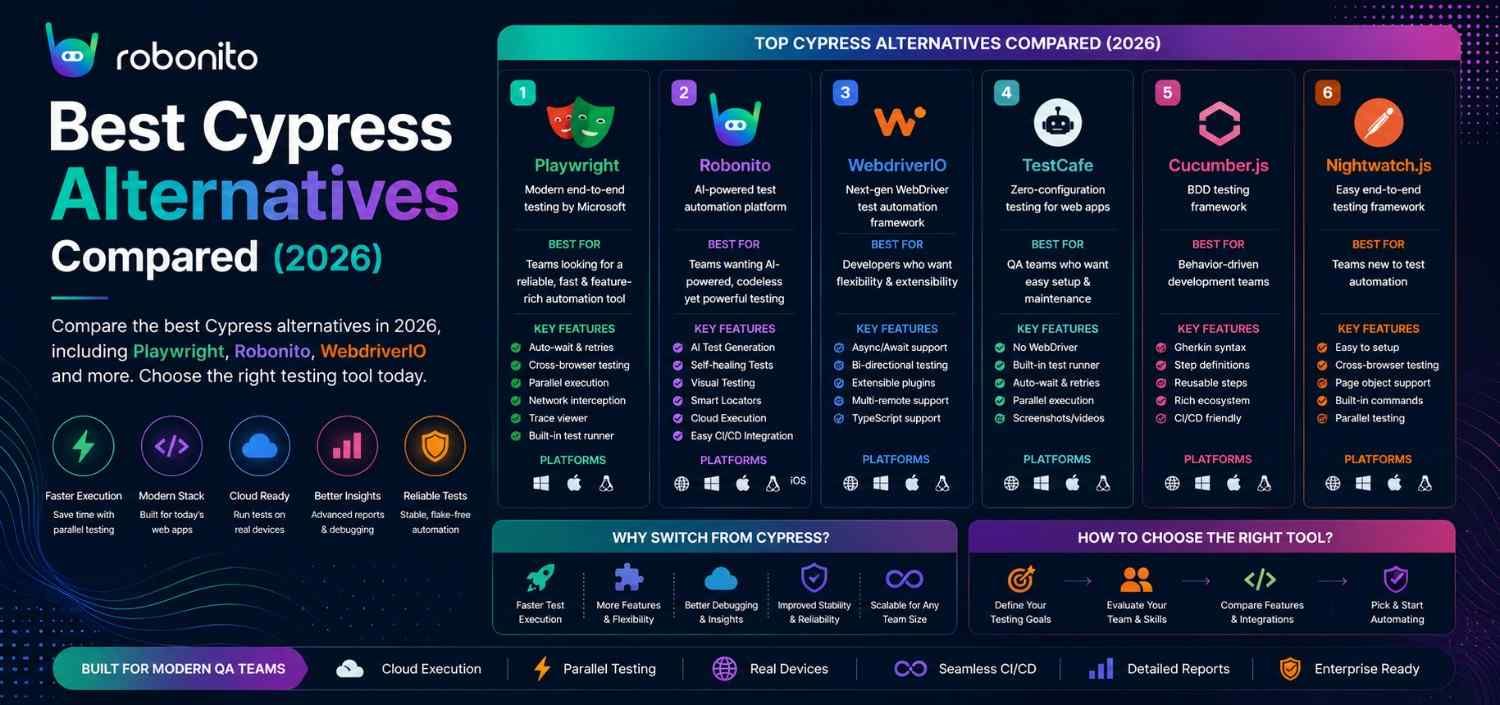
Cypress is still excellent for what it does. But it does not support Safari natively, does not work with Python or Java, cannot test multiple tabs simultaneously, and is JavaScript-only. If any of those limitations affect your team, this guide covers the 9 best alternatives — with real code, honest assessments, and a clear recommendation for each team type.
By Robonito Engineering Team · Updated May 2026 · 19 min read
Quick stats
| Fact | Source |
|---|---|
| Playwright surpassed Selenium in npm downloads in Q3 2025 | npm trends |
| Cypress is used by 45% of JavaScript frontend teams for E2E testing | State of JS Survey 2025 |
| Safari holds 26% of mobile browser share — Cypress's limited Safari support affects a significant portion of users | StatCounter May 2026 |
| Teams switching from Cypress to Playwright complete migration in 1–2 weeks for average suites | Microsoft Playwright team |
| No-code testing adoption grew 340% from 2023 to 2026 | Gartner |
Why teams consider Cypress alternatives
Cypress is not a broken tool — it is a well-designed, actively maintained framework with an excellent developer experience. The teams that look for alternatives are not dissatisfied with Cypress's quality; they are running into its architectural constraints.
The four primary reasons teams evaluate Cypress alternatives:
Safari/WebKit support — Cypress's Safari support is still experimental as of 2026. Safari (WebKit engine) holds 19% of desktop and 26% of mobile browser share. If your users are on Safari and your tests do not run on WebKit, you are testing for 74–81% of your actual users. Playwright handles this natively.
Language constraints — Cypress is JavaScript and TypeScript only. Teams whose primary languages are Python, Java, C#, or Ruby cannot write Cypress tests without adopting a new language. Playwright supports all of them.
Multi-tab and cross-domain testing — Cypress cannot test workflows that involve multiple browser tabs or navigate to different domains within the same test. Real user journeys in e-commerce, OAuth flows, and payment redirects often cross domains. Playwright handles these natively.
Scale and parallelisation cost — Cypress's free OSS tier does not include parallelisation. Cypress Cloud (previously Cypress Dashboard) charges for parallel execution and test analytics. At scale, these costs become significant. Playwright parallelises within a single command with no additional cost.
The honest summary: if none of these limitations affect your project, Cypress remains an excellent choice. If any of them do, the alternatives below are worth evaluating.
The Cypress alternative for teams that want no scripts at all
Robonito is an AI-driven end-to-end QA automation platform covering web, mobile, API, and desktop — auto-generating tests from user flows, self-healing when your UI changes, running in CI across all browsers. Try Robonito free →
Quick comparison: all 9 alternatives
| Tool | Language | Safari/WebKit | Multi-tab | Coding required | Self-healing | Free |
|---|---|---|---|---|---|---|
| Robonito | None | ✅ | ✅ | None | ✅ AI | ✅ |
| Playwright | TS/JS/Python/Java/C# | ✅ Native | ✅ | Yes | ❌ | ✅ OSS |
| Selenium | All major | ❌ Official | ✅ | Yes | ❌ | ✅ OSS |
| WebdriverIO | JS/TS | ✅ (via Playwright) | ✅ | Yes | ❌ | ✅ OSS |
| Puppeteer | JS/TS | ❌ | ✅ | Yes | ❌ | ✅ OSS |
| Nightwatch.js | JS/TS | ✅ (via Playwright) | ✅ | Yes | ❌ | ✅ OSS |
| Katalon Studio | Groovy/low-code | ✅ | ✅ | Low-code | ⚠️ | ❌ |
| Mabl | None | ✅ | ✅ | None | ✅ Advanced | ❌ |
| TestCafe | JS/TS | ✅ | ❌ | Yes | ❌ | ✅ OSS |
The 9 best Cypress alternatives in 2026
1. Robonito — Best AI-powered no-code platform for web, mobile, API & desktop
robonito.com · Free tier · No coding required · AI intent-based
Robonito is an AI-driven end-to-end QA automation platform that addresses Cypress's core limitation from a completely different angle: instead of replacing Cypress's scripting model with a better scripting model, Robonito eliminates scripting entirely.
Where Cypress requires JavaScript knowledge to write tests, configure test runners, manage selectors, and update broken tests when the UI changes — Robonito's AI observes how users interact with the application, generates intent-based test cases automatically, and uses multi-signal recognition to locate elements even after UI updates.
Platform coverage that goes beyond what Cypress offers:
Robonito covers:
├── Web Applications
│   ├── Cross-browser: Chrome, Safari, Firefox, Edge
│   ├── Visual regression across browsers
│   └── CI/CD deployment gates
│
├── Mobile Web Applications
│   ├── iPhone SE (375px) through tablet (1024px)
│   ├── Touch interaction patterns
│   └── Safari for iOS, Chrome for Android
│
├── API Testing
│   ├── REST endpoint validation
│   ├── Response schema verification
│   └── Authentication flow testing
│
└── Desktop Applications
    ├── Web-based desktop apps
    ├── Electron applications
    └── Desktop workflow automation
Why Robonito handles Safari better than Cypress:
Cypress's Safari support is experimental — it works for basic scenarios but has known gaps with specific interactions, animations, and Safari-specific behaviours. Robonito's AI element recognition works through real browser engines including WebKit, providing consistent Safari testing without the experimental limitations.
Self-healing vs Cypress's manual maintenance:
When a developer renames a button, moves a form field, or restructures a component, Cypress tests that target that element break. A developer must find the broken test, identify the new selector, update the test, and push a fix. With Robonito's self-healing, the AI detects the change and updates the test's element reference automatically. The pipeline continues running.
Real CI/CD integration:
## .github/workflows/robonito-regression.yml
name: Robonito Full Platform Tests

on:
  push:
    branches: [main]
  pull_request:

jobs:
  regression:
    runs-on: ubuntu-latest
    steps:
      - uses: actions/checkout@v4
      - name: Run Robonito regression
        uses: robonito/run-tests-action@v2
        with:
          api-key: ${{ secrets.ROBONITO_API_KEY }}
          suite: regression
          environment: staging
          platforms: web,mobile-web,api
          browsers: chrome,safari,firefox,edge
          fail-on: critical
          notify-slack: ${{ secrets.SLACK_QA_WEBHOOK }}
Honest limitations: Not a replacement for Cypress component testing (testing individual React/Vue components in isolation). For teams that specifically value Cypress's interactive debugger and real-time test execution view, Robonito's reporting-based workflow is a different paradigm. Best for web, mobile web, API, and desktop workflows — not for React component-level testing.
Best for: Teams with non-technical QA members, high UI change frequency causing constant test breakage, teams wanting coverage across web + mobile + API + desktop without separate tools and separate skill sets.
Pricing: Free tier with generous limits. Paid plans — robonito.com/pricing.
2. Playwright — Best for engineering teams needing cross-browser and multi-language
playwright.dev · Open source · Free · TypeScript/JS/Python/Java/C#
Playwright is the most direct and complete Cypress alternative for engineering teams. It matches Cypress's developer experience quality while removing every major Cypress constraint: Safari works natively, Python/Java/C# are all first-class citizens, multi-tab testing works out of the box, and parallelisation is free.
Real code — Cypress vs Playwright side by side:
// Cypress — JavaScript only, runs inside browser
describe('Checkout', () => {
  it('completes purchase', () => {
    cy.visit('/products/widget-pro');
    cy.get('[data-testid="add-to-cart"]').click();
    cy.get('[data-testid="cart-count"]').should('have.text', '1');
    cy.get('[data-testid="checkout-link"]').click();
    cy.get('[data-testid="name-input"]').type('Jane Smith');
    cy.get('[data-testid="email-input"]').type('jane@example.com');
    cy.get('[data-testid="place-order"]').click();
    cy.get('[data-testid="confirmation"]').should('be.visible');
  });
});
// Playwright — multi-language, runs across Chromium + Firefox + WebKit
import { test, expect } from '@playwright/test';

test('checkout completes on all browsers', async ({ page, browserName }) => {
  await page.goto('/products/widget-pro');
  await page.getByTestId('add-to-cart').click();
  await expect(page.getByTestId('cart-count')).toHaveText('1');
  await page.getByRole('link', { name: 'Checkout' }).click();
  await page.getByLabel('Full name').fill('Jane Smith');
  await page.getByLabel('Email').fill('jane@example.com');
  await page.getByRole('button', { name: 'Place order' }).click();
  await expect(page.getByTestId('confirmation')).toBeVisible();
  console.log(`✅ Passed on ${browserName}`);
});
// This single test runs on Chrome, Firefox, AND Safari
// In Cypress, you would need Cypress Cloud + experimental webkit flag
Multi-tab testing — impossible in Cypress, native in Playwright:
// Playwright — testing OAuth flow that opens in a new tab
test('OAuth login opens in new tab', async ({ page, context }) => {
  await page.goto('/login');
  await page.getByRole('button', { name: 'Continue with Google' }).click();

  // Wait for the new tab to open (impossible in Cypress)
  const newPage = await context.waitForEvent('page');
  await newPage.waitForLoadState('networkidle');

  // Verify OAuth consent screen opened correctly
  await expect(newPage).toHaveURL(/accounts.google.com/);

  // Complete OAuth flow
  await newPage.getByLabel('Email').fill('test@gmail.com');
  await newPage.getByRole('button', { name: 'Next' }).click();
  // ... complete flow
});
Migration from Cypress to Playwright:
// Cypress selector → Playwright equivalent mapping

// cy.get('[data-testid="submit"]')
page.getByTestId('submit')

// cy.get('button').contains('Submit')
page.getByRole('button', { name: 'Submit' })

// cy.get('##email').type('test@example.com')
await page.getByLabel('Email').fill('test@example.com')

// cy.intercept('POST', '/api/orders').as('createOrder')
// cy.wait('@createOrder')
const responsePromise = page.waitForResponse('/api/orders');
// ... trigger the request
const response = await responsePromise;

// cy.should('be.visible')
await expect(element).toBeVisible()
Honest limitations: JavaScript developers comfortable with Cypress's in-browser runner and time-travel debugger find Playwright's trace viewer a step down for interactive debugging. No built-in component testing mode (Cypress's component testing is a genuine advantage). Self-healing requires manual selector updates.
Best for: Engineering teams replacing Cypress for cross-browser coverage, Python/Java/C# teams blocked by Cypress's JavaScript requirement, teams needing multi-tab and cross-domain testing.
Pricing: Free and open source.
3. Selenium — When maximum language flexibility is required
selenium.dev · Open source · Free · All major languages
Selenium is the most language-flexible web testing framework available — Java, Python, C#, Ruby, JavaScript, Kotlin, and PHP all have mature official bindings. For organisations standardised on Ruby or PHP, where neither Cypress nor Playwright offer first-class support, Selenium is the only major option.
Real code:
## Selenium Python — for teams whose primary language is Python
from selenium import webdriver
from selenium.webdriver.common.by import By
from selenium.webdriver.support.ui import WebDriverWait
from selenium.webdriver.support import expected_conditions as EC

def test_checkout_completes(driver):
    driver.get("https://yourapp.com/products/widget-pro")

    ## Selenium requires explicit waits — no auto-waiting like Cypress or Playwright
    wait = WebDriverWait(driver, 10)
    add_to_cart = wait.until(
        EC.element_to_be_clickable((By.CSS_SELECTOR, "[data-testid='add-to-cart']"))
    )
    add_to_cart.click()

    checkout_link = wait.until(
        EC.element_to_be_clickable((By.CSS_SELECTOR, "[data-testid='checkout-link']"))
    )
    checkout_link.click()

    name_input = wait.until(EC.presence_of_element_located((By.ID, "name")))
    name_input.send_keys("Jane Smith")

    driver.find_element(By.ID, "email").send_keys("jane@example.com")
    driver.find_element(By.CSS_SELECTOR, "[data-testid='place-order']").click()

    confirmation = wait.until(
        EC.visibility_of_element_located((By.CSS_SELECTOR, "[data-testid='confirmation']"))
    )
    assert confirmation.is_displayed()
Honest limitations: Requires explicit waits — the most common source of flaky tests. No native Safari support. Slower than modern alternatives. High maintenance overhead at scale. For Python teams, pytest + Playwright is a better choice than Selenium + Python in 2026.
Best for: Teams already invested in large Selenium Ruby or PHP suites, legacy enterprise environments where Selenium infrastructure already exists.
Pricing: Free and open source.
4. WebdriverIO — Best for Node.js teams wanting unified web + mobile
webdriver.io · Open source · Free · JavaScript/TypeScript
WebdriverIO is the most versatile JavaScript testing framework after Playwright. Its defining advantage over both Cypress and Playwright is unified web and mobile testing — the same test framework runs web tests via WebDriver and mobile tests via Appium, with a consistent API across both.
// webdriverio test — consistent API for web and mobile
describe('Checkout', () => {
  it('completes purchase', async () => {
    await browser.url('/products/widget-pro');

    // Web test: uses standard WebDriver selectors
    await $('[data-testid="add-to-cart"]').click();
    await expect($('[data-testid="cart-count"]')).toHaveText('1');

    await $('[data-testid="checkout-link"]').click();
    await $('##name').setValue('Jane Smith');
    await $('##email').setValue('jane@example.com');
    await $('[data-testid="place-order"]').click();

    await expect($('[data-testid="confirmation"]')).toBeDisplayed();
  });
});

// Mobile test: same framework, same runner — different capabilities config
// Switch capabilities from browser to Appium for native app testing
Honest limitations: More configuration overhead than Playwright or Cypress for basic web testing. Smaller community focused on web-specific use cases. Less polished developer experience than Cypress for local debugging.
Best for: JavaScript/TypeScript teams wanting one framework for web + native mobile, teams already using Appium who want a better JavaScript wrapper.
Pricing: Free and open source.
5. Puppeteer — Best for headless Chrome automation and scripting
pptr.dev · Open source · Free · JavaScript/TypeScript
Puppeteer is Google's official Chrome/Firefox automation library. It is not primarily a test framework — it has no built-in test runner, assertion library, or test reporting. It is a low-level automation library that higher-level tools sometimes use as a foundation.
// Puppeteer — headless screenshot generation across viewports
const puppeteer = require('puppeteer');

async function generateViewportScreenshots(url, outputDir) {
  const browser = await puppeteer.launch({ headless: true });
  const viewports = [
    { name: 'mobile',   width: 375,  height: 812  },
    { name: 'tablet',   width: 768,  height: 1024 },
    { name: 'desktop',  width: 1440, height: 900  },
  ];

  for (const viewport of viewports) {
    const page = await browser.newPage();
    await page.setViewport(viewport);
    await page.goto(url, { waitUntil: 'networkidle0' });
    await page.screenshot({
      path: `${outputDir}/screenshot-${viewport.name}.png`,
      fullPage: true
    });
    await page.close();
    console.log(`✅ Screenshot: ${viewport.name}`);
  }

  await browser.close();
}
When to choose Puppeteer over Cypress: PDF generation, programmatic screenshot generation for design systems, web scraping pipelines, specific Chrome DevTools Protocol features. For actual E2E testing with assertions and reporting, Playwright is a better choice (it is a superset of Puppeteer's capabilities).
Honest limitations: Chrome/Firefox only — no Safari. Not a test framework — requires additional tooling for test structure, assertions, and reporting. Playwright has superseded Puppeteer for testing use cases.
Pricing: Free and open source.
6. Nightwatch.js — Best for teams wanting a simple Node.js BDD framework
nightwatchjs.org · Open source · Free · JavaScript/TypeScript
Nightwatch.js provides E2E testing with a clean, BDD-friendly syntax and supports Chromium, Firefox, and WebKit through its Playwright integration in v3. It is less complex than WebdriverIO and more opinionated than raw Playwright.
// nightwatch/tests/checkout.js
describe('Checkout flow', function() {
  it('should complete purchase with valid details', function(browser) {
    browser
      .navigateTo('/products/widget-pro')
      .waitForElementVisible('[data-testid="add-to-cart"]')
      .click('[data-testid="add-to-cart"]')
      .assert.textEquals('[data-testid="cart-count"]', '1')
      .click('[data-testid="checkout-link"]')
      .setValue('##name', 'Jane Smith')
      .setValue('##email', 'jane@example.com')
      .click('[data-testid="place-order"]')
      .waitForElementVisible('[data-testid="confirmation"]')
      .assert.visible('[data-testid="confirmation"]');
  });
});
Honest limitations: Smaller community than Cypress or Playwright. Less active maintenance than the top-tier alternatives. Test reporting less polished. For new projects, Playwright provides similar capabilities with stronger community support and better long-term maintenance trajectory.
Best for: Teams that prefer Nightwatch's specific BDD syntax, existing Nightwatch projects that need maintenance, teams that find Playwright's flexibility overwhelming.
Pricing: Free and open source.
7. Katalon Studio — Best for all-in-one enterprise platform
katalon.com · Commercial · Low-code (Groovy)
Katalon Studio is an all-in-one test automation platform covering web, mobile, API, and desktop testing. For enterprises wanting integrated test management, execution, and reporting in one tool without assembling a framework stack, Katalon provides that breadth.
// Katalon Studio test — Groovy syntax with keyword-driven approach
// Web UI test
WebUI.openBrowser('https://yourapp.com/products/widget-pro')
WebUI.click(findTestObject('page_Products/btn_AddToCart'))
WebUI.verifyElementText(findTestObject('page_Cart/lbl_CartCount'), '1')
WebUI.click(findTestObject('page_Cart/btn_Checkout'))
WebUI.setText(findTestObject('page_Checkout/input_Name'), 'Jane Smith')
WebUI.setText(findTestObject('page_Checkout/input_Email'), 'jane@example.com')
WebUI.click(findTestObject('page_Checkout/btn_PlaceOrder'))
WebUI.verifyElementVisible(findTestObject('page_Confirmation/lbl_Confirmed'))
WebUI.closeBrowser()
Honest limitations: Significant pricing increase post-Perforce acquisition. Groovy scripting requirement is a barrier for JavaScript teams accustomed to Cypress. Self-healing less mature than AI-native platforms. Heavy resource usage on local machines. Maintenance overhead grows considerably with large suites.
Best for: Enterprises needing web + mobile + API + desktop in one integrated platform with unified reporting, teams in regulated industries needing audit-trail compliance tooling.
Pricing: Free tier with limitations. Paid plans — verify current pricing at katalon.com post-acquisition.
8. Mabl — Best for AI-powered no-code with advanced visual testing
mabl.com · Commercial · No-code
Mabl is the most direct competitor to Robonito in the AI-powered no-code testing space. Its primary differentiator is visual testing depth — Mabl's visual AI detects pixel-level rendering differences across browsers with the most sophisticated visual diffing available in any no-code platform.
How Mabl compares to Robonito for Cypress teams:
Both replace Cypress's scripting model with AI-generated, self-healing tests. The key differences: Robonito has a more generous free tier and covers web + mobile web + API + desktop; Mabl specialises in web UI and has deeper visual regression. For design-critical applications where pixel-perfect cross-browser rendering is the primary quality concern, Mabl's visual AI is the best available. For teams needing the broadest platform coverage with a free tier, Robonito is the stronger choice.
Honest limitations: No free tier — requires budget commitment before meaningful evaluation. Per-seat pricing can become expensive at scale. Setup time longer than Robonito. Primarily web UI focused — less comprehensive API testing.
Best for: Design-heavy web applications where visual cross-browser regression is the top priority, enterprises with budget for the most sophisticated visual AI available.
Pricing: No free tier. Enterprise pricing — contact Mabl.
9. TestCafe — Best for plugin-free cross-browser testing
testcafe.io · Open source core · Free · JavaScript/TypeScript
TestCafe's architectural differentiator — and the reason it was notable when launched — is that it requires no browser plugins or WebDriver. Tests are injected directly into the browser as a proxy, which makes setup simpler than Selenium and eliminates some cross-browser driver compatibility issues.
// testcafe/tests/checkout.test.js
import { Selector } from 'testcafe';

fixture('Checkout')
  .page('https://yourapp.com/products/widget-pro');

test('completes purchase with valid details', async t => {
  const addToCartBtn  = Selector('[data-testid="add-to-cart"]');
  const cartCount     = Selector('[data-testid="cart-count"]');
  const checkoutLink  = Selector('[data-testid="checkout-link"]');
  const nameInput     = Selector('#name');
  const emailInput    = Selector('#email');
  const placeOrderBtn = Selector('[data-testid="place-order"]');
  const confirmation  = Selector('[data-testid="confirmation"]');

  await t
    .click(addToCartBtn)
    .expect(cartCount.innerText).eql('1')
    .click(checkoutLink)
    .typeText(nameInput, 'Jane Smith')
    .typeText(emailInput, 'jane@example.com')
    .click(placeOrderBtn)
    .expect(confirmation.visible).ok();
});
Honest assessment for 2026: TestCafe's development momentum has slowed since DevExpress reduced investment. The community has grown smaller relative to Playwright and Cypress. For new projects, Playwright is the better long-term bet. TestCafe is worth considering for teams that already have a TestCafe suite that is working well, or for the specific use case of testing in environments where WebDriver installation is restricted.
Honest limitations: Declining community relative to Playwright and Cypress. Cannot test multiple browser tabs. Limited debugging tools compared to Cypress. Plugin-free architecture, while once a differentiator, is less significant now that WebDriver-based tools have matured.
Best for: Teams with existing TestCafe suites they want to maintain, environments where WebDriver installation is restricted.
Pricing: Free OSS. TestCafe Studio commercial.
Head-to-head: Cypress vs top alternatives
| Dimension | Cypress | Playwright | Robonito | WebdriverIO |
|---|---|---|---|---|
| Safari/WebKit | ⚠️ Experimental | ✅ Native | ✅ | ✅ via Playwright |
| Language support | JS/TS only | TS/JS/Python/Java/C# | None needed | JS/TS |
| Multi-tab testing | ❌ | ✅ | ✅ | ✅ |
| Cross-domain | ❌ | ✅ | ✅ | ✅ |
| Component testing | ✅ Best-in-class | ✅ | ❌ | ❌ |
| Self-healing | ❌ | ❌ | ✅ AI | ❌ |
| Non-technical users | ❌ | ❌ | ✅ | ❌ |
| CI parallelisation | Paid (Cypress Cloud) | ✅ Free | ✅ Free | ✅ Free |
| Interactive debugger | ✅ Best-in-class | ✅ Trace viewer | Dashboard | Limited |
| Mobile + API + Desktop | ❌ | Mobile web only | ✅ All | ✅ Mobile |
| Free tier | ✅ OSS | ✅ OSS | ✅ | ✅ OSS |
Cypress vs Robonito
Cypress and Robonito solve different testing challenges.
Cypress is a code-first testing framework designed primarily for frontend engineering teams. It provides an excellent developer experience, powerful debugging tools, and strong support for JavaScript and TypeScript applications.
Robonito takes a different approach. Instead of requiring engineers to write and maintain test scripts, it uses AI-powered, no-code automation to generate, execute, and maintain tests across web, mobile, API, and desktop applications.
Quick comparison
| Feature | Cypress | Robonito |
|---|---|---|
| Coding Required | JavaScript/TypeScript | No Code |
| Browser Coverage | Chrome, Firefox, Edge, Experimental Safari | Chrome, Safari, Firefox, Edge |
| Mobile Testing | Mobile Web Only | Mobile Web & Mobile App Testing |
| API Testing | Yes | Yes |
| Desktop Testing | No | Yes |
| Self-Healing Tests | No | Yes |
| Multi-Tab Testing | No | Yes |
| Cross-Domain Testing | Limited | Yes |
| CI/CD Integration | Yes | Yes |
| Best For | Engineering-led automation teams | Teams seeking faster automation with less maintenance |
When Cypress is the better choice
Choose Cypress when:
- Your team consists primarily of JavaScript or TypeScript engineers.
- Component testing is a major part of your testing strategy.
- Developers rely heavily on Cypress's interactive debugging experience.
- You prefer complete control over automation code.
When Robonito is the better choice
Choose Robonito when:
- You want to reduce test maintenance effort.
- Your QA team includes non-technical testers.
- You need coverage across web, mobile, API, and desktop applications from a single platform.
- Frequent UI changes cause test instability and selector maintenance.
- You want AI-powered self-healing automation instead of manually updating broken tests.
Bottom line
Cypress remains one of the best code-first testing frameworks available in 2026. However, teams looking to reduce scripting effort, accelerate test creation, and eliminate routine maintenance often choose Robonito as a modern AI-powered alternative that supports web, mobile, API, and desktop testing from a single platform.
Migrating from Cypress — practical guidance
The migration decision
Before migrating, be clear on why. If the reason is "we heard Playwright is better" — that is not sufficient justification to rewrite a working test suite. If the reason is "our tests do not run on Safari and 26% of our users are on Safari" — that is a concrete, measurable problem that migration solves.
Migrate when: Safari coverage is a genuine gap, you need Python/Java/C# support, multi-tab testing is blocking critical test scenarios, Cypress Cloud costs are a concern at your scale.
Stay with Cypress when: JavaScript-only is fine for your team, component testing is central to your strategy, your team values the interactive debugger over cross-browser coverage.
Cypress to Playwright migration map
// ── Selectors ─────────────────────────────────────────────────────

// Cypress:
cy.get('[data-testid="submit-button"]')
cy.get('button').contains('Submit')
cy.get('#email')
cy.get('.product-card').first()

// Playwright equivalent:
page.getByTestId('submit-button')
page.getByRole('button', { name: 'Submit' })
page.getByLabel('Email')  // or page.locator('#email')
page.locator('.product-card').first()

// ── Assertions ────────────────────────────────────────────────────

// Cypress:
cy.get('[data-testid="count"]').should('have.text', '1')
cy.get('[data-testid="modal"]').should('be.visible')
cy.url().should('include', '/dashboard')

// Playwright:
await expect(page.getByTestId('count')).toHaveText('1')
await expect(page.getByTestId('modal')).toBeVisible()
await expect(page).toHaveURL(/dashboard/)

// ── Network interception ──────────────────────────────────────────

// Cypress:
cy.intercept('POST', '/api/orders').as('createOrder')
// ... trigger request ...
cy.wait('@createOrder').its('response.statusCode').should('eq', 201)

// Playwright:
const responsePromise = page.waitForResponse(
  resp => resp.url().includes('/api/orders') && resp.request().method() === 'POST'
);
// ... trigger request ...
const response = await responsePromise;
expect(response.status()).toBe(201);

// ── Setup/teardown ────────────────────────────────────────────────

// Cypress:
beforeEach(() => { cy.visit('/'); cy.login(); })
afterEach(() => { cy.clearCookies(); })

// Playwright:
test.beforeEach(async ({ page }) => { await page.goto('/'); await login(page); })
test.afterEach(async ({ context }) => { await context.clearCookies(); })
Gradual migration approach (recommended)
Week 1: Set up Playwright alongside existing Cypress suite
        Write new feature tests in Playwright
        Run both suites in CI in parallel

Week 2: Migrate highest-maintenance Cypress tests first
        (Check CI history for most-broken tests)
        Verify Playwright output matches Cypress results

Week 3+: Continue migration module by module
         Retire Cypress tests as Playwright coverage grows
         Add WebKit project to Playwright config for Safari
Choosing the right Cypress alternative
| Your situation | Best choice | Key reason |
|---|---|---|
| Need Safari/WebKit coverage | Playwright | Native WebKit support, no workarounds |
| Python, Java, or C# team | Playwright | First-class language support |
| Need multi-tab or cross-domain testing | Playwright | Built-in context API |
| Non-technical QA team, self-healing needed | Robonito | Zero code, AI self-healing |
| Need web + mobile + API + desktop in one platform | Robonito | Broadest no-code platform coverage |
| Unified web + native mobile in JavaScript | WebdriverIO | Same framework, Appium integration |
| Enterprise, all platforms, unified reporting | Katalon | All-in-one platform |
| Visual regression as primary concern | Mabl | Most sophisticated visual AI |
| Maximum language flexibility (Ruby/PHP) | Selenium | Only framework with these bindings |
| Keep Cypress, fix specific issues | Cypress | Still excellent for JS teams within its scope |
Pre-migration checklist
Before switching from Cypress:
- Specific reason for switching identified — not "Playwright seems popular"
- All Cypress limitations affecting your project documented
- New tool evaluated against your real application (not just a demo)
- Migration effort estimated — test count, complexity, team availability
- CI/CD integration tested with 5 simple tests before committing
- Team upskilling plan confirmed (Playwright: 1–2 days; Robonito: hours)
- Gradual migration approach agreed — no big-bang rewrites
- Existing Cypress suite kept running in parallel until new suite proves reliable
- Safari/WebKit testing requirement quantified (what % of your users are on Safari?)
Frequently Asked Questions
What is the best Cypress alternative in 2026?
Playwright for engineering teams needing Safari support, multi-language, or multi-tab testing. Robonito for teams wanting AI-powered no-code testing across web, mobile, API, and desktop without scripting overhead. WebdriverIO for unified web and mobile JavaScript testing. The best choice depends on which specific Cypress limitation you are solving.
Is Cypress still relevant in 2026?
Yes — Cypress remains one of the most widely used web testing frameworks, particularly for JavaScript frontend teams. Its component testing, interactive debugger, and developer experience continue to be industry-leading. Its limitations (JavaScript-only, limited Safari, no multi-tab) are the specific reasons to consider alternatives.
What is the main difference between Playwright and Cypress?
Playwright supports Safari/WebKit natively, multiple languages, and multi-tab testing. Cypress runs inside the browser (superior debugging) and has better component testing. Both auto-wait and are significantly more reliable than Selenium. Choose Playwright for cross-browser coverage including Safari; choose Cypress for JavaScript-first teams where interactive debugging is the priority.
How hard is it to migrate from Cypress to Playwright?
Manageable — 1–2 weeks for a typical 100-test suite. Core concepts map directly but API syntax differs. Selectors, assertions, and network interceptors all have Playwright equivalents. Gradual migration (new tests in Playwright, Cypress maintained until coverage matches) is the lowest-risk approach.
Can I use a Cypress alternative for mobile testing?
Playwright covers mobile web testing via device emulation and WebKit. Robonito covers web, mobile web, API, and desktop in one no-code platform. For native iOS and Android testing, platform-native tools (XCUITest, Espresso, Detox) are purpose-built and out of Cypress's scope entirely.
External references
- Playwright Documentation — Official Playwright docs
- Playwright Migration from Cypress — Official migration guide
- WebdriverIO Documentation — Official WebdriverIO docs
- Puppeteer Documentation — Official Puppeteer docs
- Nightwatch.js Documentation — Official Nightwatch docs
- StatCounter Browser Market Share — Safari usage data
- State of JS 2025 — Testing framework adoption data
The Cypress alternative that covers web, mobile, API and desktop — zero scripts
Robonito is an AI-driven end-to-end QA platform. Where Cypress covers web with JavaScript, Robonito covers web, mobile web, API, and desktop with no code — self-healing tests that never break on UI changes, running in CI across all browsers. Start free at Robonito.com →
Automate your QA — no code required
Stop writing test scripts.
Start shipping with confidence.
Join thousands of QA teams using Robonito to automate testing in minutes — not months.
