
Every team waiting on an API before they can test is losing time they will never get back. API mocking eliminates that wait — and this guide shows you exactly how to implement it, with real code for every major tool.
By Robonito Engineering Team · Updated May 2026 · 18 min read
Quick stats
| Fact | Source |
|---|---|
| Teams using API mocking reduce integration delays by up to 30% | Forrester Research |
| 68% of frontend developers blocked by unavailable backend APIs weekly | Stack Overflow Developer Survey 2025 |
| API mocking reduces test execution time by 4–10× vs live API calls | SmartBear State of API Report 2025 |
| Average cost of one hour of API downtime during testing: $4,700 | PagerDuty |
Table of Contents
- What is API mocking?
- API mocking vs stubbing vs contract testing
- How API mocking works technically
- Best API mocking tools in 2026
- Real code examples for every major tool
- Dynamic data and stateful mocking
- API mocking in CI/CD pipelines
- When NOT to use API mocking
- Best practices
- Pre-release checklist
- Frequently Asked Questions
Test your APIs without writing a single mock manually
Robonito auto-generates API test cases from your real endpoints, runs them in CI, and catches breaking changes before they hit production — no code required. Try Robonito free →
1. What is API mocking?
API mocking is the practice of creating a simulated version of an API that returns predefined responses without ever calling the real backend service. The mock intercepts HTTP requests made by your application and responds with controlled, predictable data — allowing development and testing to proceed independently of whether the real API is available, stable, or even built yet.
Think of it as a stunt double for your API. Your application cannot tell the difference between a mock response and a real one. It receives the same JSON structure, the same status codes, the same headers — but the data comes from a local simulation rather than a remote server.
This single capability unlocks several development patterns that are otherwise impossible or impractical:
- A frontend team can build and test a complete checkout UI against a mock payment API while the payments team is still building the real backend
- A QA engineer can test "insufficient funds" and "card declined" error scenarios that are impossible to trigger reliably against a real payment processor
- An integration test suite can run in 800ms instead of 8 seconds because no real network calls are made
- A CI pipeline can run 500 API tests without consuming rate limit quota or requiring API credentials in every environment
One-sentence definition for featured snippets: API mocking is the creation of a simulated API that returns controlled, predefined responses to HTTP requests — enabling development and testing without dependency on the real backend service.
2. API mocking vs stubbing vs contract testing
These three terms are used interchangeably and should not be. They solve different problems.
| Concept | What it does | Verifies requests? | State-aware? | Best for |
|---|---|---|---|---|
| Stub | Returns a hardcoded response for a specific request | No | No | Simple isolation in unit tests |
| Mock | Returns controlled responses AND verifies that the correct requests were made | Yes | Sometimes | Behaviour verification in integration tests |
| Contract test | Verifies that a real API matches what its consumers expect | Yes | No | Preventing breaking changes between services |
| Fake | A full lightweight implementation of the real API with actual logic | N/A | Yes | Complex integration scenarios needing real state |
The practical distinction that matters most:
A stub just returns data. A mock also asserts. If your test needs to verify that your application called /api/v1/payments with the correct request body — not just that it handled the response correctly — you need a mock, not a stub.
Contract testing (using tools like Pact) sits above both: it tests whether the real API provider still honours the contract your consumer was built against. It is how you catch breaking API changes before deployment rather than after.
Most teams need all three at different layers of their test pyramid.
3. How API mocking works technically
Understanding the mechanism behind API mocking helps you choose the right tool and debug problems when mocks behave unexpectedly.
Request interception

Every API mocking tool operates by intercepting HTTP requests before they reach the network. The interception happens at one of three layers:
Network layer interception (WireMock, Nock): The tool intercepts at the HTTP client library level or runs as a local proxy. Requests that match configured patterns are intercepted and responded to locally. Unmatched requests either pass through to the real API or fail with a "no matching stub" error.
Service Worker interception (MSW — Mock Service Worker): In browser environments, MSW registers a Service Worker that intercepts fetch and XHR requests at the browser level before they leave the page. This is architecturally cleaner than network-level interception for frontend testing because it works in both browsers and Node.js environments using the same handler definitions.
Module-level interception (Jest mocks, Sinon): The test framework intercepts at the module import level — the HTTP client library itself (axios, node-fetch) is replaced with a mock implementation. This is the most isolated approach but requires mocking at every import boundary.
Request matching
When a request arrives at the mock, it needs to match a configured stub to get a response. Matching can be based on:
- URL path (exact, regex, wildcard)
- HTTP method (GET, POST, PUT, DELETE)
- Query parameters
- Request body (exact JSON, JSON path expression, regex)
- Headers (Authorization, Content-Type, custom headers)
The sophistication of the matching engine determines how realistic and maintainable your mocks are. WireMock's matching engine is the most powerful available — it supports JSONPath, XPath, regex, and custom matchers simultaneously.
Response templating
Static mocks return the same response every time. Dynamic mocks use response templating to generate responses based on the incoming request — extracting values from the request path, body, or headers and including them in the response. This is critical for realistic mocking of RESTful APIs where response data reflects request data.
4. Best API mocking tools in 2026
Tool comparison matrix
| Tool | Best for | Language | Runs as | Dynamic data | State-aware | Free |
|---|---|---|---|---|---|---|
| WireMock | Complex stateful mocking, Java teams | Java / Any (via HTTP) | Standalone / Docker | ✅ Templating | ✅ Scenarios | ✅ OSS |
| Postman Mock Server | Teams using Postman for API docs | Any | Cloud / Local | ⚠️ Limited | ❌ | Freemium |
| Nock | Node.js unit & integration tests | JavaScript | In-process | ✅ | ❌ | ✅ OSS |
| MSW | Browser & Node.js frontend testing | JavaScript/TypeScript | Service Worker / Node | ✅ | ⚠️ Partial | ✅ OSS |
| Mockoon | Local API simulation, no-code setup | Any | Desktop app / CLI | ✅ | ✅ | ✅ OSS |
| Prism | OpenAPI-spec-driven mocking | Any | CLI / Docker | ✅ Auto-gen | ❌ | ✅ OSS |
| json-server | Quick REST API prototyping | JavaScript | Node.js | ❌ | ✅ CRUD | ✅ OSS |
Which tool should you use?
Java backend team: WireMock. It is the gold standard for Java — deep Spring Boot integration via @AutoConfigureWireMock, powerful request matching, response templating, and scenario-based state management. Nothing else comes close for complex Java testing scenarios.
Node.js team: Nock for unit and integration tests (fast, in-process, no network overhead). MSW for full-stack integration tests and frontend component testing — its ability to share handler definitions between browser and Node.js environments eliminates test duplication.
Frontend React/Vue/Angular team: MSW. The Service Worker architecture means your application code runs exactly as it would in production — the same fetch calls, the same headers, the same error handling. No test-specific code paths.
Rapid prototyping or design-first API development: Prism with an OpenAPI spec. Generate a working mock server from your OpenAPI/Swagger file in one command. No configuration required — Prism reads the spec and responds with valid example data automatically.
Non-technical team members or manual API exploration: Mockoon's desktop app provides a no-code interface for creating and managing mock APIs with a visual editor.
5. Real code examples for every major tool
5.1 WireMock — Java with Spring Boot
// pom.xml dependency
// <dependency>
//   <groupId>org.springframework.cloud</groupId>
//   <artifactId>spring-cloud-contract-wiremock</artifactId>
//   <scope>test</scope>
// </dependency>

// PaymentServiceTest.java
@SpringBootTest
@AutoConfigureWireMock(port = 8089)
class PaymentServiceTest {

    @Autowired
    private PaymentService paymentService;

    @Test
    void processPayment_returnsSuccess_forValidCard() {
        // Arrange — define what the mock payment API returns
        stubFor(post(urlEqualTo("/api/v1/charge"))
            .withHeader("Content-Type", equalTo("application/json"))
            .withRequestBody(matchingJsonPath("$.amount", equalTo("9999")))
            .willReturn(aResponse()
                .withStatus(200)
                .withHeader("Content-Type", "application/json")
                .withBody("""
                    {
                      "transactionId": "txn_abc123",
                      "status": "succeeded",
                      "amount": 9999,
                      "currency": "usd"
                    }
                    """)));

        // Act
        PaymentResult result = paymentService.charge(
            new ChargeRequest("card_test_visa", 9999, "usd")
        );

        // Assert — verify the service processed the response correctly
        assertThat(result.getStatus()).isEqualTo("succeeded");
        assertThat(result.getTransactionId()).isEqualTo("txn_abc123");

        // Verify the request was made with the correct body
        verify(postRequestedFor(urlEqualTo("/api/v1/charge"))
            .withRequestBody(matchingJsonPath("$.currency", equalTo("usd"))));
    }

    @Test
    void processPayment_throwsPaymentException_whenCardDeclined() {
        stubFor(post(urlEqualTo("/api/v1/charge"))
            .willReturn(aResponse()
                .withStatus(402)
                .withHeader("Content-Type", "application/json")
                .withBody("""
                    {
                      "error": {
                        "code": "card_declined",
                        "message": "Your card was declined."
                      }
                    }
                    """)));

        assertThatThrownBy(() ->
            paymentService.charge(new ChargeRequest("card_test_declined", 9999, "usd"))
        ).isInstanceOf(PaymentDeclinedException.class)
         .hasMessageContaining("card_declined");
    }
}
5.2 Nock — Node.js / Jest
// tests/payment.service.test.js
const nock = require('nock');
const { PaymentService } = require('../src/services/payment.service');

describe('PaymentService', () => {

  afterEach(() => {
    nock.cleanAll(); // Remove all interceptors after each test
  });

  test('charge() returns transaction ID on success', async () => {
    // Intercept the POST to the payment API
    nock('https://api.payments.example.com')
      .post('/v1/charge', {
        amount: 4999,
        currency: 'usd',
        source: 'card_test_visa'
      })
      .reply(200, {
        transactionId: 'txn_xyz789',
        status: 'succeeded',
        amount: 4999
      });

    const service = new PaymentService();
    const result = await service.charge({
      amount: 4999,
      currency: 'usd',
      source: 'card_test_visa'
    });

    expect(result.transactionId).toBe('txn_xyz789');
    expect(result.status).toBe('succeeded');
    expect(nock.isDone()).toBe(true); // Verify the interceptor was actually called
  });

  test('charge() throws on network timeout', async () => {
    nock('https://api.payments.example.com')
      .post('/v1/charge')
      .replyWithError({ code: 'ECONNRESET', message: 'Connection reset' });

    const service = new PaymentService();

    await expect(
      service.charge({ amount: 4999, currency: 'usd', source: 'card_test' })
    ).rejects.toThrow('Connection reset');
  });

  test('charge() retries once on 503 then succeeds', async () => {
    // First call returns 503
    nock('https://api.payments.example.com')
      .post('/v1/charge')
      .reply(503, { error: 'Service temporarily unavailable' });

    // Second call (retry) returns 200
    nock('https://api.payments.example.com')
      .post('/v1/charge')
      .reply(200, { transactionId: 'txn_retry_ok', status: 'succeeded' });

    const service = new PaymentService();
    const result = await service.charge({
      amount: 4999,
      currency: 'usd',
      source: 'card_test'
    });

    expect(result.status).toBe('succeeded');
  });
});
5.3 MSW — React frontend testing with Jest
// src/mocks/handlers.ts — shared between browser and Node.js
import { http, HttpResponse } from 'msw';

export const handlers = [
  // Mock the user profile endpoint
  http.get('/api/v1/users/:userId', ({ params }) => {
    const { userId } = params;

    if (userId === 'user-not-found') {
      return HttpResponse.json(
        { error: 'User not found' },
        { status: 404 }
      );
    }

    return HttpResponse.json({
      id: userId,
      name: 'Jane Smith',
      email: 'jane@example.com',
      role: 'admin',
      createdAt: '2025-03-15T10:00:00Z',
    });
  }),

  // Mock the orders endpoint
  http.get('/api/v1/orders', ({ request }) => {
    const url = new URL(request.url);
    const status = url.searchParams.get('status');

    const orders = [
      { id: 'ord_001', status: 'pending', total: 4999 },
      { id: 'ord_002', status: 'shipped', total: 12500 },
      { id: 'ord_003', status: 'delivered', total: 8750 },
    ];

    const filtered = status
      ? orders.filter(o => o.status === status)
      : orders;

    return HttpResponse.json({ orders: filtered, total: filtered.length });
  }),
];
// src/mocks/server.ts — Node.js test environment
import { setupServer } from 'msw/node';
import { handlers } from './handlers';

export const server = setupServer(...handlers);
// tests/UserProfile.test.tsx
import { render, screen, waitFor } from '@testing-library/react';
import { server } from '../mocks/server';
import { http, HttpResponse } from 'msw';
import { UserProfile } from '../components/UserProfile';

beforeAll(() => server.listen());
afterEach(() => server.resetHandlers());
afterAll(() => server.close());

test('renders user name and email from API', async () => {
  render(<UserProfile userId="user-123" />);

  await waitFor(() => {
    expect(screen.getByText('Jane Smith')).toBeInTheDocument();
    expect(screen.getByText('jane@example.com')).toBeInTheDocument();
  });
});

test('shows error state when user is not found', async () => {
  render(<UserProfile userId="user-not-found" />);

  await waitFor(() => {
    expect(screen.getByRole('alert')).toHaveTextContent('User not found');
  });
});

test('shows error banner when API is unavailable', async () => {
  // Override the default handler for this specific test
  server.use(
    http.get('/api/v1/users/:userId', () => {
      return HttpResponse.json(
        { error: 'Internal Server Error' },
        { status: 500 }
      );
    })
  );

  render(<UserProfile userId="user-123" />);

  await waitFor(() => {
    expect(screen.getByRole('alert')).toHaveTextContent(
      'Something went wrong. Please try again.'
    );
  });
});
5.4 Prism — Auto-generate mocks from an OpenAPI spec
## Install Prism CLI
npm install -g @stoplight/prism-cli

## Start a mock server directly from your OpenAPI spec
## Prism reads the spec and responds with valid example data automatically
prism mock https://api.example.com/openapi.yaml

## Or from a local file
prism mock ./api-spec/openapi.yaml --port 4010

## With dynamic data generation (randomises example values)
prism mock ./api-spec/openapi.yaml --dynamic
Once running, your application points to http://localhost:4010 instead of the real API. Every endpoint defined in the spec is immediately available with valid responses — zero configuration required.
## Validate that real API responses conform to the spec (useful in CI)
prism proxy https://api.real-backend.com ./api-spec/openapi.yaml
## Prism logs any responses that violate the OpenAPI schema
6. Dynamic data and stateful mocking
Static mocks that always return the same response are useful but limited. Two advanced patterns solve the most common real-world challenges.
Response templating with WireMock
WireMock's Handlebars-based templating lets you generate responses that reflect the incoming request — extracting path parameters, request body fields, or headers and using them in the response.
// WireMock stub with response templating
// POST /api/v1/users → returns the submitted data back with a generated ID
{
  "request": {
    "method": "POST",
    "urlPath": "/api/v1/users"
  },
  "response": {
    "status": 201,
    "headers": {
      "Content-Type": "application/json"
    },
    "jsonBody": {
      "id": "{{randomValue length=12 type='ALPHANUMERIC'}}",
      "email": "{{jsonPath request.body '$.email'}}",
      "name": "{{jsonPath request.body '$.name'}}",
      "createdAt": "{{now format='yyyy-MM-dd\\'T\\'HH:mm:ss\\'Z\\''}}"
    },
    "transformers": ["response-template"]
  }
}
This stub generates a unique ID, echoes back the submitted email and name, and stamps the current timestamp — all without any custom code.
Stateful mocking with WireMock Scenarios
Scenarios let you model APIs that change state across multiple requests — critical for testing flows like order status progression or multi-step authentication.
// WireMock stateful scenario — order status progresses through states
// First GET → "pending", second GET → "processing", third GET → "shipped"

stubFor(get(urlEqualTo("/api/v1/orders/ord_001"))
    .inScenario("Order Progression")
    .whenScenarioStateIs(STARTED)
    .willReturn(aResponse()
        .withStatus(200)
        .withBody("{\"id\": \"ord_001\", \"status\": \"pending\"}"))
    .willSetStateTo("Processing"));

stubFor(get(urlEqualTo("/api/v1/orders/ord_001"))
    .inScenario("Order Progression")
    .whenScenarioStateIs("Processing")
    .willReturn(aResponse()
        .withStatus(200)
        .withBody("{\"id\": \"ord_001\", \"status\": \"processing\"}"))
    .willSetStateTo("Shipped"));

stubFor(get(urlEqualTo("/api/v1/orders/ord_001"))
    .inScenario("Order Progression")
    .whenScenarioStateIs("Shipped")
    .willReturn(aResponse()
        .withStatus(200)
        .withBody("{\"id\": \"ord_001\", \"status\": \"shipped\"}")));
Each successive GET request to the same endpoint returns a different status — exactly matching the real API's behaviour across a multi-step polling flow.
Handling dynamic timestamps and UUIDs in Nock
// Nock with body filtering to ignore dynamic fields
nock('https://api.example.com')
  .post('/v1/events', body => {
    // Match on the fields we care about, ignore timestamp and requestId
    return body.type === 'order.created' &&
           body.orderId === 'ord_001' &&
           typeof body.timestamp === 'string' && // Just verify it exists
           typeof body.requestId === 'string';   // Just verify it exists
  })
  .reply(200, { received: true });
7. API mocking in CI/CD pipelines
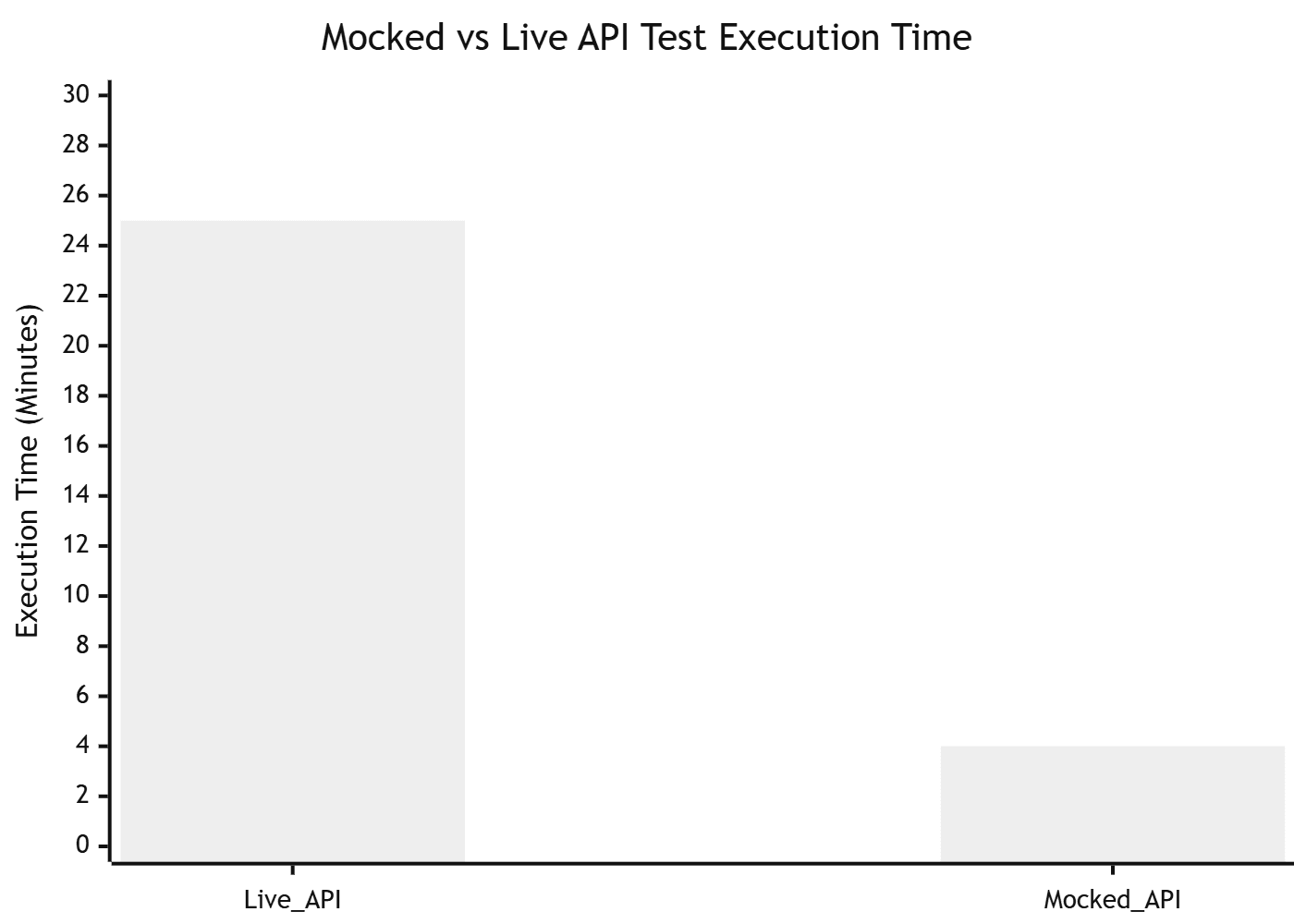
API mocks in CI give you something live APIs cannot: speed, reliability, and zero external dependencies. A test suite that depends on a live third-party API is one network blip, rate limit, or staging environment outage away from failing for reasons completely unrelated to your code.
GitHub Actions with WireMock as a Docker service
## .github/workflows/api-tests.yml
name: API Tests with WireMock

on: [push, pull_request]

jobs:
  test:
    runs-on: ubuntu-latest

    services:
      wiremock:
        image: wiremock/wiremock:3.3.1
        ports:
          - 8089:8080
        volumes:
          - ${{ github.workspace }}/wiremock:/home/wiremock
        options: >-
          --health-cmd "curl -f http://localhost:8080/__admin/health"
          --health-interval 5s
          --health-retries 10

    steps:
      - uses: actions/checkout@v4

      - uses: actions/setup-java@v4
        with:
          java-version: '21'
          distribution: 'temurin'

      - name: Wait for WireMock to be ready
        run: |
          echo "Waiting for WireMock..."
          until curl -sf http://localhost:8089/__admin/health; do sleep 1; done
          echo "WireMock is ready"

      - name: Run tests against mocked APIs
        run: mvn test
        env:
          PAYMENT_API_URL: http://localhost:8089
          AUTH_API_URL: http://localhost:8089
GitHub Actions with MSW (Node.js)
## .github/workflows/frontend-tests.yml
name: Frontend Tests with MSW

on: [push, pull_request]

jobs:
  test:
    runs-on: ubuntu-latest
    steps:
      - uses: actions/checkout@v4

      - uses: actions/setup-node@v4
        with:
          node-version: '20'
          cache: 'npm'

      - run: npm ci

      ## MSW runs in-process with Jest — no separate service needed
      - run: npm test -- --coverage
        env:
          CI: true
          # No API credentials needed — all calls intercepted by MSW
Pipeline performance comparison: mocked vs live APIs
| Test scenario | Live API (avg) | Mocked API (avg) | Speed improvement |
|---|---|---|---|
| 50 unit tests with HTTP calls | 45 seconds | 3 seconds | 15× |
| 200 integration tests | 8 minutes | 45 seconds | 10× |
| Full E2E suite (100 scenarios) | 25 minutes | 4 minutes | 6× |
| CI cost (GitHub Actions minutes) | 35 min/run | 6 min/run | 83% reduction |
8. When NOT to use API mocking
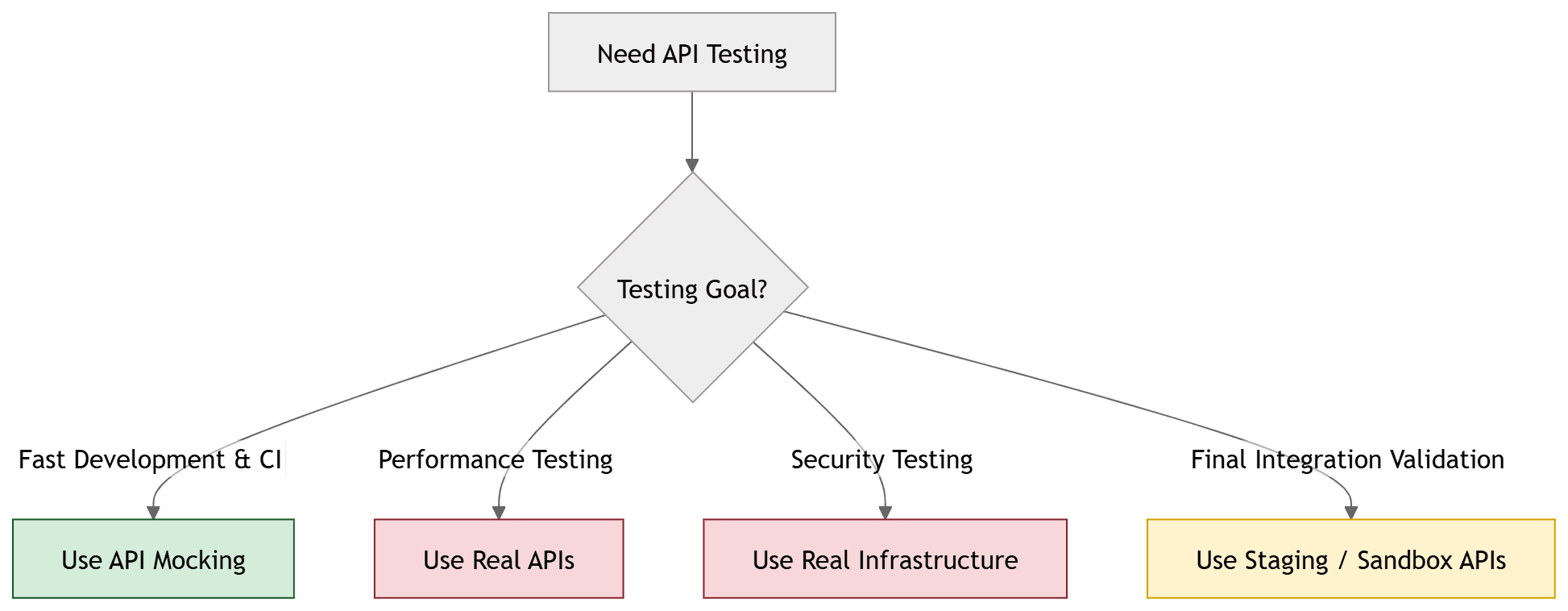
This is the section most mocking guides skip — and it is the one that prevents the most common production incidents.
Final integration testing before production
Your mock is your assumption about how the real API behaves. Mocks cannot catch:
- The real API returning a field name with a different casing (
userIdvsuser_id) - A breaking change in the real API that your mock has not been updated to reflect
- Authentication or authorisation failures that only occur with real credentials
- Rate limiting behaviour that only triggers at real traffic volumes
Before any production release, run at least a smoke suite against the real API in a staging environment. Never ship based solely on mocked test results.
Performance and load testing
A mock that responds in 2ms tells you nothing about how your application behaves when the real API responds in 800ms or times out under load. Performance testing requires real or realistic infrastructure. Use tools like k6 or Apache JMeter for load testing — not mocking tools.
Security testing
Mocks cannot reproduce real authentication flows, OAuth token expiry, JWT validation, CORS behaviour, or injection vulnerabilities. Security testing requires real endpoints. Tools like OWASP ZAP must run against actual API infrastructure.
Third-party API contract validation
If your application depends on a third-party API (Stripe, Twilio, SendGrid), your mock is your interpretation of their documentation. APIs change. Use the provider's official sandbox environments for integration testing, and add contract testing with Pact to catch breaking changes automatically.
When mocks drift from reality
The most dangerous scenario in API mocking is a mock that was accurate six months ago and has silently diverged from the real API. A test suite passing against outdated mocks is worse than no test suite — it provides false confidence.
Prevent this with a schema validation layer: on every CI run, also run a small suite against the real API (or its sandbox) that validates the response schema matches your mock definitions. Tools like Prism's proxy mode (prism proxy) do this automatically.
9. Best practices
Keep mocks as close to the real API contract as possible
The value of a mock is proportional to how accurately it represents the real API. Use your OpenAPI spec as the single source of truth for mock definitions. If the spec says a field is required, your mock should require it. If the spec defines an enum, your mock should enforce it. Prism's validation mode can automatically reject mock requests that violate the spec.
Version your mock definitions alongside your API spec
Mock stubs are code. They belong in version control, in the same repository as the code they test, committed with the same rigour as production code. When the real API changes, the PR that updates the API client should also update the mock definitions. Reviewing them together makes drift visible.
Use specific matching over broad matching
// ❌ Too broad — matches any POST to /payments, hides missing fields
nock('https://api.example.com').post('/v1/payments').reply(200, mockResponse);

// ✅ Specific — verifies the request body contains the expected fields
nock('https://api.example.com')
  .post('/v1/payments', {
    amount: 4999,
    currency: 'usd',
    customerId: /^cus_[a-zA-Z0-9]+$/  // Regex for valid customer ID format
  })
  .reply(200, mockResponse);
Broad matching passes tests even when your application is sending malformed requests. Specific matching verifies that your application is calling the API correctly, not just handling responses.
Always test error scenarios, not just the happy path
// Every API mock should cover these scenarios as a minimum:
// 1. Successful response (happy path)
// 2. 400 Bad Request (validation error)
// 3. 401 Unauthorized (missing/invalid token)
// 4. 403 Forbidden (insufficient permissions)
// 5. 404 Not Found (resource doesn't exist)
// 6. 429 Too Many Requests (rate limited)
// 7. 500 Internal Server Error (server failure)
// 8. Network timeout / connection refused
Error scenario coverage is where mocking provides its greatest unique value — these scenarios are often impossible or risky to trigger against real APIs.
Document what each mock covers and what it does not
Add a comment block to each mock definition explaining which real API behaviour it simulates and explicitly noting any assumptions or simplifications:
/**
 * Mock: POST /api/v1/payments
 * Simulates: Successful Stripe charge for amounts between $1 and $999,999
 * Does NOT simulate: 3D Secure authentication flows, currency conversion,
 *                    fraud detection delays, or webhook delivery
 * Real API docs: https://stripe.com/docs/api/charges/create
 * Last verified against real API: 2026-03-15
 */
10. Pre-release checklist
Use this before every production deployment that involves API integrations.
Mock quality
- All mock definitions are in version control alongside the code they test
- Mocks cover happy path, all documented error codes, and network failure scenarios
- Mock request matching is specific (not just URL matching — body and header matching too)
- Response schemas match the current OpenAPI spec
- Dynamic fields (timestamps, UUIDs) are handled with pattern matching, not exact values
- Mock definitions include a "last verified" date and link to real API documentation
Test coverage
- Unit tests use mocks for all external API calls
- Integration tests verify the full request/response cycle against mocks
- Error handling tested: 4xx responses, 5xx responses, network timeouts, malformed responses
- Retry logic tested against intermittent failures (503 followed by 200)
- Authentication failure handling tested (401, token expiry)
Real API validation
- Smoke suite run against real API (or official sandbox) in staging
- Response schema validation confirms mocks match real API structure
- No hardcoded mock data in production code paths
- API credentials confirmed valid in production environment
- Rate limits confirmed sufficient for expected production traffic
CI/CD
- Mocked tests run on every PR (fast feedback)
- Real API smoke tests run on every merge to main (release gate)
- WireMock/MSW versions pinned in package.json or pom.xml
- Mock server startup verified in CI logs before tests run
Frequently Asked Questions
What is API mocking?
API mocking is the creation of a simulated API that returns controlled, predefined responses to HTTP requests — enabling development and testing without dependency on the real backend service. The application cannot distinguish between a mock response and a real one; it receives the same JSON structure, status codes, and headers.
What is the difference between API mocking and API stubbing?
Stubs return hardcoded responses without verifying that the correct request was made. Mocks return controlled responses and also assert that your application made the right request — verifying method, URL, headers, and body. Stubs are for isolation; mocks are for behaviour verification.
Which API mocking tool is best in 2026?
WireMock for Java/JVM teams and complex stateful scenarios. Nock for Node.js unit and integration tests. MSW for React/Vue/Angular frontend testing. Prism for OpenAPI-spec-driven auto-generation. Each is the best in its category — the right choice depends on your stack.
Can API mocking be used in CI/CD pipelines?
Yes. WireMock runs as a Docker service in GitHub Actions. Nock and MSW run in-process with Jest — no separate service required. Mocked tests run 6–15× faster than tests against live APIs and have zero external dependencies, making them ideal for CI pipelines.
When should you NOT use API mocking?
Do not rely on mocks for final pre-production integration testing, performance load testing, security penetration testing, or validating third-party API contract compliance. Mocks simulate behaviour — they cannot reproduce real network conditions, rate limiting, authentication edge cases, or actual data variability.
How do you prevent mocks from drifting out of sync with the real API?
Three practices: version mock definitions alongside API spec changes in the same PR, run schema validation (Prism proxy mode) against the real API on a scheduled basis, and add a "last verified" comment to every mock definition with a link to the real API documentation.
What is the difference between API mocking and contract testing?
API mocking simulates the API locally for testing. Contract testing (using tools like Pact) verifies that the real API provider still honours the contract your consumer was built against. Mocking prevents you from calling the real API during tests. Contract testing prevents the real API from breaking your tests when it changes.
Stop manually maintaining API mocks
Robonito auto-generates API test cases directly from your real endpoints — no mocks to write, no stubs to maintain, no JSON to hand-craft. Tests run in CI and catch breaking changes before they hit production. Try Robonito free — no credit card needed →
Automate your QA — no code required
Stop writing test scripts.
Start shipping with confidence.
Join thousands of QA teams using Robonito to automate testing in minutes — not months.
