
At 2am, a broken deployment reaches production because no human was awake to catch it. At 11am, a critical security patch waits in the deployment queue for three days because the approval process requires a VP sign-off. Both scenarios represent the same failure — a CI/CD strategy that does not match the team's actual risk tolerance and release confidence. This guide covers the precise difference between Continuous Delivery and Continuous Deployment, when each is the right choice, and exactly how to build the pipeline that supports each approach.
By Robonito Engineering Team · Updated June 2026 · 19 min read
Quick stats
| Fact | Source |
|---|---|
| Teams using CI/CD deploy 208× more frequently with 2,604× faster recovery | DORA State of DevOps 2025 |
| 64% of teams using Continuous Deployment report fewer production incidents | DORA 2025 |
| Automated test quality is the #1 predictor of CI/CD pipeline reliability | DORA 2025 |
| Test maintenance consumes 40-60% of automation effort in pipelines without self-healing | Capgemini World Quality Report 2025 |
| Teams with automated deployment gates catch 90%+ of regressions before production | World Quality Report 2025 |
Table of Contents
- The precise definitions — no more confusion
- The one decision point that separates them
- Continuous Integration — the foundation both require
- Continuous Delivery pipeline — with real YAML
- Continuous Deployment pipeline — with real YAML
- The testing strategy CI/CD requires
- Deployment gates — what must pass before production
- When to choose Delivery vs Deployment
- Common CI/CD failures and how to prevent them
- CI/CD tool comparison (2026)
- Robonito in CI/CD pipelines — the testing layer
- Pre-pipeline implementation checklist
- Frequently Asked Questions
The testing layer your CI/CD pipeline needs — automated, self-healing, no scripts
Robonito runs as a deployment gate in your CI/CD pipeline — blocking releases when critical flows fail, auto-healing when your UI changes, covering web, mobile, API, and desktop without any test scripting. Try Robonito free →
1. The precise definitions — no more confusion
Continuous Integration (CI): The practice of merging developer code changes into a shared repository frequently — typically multiple times per day — with automated builds and tests running on every merge to detect integration issues early.
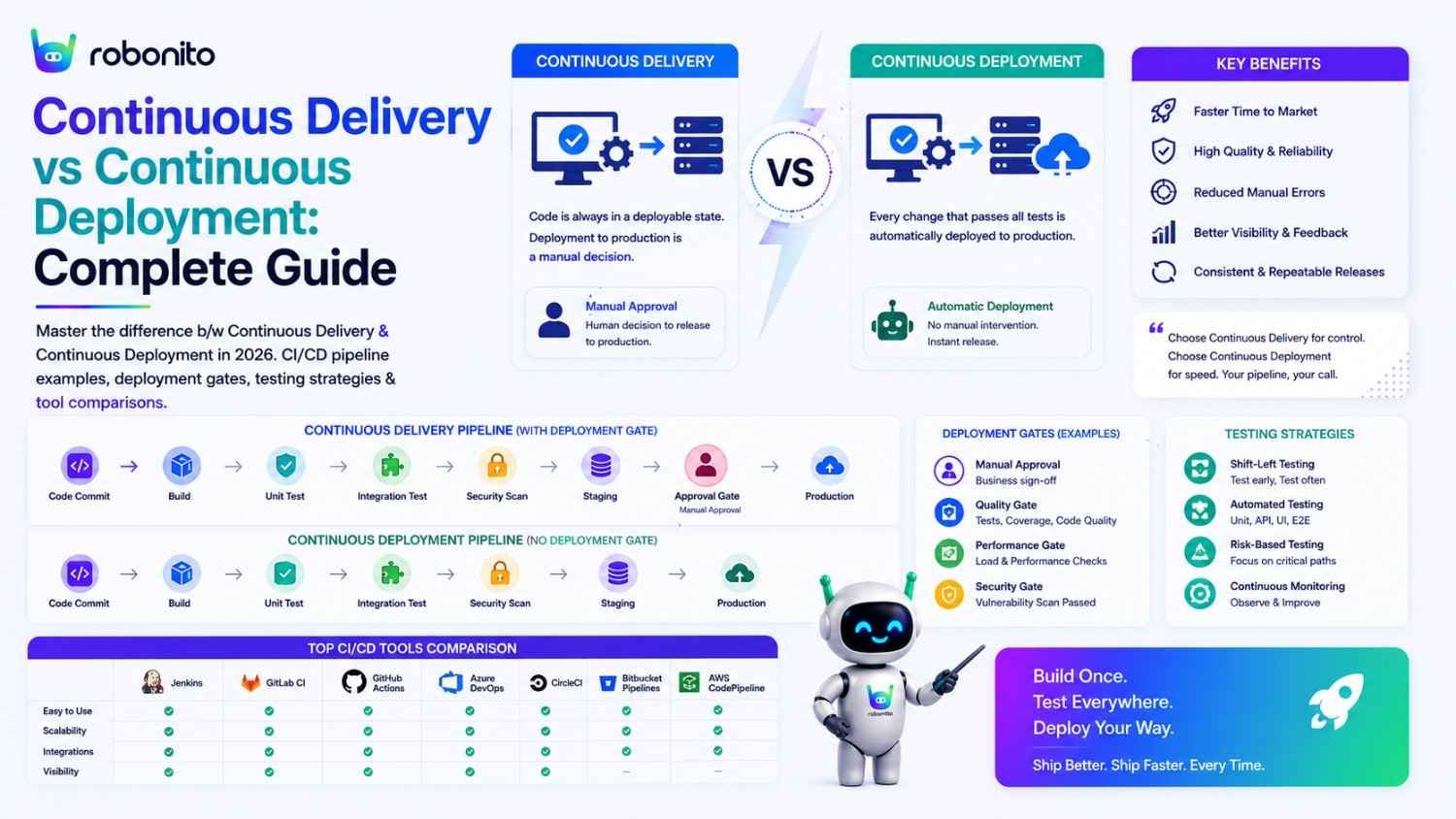
Continuous Delivery (CD): The practice of ensuring that software is always in a deployable state. Every code change is automatically built, tested across multiple environments, and made ready to deploy to production. The actual production deployment requires human approval.
Continuous Deployment (CDeployment): Extends Continuous Delivery by removing the human approval gate. Every change that passes automated quality checks is automatically deployed to production without any manual intervention.
The entire difference between these last two practices is a single decision: is there a human in the loop before the production deployment fires?
Continuous Integration:
  Code commit → Automated build + tests → ✅ or ❌
  (Runs on every commit, provides fast feedback)

Continuous Delivery:
  Code commit → CI pipeline → Staging deploy → Quality gates
  → HUMAN APPROVAL → Production deploy
  (Human decides when to ship)

Continuous Deployment:
  Code commit → CI pipeline → Staging deploy → Quality gates
  → (all gates pass) → Automatic production deploy
  (Machine decides when to ship, based on test results)
2. The one decision point that separates them
The entire strategic question between Continuous Delivery and Continuous Deployment reduces to one question: do you trust your automated test suite enough to let it make the production deployment decision without a human?
This is not a philosophical question — it is a practical one with a measurable answer.
Signs you trust your automated tests enough for Continuous Deployment:
  ✅ Test suite false positive rate < 2% (tests rarely fail for wrong reasons)
  ✅ Defect Removal Efficiency (DRE) > 90% (tests catch 90%+ of bugs before prod)
  ✅ Flaky test rate < 5% (test results are reliable)
  ✅ Test coverage of all P0/P1 flows: 100%
  ✅ Post-deployment smoke tests run against production successfully
  ✅ Rollback can be completed in < 5 minutes when needed

Signs you need to stay with Continuous Delivery (human approval):
  ⚠️ Test flakiness > 10% (team has learned to distrust CI results)
  ⚠️ DRE < 80% (meaningful chance a real bug would pass to production)
  ⚠️ UI tests break frequently from UI changes (fragile test suite)
  ⚠️ No post-deployment smoke tests against production
  ⚠️ Rollback process is manual and takes > 30 minutes
  ⚠️ Regulatory or contractual requirement for human sign-off
Most teams start with Continuous Delivery and earn their way to Continuous Deployment by improving test reliability over time. Skipping straight to Continuous Deployment with an unreliable test suite produces the 2am broken deployment scenario — and quickly destroys team confidence in the entire CI/CD approach.
3. Continuous Integration — the foundation both require
Neither Continuous Delivery nor Continuous Deployment is achievable without solid Continuous Integration. CI is the foundation that both approaches build on.
What CI must accomplish:
## What every CI run must do on every code commit

1. Code quality checks (seconds):
   - Linting and formatting validation
   - Static analysis (type checking)
   - Security dependency scanning (Snyk, npm audit)

2. Fast unit tests (< 5 minutes):
   - All unit tests pass
   - Code coverage ≥ 80%
   - No new failing tests introduced

3. Build artifact (1-3 minutes):
   - Application compiles successfully
   - Docker image builds without errors
   - Build artifacts tagged with commit SHA

4. Integration tests (10-20 minutes):
   - API contract tests pass
   - Database integration tests pass
   - Third-party service mocks behave correctly

Total CI time target: < 20 minutes
Result: A deployable artifact with a known quality level
The CI stage is not optional and cannot be skipped for speed. Teams that skip CI to "move faster" inevitably slow down — because every hour of CI savings is paid back in hours of production incident investigation.
4. Continuous Delivery pipeline — with real YAML
A Continuous Delivery pipeline automates everything up to production deployment, then holds for human approval.
## .github/workflows/continuous-delivery.yml
name: Continuous Delivery Pipeline

on:
  push:
    branches: [main]

jobs:
  ## ── Stage 1: CI ─────────────────────────────────────────────────
  ci:
    name: Continuous Integration
    runs-on: ubuntu-latest
    steps:
      - uses: actions/checkout@v4
      - uses: actions/setup-node@v4
        with: { node-version: '20', cache: 'npm' }
      - run: npm ci

      - name: Lint and type check
        run: npm run lint && npm run type-check

      - name: Unit tests with coverage
        run: npm test -- --coverage
      - name: Enforce 80% coverage gate
        run: |
          COV=$(cat coverage/coverage-summary.json | python3 -c \
            "import sys,json; print(json.load(sys.stdin)['total']['lines']['pct'])")
          python3 -c "exit(0 if float('${COV}') >= 80 else 1)" || \
            (echo "Coverage ${COV}% below 80%" && exit 1)

      - name: Build production artifact
        run: npm run build

      - name: Upload artifact
        uses: actions/upload-artifact@v4
        with:
          name: build-${{ github.sha }}
          path: dist/
          retention-days: 7

  ## ── Stage 2: Integration Tests ───────────────────────────────────
  integration:
    name: Integration Tests
    runs-on: ubuntu-latest
    needs: ci
    services:
      postgres:
        image: postgres:16
        env: { POSTGRES_DB: testdb, POSTGRES_USER: test, POSTGRES_PASSWORD: test }
        options: --health-cmd pg_isready
    steps:
      - uses: actions/checkout@v4
      - uses: actions/setup-python@v5
        with: { python-version: '3.12' }
      - run: pip install pytest httpx --break-system-packages
      - run: pytest tests/integration/ -v --timeout=30
        env:
          DATABASE_URL: postgresql://test:test@localhost/testdb

  ## ── Stage 3: Staging Deploy ──────────────────────────────────────
  deploy-staging:
    name: Deploy to Staging
    runs-on: ubuntu-latest
    needs: integration
    environment: staging
    steps:
      - uses: actions/checkout@v4
      - uses: actions/download-artifact@v4
        with: { name: build-${{ github.sha }} }
      - name: Deploy to staging environment
        run: ./scripts/deploy.sh staging ${{ github.sha }}
        env:
          DEPLOY_KEY: ${{ secrets.STAGING_DEPLOY_KEY }}

      - name: Wait for staging health check
        run: |
          for i in {1..30}; do
            if curl -sf ${{ secrets.STAGING_URL }}/health; then
              echo "Staging healthy"; exit 0
            fi
            echo "Attempt $i/30..."; sleep 10
          done
          exit 1

  ## ── Stage 4: Quality Gates ───────────────────────────────────────
  quality-gates:
    name: Quality Gates (Automated)
    runs-on: ubuntu-latest
    needs: deploy-staging
    steps:
      - uses: actions/checkout@v4
      - uses: actions/setup-node@v4
        with: { node-version: '20', cache: 'npm' }
      - run: npm ci
      - run: npx playwright install --with-deps

      ## Gate 1: E2E Regression (Robonito AI + Playwright)
      - name: Robonito regression suite
        uses: robonito/run-tests-action@v2
        with:
          api-key: ${{ secrets.ROBONITO_API_KEY }}
          suite: regression
          environment: staging
          browsers: chrome,safari,firefox,edge
          fail-on: critical  ## P0/P1 failures block deployment

      ## Gate 2: Performance acceptance
      - name: Performance gate (k6)
        run: |
          curl -sL https://github.com/grafana/k6/releases/latest/download/k6-linux-amd64.tar.gz \
            | tar xz && sudo mv k6*/k6 /usr/local/bin/
          k6 run \
            --threshold 'http_req_duration{p(95)}<2000' \
            --threshold 'http_req_failed{rate}<0.01' \
            load-tests/smoke.js
        env: { BASE_URL: ${{ secrets.STAGING_URL }} }

      ## Gate 3: Security scan
      - name: OWASP ZAP security scan
        uses: zaproxy/action-full-scan@v0.10.0
        with:
          target: ${{ secrets.STAGING_URL }}
          fail_action: true

      ## Gate 4: Accessibility
      - name: WCAG 2.2 AA scan
        run: npx playwright test tests/accessibility/ --project=chromium

  ## ── Stage 5: HUMAN APPROVAL GATE ────────────────────────────────
  ## This is what makes it Continuous DELIVERY (not Deployment)
  ## Remove this job to convert to Continuous Deployment
  production-approval:
    name: Awaiting Production Approval
    runs-on: ubuntu-latest
    needs: quality-gates
    environment: production  ## 'production' environment has required reviewers configured
    ## GitHub requires a reviewer to approve before this job runs
    ## Configure in: Settings → Environments → production → Required reviewers
    steps:
      - name: Log approval
        run: echo "Production deployment approved by ${{ github.actor }}"

  ## ── Stage 6: Production Deploy ───────────────────────────────────
  deploy-production:
    name: Deploy to Production
    runs-on: ubuntu-latest
    needs: production-approval
    steps:
      - uses: actions/checkout@v4
      - uses: actions/download-artifact@v4
        with: { name: build-${{ github.sha }} }

      - name: Deploy to production
        run: ./scripts/deploy.sh production ${{ github.sha }}
        env:
          DEPLOY_KEY: ${{ secrets.PRODUCTION_DEPLOY_KEY }}

      ## Post-deployment smoke test against PRODUCTION
      - name: Production smoke test
        run: npx playwright test tests/smoke/ --project=chromium
        env:
          BASE_URL: ${{ secrets.PRODUCTION_URL }}

      - name: Notify team on successful deployment
        uses: 8398a7/action-slack@v3
        with:
          status: success
          text: "v${{ github.sha }} deployed to production by ${{ github.actor }}"
        env:
          SLACK_WEBHOOK_URL: ${{ secrets.SLACK_RELEASES_CHANNEL }}
The critical element: The production-approval job references a GitHub Environment named production that has required reviewers configured. When GitHub reaches that job, it pauses the pipeline and sends a notification to the designated reviewers. No production deployment occurs until an authorised person manually approves.
5. Continuous Deployment pipeline — with real YAML
Continuous Deployment removes the human approval gate. The production-approval job disappears. Every change that passes all quality gates deploys automatically.
## .github/workflows/continuous-deployment.yml
## Notice: no 'production-approval' job — deployment is fully automatic
name: Continuous Deployment Pipeline

on:
  push:
    branches: [main]

jobs:
  ci:
    ## ... identical to Continuous Delivery Stage 1 above
    name: CI — Unit Tests + Build

  integration:
    ## ... identical to Stage 2 above
    name: Integration Tests
    needs: ci

  deploy-staging:
    ## ... identical to Stage 3 above
    name: Deploy to Staging
    needs: integration

  quality-gates:
    ## ... identical to Stage 4 above — these gates are now the ONLY protection
    name: Quality Gates — All Must Pass
    needs: deploy-staging
    ## IMPORTANT: These gates now carry the full weight of production safety
    ## Any test failure here is the only thing preventing a bad deploy

  ## ── AUTOMATIC PRODUCTION DEPLOY ──────────────────────────────────
  ## No human approval — quality gates ARE the approval
  deploy-production:
    name: Automatic Production Deploy
    runs-on: ubuntu-latest
    needs: quality-gates
    steps:
      - uses: actions/checkout@v4
      - uses: actions/download-artifact@v4
        with: { name: build-${{ github.sha }} }

      - name: Deploy to production (automatic)
        run: ./scripts/deploy.sh production ${{ github.sha }}
        env:
          DEPLOY_KEY: ${{ secrets.PRODUCTION_DEPLOY_KEY }}

      ## Post-deploy smoke — if this fails, trigger automatic rollback
      - name: Production smoke test
        id: smoke
        run: npx playwright test tests/smoke/ --project=chromium
        continue-on-error: true  # Don't fail the job — handle in next step
        env:
          BASE_URL: ${{ secrets.PRODUCTION_URL }}

      - name: Automatic rollback on smoke failure
        if: steps.smoke.outcome == 'failure'
        run: |
          echo "🔴 Production smoke failed — rolling back to previous version"
          ./scripts/rollback.sh production
          exit 1  ## Fail the pipeline to signal the rollback

      - name: Notify team
        if: always()
        uses: 8398a7/action-slack@v3
        with:
          status: ${{ job.status }}
          text: |
            ${{ job.status == 'success' && '🚀' || '🔴' }}
            Commit ${{ github.sha }} ${{ job.status == 'success' && 'deployed' || 'FAILED + rolled back' }}
        env:
          SLACK_WEBHOOK_URL: ${{ secrets.SLACK_RELEASES_CHANNEL }}
The critical addition for Continuous Deployment: Automatic rollback. When the post-deployment smoke test fails against live production, the pipeline triggers a rollback immediately — before any users encounter the broken state. This safety net is what makes Continuous Deployment viable for production environments.
6. The testing strategy CI/CD requires
The quality of a CI/CD pipeline is exactly equal to the quality of the tests running inside it. A pipeline with fast but unreliable tests gives false confidence. A pipeline with reliable but slow tests creates bottlenecks that teams work around.
The three-tier testing strategy
Tier 1 — Pre-merge (every commit, < 5 minutes):
  Unit tests (≥ 80% coverage gate)
  Static analysis and type checking
  Security dependency scan

  Purpose: Catch logic errors and security issues before they enter main
  Failure action: Block the PR merge

Tier 2 — Post-merge (every merge to main, 15-25 minutes):
  Integration tests (API contracts, database interactions)
  Build and artifact generation
  Deploy to staging

  Purpose: Verify integrated behaviour and staging deployment
  Failure action: Alert team, do not proceed to quality gates

Tier 3 — Quality gates (after staging deploy, 30-45 minutes):
  E2E regression suite (all P0/P1 critical flows, all browsers)
  Performance acceptance (p95 < defined thresholds)
  Security dynamic scan (OWASP ZAP)
  Accessibility scan (axe-core WCAG 2.2 AA)

  Purpose: Verify complete system quality in production-like environment
  Failure action: Block deployment (Continuous Delivery → notify approver;
                                   Continuous Deployment → automatic rollback)
Test reliability requirements for Continuous Deployment
Metric                         Continuous Delivery   Continuous Deployment
─────────────────────────────────────────────────────────────────────────
Test false positive rate       < 10% acceptable      Must be < 2%
Defect Removal Efficiency      > 80% acceptable      Must be > 90%
P0 automation coverage         90% target            100% required
Flaky test rate                < 15%                 < 5%
Suite execution time           < 60 minutes          < 45 minutes
Post-deploy smoke test         Recommended           Required
Why fragile selectors destroy CI/CD pipelines
The most common cause of CI/CD pipeline unreliability is automated tests that break when the UI changes — not because a bug was introduced, but because a CSS class was renamed, a component was restructured, or a design system was updated.
Traditional Selenium/Playwright with CSS selectors:
  Developer updates checkout button class from "btn-primary" to "ds-action-btn"
  → 15 automated tests fail in CI
  → Pipeline blocks
  → Team investigates: "Is it a real bug?"
  → Investigation: "No, it's a selector update"
  → Engineer spends 2 hours updating selectors
  → False positive rate spikes
  → Team learns to ignore CI failures
  → CI/CD pipeline loses credibility

Robonito with intent-based self-healing:
  Developer updates checkout button class from "btn-primary" to "ds-action-btn"
  → Robonito evaluates: ARIA role still "button" ✅
                        Accessible name still "Place Order" ✅
                        Visual position unchanged ✅
  → Tests auto-heal, continue executing
  → Pipeline passes
  → No engineer time spent
  → False positive rate stays low
  → CI/CD pipeline remains trusted
7. Deployment gates — what must pass before production
A deployment gate is an automated quality check that must pass before the pipeline proceeds. Gates are the mechanism that makes both Continuous Delivery and Continuous Deployment safe.
The five essential deployment gates
Gate 1: Functional regression (hardest to implement, highest value)
## Robonito regression — covers web + API + mobile in one step
- name: Functional regression gate
  uses: robonito/run-tests-action@v2
  with:
    api-key: ${{ secrets.ROBONITO_API_KEY }}
    suite: regression
    environment: staging
    browsers: chrome,safari,firefox,edge
    fail-on: critical        ## Only P0/P1 failures block deployment
    healing_mode: intent     ## Self-healing prevents false positives
    notify-slack: ${{ secrets.SLACK_QA_CHANNEL }}
Gate 2: Performance acceptance
// k6 performance gate — fails pipeline if thresholds exceeded
export const options = {
  thresholds: {
    // These thresholds are the deployment gate — fail = no deploy
    'http_req_duration{name:checkout}':  ['p(95)<2000'],  // 95th % < 2s
    'http_req_duration{name:api_orders}': ['p(95)<500'],  // API < 500ms
    'http_req_failed':                    ['rate<0.01'],  // < 1% errors
  },
};
Gate 3: Security scan
- name: OWASP ZAP dynamic security scan
  uses: zaproxy/action-full-scan@v0.10.0
  with:
    target: ${{ secrets.STAGING_URL }}
    fail_action: true  # Critical/High findings block deployment
Gate 4: Accessibility compliance
- name: WCAG 2.2 AA compliance scan
  run: npx playwright test tests/accessibility/
  ## axe-core violations = deployment blocked
Gate 5: Post-deployment production smoke
## Runs AFTER production deployment — catches deployment config issues
- name: Production smoke test
  run: |
    npx playwright test tests/smoke/ --project=chromium
  env:
    BASE_URL: ${{ secrets.PRODUCTION_URL }}
  ## Failure here triggers automatic rollback (Continuous Deployment)
  ## or alerts on-call engineer (Continuous Delivery)
8. When to choose Delivery vs Deployment
Use this framework to make the right architectural decision for your team.
Choose Continuous Deployment when
Technical prerequisites met:
  ✅ Test suite DRE consistently > 90%
  ✅ Test false positive rate < 2%
  ✅ P0 automation coverage: 100%
  ✅ Automatic rollback implemented and tested
  ✅ Feature flags available for risk mitigation
  ✅ Canary or blue-green deployment available
  ✅ Monitoring and alerting with < 5 min incident detection

Organisational fit:
  ✅ Team ships multiple changes per day (high velocity)
  ✅ Changes are small and incremental (easy to isolate regressions)
  ✅ No regulatory requirement for human sign-off
  ✅ Product team trusts automated quality gates
Choose Continuous Delivery when
One or more of these apply:
  ⚠️ Test DRE is 70-90% — too risky to remove human review
  ⚠️ Flaky tests > 10% — pipeline results not trusted
  ⚠️ Regulated industry: FDA, FCA, HIPAA, SOX (requires audit trail)
  ⚠️ Customer-facing changes require product review before shipping
  ⚠️ Large feature releases where human coordination is required
  ⚠️ Multiple teams deploying to shared infrastructure
  ⚠️ Team is new to CI/CD — building pipeline confidence
The graduation path
Most successful teams follow this progression:
Phase 1: Continuous Integration only
  → Automated tests on every commit
  → Manual deployment by engineer
  → Target: 4-8 weeks

Phase 2: Continuous Delivery
  → Automated pipeline to staging
  → Human approval for production
  → Focus: improving test reliability, reducing false positives
  → Target: 3-6 months

Phase 3: Continuous Deployment
  → Automated production deployment when tests pass
  → Enabled by: DRE > 90%, false positive rate < 2%
  → Ongoing: maintain test quality as gating factor
9. Common CI/CD failures and how to prevent them
Failure 1: Tests that never block deployments
## ❌ This pipeline runs tests but never stops a deployment:
- run: npx playwright test
  continue-on-error: true  # Tests can fail — pipeline continues anyway

## ✅ Tests must produce exit code 1 to block the pipeline:
- run: npx playwright test
## Default: exit code 1 on failure → pipeline stops → no deployment
Failure 2: Flaky tests that destroy pipeline confidence
Pattern: Tests fail 15-20% of the time for non-bug reasons
Result: Team runs pipeline multiple times until it "passes"
        or adds --retries=3 to hide the problem

Impact: Real failures are missed because the team learned
        to re-run rather than investigate

Fix:
  1. Track flakiness per test — flag any test failing > 3 times
     without a code change in 30 days
  2. Quarantine flaky tests (remove from blocking gates,
     fix in next sprint)
  3. Use self-healing automation (Robonito) for UI tests
     to prevent selector-based false positives
  4. Add test data isolation to prevent state contamination
Failure 3: Over-testing in E2E, under-testing in unit
Inverted pyramid impact on CI/CD:
  500 E2E tests × 60 seconds each = 500 minutes per pipeline run
  Team runs pipeline once per day maximum
  Mean time to detect regression: 24 hours

Correct pyramid:
  350 unit tests × 0.1 seconds = 35 seconds
  100 integration tests × 5 seconds = 8 minutes
  50 E2E tests × 30 seconds = 25 minutes
  Total pipeline: < 35 minutes
  Team runs pipeline on every PR
  Mean time to detect regression: 30 minutes
Failure 4: No rollback strategy for Continuous Deployment
## rollback.sh — required for Continuous Deployment pipelines
##!/bin/bash
## Triggered automatically when post-deploy smoke tests fail

TARGET_ENV=$1  ## "production"
PREVIOUS_VERSION=$(cat .deployment-history/$TARGET_ENV/previous_sha)

echo "Rolling back $TARGET_ENV to $PREVIOUS_VERSION"

## Blue-green: switch traffic back to previous version
kubectl set image deployment/app app=registry/app:$PREVIOUS_VERSION

## Wait for rollback to complete
kubectl rollout status deployment/app --timeout=120s

echo "Rollback complete. Production running: $PREVIOUS_VERSION"

## Alert team
curl -X POST $SLACK_WEBHOOK -d "{
  \"text\": \" Production rollback executed — deploy $CURRENT_VERSION reverted to $PREVIOUS_VERSION\"
}"
10. CI/CD tool comparison (2026)
Pipeline orchestration
| Tool | Best for | Key strength | Pricing |
|---|---|---|---|
| GitHub Actions | GitHub-hosted teams | Native GitHub integration, large marketplace | Free (public), from $4/user/mo |
| GitLab CI | GitLab teams | All-in-one DevOps, self-hosted option | Free tier, from $29/user/mo |
| Jenkins | Enterprise, legacy | Maximum flexibility, on-premises | Free OSS |
| CircleCI | Speed-focused teams | Fastest parallel execution | Free tier, from $15/mo |
| Azure DevOps | Microsoft ecosystem | Full ALM suite, Azure integration | Free tier, from $6/user/mo |
Testing tools for CI/CD quality gates
| Tool | Type | CI/CD role | Free |
|---|---|---|---|
| Robonito | E2E + API + Mobile AI | Regression gate (no-code, self-healing) | ✅ Free tier |
| Playwright | E2E web | Cross-browser regression gate | ✅ OSS |
| pytest | API + integration | API regression gate | ✅ OSS |
| k6 | Performance | Performance acceptance gate | ✅ OSS |
| OWASP ZAP | Security | Security scan gate | ✅ OSS |
| axe-core | Accessibility | WCAG compliance gate | ✅ OSS |
| Snyk | Dependencies | Vulnerability scan gate | ✅ Free tier |
11. Robonito in CI/CD pipelines — the testing layer
Robonito is designed specifically to serve as a CI/CD quality gate — the automated regression layer that determines whether a deployment proceeds or is blocked.
Why Robonito is particularly valuable in CI/CD contexts
Self-healing eliminates false positive deployments. In traditional CI/CD pipelines, UI-based tests fail constantly due to selector changes — not bugs. These false positives either block legitimate deployments or, worse, train teams to ignore test failures. Robonito's intent-based self-healing eliminates the selector-change false positive category, making the gate's failures meaningful.
No-code means non-engineers can maintain the gates. CI/CD deployment gates are only as comprehensive as the test suite behind them. Robonito allows non-technical QA analysts to create and maintain tests, meaning the gate's coverage grows with the whole team's capacity — not just the automation engineers.
Covers all CI/CD testing surfaces. One Robonito action covers web regression across all browsers, mobile web, API validation, and desktop — replacing multiple separate tool integrations with one step.
## Complete CI/CD quality gate in one step:
- name: Robonito quality gates
  uses: robonito/run-tests-action@v2
  with:
    api-key: ${{ secrets.ROBONITO_API_KEY }}
    suite: regression
    environment: staging

    ## Cross-browser web regression
    browsers: chrome,safari,firefox,edge

    ## API regression included
    platforms: web,mobile-web,api

    ## Self-healing: prevents false positives from UI changes
    healing_mode: intent
    healing_confidence_threshold: 0.85

    ## Deployment gate: only P0/P1 failures block deployment
    fail-on: critical

    ## Notifications
    notify-slack: ${{ secrets.SLACK_QA_CHANNEL }}
    post-pr-comment: true  ## Posts results to PR automatically

## Equivalent traditional setup would require:
## - Playwright configuration for cross-browser
## - Separate pytest for API tests
## - Separate mobile viewport configuration
## - Manual selector maintenance when UI changes
## - Multiple separate reporting integrations
12. Pre-pipeline implementation checklist
Before implementing Continuous Delivery
- CI pipeline established (unit tests + build on every commit)
- Staging environment accessible and stable
- Automated deployment to staging working reliably
- Core regression test suite exists with > 20 tests
- At least one deployment gate configured (E2E tests minimum)
- Rollback procedure documented (even if manual)
- Team trained on reading CI pipeline results
- Slack/Teams notifications configured for failures
Before graduating to Continuous Deployment
- Test DRE consistently > 90% for 3+ months
- Test false positive rate < 2% (< 1 in 50 failures is not a real bug)
- P0 automation coverage: 100% (every critical flow automated)
- Automated rollback implemented and tested (not just documented)
- Post-deployment production smoke tests verified working
- Feature flag system available to isolate risk
- Canary or blue-green deployment capability confirmed
- On-call alerting configured for production incidents
- Team has documented incident response runbook
- Stakeholders briefed: no human approval gate before production
Canary vs Blue-Green Deployment
| Strategy | Description | Risk |
|---|---|---|
| Canary | Gradually expose traffic to new version | Lower |
| Blue-Green | Switch all traffic to new environment | Medium |
GitOps and Continuous Deployment
GitOps extends Continuous Deployment by making Git the single source of truth for infrastructure and application state.
Popular GitOps tools include:
- Argo CD
- Flux CD
Benefits include:
- Auditability
- Easy rollback
- Declarative infrastructure
- Consistent environments
GitOps is increasingly becoming the preferred implementation model for Continuous Deployment in Kubernetes environments.
Frequently Asked Questions
What is the difference between Continuous Delivery and Continuous Deployment?
Continuous Delivery keeps a human approval gate before production: every change is automatically built, tested, and made ready to deploy, but a human decides when to ship. Continuous Deployment removes the human gate: every change that passes automated quality checks deploys to production automatically. The entire difference is one decision: is there a human in the deployment path?
Which should you choose: Continuous Delivery or Continuous Deployment?
Start with Continuous Delivery — it builds pipeline confidence and allows you to improve test reliability before removing the human safety net. Graduate to Continuous Deployment when your test DRE consistently exceeds 90%, your false positive rate is below 2%, and you have automatic rollback capability. Most teams with mature CI/CD settle on Continuous Deployment for standard features and Continuous Delivery for high-risk or compliance-sensitive releases.
What automated tests are required for Continuous Deployment?
At minimum: unit tests with ≥80% coverage, integration tests for all API contracts, end-to-end regression covering 100% of P0/P1 flows across all browsers, performance thresholds (p95 < defined limits), security scanning (OWASP ZAP), and post-deployment production smoke tests. False positive rate must be below 2% — unreliable tests in a Continuous Deployment pipeline produce both blocking false positives and missed real failures.
How does automated testing fit into CI/CD pipelines?
Tests run in three tiers: unit tests on every commit (< 5 minutes), integration tests on every PR (10-20 minutes), and full regression on every merge to main (30-60 minutes). For Continuous Deployment, smoke tests also run against production after each automatic deployment. Tests must exit with code 1 on failure to block the pipeline — tests that run but never block are decorative.
What is the CI/CD pipeline testing bottleneck?
The most common bottleneck is fragile UI tests that fail when the UI changes — not because a bug was introduced, but because CSS classes changed. These false positives either block legitimate deployments or train teams to ignore CI failures, undermining the entire pipeline's credibility. Self-healing test platforms (like Robonito) eliminate this specific class of failure by recognising elements through intent rather than brittle selectors.
External references
- GitHub Actions Documentation — CI/CD pipeline reference
- Playwright Documentation — CI integration guide
- DORA State of DevOps 2025 — CI/CD performance benchmarks
- k6 Documentation — Performance testing in CI
- OWASP ZAP GitHub Action — Security scan in CI
- Capgemini World Quality Report 2025 — Testing in CI statistics
- Google SRE Book — Release Engineering — Deployment best practices
The testing layer your CI/CD pipeline needs — self-healing, cross-browser, no scripts
Robonito runs as a deployment gate in your pipeline — blocking releases when critical flows fail, auto-healing when your UI changes, covering web + mobile + API + desktop without any scripting or maintenance overhead. Add Robonito to your CI/CD pipeline in under an hour with the free tier. Start free at Robonito.com →
Automate your QA — no code required
Stop writing test scripts.
Start shipping with confidence.
Join thousands of QA teams using Robonito to automate testing in minutes — not months.
