
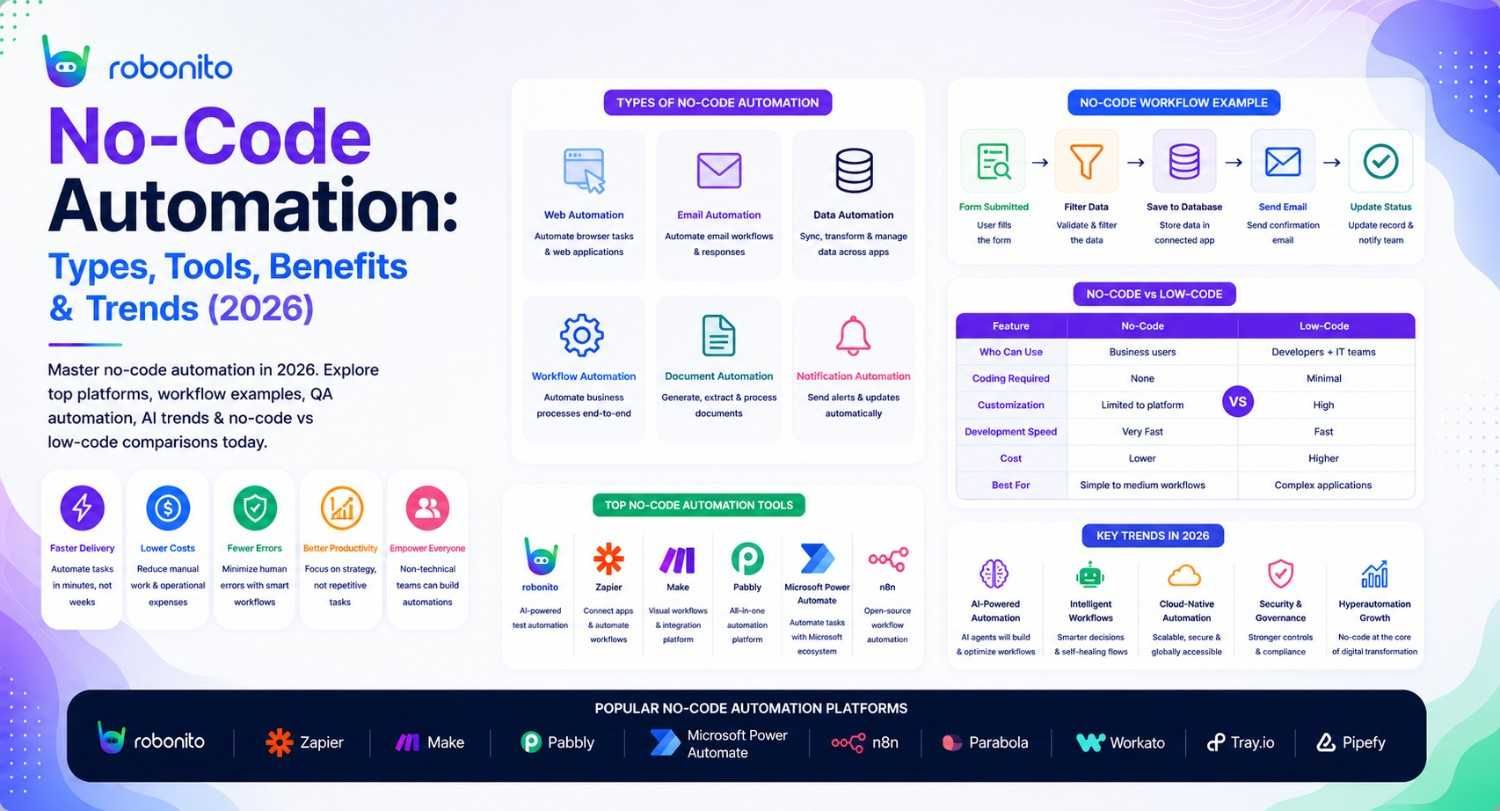
The global no-code automation market hit $21.2 billion in 2025 and is projected to reach $65 billion by 2030. Behind that growth is a simple reality: every team has more repetitive work to automate than developers available to build automation. No-code platforms are closing that gap — and in 2026, they are more capable than ever.
By Robonito Engineering Team · Updated May 2026 · 18 min read
Quick stats
| Fact | Source |
|---|---|
| No-code/low-code market projected to reach $65 billion by 2030 | Gartner |
| 70% of new business applications will use no-code/low-code by 2025 | Gartner |
| Teams using no-code automation report 40% faster process delivery | Forrester |
| 84% of enterprises use at least one no-code or low-code tool in 2026 | IDC |
| No-code QA automation reduces testing cycle time by up to 80% | Capgemini World Quality Report 2025 |
Table of Contents
- What is no-code automation?
- The six types of no-code automation
- No-code vs low-code — the honest comparison
- How no-code automation works technically
- No-code automation tools compared (2026)
- No-code QA and test automation — a deep dive
- Real no-code automation workflow examples
- How AI is transforming no-code automation in 2026
- Honest limitations of no-code automation
- Choosing the right no-code automation platform
- Pre-implementation checklist
- Frequently Asked Questions
The no-code platform built specifically for QA automation
Robonito auto-generates test cases from your real user flows, runs them in CI, and self-heals when your UI changes — no scripts, no selectors, no maintenance sprints. Try Robonito free →
1. What is no-code automation?
One-sentence definition for featured snippets: No-code automation is the practice of building automated workflows, applications, and processes using visual drag-and-drop interfaces, pre-built templates, and trigger-action logic — without writing any code.
For most of the software industry's history, automation meant programming. You automated something by writing a script, configuring a framework, or deploying a bot — all of which required technical skills that most business teams do not have and developer time that is perpetually in short supply.
No-code automation breaks that dependency. Instead of writing if ticket.status == 'unresolved' and ticket.age > 24 * 3600: send_email(ticket.customer), a customer support manager opens a visual workflow builder, sets a trigger ("check tickets daily"), adds a condition ("inactive for 24 hours"), and configures an action ("send follow-up email"). No code written. No developer required. Deployed in an afternoon.
This is not a toy capability for simple tasks. In 2026, no-code automation powers enterprise-grade workflows at companies including Shopify, Airbnb, and Twitter — handling millions of automated events per day without a single line of custom code.
The driving force behind this growth is straightforward: the demand for automation has outpaced the supply of developers who can build it. No-code platforms are the industry's response to that gap.
2. The six types of no-code automation
No-code automation is not a single category — it spans six distinct types, each solving a different class of automation problem.
Type 1: Workflow automation
What it automates: Multi-step business processes that cross systems and teams — notification chains, approval flows, data routing, scheduled tasks.
How it works: Trigger → Condition → Action chains. A new entry in a form triggers a Slack notification, updates a CRM record, creates a project task, and sends a confirmation email — all from one visual workflow, no code.
Leading tools: Zapier, Make (formerly Integromat), n8n (self-hosted), Microsoft Power Automate.
Real example:
Workflow: New customer signup automation

Trigger: New row added to "Customers" Google Sheet
  │
  ├── Action 1: Create contact in HubSpot CRM
  ├── Action 2: Send welcome email via Mailchimp
  ├── Action 3: Post to #new-customers Slack channel
  └── Action 4: Create onboarding task in Asana
         └── Assigned to: Customer Success team
             Due date: 3 days from signup
Type 2: Robotic Process Automation (RPA)
What it automates: Repetitive desktop and web tasks that previously required a human to operate — logging into portals, copying data between systems, generating reports, filling forms.
How it works: A software robot records or observes the steps a human takes to complete a task, then replays those steps automatically on a schedule or trigger.
Leading tools: UiPath (with no-code Studio Web), Automation Anywhere (with no-code process recorder), Power Automate Desktop.
Important distinction from workflow automation: RPA operates at the interface level — it clicks buttons, reads screens, and fills forms like a human would. Workflow automation operates at the API level — it calls APIs and moves data between systems without touching a UI. RPA is needed when the system to be automated has no API. Workflow automation is preferred when APIs are available, because it is faster and more reliable.
Type 3: Data integration automation
What it automates: Moving, transforming, and synchronising data between databases, CRMs, data warehouses, analytics platforms, and SaaS tools.
How it works: Visual ETL (Extract, Transform, Load) pipelines define data sources, transformation rules, and destinations. Data flows automatically on a schedule or in real-time without custom integration code.
Leading tools: Fivetran, Airbyte, Stitch, HubSpot Operations Hub.
Real example: Customer data captured in Salesforce is automatically synced to a Snowflake data warehouse every hour, transformed into the reporting schema, and surfaced in Tableau dashboards — without a data engineer writing a single pipeline script.
Type 4: App and website building
What it automates: The creation of web applications, internal tools, and customer-facing portals — replacing months of development with visual building.
How it works: Visual editors with component libraries, database connections, and logic builders allow non-developers to assemble functioning applications from pre-built elements.
Leading tools: Bubble (complex web apps), Webflow (marketing sites and CMS), Glide (mobile apps from spreadsheets), Retool (internal tools), AppGyver.
2026 evolution: AI-assisted app generation is now mainstream. Platforms like Bubble and Webflow accept natural language descriptions of what you want to build and generate the initial application structure automatically. The no-code builder then handles refinement.
Type 5: Browser automation
What it automates: Web-based tasks that require navigating websites, extracting data, filling forms, or monitoring content — without writing Playwright or Puppeteer scripts.
How it works: Visual recorders capture browser interactions (clicks, form fills, navigation) and convert them into repeatable automated sequences. More advanced platforms add scheduling, data extraction, and notification capabilities.
Leading tools: Browse AI, Bardeen, Phantombuster, Octoparse.
Use cases: Competitive price monitoring, lead data enrichment, automated form submissions, web scraping for market research, content change detection.
Type 6: Testing and QA automation
What it automates: Software testing workflows — functional tests, regression suites, cross-browser checks — without QA engineers writing and maintaining test scripts.
How it works: QA professionals record user interactions with the application, or describe test scenarios in plain language. The platform generates test cases, executes them across browsers and environments, self-heals when the UI changes, and reports results in CI/CD pipelines.
Leading tools: Robonito, Testim, Mabl, TestRigor.
Why it matters more than other types for software teams: Every software release carries regression risk. Traditional automated testing requires automation engineers to write and maintain scripts. No-code QA automation enables the entire QA team — including non-technical testers — to contribute regression coverage without scripting overhead. The result is broader coverage, faster cycles, and dramatically reduced maintenance burden.
3. No-code vs low-code — the honest comparison
The no-code vs low-code distinction is one of the most debated in the automation industry. Here is the clear breakdown:
| Dimension | No-code | Low-code |
|---|---|---|
| Target user | Non-technical: business analysts, operations, QA analysts | Technical: developers who want to move faster |
| Coding required | None — ever | Optional for simple things, required for complex logic |
| Flexibility ceiling | Lower — constrained by platform capabilities | Higher — custom code breaks constraints |
| Learning curve | Hours to days | Days to weeks |
| Maintenance overhead | Low — platform handles updates | Moderate — custom code needs maintaining |
| Scalability | Limited for highly complex scenarios | Scales further with custom code |
| Best for | Standardised workflows, broad team adoption | Complex enterprise logic, developer-led automation |
| Examples | Zapier, Robonito, Power Automate | OutSystems, Mendix, Appian |
The practical question: which do you need?
Choose no-code if: Your automation use cases are well-defined, your workflows follow recognisable patterns, and your team includes non-technical members who need to own the automation. Speed and accessibility are the primary values.
Choose low-code if: You need custom business logic that no template covers, you have developer resources who want to move faster without starting from scratch, or your automation needs to integrate with complex proprietary systems.
The emerging third path in 2026: AI-augmented no-code, where natural language descriptions generate the workflow and visual builders handle refinement. This is collapsing the practical gap between no-code and low-code for many use cases.
4. How no-code automation works technically
Understanding what happens under the hood helps teams make better platform choices and debug problems when automations fail.
Trigger-condition-action architecture
Every no-code automation, regardless of platform or type, follows the same fundamental architecture:
TRIGGER
(Something happens)
     │
     ▼
CONDITION
(Optional: is X true?)
     │
     ▼
ACTION
(Do something)
     │
     ▼
ERROR HANDLING
(What if the action fails?)
A Zapier workflow, a Power Automate flow, and a Robonito test all implement this architecture — just for different domains and at different abstraction levels.
Integration layer — how no-code connects to everything
No-code platforms connect to external systems through two mechanisms:
Pre-built connectors — the platform maintains an official integration with a popular SaaS tool (Salesforce, Slack, GitHub, Jira). The connector handles authentication, API versioning, and data mapping. The user just selects the connector and configures it.
Webhook/API passthrough — for systems without a pre-built connector, most no-code platforms accept incoming webhooks and can call arbitrary HTTP endpoints. This gives them broad connectivity beyond their official integration catalogue.
Self-healing and AI adaptation
The defining characteristic of modern (2026) no-code automation platforms versus first-generation tools is adaptive execution. When the application or workflow they are automating changes — a button moves, a field is renamed, an API endpoint changes — older platforms break and require manual repair. Modern platforms with AI-powered adaptation detect the change and attempt to update the automation automatically.
For no-code QA automation specifically, this self-healing is the primary value proposition. UI-based test automation historically broke on every UI change — requiring an automation engineer to update selectors. Self-healing eliminates most of that maintenance overhead.
5. No-code automation tools compared (2026)
Workflow automation
| Tool | Best for | Connections | Free tier | Pricing from |
|---|---|---|---|---|
| Zapier | Broad SaaS integration, simple workflows | 6,000+ apps | ✅ (100 tasks/mo) | $19.99/mo |
| Make (Integromat) | Complex multi-step workflows, visual logic | 1,000+ apps | ✅ (1,000 ops/mo) | $9/mo |
| n8n | Self-hosted, developer-friendly, unlimited | 350+ | ✅ Self-hosted | Free OSS / $24/mo cloud |
| Power Automate | Microsoft 365 ecosystem | 700+ connectors | ✅ (limited) | $15/user/mo |
No-code RPA
| Tool | Best for | Pricing |
|---|---|---|
| UiPath | Enterprise RPA, complex desktop automation | Custom enterprise |
| Automation Anywhere | Cloud-native RPA, large enterprises | Custom enterprise |
| Power Automate Desktop | Windows desktop automation, M365 teams | Included with Windows |
No-code QA automation
| Tool | Test generation | Self-healing | CI/CD | Free tier | Best for |
|---|---|---|---|---|---|
| Robonito | ✅ From user flows | ✅ AI-powered | ✅ Native | ✅ | Web + API testing, agile teams |
| Mabl | ✅ From recorded sessions | ✅ Advanced visual | ✅ | ❌ | Visual regression, large enterprises |
| TestRigor | ✅ Natural language | ✅ | ✅ | ❌ | Non-technical business analyst teams |
| Testim | ✅ AI-assisted | ✅ | ✅ | ❌ | Teams prioritising creation speed |
Data integration
| Tool | Best for | Free tier | Pricing |
|---|---|---|---|
| Fivetran | Automated data pipelines to warehouses | ❌ | Usage-based |
| Airbyte | Open-source data integration | ✅ OSS | Free OSS / Cloud |
| Stitch | Simple ELT to data warehouses | ❌ | From $100/mo |
6. No-code QA and test automation — a deep dive
No-code QA automation deserves its own section because it is the most strategically important no-code automation category for software teams — and the one where the difference between first-generation and current-generation tools is most pronounced.
The problem it solves
Traditional test automation has a well-documented ROI problem: the cost of maintaining automated test suites frequently exceeds the value they provide. Research from Capgemini consistently shows that 40–60% of automation effort goes to maintaining existing tests rather than writing new ones. Fragile selectors break on every UI change. Non-technical QA team members cannot contribute. Automation engineers spend their careers maintaining test infrastructure instead of finding bugs.
No-code QA automation addresses this at the root:
Test creation without code — a QA analyst records a user flow or describes it in plain language. The platform generates the test case. No selector knowledge required, no framework configuration needed.
Self-healing without intervention — when the application's UI changes, the AI detects the change and updates the test's element references automatically. A button that moved from the left side of the screen to the right does not break the test.
CI/CD integration without setup — tests run automatically on every deployment, blocking releases when critical flows fail. No pipeline configuration expertise required.
What no-code QA automation covers
No-code QA automation handles:
✅ Functional UI regression testing
✅ API endpoint testing and schema validation
✅ Cross-browser compatibility (Chrome, Safari, Firefox, Edge)
✅ Responsive/mobile viewport testing
✅ Form validation and user flow testing
✅ Smoke testing after deployments
✅ Performance acceptance criteria (page load thresholds)

Still benefits from scripted testing:
⚠️ Complex custom business logic with precise assertions
⚠️ Performance load testing (k6, JMeter still needed)
⚠️ Security penetration testing (OWASP ZAP, Burp Suite)
⚠️ Deeply customised test data generation at scale
How Robonito approaches no-code QA automation
Robonito's approach to no-code QA automation is built around three core capabilities that differentiate it from first-generation no-code test tools:
Flow-based test generation: Instead of recording clicks as a sequence of DOM selectors (which breaks whenever the DOM changes), Robonito understands the intent of each interaction — "click the primary call-to-action button" rather than document.querySelector('.btn-primary'). This intent-based approach is what enables self-healing.
Multi-signal element recognition: When executing tests, Robonito uses multiple signals to locate elements — visual position, ARIA role, text content, surrounding context — not a single fragile CSS class. When one signal changes, others still identify the element correctly.
CI/CD deployment gates: Tests integrate directly into GitHub Actions, GitLab CI, Jenkins, and CircleCI. A failing critical test blocks the deployment. The team does not need to check a separate dashboard — the pipeline fails and shows exactly which test failed and why.
7. Real no-code automation workflow examples
Example 1: Customer support ticket follow-up (Zapier)
Scenario: Follow up on support tickets inactive for 24 hours

Platform: Zapier

Trigger: Schedule — runs every day at 9am
  │
  ├── Step 1: Find rows in Google Sheets "Support Tickets"
  │           Filter: Status = "Open" AND Last Updated > 24 hours ago
  │
  ├── Step 2: For each matching ticket:
  │           Send email via Gmail
  │           To: {{customer_email}}
  │           Subject: "Following up on your support request ##{{ticket_id}}"
  │           Body: [email template with ticket details]
  │
  ├── Step 3: Update Google Sheets row
  │           Set "Last Follow-up" = today's date
  │           Set "Follow-up Count" = {{follow_up_count}} + 1
  │
  └── Step 4: If Follow-up Count > 3:
              Post to Slack ##escalations channel
              Message: "Ticket ##{{ticket_id}} has been followed up 3 times without response"

Result: Customer support team never manually follows up —
        the workflow handles it automatically.
        Escalations surface automatically without manager review of every ticket.
Example 2: New employee onboarding (Power Automate)
Scenario: Automate 12-step new employee onboarding process

Platform: Microsoft Power Automate

Trigger: New row added to HR system (SharePoint list) with Status = "Starting"
  │
  ├── Day 0 (start date):
  │   ├── Create Microsoft 365 account
  │   ├── Add to department teams and channels
  │   ├── Send welcome email with first-day logistics
  │   └── Create IT setup ticket in Jira Service Desk
  │
  ├── Day 1:
  │   ├── Send "day one" checklist email
  │   ├── Schedule 1:1 with manager (Teams meeting)
  │   └── Assign onboarding training courses in LMS
  │
  ├── Day 7:
  │   ├── Send week-one check-in survey (Microsoft Forms)
  │   └── Notify HR if survey not completed in 48 hours
  │
  └── Day 30:
      ├── Send 30-day check-in survey
      └── Schedule 30-day review meeting with manager

Result: HR processes 12-step onboarding automatically
        for every new hire. Zero manual task tracking.
        Average onboarding completion rate increased 34%.
Example 3: No-code regression test suite (Robonito)
Scenario: Automated regression testing for e-commerce checkout

Platform: Robonito

Workflow created by: QA analyst (non-technical) using test recorder

Test suite: "Checkout Regression — Critical Path"

Tests:
├── TC-001: Guest checkout with credit card
│   Record: Navigate → Add to cart → Checkout → Fill form → Pay
│   Assertion: Order confirmation page loads with order number
│
├── TC-002: Checkout with saved payment method
│   Record: Login → Add to cart → Checkout → Select saved card → Pay
│   Assertion: Order confirmation + order in account history
│
├── TC-003: Checkout fails gracefully with declined card
│   Record: Checkout flow + enter test declined card number
│   Assertion: Error message shown, cart preserved, no order created
│
└── TC-004: Mobile checkout (375px viewport)
    Record: Same as TC-001 but at mobile viewport
    Assertion: All elements accessible, no layout overflow

CI/CD integration:
  - Runs on every PR merge to main
  - Blocks deployment if TC-001 or TC-002 fail
  - Self-heals when UI elements change position or class
  - Reports to Slack on failure with screenshot evidence

Result: QA cycle reduced from 3 days manual to 20 minutes automated.
        Zero test maintenance after UI redesign in Q1 2026
        (self-healing handled all selector updates automatically).
8. How AI is transforming no-code automation in 2026
The no-code automation landscape of 2026 is fundamentally different from 2024 in one dimension: AI integration is no longer a feature — it is the foundation.
Natural language workflow creation
The most significant shift is natural language automation generation. Instead of assembling a workflow from drag-and-drop components, users describe what they want in plain English and the platform generates the workflow.
2024 approach: Open Zapier → Find Gmail trigger → Add Slack action → Configure fields → Add filters → Test → Deploy. Takes 30–45 minutes for a moderate workflow.
2026 approach: "When a customer emails support@ourcompany.com with subject containing 'urgent', immediately post the email content to the #urgent-support Slack channel and create a high-priority ticket in Jira." Platform generates the workflow in seconds. User reviews and activates. Takes 5 minutes.
Major platforms shipping natural language workflow generation in 2026: Zapier AI, Make Copilot, Microsoft Copilot for Power Automate, n8n AI.
AI-powered self-healing (beyond QA)
Self-healing automation — traditionally a QA-specific concept — is now appearing across all no-code automation categories. When a web form's field labels change, when an API response schema evolves, when a SaaS tool updates its interface, AI-powered automation platforms detect the change and update the automation accordingly.
This addresses the most common reason automation breaks down in production: the underlying system changed and nobody updated the automation. In 2026, the platform handles most of those updates automatically.
Predictive automation suggestions
Modern no-code platforms analyse your existing workflows and data patterns to suggest new automations you have not built yet. "We noticed you manually export this report every Monday — would you like to automate that?" This shifts automation from reactive (I have a problem, let me automate it) to proactive (the platform identifies automation opportunities).
AI quality gates in testing
For no-code QA automation specifically, AI in 2026 does more than self-heal. It analyses test results to identify which failures are real regressions versus environment noise, suggests new test cases based on application changes, and predicts which areas of the application are most likely to have regressions based on code change patterns.
9. Honest limitations of no-code automation
Every guide that only describes benefits is a marketing brochure. Here is what no-code automation genuinely does not handle well in 2026.
Complex business logic with precise conditions
No-code workflow builders excel at linear and branching logic. They struggle with complex multi-condition business rules that require nested conditionals, mathematical transformations, or stateful logic across multiple workflow runs. The visual interface becomes unwieldy for complex logic, and what would be 10 lines of code becomes a maze of conditions and branches that is harder to read than code would be.
Practical ceiling: If you find yourself building a no-code workflow with more than 4 levels of nested conditions, consider whether a developer writing the logic in code would produce a more maintainable solution.
Data transformation at scale
Transforming large datasets with complex rules, joining multiple data sources with custom matching logic, or processing data that requires statistical operations — these push beyond what most no-code data integration platforms handle elegantly. They work well for moving data between systems in its original form; they work less well for complex transformation logic.
High-frequency, latency-sensitive automation
No-code workflow platforms typically have execution latency measured in seconds. For automation that must respond in milliseconds — real-time fraud detection, sub-second API responses, high-frequency event processing — code-based implementations on appropriate infrastructure are required.
Vendor lock-in and portability
Workflows built in Zapier cannot be exported to Make. Tests built in one no-code platform are rarely portable to another. This vendor lock-in is a real strategic risk — if a platform changes pricing, sunsets features, or is acquired, migration is expensive. Evaluate exit costs before committing deeply to any single platform.
Security and compliance in highly regulated environments
No-code platforms process your data on their infrastructure. For highly regulated industries — healthcare (HIPAA), finance (PCI-DSS, SOX), government — carefully review data residency, processing agreements, and compliance certifications before routing sensitive data through a no-code platform. Many platforms have these certifications; verify them for your specific compliance requirements.
10. Choosing the right no-code automation platform
Decision framework by use case
| Your primary need | Recommended platform | Why |
|---|---|---|
| Connect SaaS tools, automate notifications | Zapier or Make | Best-in-class connector library |
| Microsoft 365 / Teams workflow automation | Power Automate | Deep M365 integration, included licensing |
| Self-hosted workflow automation | n8n | No per-task pricing, full data control |
| Desktop/legacy system automation | Power Automate Desktop or UiPath | Screen-level automation for systems without APIs |
| Build internal web tools | Retool or Bubble | Component-rich app builders |
| Marketing site building | Webflow | Design-first, CMS, no-code deploymnt |
| Data pipeline to warehouse | Fivetran or Airbyte | Purpose-built for data movement |
| QA and test automation | Robonito | Purpose-built for testing, self-healing, CI/CD |
Questions to ask before committing to a platform
Scale: What is the pricing model at your expected usage volume? Per-task, per-user, and per-automation pricing all produce very different costs at scale. Model the cost at 10× your initial usage before signing.
Connectivity: Does the platform have pre-built connectors for every system you need to connect? Missing a connector means either building a custom HTTP integration (which requires technical skills) or choosing a different platform.
Security posture: Where is data processed? What are the data retention policies? Do they have the compliance certifications your industry requires?
Exit strategy: How difficult is migration if you need to change platforms? Are your workflows exportable? Can you recreate them elsewhere without starting from scratch?
Support tier: For automation that becomes operationally critical, what support SLA does the platform offer? A workflow that processes customer orders needs faster support than one that sends weekly reports.
11. Pre-implementation checklist
Before deploying any no-code automation to production, verify every item below.
Design and scope
- Automation objective is clearly defined with measurable success criteria
- All trigger conditions documented and tested with edge case inputs
- Error handling configured for every step that can fail
- Data mapping verified between source and destination systems
- Volume and frequency estimates validated against platform plan limits
Security and compliance
- No personally identifiable information (PII) flows through platforms without data processing agreements
- API credentials stored in platform's secret management (not hardcoded in workflow)
- Compliance requirements reviewed for data residency and processing (GDPR, HIPAA, etc.)
- Access permissions reviewed — who can edit or view the automation?
Testing and monitoring
- Automation tested with valid inputs (happy path)
- Automation tested with invalid/edge case inputs (error path)
- Failure alerts configured — who is notified when automation errors?
- Success metrics tracked — how will you know if it is working?
- Rollback procedure documented — how do you disable the automation if it causes problems?
For no-code QA automation specifically
- Test suite covers all P0/P1 critical user flows
- Self-healing confidence thresholds configured
- CI/CD integration tested with a deliberate failure
- Test results posting to team Slack or email
- Smoke tests verified running after each deployment
Frequently Asked Questions
What is no-code automation?
No-code automation is the practice of building automated workflows, applications, and processes using visual drag-and-drop interfaces, pre-built templates, and trigger-action logic — without writing any code. It enables business users, QA teams, and operations professionals to automate repetitive tasks independently of software developers.
What is the difference between no-code and low-code automation?
No-code automation is designed for non-technical users — everything is built visually with zero programming required. Low-code automation provides a visual environment but allows (and sometimes requires) custom code for advanced logic, making it suited for developers who want to move faster. No-code prioritises accessibility; low-code prioritises flexibility.
What are the best no-code automation tools in 2026?
By category: Zapier and Make for workflow automation, Power Automate for Microsoft ecosystem, n8n for self-hosted, UiPath for RPA, Bubble for app building, Fivetran for data integration, and Robonito for QA test automation. The best choice depends entirely on your specific automation category and technical environment.
How is AI changing no-code automation in 2026?
AI is transforming no-code automation through natural language workflow creation (describe what you want and the platform builds it), self-healing automation (detects and adapts to application changes automatically), and predictive suggestions (identifies automation opportunities in your workflow). These capabilities are reducing the technical barrier from "can you use a drag-and-drop interface?" to "can you describe what you want?"
What are the limitations of no-code automation?
No-code automation struggles with complex multi-condition business logic, data transformation at scale, latency-sensitive high-frequency processing, and highly customised compliance requirements. It also introduces vendor lock-in — workflows built in one platform rarely transfer to another. These limitations are real and should inform your platform selection for complex use cases.
Is no-code QA automation suitable for enterprise teams?
Yes — enterprise adoption of no-code QA automation is accelerating fastest among large QA organisations because the maintenance cost reduction is most impactful at scale. Teams with hundreds of test cases recover significant engineering capacity when self-healing handles selector updates automatically. Platforms like Robonito provide enterprise features including SSO, RBAC, audit logging, and SLA-backed support.
External references
- Gartner Low-Code/No-Code Market Forecast — Market size data
- Forrester No-Code Automation Wave 2025 — Platform comparison research
- Zapier Documentation — Workflow automation reference
- Make (Integromat) Documentation — Advanced workflow automation
- n8n Documentation — Open-source workflow automation
- Microsoft Power Automate Documentation — Microsoft ecosystem automation
- IDC No-Code/Low-Code Research 2026 — Enterprise adoption data
The no-code automation platform built for software quality
Robonito auto-generates test cases from your user flows, self-heals when your UI changes, and runs in your CI/CD pipeline — so your team ships with confidence, not guesswork. Teams using Robonito reduce QA cycle time by up to 80% in the first quarter. Start free at Robonito.com →
Automate your QA — no code required
Stop writing test scripts.
Start shipping with confidence.
Join thousands of QA teams using Robonito to automate testing in minutes — not months.
