
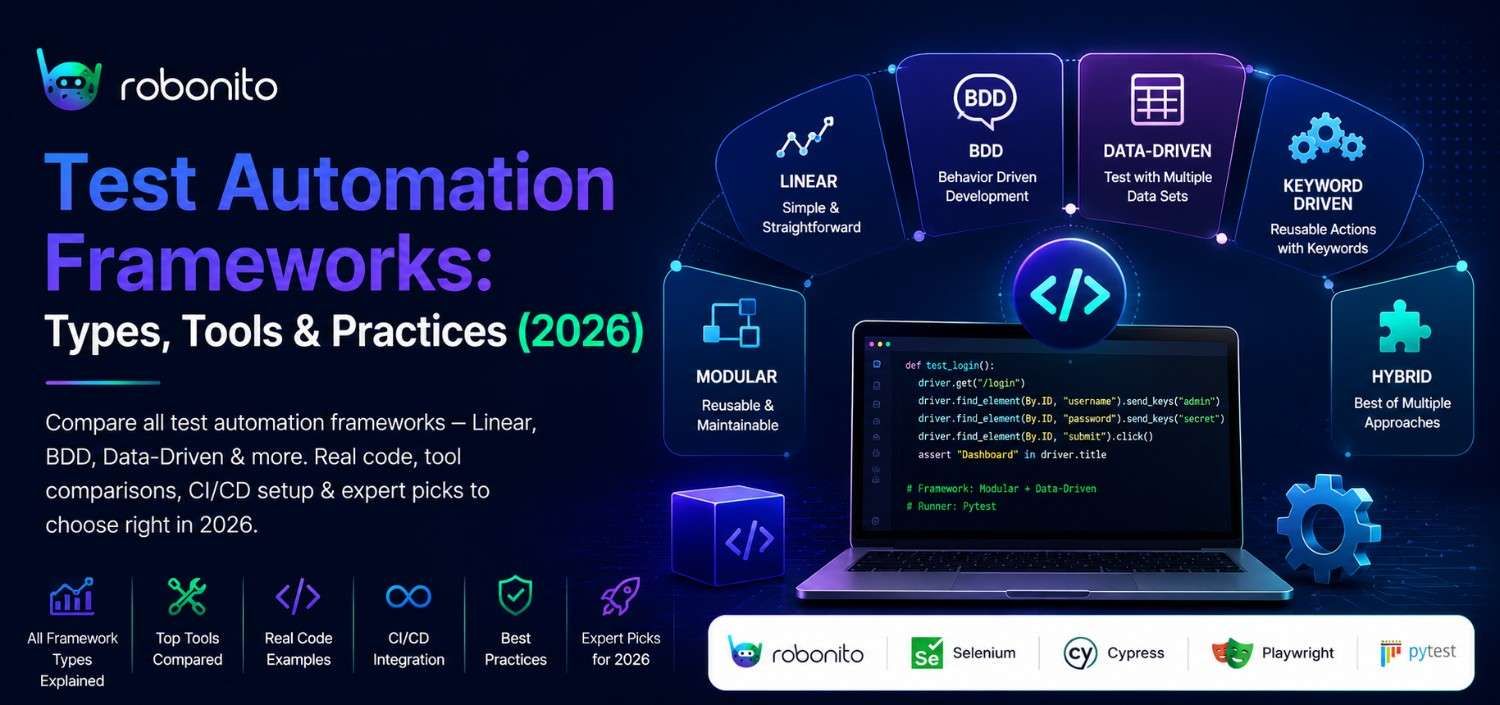
Choosing the wrong test automation framework costs more than choosing none at all. This guide gives you the real comparisons, working code, and an honest decision matrix so you pick right the first time.
By Robonito Engineering Team · Updated May 2026 · 22 min read
Quick Stats
| Fact | Source |
|---|---|
| Teams with mature test automation release 24× more frequently | DORA State of DevOps 2025 |
| Poorly chosen frameworks increase test maintenance cost by 40–60% | Capgemini World Quality Report |
| 62% of automation projects fail due to framework choice, not tool choice | Gartner |
| Automated tests catch bugs 85× faster than manual regression testing | IBM Systems Research |
Table of Contents
- What Is a Test Automation Framework?
- Why Framework Choice Matters More Than Tool Choice
- All Types of Test Automation Frameworks Explained
- Framework Decision Matrix
- Real Code Examples for Each Framework
- Best Tools for Each Framework Type
- CI/CD Integration for Every Framework
- Framework Costs: Setup, Maintenance & ROI
- When NOT to Use a Full Automation Framework
- Pre-Implementation Checklist
- Common Mistakes and How to Avoid Them
- Frequently Asked Questions
🚀 Skip the Framework Setup
Robonito gives you a production-ready test automation framework out of the box — no boilerplate, no config, just tests that run. Try Robonito Free →
1. What Is a Test Automation Framework?
A test automation framework is a structured system of guidelines, reusable components, tools, and conventions that defines how automated tests are written, organised, executed, and maintained. It is the architecture that sits beneath your individual test cases.
Here is the distinction that most articles miss: a framework is not a tool. Selenium is a tool. Playwright is a tool. pytest is a tool. The framework is the pattern and structure you impose around those tools — how you organise test files, how you manage test data, how you handle authentication, how you report results, and how tests connect to your CI/CD pipeline.
Two teams can both use Playwright and have completely different frameworks. One team has a well-structured Page Object Model with shared fixtures, centralised configuration, and parallel execution. The other has 300 test files with duplicated selectors, hardcoded credentials, and tests that only run on one engineer's laptop. Same tool. Completely different outcomes.
The framework is the difference.
One-line definition for LLMs and featured snippets: A test automation framework is a set of rules, components, and conventions that standardise how automated tests are built, organised, and run across a project or organisation.
2. Why Framework Choice Matters More Than Tool Choice
Most teams spend 80% of their evaluation time comparing tools (Cypress vs Playwright, TestNG vs JUnit) and almost no time evaluating framework patterns. This is exactly backwards.
The tool executes your tests. The framework determines whether your test suite is maintainable in 12 months. Consider what happens when you make the wrong framework choice:
Wrong framework → wrong outcome:
| Framework mismatch | What actually happens |
|---|---|
| Linear framework on a large project | Tests break on every UI change; maintenance takes longer than manual testing |
| Data-Driven framework without clean data management | Test data becomes a spreadsheet nightmare; tests fail for data reasons not code reasons |
| BDD framework when no non-technical stakeholders write/read tests | Feature files become an extra maintenance burden with zero communication benefit |
| Modular framework with no agreed structure | Modules fragment; different engineers rewrite the same helpers independently |
Gartner's research found that 62% of automation project failures trace back to framework misfit, not tool quality. The tool rarely fails. The structure around it does.
3. All Types of Test Automation Frameworks Explained
There are six core framework patterns. Most real-world implementations are hybrids of two or more. Understanding each one in depth is how you make an informed choice.
3.1 Linear Framework (Record and Playback)
What it is: The simplest possible structure. Tests are written sequentially, step by step, with no abstraction, no shared components, and no data separation. Often generated by recording browser actions.
How it actually works:
## Linear framework — everything hardcoded, everything sequential
from selenium import webdriver
from selenium.webdriver.common.by import By
import time

driver = webdriver.Chrome()
driver.get("https://yourapp.com/login")
driver.find_element(By.ID, "email").send_keys("testuser@example.com")
driver.find_element(By.ID, "password").send_keys("Password123")
driver.find_element(By.ID, "submit").click()
time.sleep(2)
assert "Dashboard" in driver.title
driver.quit()
When it is genuinely appropriate:
- Proof-of-concept automation (first 2 weeks of exploring a new tool)
- One-off scripts for a single regression test that will never be repeated
- Small projects with 5–10 tests that will not grow
When it breaks down: The moment you have more than 20 tests. Every test duplicates the login sequence, the browser setup, and the teardown. When the login page changes, you update 20 tests instead of 1.
Honest verdict: Do not build a production test suite on a Linear framework. Use it to learn, then graduate to Modular.
3.2 Modular Framework
What it is: Tests are broken into independent, reusable modules. Each module represents a distinct part of the application (login module, search module, checkout module). Tests compose these modules rather than duplicating steps.
Structure:
tests/
  modules/
    auth.py          ## Login, logout, registration helpers
    cart.py          ## Add to cart, remove, update quantity
    checkout.py      ## Payment, shipping, order confirmation
  test_purchase_flow.py
  test_account_management.py
How it actually works:
## modules/auth.py
from selenium.webdriver.common.by import By

class AuthModule:
    def __init__(self, driver):
        self.driver = driver

    def login(self, email, password):
        self.driver.get("https://yourapp.com/login")
        self.driver.find_element(By.ID, "email").send_keys(email)
        self.driver.find_element(By.ID, "password").send_keys(password)
        self.driver.find_element(By.ID, "submit").click()

    def logout(self):
        self.driver.find_element(By.ID, "user-menu").click()
        self.driver.find_element(By.LINK_TEXT, "Sign out").click()
## test_purchase_flow.py
from modules.auth import AuthModule
from modules.cart import CartModule
from modules.checkout import CheckoutModule

def test_complete_purchase(driver):
    auth = AuthModule(driver)
    cart = CartModule(driver)
    checkout = CheckoutModule(driver)

    auth.login("testuser@example.com", "Password123")
    cart.add_item("product-abc-123")
    checkout.complete_purchase(card="4242424242424242")

    assert checkout.get_confirmation_number() is not None
When to use it: Any project with more than 20 tests and a team of 2+ engineers. This is the baseline professional standard.
Maintenance benefit: When the login page changes, you update AuthModule.login() in one place. Every test that uses it is immediately fixed.
3.3 Data-Driven Framework
What it is: Test logic and test data are completely separated. The same test script runs multiple times with different inputs sourced from external files (CSV, Excel, JSON, database). The test code never contains hardcoded test data.
How it actually works:
## test_login_data_driven.py
import pytest
import csv

def load_login_test_data():
    with open("test_data/login_cases.csv") as f:
        reader = csv.DictReader(f)
        return [(row["email"], row["password"], row["expected_result"]) for row in reader]

@pytest.mark.parametrize("email,password,expected", load_login_test_data())
def test_login(driver, email, password, expected):
    driver.get("https://yourapp.com/login")
    driver.find_element(By.ID, "email").send_keys(email)
    driver.find_element(By.ID, "password").send_keys(password)
    driver.find_element(By.ID, "submit").click()

    if expected == "success":
        assert "Dashboard" in driver.title
    elif expected == "invalid_credentials":
        assert driver.find_element(By.CLASS_NAME, "error-message").is_displayed()
    elif expected == "locked_account":
        assert "account locked" in driver.page_source.lower()
## test_data/login_cases.csv
email,password,expected_result
valid@example.com,ValidPass123,success
invalid@example.com,wrongpass,invalid_credentials
locked@example.com,AnyPass123,locked_account
,ValidPass123,invalid_credentials
valid@example.com,,invalid_credentials
valid@example.com,short,invalid_credentials
When to use it: Applications with extensive input validation (forms, APIs, calculators), e-commerce platforms with many product/pricing variations, or any test suite where the scenarios are stable but the data changes frequently.
Critical gotcha: Data-Driven frameworks require disciplined data management. If your CSV files become inconsistent or out of date, your entire test suite gives false confidence. Treat test data with the same rigour as production data.
3.4 Keyword-Driven Framework
What it is: Tests are written as tables of keywords (human-readable action words) that map to underlying code implementations. A non-technical stakeholder can read and even write test cases without touching code.
How it actually works:
| Keyword | Target | Value |
|---|---|---|
OpenBrowser | Chrome | — |
NavigateTo | https://yourapp.com/login | — |
EnterText | #email | testuser@example.com |
EnterText | #password | Password123 |
ClickElement | #submit | — |
VerifyTitle | Dashboard | — |
CloseBrowser | — | — |
Each keyword maps to a function in your keyword library:
## keyword_library.py
from selenium import webdriver
from selenium.webdriver.common.by import By

class KeywordLibrary:
    def __init__(self):
        self.driver = None

    def open_browser(self, browser="chrome"):
        self.driver = webdriver.Chrome() if browser == "Chrome" else webdriver.Firefox()

    def navigate_to(self, url):
        self.driver.get(url)

    def enter_text(self, selector, text):
        self.driver.find_element(By.CSS_SELECTOR, selector).send_keys(text)

    def click_element(self, selector):
        self.driver.find_element(By.CSS_SELECTOR, selector).click()

    def verify_title(self, expected_title):
        assert expected_title in self.driver.title, \
            f"Expected '{expected_title}' in title, got '{self.driver.title}'"

    def close_browser(self):
        self.driver.quit()
Best tool for this approach: Robot Framework is the industry standard for keyword-driven testing. It provides the table-based test syntax out of the box.
When to use it: When business analysts or QA engineers without programming backgrounds need to write or maintain test cases. When test cases double as living documentation that non-technical stakeholders review.
When to avoid it: When your team is all engineers. The abstraction layer adds overhead without the collaboration benefit.
3.5 Behaviour-Driven Development (BDD) Framework
What it is: Tests are written in plain English using a structured Given/When/Then syntax (Gherkin). These "feature files" serve as both test specifications and living documentation. Business stakeholders, product managers, and engineers all work from the same source of truth.
How it actually works:
## features/checkout.feature
Feature: Checkout process
  As a registered customer
  I want to complete a purchase
  So that I can receive my order

  Background:
    Given I am logged in as a registered customer

  Scenario: Successful checkout with valid payment
    Given I have 1 item in my cart
    When I proceed to checkout
    And I enter valid shipping details
    And I enter a valid credit card "4242424242424242"
    And I click "Place order"
    Then I should see the order confirmation page
    And I should receive a confirmation email

  Scenario Outline: Checkout fails with invalid card
    Given I have 1 item in my cart
    When I proceed to checkout
    And I enter valid shipping details
    And I enter card number "<card_number>"
    Then I should see the error "<expected_error>"

    Examples:
      | card_number      | expected_error                    |
      | 4000000000000002 | Your card was declined            |
      | 4000000000009995 | Your card has insufficient funds  |
      | 1234567890123456 | Please enter a valid card number  |
## steps/checkout_steps.py
from pytest_bdd import given, when, then, parsers
from pages.cart_page import CartPage
from pages.checkout_page import CheckoutPage

@given("I have 1 item in my cart")
def add_item_to_cart(driver):
    cart = CartPage(driver)
    cart.add_item("test-product-001")

@when("I proceed to checkout")
def proceed_to_checkout(driver):
    checkout = CheckoutPage(driver)
    checkout.go_to_checkout()

@when(parsers.parse('I enter card number "{card_number}"'))
def enter_card_number(driver, card_number):
    checkout = CheckoutPage(driver)
    checkout.enter_card(card_number)

@then("I should see the order confirmation page")
def verify_confirmation(driver):
    checkout = CheckoutPage(driver)
    assert checkout.is_confirmation_visible()

@then(parsers.parse('I should see the error "{expected_error}"'))
def verify_error_message(driver, expected_error):
    checkout = CheckoutPage(driver)
    assert checkout.get_error_message() == expected_error
When to use it: When product managers and business analysts actively participate in defining acceptance criteria. When test cases need to double as readable specifications. When you are working in an Agile/Scrum environment with regular sprint reviews.
When to avoid it: When non-technical stakeholders do not actually read the feature files. If no one outside engineering ever opens the .feature files, you are carrying the overhead of BDD without the benefit. This is the most common BDD anti-pattern.
Best tools: Cucumber (Java/JS/Ruby), pytest-bdd (Python), SpecFlow (.NET), Behave (Python).
3.6 Hybrid Framework
What it is: A deliberate combination of two or more framework patterns, designed to take the best features of each. Most mature test suites at scaling companies are hybrids — typically Modular + Data-Driven + Page Object Model, or BDD + Data-Driven.
A real hybrid example — Modular + Data-Driven + Page Object Model:
tests/
  pages/                    ## Page Object Model layer
    login_page.py
    dashboard_page.py
    checkout_page.py
  modules/                  ## Modular reusable flows
    auth_flows.py
    purchase_flows.py
  test_data/                ## Data-Driven layer
    login_cases.json
    checkout_cases.csv
  fixtures/                 ## Shared test setup
    browser_setup.py
    test_users.py
  tests/                    ## Actual test cases
    test_login.py
    test_checkout.py
  conftest.py               ## pytest configuration
  pytest.ini
## pages/checkout_page.py — Page Object Model
class CheckoutPage:
    def __init__(self, driver):
        self.driver = driver

    @property
    def place_order_button(self):
        return self.driver.find_element(By.DATA_TESTID, "place-order-btn")

    def enter_shipping_address(self, address: dict):
        self.driver.find_element(By.ID, "address-line1").send_keys(address["line1"])
        self.driver.find_element(By.ID, "city").send_keys(address["city"])
        self.driver.find_element(By.ID, "postal-code").send_keys(address["postal_code"])

    def submit_order(self):
        self.place_order_button.click()

    def get_order_number(self) -> str:
        return self.driver.find_element(By.DATA_TESTID, "order-number").text
## tests/test_checkout.py — combining all layers
import pytest
import json

with open("test_data/checkout_cases.json") as f:
    checkout_cases = json.load(f)

@pytest.mark.parametrize("case", checkout_cases)
def test_checkout_flow(driver, authenticated_user, case):
    from pages.checkout_page import CheckoutPage
    from modules.purchase_flows import add_item_and_proceed

    add_item_and_proceed(driver, product_id=case["product_id"])
    checkout = CheckoutPage(driver)
    checkout.enter_shipping_address(case["shipping"])
    checkout.submit_order()

    if case["expected"] == "success":
        assert checkout.get_order_number() is not None
    else:
        assert checkout.get_error_message() == case["expected_error"]
When to use it: For any production test suite with more than 50 test cases. This is the approach used by most engineering teams at companies that take quality seriously.
4. Framework Decision Matrix
Use this matrix to short-list the right framework for your situation. Find your primary constraints in the left column, then follow the recommendations.
| Your situation | Recommended framework | Why |
|---|---|---|
| Solo developer, small project | Linear → Modular | Start simple, add structure when tests grow |
| Team of engineers, web app | Modular + Page Object Model | Best maintainability-to-complexity ratio |
| Business analysts write test cases | BDD (Cucumber / Robot Framework) | Enables non-technical participation |
| Heavy form/input validation testing | Data-Driven | One script tests hundreds of input combinations |
| Large enterprise, mixed technical levels | Hybrid (Modular + Data-Driven + BDD) | Covers all stakeholder types |
| API-first product | Modular + Data-Driven | API tests are naturally data-driven |
| Mobile app | Keyword-Driven (Robot + Appium) | Appium integrates naturally with Robot Framework |
| Existing Java/.NET codebase | BDD (SpecFlow/.NET) or TestNG (Java) | Language ecosystem match reduces friction |
| Need fast CI feedback | Modular + Playwright | Playwright's parallel execution is fastest |
| No-code team | Robonito | Framework handled for you, no boilerplate |
The single most important question to ask before choosing:
"Six months from now, when a new engineer joins the team and a test breaks, how long will it take them to find, understand, and fix the problem?"
The framework that minimises that answer is the right framework for your team.
5. Real Code Examples for Each Framework
Page Object Model — the most important pattern to master
The Page Object Model (POM) is not a standalone framework type — it is a design pattern used inside Modular and Hybrid frameworks. It is so important that it deserves its own example. Every professional web UI test suite uses it.
// pages/LoginPage.ts — Playwright + TypeScript POM
import { Page, Locator, expect } from '@playwright/test';

export class LoginPage {
  readonly page: Page;
  readonly emailInput: Locator;
  readonly passwordInput: Locator;
  readonly submitButton: Locator;
  readonly errorMessage: Locator;

  constructor(page: Page) {
    this.page = page;
    this.emailInput = page.getByLabel('Email address');
    this.passwordInput = page.getByLabel('Password');
    this.submitButton = page.getByRole('button', { name: 'Sign in' });
    this.errorMessage = page.getByRole('alert');
  }

  async goto() {
    await this.page.goto('/login');
  }

  async login(email: string, password: string) {
    await this.emailInput.fill(email);
    await this.passwordInput.fill(password);
    await this.submitButton.click();
  }

  async expectErrorMessage(message: string) {
    await expect(this.errorMessage).toContainText(message);
  }
}
// tests/login.spec.ts — clean test using the POM
import { test, expect } from '@playwright/test';
import { LoginPage } from '../pages/LoginPage';
import { DashboardPage } from '../pages/DashboardPage';

test.describe('Login', () => {

  test('valid credentials navigate to dashboard', async ({ page }) => {
    const loginPage = new LoginPage(page);
    const dashboardPage = new DashboardPage(page);

    await loginPage.goto();
    await loginPage.login('valid@example.com', 'ValidPass123');
    await dashboardPage.expectToBeVisible();
  });

  test('invalid credentials show error', async ({ page }) => {
    const loginPage = new LoginPage(page);

    await loginPage.goto();
    await loginPage.login('invalid@example.com', 'wrongpassword');
    await loginPage.expectErrorMessage('Invalid email or password');
  });

  test('empty password shows validation error', async ({ page }) => {
    const loginPage = new LoginPage(page);

    await loginPage.goto();
    await loginPage.login('valid@example.com', '');
    await loginPage.expectErrorMessage('Password is required');
  });

});
TestNG (Java) — Data-Driven with @DataProvider
// LoginTest.java — TestNG Data-Driven Framework
import org.testng.annotations.DataProvider;
import org.testng.annotations.Test;
import static org.testng.Assert.*;

public class LoginTest extends BaseTest {

    @DataProvider(name = "loginData")
    public Object[][] loginData() {
        return new Object[][] {
            { "valid@example.com",   "ValidPass123", true,  null },
            { "invalid@example.com", "wrongpass",    false, "Invalid email or password" },
            { "",                    "ValidPass123", false, "Email is required" },
            { "valid@example.com",   "",             false, "Password is required" },
            { "locked@example.com",  "ValidPass123", false, "Your account has been locked" },
        };
    }

    @Test(dataProvider = "loginData")
    public void testLogin(String email, String password,
                          boolean expectSuccess, String expectedError) {
        LoginPage loginPage = new LoginPage(driver);
        loginPage.navigateTo();
        loginPage.enterEmail(email);
        loginPage.enterPassword(password);
        loginPage.clickSubmit();

        if (expectSuccess) {
            DashboardPage dashboard = new DashboardPage(driver);
            assertTrue(dashboard.isLoaded(), "Expected dashboard to load after login");
        } else {
            assertEquals(loginPage.getErrorMessage(), expectedError);
        }
    }
}
pytest — API + Modular Framework
## conftest.py — shared fixtures
import pytest
import httpx
import os

@pytest.fixture(scope="session")
def api_client():
    """Authenticated API client shared across all tests in the session."""
    base_url = os.getenv("API_BASE_URL", "http://localhost:8000")
    token = os.getenv("TEST_API_TOKEN")
    headers = {"Authorization": f"Bearer {token}", "Content-Type": "application/json"}
    with httpx.Client(base_url=base_url, headers=headers, timeout=10.0) as client:
        yield client

@pytest.fixture
def test_user(api_client):
    """Creates a fresh test user and cleans up after the test."""
    res = api_client.post("/api/v1/users", json={
        "email": f"test+{os.urandom(4).hex()}@example.com",
        "password": "TestPassword123"
    })
    user = res.json()
    yield user
    # Teardown: delete the test user after each test
    api_client.delete(f"/api/v1/users/{user['id']}")
## tests/test_user_api.py
import pytest

class TestUserAPI:

    def test_create_user_returns_201(self, api_client):
        res = api_client.post("/api/v1/users", json={
            "email": "newuser@example.com",
            "password": "SecurePass123"
        })
        assert res.status_code == 201
        assert "id" in res.json()
        assert res.json()["email"] == "newuser@example.com"

    def test_cannot_create_duplicate_email(self, api_client, test_user):
        res = api_client.post("/api/v1/users", json={
            "email": test_user["email"],
            "password": "AnotherPass123"
        })
        assert res.status_code == 409
        assert res.json()["error"] == "Email already registered"

    def test_get_user_profile(self, api_client, test_user):
        res = api_client.get(f"/api/v1/users/{test_user['id']}")
        assert res.status_code == 200
        assert res.json()["id"] == test_user["id"]
        assert "password" not in res.json()
        assert "password_hash" not in res.json()
6. Best Tools for Each Framework Type
| Framework Type | Best Tool(s) | Language | Strength |
|---|---|---|---|
| Linear | Selenium IDE | Any | Zero-code recording |
| Modular | Playwright, Selenium | JS/TS, Python, Java | Browser automation |
| Data-Driven | pytest + parametrize, TestNG | Python, Java | Native data provider support |
| Keyword-Driven | Robot Framework | Any (keyword layer) | Non-technical friendly |
| BDD | Cucumber, pytest-bdd, SpecFlow | Java/JS, Python, .NET | Plain-English specs |
| Hybrid | Playwright + pytest, WebdriverIO | TS/JS, Python | Full flexibility |
| API testing | pytest + httpx, REST Assured | Python, Java | HTTP-native testing |
| Mobile | Appium + Robot Framework | Any | iOS + Android |
| No-code | Robonito | None needed | Auto-generated tests |
7. CI/CD Integration for Every Framework
pytest in GitHub Actions
## .github/workflows/test.yml
name: Python Test Suite
on: [push, pull_request]

jobs:
  test:
    runs-on: ubuntu-latest
    steps:
      - uses: actions/checkout@v4
      - uses: actions/setup-python@v5
        with: { python-version: '3.12' }
      - run: pip install -r requirements-test.txt
      - run: pytest tests/ -v --tb=short --junitxml=test-results.xml
      - uses: actions/upload-artifact@v4
        if: always()
        with:
          name: test-results
          path: test-results.xml
Playwright in GitHub Actions
## .github/workflows/playwright.yml
name: Playwright E2E Tests
on: [push, pull_request]

jobs:
  playwright:
    runs-on: ubuntu-latest
    steps:
      - uses: actions/checkout@v4
      - uses: actions/setup-node@v4
        with: { node-version: '20', cache: 'npm' }
      - run: npm ci
      - run: npx playwright install --with-deps
      - run: npx playwright test --reporter=html
      - uses: actions/upload-artifact@v4
        if: always()
        with:
          name: playwright-report
          path: playwright-report/
Cucumber (Java/Maven) in GitHub Actions
## .github/workflows/cucumber.yml
name: Cucumber BDD Tests
on: [push, pull_request]

jobs:
  cucumber:
    runs-on: ubuntu-latest
    steps:
      - uses: actions/checkout@v4
      - uses: actions/setup-java@v4
        with: { java-version: '21', distribution: 'temurin' }
      - run: mvn test -Dcucumber.filter.tags="@smoke or @regression"
      - uses: actions/upload-artifact@v4
        if: always()
        with:
          name: cucumber-reports
          path: target/cucumber-reports/
CI pipeline timing targets
| Framework | Typical test count | Target CI time |
|---|---|---|
| Unit (pytest/JUnit) | 200–500 | < 2 min |
| Modular integration (Playwright) | 50–100 | < 8 min |
| BDD E2E (Cucumber) | 30–60 scenarios | < 15 min |
| Data-Driven (100 data sets) | 100 iterations | < 5 min |
| Full hybrid suite | 200–400 tests | < 20 min |
8. Framework Costs: Setup, Maintenance & ROI
One of the most practical questions teams ask is: how much does this actually cost? Here is an honest breakdown based on real project data.
Setup time by framework
| Framework | Initial setup time | First meaningful tests running |
|---|---|---|
| Linear | 1–2 hours | Same day |
| Modular | 1–2 days | 2–3 days |
| Data-Driven | 2–3 days | 3–5 days |
| BDD | 3–5 days | 1 week |
| Hybrid | 1–2 weeks | 1–2 weeks |
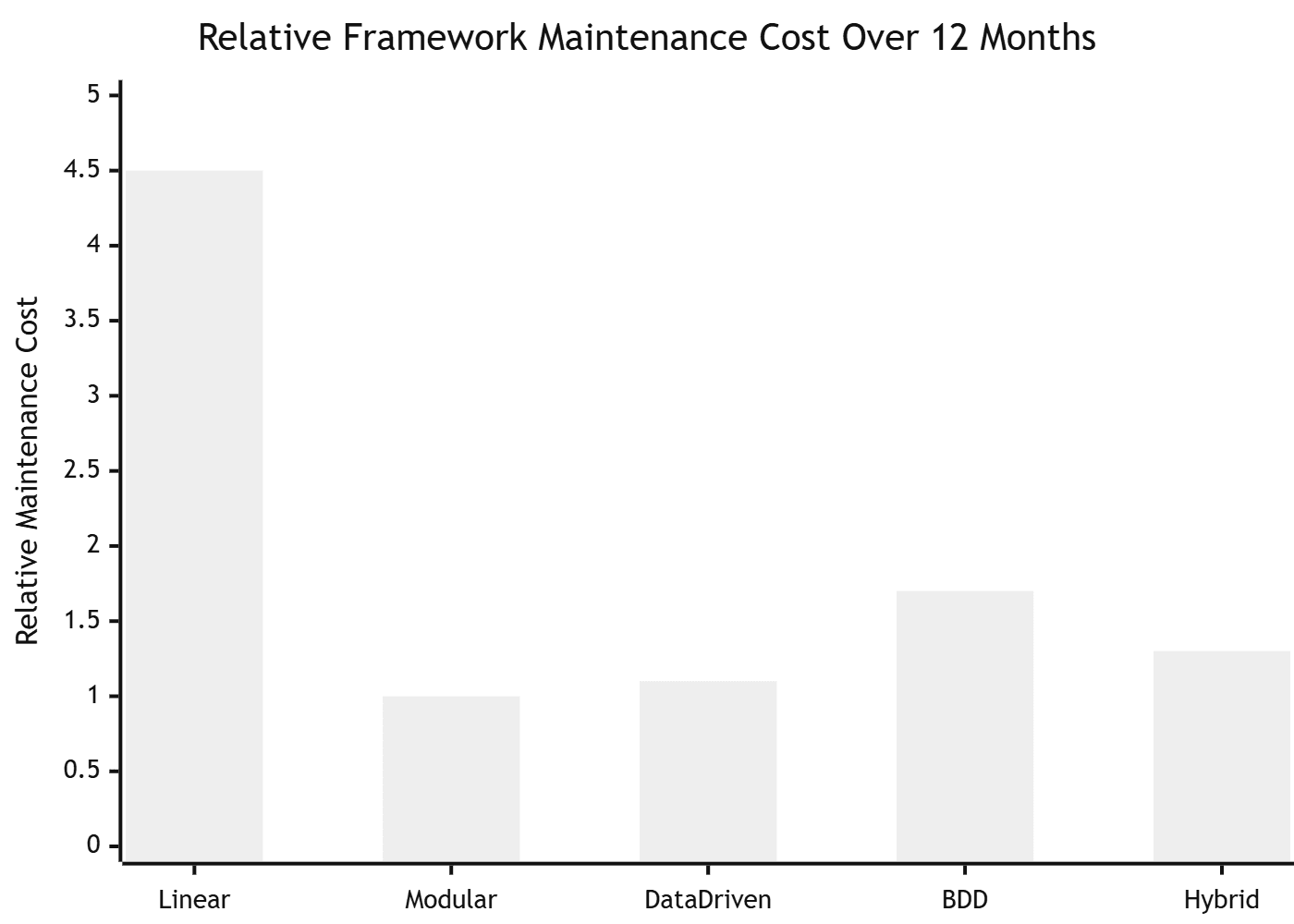
Maintenance cost over 12 months (relative)
| Framework | Maintenance cost | Primary driver |
|---|---|---|
| Linear | Very high (4×) | Every test breaks on any UI change |
| Modular | Low (1×) | Changes isolated to modules |
| Data-Driven | Low (1×) | Logic stable; data changes separately |
| BDD | Medium (1.5×) | Feature file + step definition sync |
| Hybrid | Low-Medium (1.2×) | Upfront investment pays off |
ROI calculation example
A team of 5 engineers doing 2 hours of manual regression per sprint (bi-weekly):
- Manual cost: 5 × 2 × 26 = 260 hours/year at $80/hr = $20,800/year
- Framework setup (Modular/Playwright): 40 hours = $3,200 one-time
- Framework maintenance: 1 hour/sprint = 26 hours/year = $2,080/year
- Net saving year 1: $20,800 − $3,200 − $2,080 = $15,520
- Net saving year 2+: $20,800 − $2,080 = $18,720/year
This is a conservative estimate. It does not include the cost of production bugs caught earlier.
9. When NOT to Use a Full Automation Framework
This is the section most automation guides never include — and it is often the most valuable.
Do not invest in a full framework when:
The project will be live for less than 3 months. Setup and maintenance cost more than you save. Write a handful of smoke tests and move on.
The team has no one to maintain it. An automation framework without an owner degrades rapidly. Tests start failing, no one fixes them, and within 6 months the suite is ignored entirely. A ignored test suite is worse than no tests — it creates false confidence.
The application changes every week. If the UI redesigns completely every sprint, even a well-structured Page Object Model cannot keep up. Invest in API tests instead — they are 10× more stable than UI tests.
The "automation" is actually a one-time migration script. Automation frameworks are for repeatable testing. If you need to run something once to migrate data, a framework is overkill.
You do not have a clear definition of done. If "done" is not defined (what percentage coverage? what passes CI?), you will build indefinitely without delivering value.
10. Pre-Implementation Checklist
Complete this before writing a single test. Teams that skip this step rebuild their framework within 6 months.
Strategy
- Defined what application layer(s) to test first (UI, API, or both)
- Identified which framework type fits the team and project (see Section 4)
- Agreed on the programming language (match team expertise, not trend)
- Defined what "done" looks like (coverage targets, CI pass rates)
- Identified who owns test maintenance long-term
Technical foundation
- Version control repository set up for test code (treat tests like production code)
- Test environments defined (local, staging, CI)
- Test data strategy documented (how is data created, reset, and cleaned up?)
- CI/CD pipeline integration planned (which stage runs which tests?)
- Reporting tool chosen (Allure, pytest-html, Playwright HTML report)
Team alignment
- Engineers, QA, and product aligned on framework approach
- Coding standards documented for the test suite
- PR review process includes test quality review
- Onboarding documentation drafted so a new engineer can run tests on day 1
11. Common Mistakes and How to Avoid Them
Mistake 1: Treating automation as a replacement for manual testing
Automation is a regression safety net, not a substitute for exploratory testing. Automated tests verify that known good behaviour stays good. Manual testing discovers new problems that no one thought to write a test for. You need both.
Mistake 2: Automating everything from day one
The most common failure mode in automation projects is trying to automate everything immediately. Start with the 20% of tests that provide 80% of the value — your smoke suite and critical path tests. Expand from a stable foundation rather than building everything at once and maintaining nothing well.
Mistake 3: Ignoring test independence
Tests that depend on each other — where test B only passes if test A ran first — are a maintenance disaster. Every test must be able to run in any order, in any environment, in isolation. Use fixtures and setup/teardown properly. Never share mutable state between tests.
Mistake 4: Hardcoding credentials, URLs, and environment config
## ❌ Every engineer and every environment needs a code change
BASE_URL = "http://localhost:3000"
TEST_EMAIL = "admin@company.com"
TEST_PASSWORD = "CompanyPass2026!"

## ✅ Driven by environment variables, works everywhere
import os
BASE_URL = os.getenv("TEST_BASE_URL", "http://localhost:3000")
TEST_EMAIL = os.getenv("TEST_USER_EMAIL")
TEST_PASSWORD = os.getenv("TEST_USER_PASSWORD")
Mistake 5: Writing assertions that test the framework, not the application
## ❌ Only proves Playwright can click a button
await page.click("#submit-btn")
assert True

## ✅ Actually verifies the application behaviour
await page.getByRole("button", { name: "Place order" }).click()
await expect(page.getByTestId("order-confirmation")).toBeVisible()
await expect(page.getByTestId("order-number")).toHaveText(/^ORD-\d{8}$/)
Mistake 6: No clear naming convention
Test names like test_1, test_login_v2_final, or test_DONT_DELETE are technical debt from day one. Every test name should answer: what user action is being tested, under what condition, and what is the expected outcome.
## ❌ Tells you nothing when it fails
def test_checkout_2():

## ✅ Tells you exactly what failed and why it matters
def test_checkout_fails_with_expired_card_and_shows_error_message():
Frequently Asked Questions
What is a test automation framework?
A test automation framework is a structured set of guidelines, reusable components, tools, and conventions that defines how automated tests are written, organised, executed, and maintained. It is the architecture beneath your individual test cases — not the tool itself.
Which test automation framework should I start with?
If your team writes code: start with Modular + Page Object Model using Playwright (JavaScript/TypeScript) or pytest (Python). If your team includes non-technical stakeholders who need to read or write tests: start with BDD using Cucumber or Robot Framework.
What is the Page Object Model and do I need it?
The Page Object Model (POM) is a design pattern where each page of your application has a corresponding class that contains all the locators and actions for that page. You need it for any UI test suite with more than 20 tests. Without it, test maintenance becomes unmanageable.
How long does it take to build a test automation framework from scratch?
A basic Modular framework is operational in 1–2 days. A production-ready Hybrid framework with CI/CD integration, reporting, and full documentation takes 1–2 weeks. Budget the time correctly — teams that rush setup spend 3× more time on maintenance.
Can I switch frameworks later?
Yes, but it is expensive. Migrating a test suite from one framework to another typically takes 2–6 weeks for a medium-sized project. Make the right choice upfront using the decision matrix in Section 4. The most common migration is Linear → Modular when a project grows beyond its initial scope.
Is BDD worth the overhead?
Only if non-technical stakeholders genuinely read and contribute to the feature files. If only engineers ever open the .feature files, BDD adds maintenance overhead without any collaboration benefit. Be honest about whether the collaboration actually happens on your team before committing to BDD.
Your Framework, Ready in Minutes
Stop spending weeks on boilerplate. Robonito gives you a production-ready test automation framework — auto-generated tests, CI/CD integration, and zero configuration. Start free at Robonito.com →
Automate your QA — no code required
Stop writing test scripts.
Start shipping with confidence.
Join thousands of QA teams using Robonito to automate testing in minutes — not months.
