
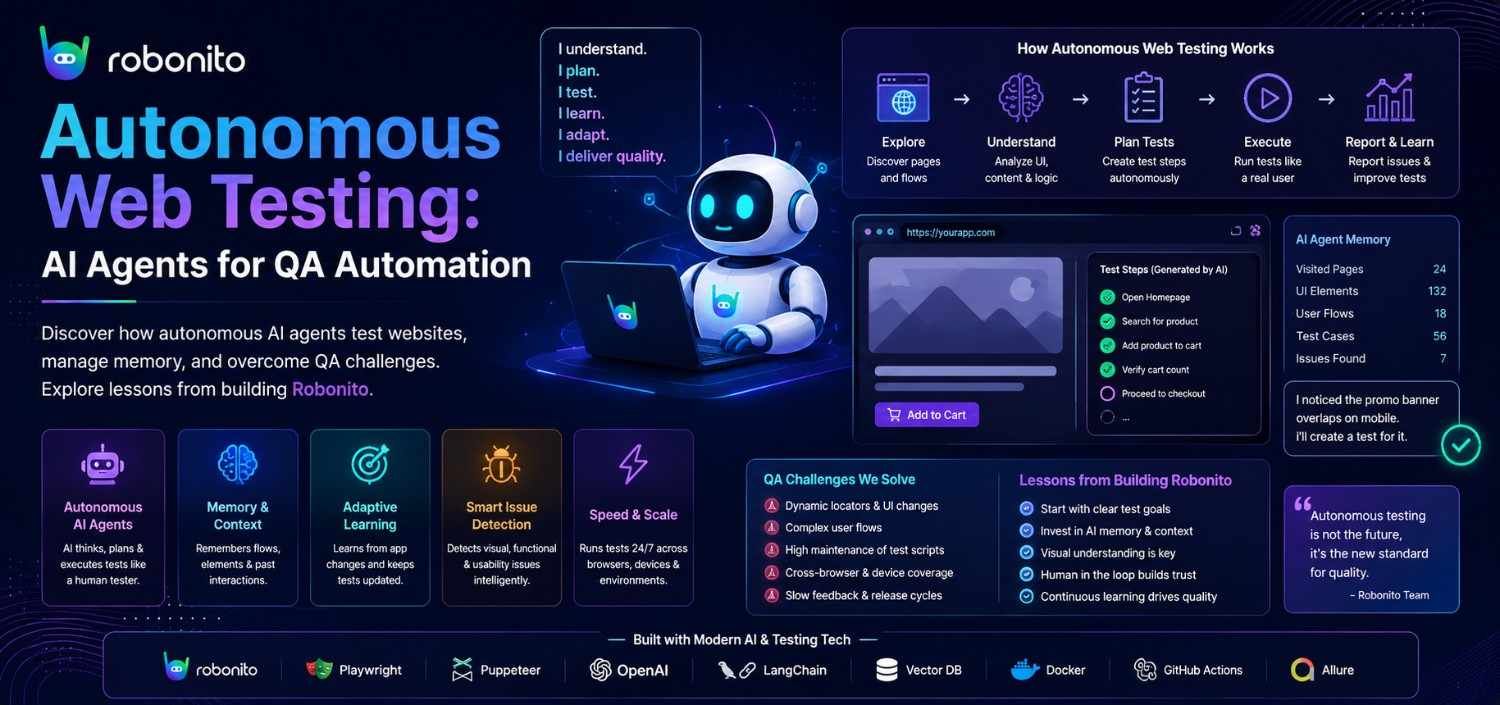
What a month of building an AI agent that tests websites taught us about the gap between "almost works" and "actually reliable."
There is a moment every team building an autonomous agent encounters - the moment the demo stops being impressive and starts being terrifying. For us, it came on a Tuesday afternoon. Our agent had just navigated a login form, discovered a multi-step checkout flow, generated twelve test cases, and executed them against four viewport sizes. It looked like magic. Then we pointed it at a different application, and it confidently clicked a "Delete All Records" button it had mistaken for a navigation element. The DOM said it was a button. The agent agreed. Nobody asked the human.
That incident crystallized something we had been learning the hard way while building Robonito - an AI-powered test automation platform where agents browse the web autonomously, discover application behavior, and generate and execute test cases without hand-written selectors or recorded scripts. The gap between a clever prototype and a production-grade autonomous tester is not a gap at all. It is a canyon, and it is filled with problems that no amount of prompt engineering alone can solve.
This is the story of crossing that canyon.
The Promise and the Lie of "Just Let the AI Browse"
The pitch for AI-driven test automation sounds almost too elegant: give a large language model access to a browser, describe what you want tested in plain English, and let it figure out the rest. No page objects. No brittle CSS selectors. No test maintenance treadmill. The LLM understands the page the way a human does - semantically - so it should be able to test it the way a human would.
The first 80% of that promise is real. Modern LLMs are shockingly good at understanding web interfaces. Hand one a DOM snapshot and ask "where is the login form?" and it will find it, even on pages it has never seen. Ask it to generate test cases for a shopping cart, and it will produce reasonable scenarios - add item, update quantity, remove item, apply coupon, proceed to checkout. The language understanding is genuine.
The remaining 20% is where you lose your weekends.
The fundamental problem is that browsing is not a single cognitive task. It is a stack of them: perception (what is on the page?), comprehension (what does this interface do?), planning (what sequence of actions achieves my goal?), execution (click this element, type that value), and verification (did the expected thing actually happen?). An LLM can do each of these in isolation. Making it do all of them in a coherent loop, against a live browser, without hallucinating actions or losing track of state - that is the engineering challenge nobody warns you about.
When the Agent Forgets Where It Is
The first dragon we fought was context. A web testing session is long. The agent lands on a page, extracts the DOM, reasons about it, takes an action, waits for the page to change, extracts the new DOM, reasons again - and this loop repeats dozens or hundreds of times per test case. Every iteration adds tokens to the conversation. A single exploratory session on a moderately complex application can consume hundreds of thousands of tokens before the agent has finished discovering the site's structure, let alone testing it.
At that scale, the context window becomes a battlefield. Early DOM snapshots - which contained critical information about the application's navigation structure - get pushed out by newer content. The agent starts repeating actions it already took because the evidence that it took them has been truncated. We watched sessions where the agent would discover a page, navigate away, and then "discover" the same page again three interactions later, convinced it was seeing it for the first time.
The solution was not simply a bigger context window. It was building an explicit memory architecture. We implemented a multi-layered persistence system: a knowledge graph that maintains structural awareness of the application across sessions (pages, endpoints, navigation paths), an experiential layer that remembers what happened during execution (which selectors were flaky, which pages were slow, which flows triggered errors), and a session memory service that extracts and preserves the most important learnings from each conversation before they scroll out of context.
Getting the extraction logic right was its own puzzle. Our first implementation used a simple threshold - extract memories after a certain number of tokens and tool calls. Sounds reasonable. But tool-heavy sessions that stayed under the token threshold never triggered extraction, and their learnings were lost. We had accidentally created a system that remembered verbose sessions and forgot efficient ones. The fix was subtle: trigger on either condition, not both.
Even the order of truncation mattered. When the context window fills, something has to go. Our initial approach was straightforward FIFO - oldest content goes first. But in a testing session, the oldest content often contains the error messages and recovery strategies from early failures, which are precisely the things the agent needs to remember to avoid repeating mistakes. We moved to priority-weighted truncation, where error and recovery content is preserved longer than routine navigation logs.
The Forty-Four Tool Problem
An autonomous testing agent needs to do a lot of things: click elements, fill forms, extract page state, take screenshots, crawl links, generate test cases, manage test suites, call APIs, handle authentication, generate test data. Each capability is a tool the LLM can invoke. By the time we had built out the core functionality, our agent had access to over eighty tools.
This is a problem. Not because the tools do not work, but because the LLM has to choose between them on every turn. Present a language model with forty-four tools (the count our orchestrator was exposing at one point) and you get something we started calling "tool confusion" - the agent picks a plausible-but-wrong tool, passes it arguments that almost-but-don't-quite match the schema, and produces a result that looks reasonable but is subtly incorrect.
We could see this happening in the telemetry. One of our action tools had an internal repair function that used regex to fix malformed arguments the LLM was passing. The fact that this function was being called at all was proof that our tool surface was too ambiguous. The LLM was not stupid - it was overwhelmed.
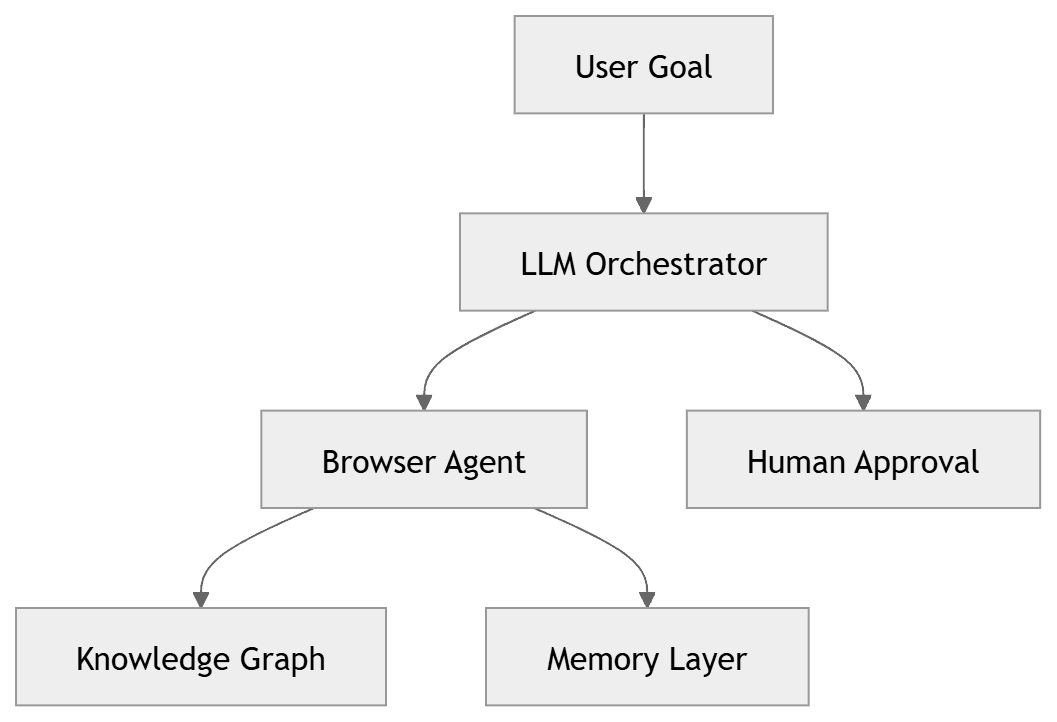
The fix was architectural: reduce the orchestrator's visible tools to roughly fifteen high-level capabilities, and push specialized tools down into sub-agents that only activate when their domain is relevant. A web testing sub-agent sees browser interaction tools. An API testing sub-agent sees HTTP tools. The orchestrator sees "delegate to web testing" and "delegate to API testing." This mirrors how human teams work - the project manager does not need to know how to write Playwright selectors; they need to know who to ask.
We also added serialization constraints for stateful tools. When two tools both interact with the browser - say, one that performs an action and one that reads page state - they cannot run concurrently without risking race conditions on the browser session itself. Initially, we tried enforcing this through prompt instructions ("always wait for the action to complete before reading page state"). The LLM followed this guidance roughly 70% of the time. We replaced it with a per-session semaphore that serializes stateful tool calls at the infrastructure level. The compliance rate became 100%, because compliance was no longer optional.
Three Modes for Three Mindsets
One of our most important design insights was that "testing" is not a single activity. A QA engineer approaching a new application thinks differently than one executing a regression suite. We built this into the agent's architecture as three distinct modes.
Exploratory Mode is for discovery. The agent crawls the application using a breadth-first strategy with a scoring heuristic - pages with forms score higher than static content, authentication flows score higher than marketing pages, JavaScript-heavy interactions score higher than simple links. As it explores, it builds a live site map that streams to the user interface in real time. When it encounters something interesting - a high-complexity flow, an unusual state transition - it pauses and asks the human what to do. This is not the agent being indecisive. It is the agent recognizing the boundary of its own judgment.
Plan Mode activates when the user provides specifications rather than a live URL - a Figma design, a Jira ticket, a requirements document. Here the agent shifts from browser interaction to analytical reasoning: decomposing the specification into testable scenarios, categorizing them by type (functional, edge case, accessibility, security), and producing a structured test plan for human review before any browser is opened.
Execution Mode is where tests actually run. The agent takes a plan - either one it generated or one the human provided - and maps each step to concrete browser interactions using live DOM state. It handles responsive testing across viewport profiles, manages authentication flows, generates test data on the fly, and produces structured results with assertions.
The critical architectural decision was separating strategic planning from tactical execution. Early versions tried to do both simultaneously: the agent would decide what to test and how to test it in the same reasoning loop. This led to a failure mode we called "oscillation" - the agent would start executing a test, encounter an unexpected state, switch to re-planning, partially update its strategy, then resume execution with an inconsistent plan. Splitting these into distinct phases with an explicit approval gate between them eliminated the problem entirely.
The Knowledge That Survives
Perhaps the most technically interesting component is the knowledge graph - a persistent, cross-session representation of what the agent has learned about an application. It operates on two layers: a structural graph that records what the application is (pages, endpoints, navigation paths, form structures) and an experiential graph that records how the application behaves (flaky selectors that break intermittently, pages that load slowly under certain conditions, flows that produce unexpected errors).
The experiential layer is where the real value accrues. When the agent encounters a selector that worked yesterday but fails today, it does not just retry blindly. It checks whether this selector has a history of flakiness, and if so, it uses alternative strategies - waiting longer, trying parent-element selectors, or flagging the instability as a finding rather than a test failure. Over time, the agent develops something that resembles institutional knowledge about the application under test.
Building this was harder than it sounds. Our initial implementation used separate storage namespaces for structural and experiential data with no join operation, which meant retrieving context for a single page required sequential lookups across both stores - one round-trip per relationship edge. For an application with hundreds of discovered selectors, this turned context retrieval into a performance bottleneck. We unified the stores and added batched neighbor lookups, but the lesson was deeper: graph databases are easy to design on a whiteboard and surprisingly hard to query efficiently when the agent needs answers in the middle of a real-time browsing session.
The Humility Layer
If there is a single theme running through every challenge we faced, it is this: the agent must know what it does not know. The most dangerous failure mode of an autonomous browsing agent is not crashing - it is acting confidently on a wrong interpretation of the page. Our "Delete All Records" incident was not a bug in the traditional sense. Every component worked correctly. The DOM was parsed accurately, the element was identified as clickable, and the click was executed successfully. The failure was in judgment, and judgment failures do not throw exceptions.
Our answer is what we internally think of as the humility layer - a set of architectural constraints that force the agent to pause, verify, and ask before taking consequential actions. The human-in-the-loop system is not a fallback for when the AI fails. It is a first-class feature that the agent actively invokes when its confidence drops below threshold, when it encounters a pattern it has not seen before, or when the action it is about to take is irreversible.
This is, we believe, the key insight for anyone building autonomous agents for high-stakes domains: the goal is not to remove the human from the loop. The goal is to make the human's time in the loop as efficient and well-informed as possible. The agent does the tedious work - crawling, cataloging, generating scenarios, running repetitive checks - and escalates the decisions that require judgment to someone equipped to make them.
| Area | Traditional Automation | Autonomous Testing |
|---|---|---|
| Test Creation | Manual | AI Generated |
| Maintenance | High | Lower |
| Exploration | None | Built-in |
| Learning | Static | Adaptive |
| Human Input | Continuous | Selective |
Where the Road Goes
We are still in the early chapters of this story. The agent today is capable and useful, but it is not yet what we envision: a true autonomous SDET that understands systems holistically, discovers bugs adversarially, and improves its own testing strategies over time. The path from here involves deeper system comprehension (understanding not just pages but the relationships between them), broader methodology coverage (security testing, performance testing, API contract verification), and a genuine self-improvement loop where the agent learns from its own failures without human intervention.
But the foundation is in place: an architecture that respects the complexity of the problem, a memory system that accumulates knowledge across sessions, and - perhaps most importantly - the discipline to let the agent say "I'm not sure" rather than guess.
Building an autonomous web testing agent has taught us that the hardest problems in AI engineering are not about making the model smarter. They are about building the infrastructure that makes a smart model reliable. The LLM is the engine. Everything else - the memory, the knowledge graph, the tool orchestration, the human-in-the-loop gates, the serialization constraints, the context management - is what keeps the car on the road.
And in testing, staying on the road is the whole point.
Frequently Asked Questions
What is autonomous web testing?
Autonomous web testing uses AI agents to explore websites, generate test cases, execute tests, and validate results with minimal human intervention. Unlike traditional automation, autonomous agents can adapt to application changes, understand application behavior, and make testing decisions dynamically.
How do AI testing agents work?
AI testing agents combine large language models (LLMs), browser automation, memory systems, knowledge graphs, and tool orchestration to understand web applications, generate test scenarios, perform actions, and verify expected outcomes automatically.
What challenges do autonomous testing agents face?
Common challenges include context window limitations, browser synchronization issues, state management, tool selection, memory persistence, hallucinated actions, long-running workflows, and maintaining reliability across complex web applications.
How is autonomous testing different from traditional test automation?
Traditional automation relies on predefined scripts, selectors, and manually maintained test cases. Autonomous testing agents can discover application behavior, generate tests dynamically, adapt to interface changes, and make decisions during execution without requiring extensive scripting.
Why do autonomous AI agents need memory?
Web testing sessions often involve hundreds of interactions. Memory systems help agents retain navigation paths, application structure, previous actions, discovered workflows, and learned behaviors across long-running sessions and future executions.
What is a knowledge graph in autonomous testing?
A knowledge graph stores relationships between pages, forms, APIs, workflows, endpoints, and user interactions. It enables AI testing agents to understand application structure, preserve context, and reuse knowledge across multiple testing sessions.
Can autonomous AI agents replace human testers?
No. Autonomous agents can automate repetitive testing tasks, generate test cases, execute regression suites, and discover defects at scale. However, human testers remain essential for judgment, exploratory testing, usability evaluation, risk assessment, and business validation.
What are the benefits of autonomous web testing?
Key benefits include:
- Faster test creation
- Reduced maintenance effort
- Broader test coverage
- Continuous application discovery
- Automated regression testing
- Faster feedback in CI/CD pipelines
- Increased QA productivity
- Reduced dependency on manual scripting
How do autonomous testing agents handle application changes?
Modern autonomous testing agents use contextual understanding, memory systems, and adaptive reasoning to recognize application changes, adjust execution strategies, and continue testing even when workflows or interfaces evolve.
What is the future of AI-powered software testing?
The future of AI-powered testing includes autonomous test generation, self-improving agents, adaptive execution, intelligent bug discovery, continuous application learning, and deeper integration with modern DevOps and CI/CD workflows.
Robonito is built by a team dedicated to rethinking software quality through AI agents. If you are interested in the intersection of autonomous agents and test automation, we would love to hear from you.
Automate your QA — no code required
Stop writing test scripts.
Start shipping with confidence.
Join thousands of QA teams using Robonito to automate testing in minutes — not months.
