Achieving Software Quality Excellence in Your Organization
Software quality is no longer just a task to check off its functionality. It is an important part of running a successful business. This is because the quality...
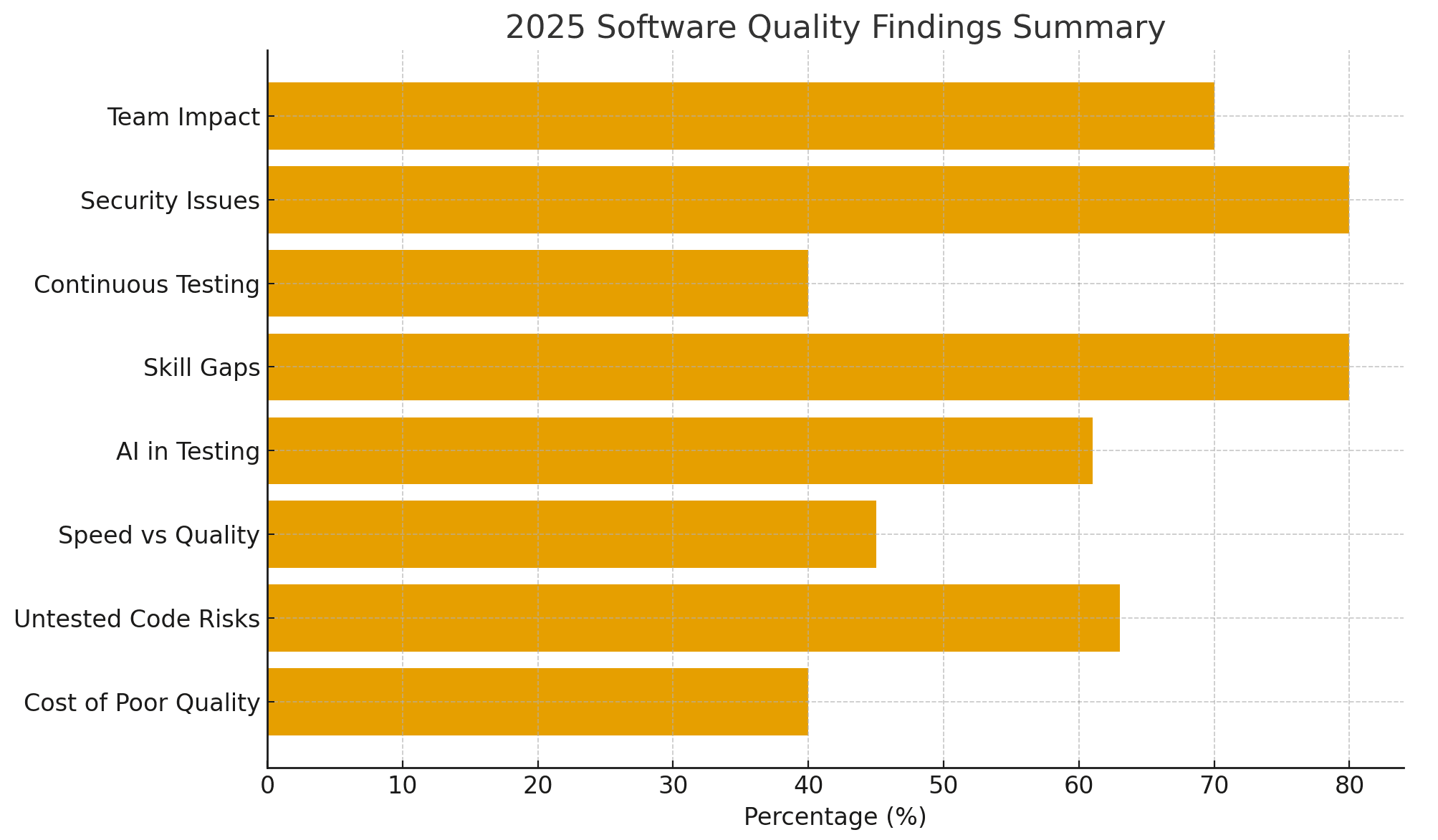
Executive Summary
Software quality is no longer just a task to check off its functionality. It is an important part of running a successful business. This is because the quality of software directly affects user satisfaction and an organization’s long-term growth. Teams that focus on software quality finish work sooner, have fewer errors, and build trust with customers. However, if software quality is compromised, it can lead to expensive problems, delays in release, and impact the company’s image.
Quality should be built into every process and platform. It begins with clear development and testing steps. It continues with automation and monitoring. This ensures reliability across web, mobile, and cloud environments. This is possible with the right use of a software testing tool like Robonito, which makes testing faster and easier. When an organization includes quality at every software development stage, from planning to release, teams can spot issues early and prevent them from reaching users.
This whitepaper provides facts, industry examples, and step-by-step advice for CTOs and QA leaders on achieving software quality excellence in your organization. It includes useful measurements and real-world examples. Following these steps will help you reduce errors, speed up releases, and make software work well for everyone who uses it.
Key Insights and Statistics on Software Quality
One of the top aims of all organizations is to achieve software quality excellence. This is because the software is becoming more complex and demands high quality features for the users. To have good quality software, the organizations are adopting cloud platform, microservices, API, and AI agents that works together. They interact with each other, manage huge data, along with being available around the clock. Such growth of dependencies is making the software more complex. If any small bug or error exists in this process, it can lead to slow services and impact business revenue. Hence, it has become very important that organizations do not compromise the quality of the software, as this could directly affect their reputation and revenue.
Some current data:
Here are some of the industrial data that highlight the relationship with software quality, software testing, and its needs for organizations.
- It is evident from the report of Consortium for Information and Software Quality that poor software quality costs U.S. businesses around $2.41 trillion in 2022. These losses came from project setbacks, system outages, and data vulnerabilities. Many of these problems could have been avoided with early testing and stronger quality measures.
- To reduce such risks, many organizations are investing heavily in test automation. The World Quality Report 2024–2025 shows that 72% of enterprises now use automation to deliver faster and more reliable releases. However, only 23% have achieved full automation across all test types. This shows that while adoption is growing, achieving uniform quality through automation is still a challenge.
- AI-powered testing is changing how teams work. The OpenText Quality Engineering Study shows that about 68% of organizations are using or trying Generative AI. They use it for tasks like designing test cases, creating data, and predicting defects. AI cuts down manual work and improves test coverage. But humans are still needed to find errors or gaps that AI might miss.
- Even with AI and automation, security issues are still rising. In 2024, over 40,000 new vulnerabilities were reported, a 38% increase from 2023. Quality and security must be considered together at every stage of development.
Software quality depends on automation, AI, and human insight. Teams that use all three can deliver software applications faster to the market. They also develop software that is secure, stable, and trusted by users.
Aspects of Software Quality
The quality of software can be assessed based on different factors that highlight its adaptability, performance, and functionality. Those factors are mentioned below:
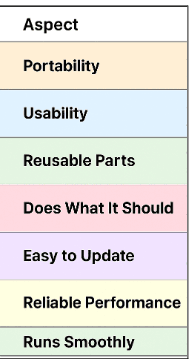
- Portability: It is the ability of the software applications to run across diverse platforms, OS, and devices with just minor changes or updates.
- Usability: This aspect shows how users can easily interact with the software applications. This is indicated by clear user interface of the apps, which improves the experience of users.
- Reusable parts: Code and components that can be reused in other projects save time and effort. You don’t have to start from scratch every time.
- Does What It Should: The software should deliver accurate results and perform tasks correctly without errors.
- Easy to Update: Fixing or improving the software should be straightforward. Changes shouldn’t break other parts.
- Reliable Performance: The software should work consistently in different situations. It shouldn’t crash or fail unexpectedly.
- Runs Smoothly: Software should be fast and use resources wisely. It should handle tasks efficiently without slowing down.
The above-mentioned factors can be a benchmark to aim at for the organizations to ensure they have achieved software quality excellence. For this, it is important for the organization to strategize a process for ensuring software quality.
Why Software Quality Must Be Strategic
Quality management in software is important, and here’s why:
- Predictability: Good-quality software does what it is supposed to do. It could be meeting user needs and the easy running of the apps. However, poor quality causes extra work, like redoing tests and fixing bugs. It led to a slowdown in the development and release cycle. Delivering on time saves money and builds confidence among the team, stakeholders, and customers.
- Reputation: A company’s products define it. Mistakes and glitches can impact your reputation, and the cost of losing that trust goes far beyond money.
- Employee Morale: Teams feel confident when they build something solid. But when software quality is poor, it creates frustration, repeated fixes, and pressure to meet deadlines. This can lower morale and affect overall performance.
- Customer Satisfaction: Customers like products that just work as per their expectations. Errors and constant fixes frustrate them, affect ratings, and can even stop them from pre-ordering your product.
These factors show why software quality can no longer be treated as an afterthought. It must be a strategic goal that impacts business outcomes, customer trust, and team confidence.
Recent industry reports from 2025 clearly support this shift:
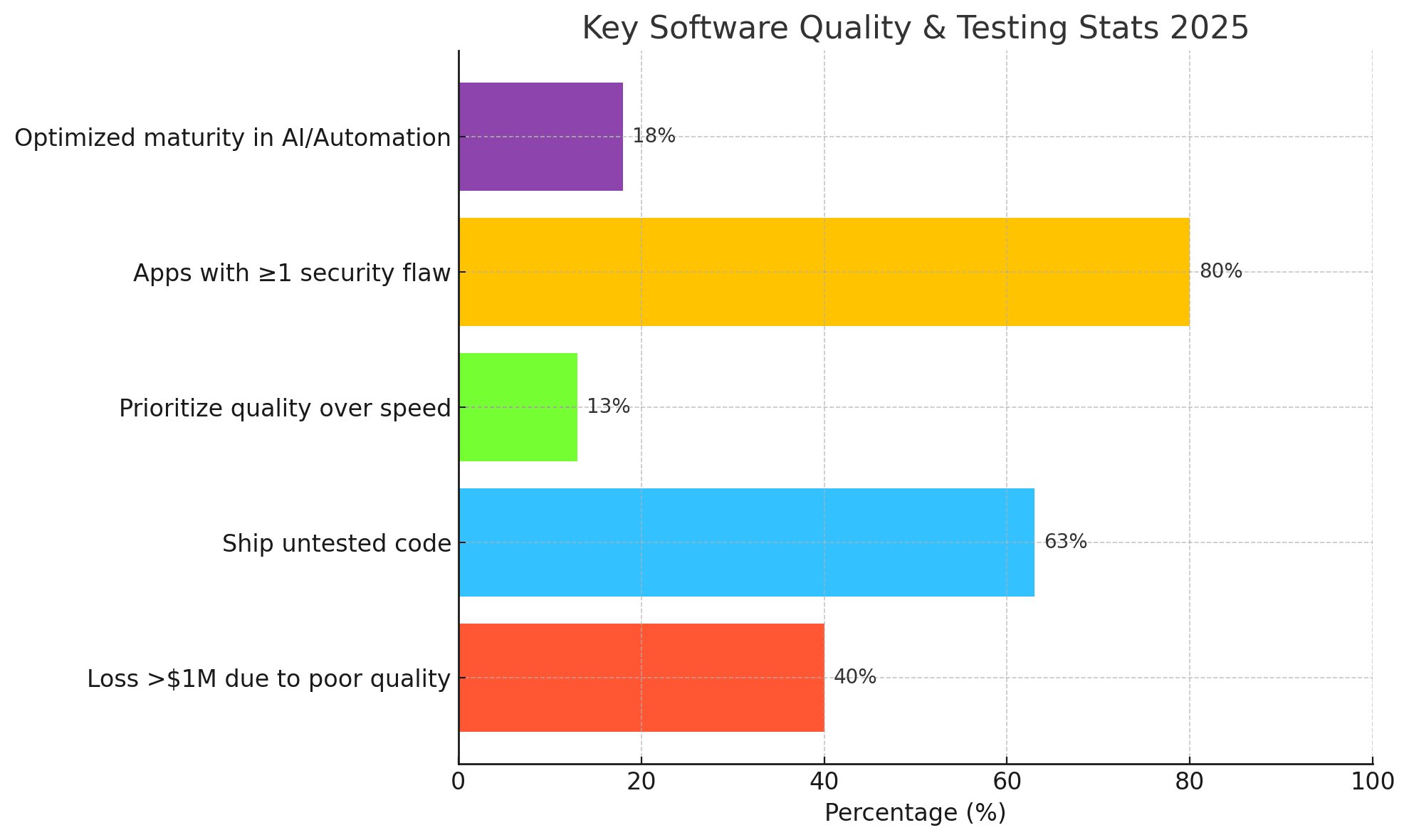
- Over 40% of organizations lose $1M+ annually due to poor quality.
- 63% ship untested code, leading to frequent outages.
- Only 13% prioritize quality over speed.
- 80% of applications tested in the year had at least one security flaw.
- Only ~18% of teams are at the “optimized” maturity stage using advanced automation / AI.
Insight: From the above statistics, it is clear that even though the organization aims for true software quality maturity, the organization still struggles. This is because most of the team looks for speed rather than for quality. This causes costly issues, security risks, and unstable releases. It is the limited use of advanced automation and AI that causes organizations to be in the early stage of true quality maturity.
Principles for Achieving Software Quality Excellence
Achieving software quality excellence is not just about finding and fixing bugs. It is more about developing the software that is secure and functional, which aligns with user expectations. Here are the principle that needs to be followed to achieve software quality excellence in your organization:
Shift Left But With Context
Start software testing as early as possible. In the traditional testing method, teams use to test the software at the end of the development stage, which often leads to an increase in bugs and errors. Its fixation, costs more to the organization and also delays the timely software release. Hence, every organization must adopt Agile methodology in its software development process. This includes software testing at every stage of the software development life cycle.
With this, you can check requirements, designs, and code before development moves too far. This helps identify problems before they grow into bigger issues. But it is not just about testing early. Your tests should reflect real-world use. Make sure they show how the software behaves in production. Hence, early testing with context saves time and reduces cost.
Measure The Right Things
Key performance metrics are important to evaluate how effective the software quality is. However, not all metrics are actually useful. Your organization should not focus on metrics that do not show the real quality of the applications. Rather, it is suggested to aim for metrics like escaped defects, time taken to identify issues, time taken to fix them, and reliability of the system. Having such metrics reported gives good information on the software's health.
Automate Where It Matters
Automation can save a lot of time in testing the software. However, not every feature’s testing requires automation. You have to focus on areas that are high risk, repeatable, and important for users. Use automation for regression tests, critical APIs, and core user journeys. However, you can keep the exploratory testing and user experience tests manual. This balance makes testing efficient and effective.
Make Quality Everyone’s Job
Quality is not just the tester’s responsibility. Developers, product managers, and operations teams all need to care about software quality. Thus, to achieve software quality, it is important to share accountability across teams. You can discuss software quality in every sprint and review. This involves having communication on the error, its fixation, updates, etc. Hence, when everyone is involved, defects are found faster and releases become more reliable.
Use AI Carefully
AI can help make testing faster and smarter. It can suggest test cases, analyze coverage, and prioritize defects. But AI is not perfect, and complete reliability can lead to errors. It can miss context or create brittle tests. Always check AI results with human judgment. Use AI as a tool to support your team, not replace it.
Challenges In Achieving Software Quality In An Organization
Even though many organizations spend a lot on automation and DevOps, keeping software quality consistent is still a challenge. The problem isn’t a lack of effort; it is the teams, systems, and processes often fail to grow as quickly as the pace of software delivery.
The sections below talk about the common barriers that stop organizations from improving their software quality.
Inadequate Time and Workload Pressure
A common challenge teams face is simply not having enough time for thorough testing. According to the State of Software Quality Report 2024 by Codacy, 58% of developers reported that time constraints are the most common challenge faced during code reviews. This shows that when delivery pressure is high, quality often gets pushed aside. As a result, it directly impacts the business of the organization.
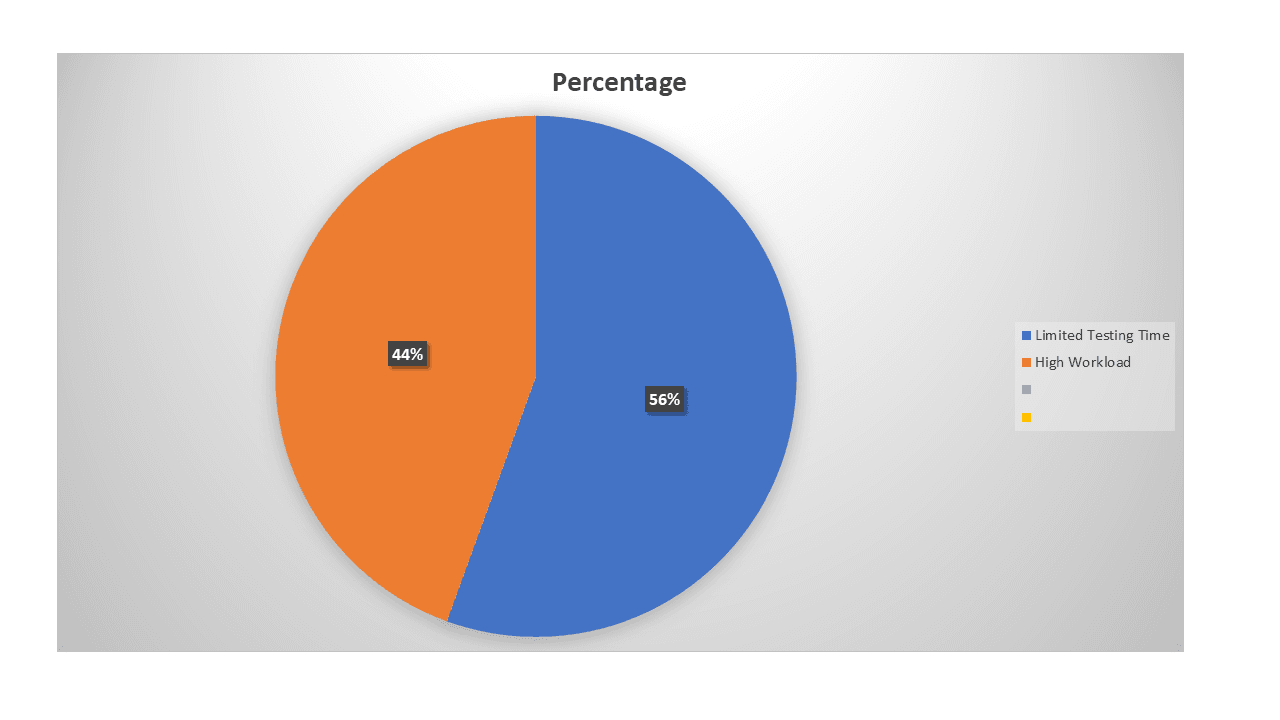
Key Insight: When teams are rushed or overloaded, quality suffers. Without enough time for proper testing, defects slip through, which can hurt the business and slow down delivery.
Low Automation Maturity And Manual Dependency
Automation being the central focus point in quality engineering, its practice is still uneven in many organizations. Still, many teams work manually in testing the software apps, which costs them time and money. Global App Testing’s 2025 Survey reveals that only 9% of testers exclusively perform manual testing. The majority (66%) employ a balanced approach, using manual testing 50–75% of the time. However, another report by Testlio has confirmed that 46% of their team has replaced 50% of tasks with automation. The point to note here is that, it still lacks a substantial portion to be automated.
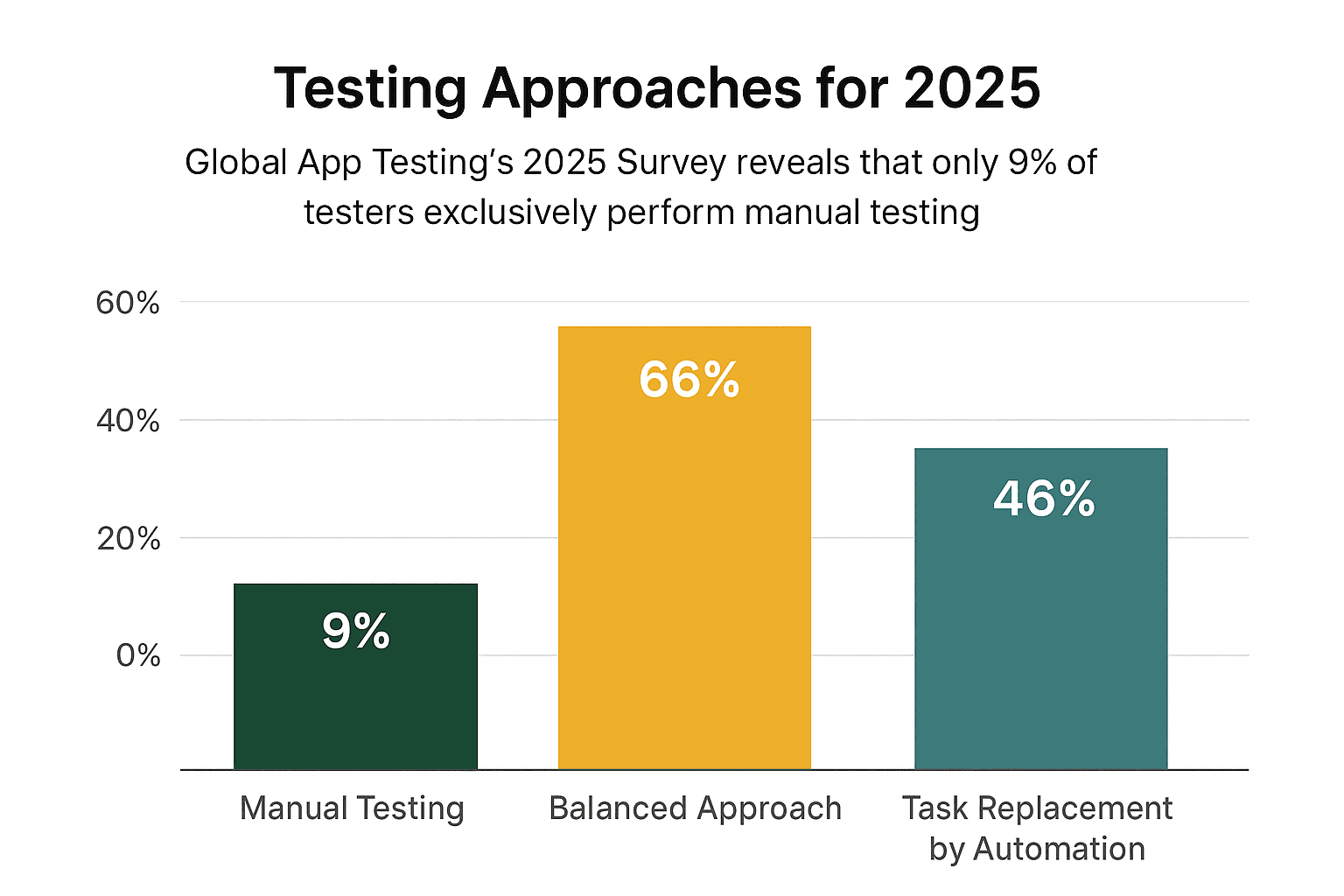
Key Insight: Without a clear automation plan and standardized frameworks, organizations struggle to deliver consistently high-quality releases on time.
Late Involvement of QA / Poor Shift-Left Execution
One of the biggest challenges in achieving quality in software is the late involvement of the QA team or pushing the testing to a later stage of development. According to TestRail, 32% of teams say late QA involvement is a major hurdle. This is because when testing happens late, bugs are discovered after development. As a result, fixing them takes extra time and effort. However, if the organization involves the QA team earlier, like in the planning stage, during the design of API and code review, it could have prevented the errors before catching them.
Key Insight: Quality can’t be added at the end. It must be part of the work from the start. Shift-left works when teams plan together early, take shared responsibility, and set up automation from the beginning.
Lack of Unified Metrics and Visibility
Improving quality is hard without clear metrics. Fragmented tools and dashboards make it difficult to track defects, coverage, and reliability of the software. It is often seen that many organizations focus on more than one QA tool, which complicates finding defects and fixing them. It is suggested to have a unified testing tool that combines all test management, production data, and CI/CD pipeline into actionable insights.
Key Insight: You can’t improve what you don’t measure. Unified quality intelligence helps teams move from reacting to predicting problems.
A Practical Roadmap You Can Adopt
Achieving software quality is not a single phase process. The organization needs to have a clear plan where steps are built based on the previous one. In this whitepaper, we will give a roadmap that defines each stage of building software quality and its approach, with examples.
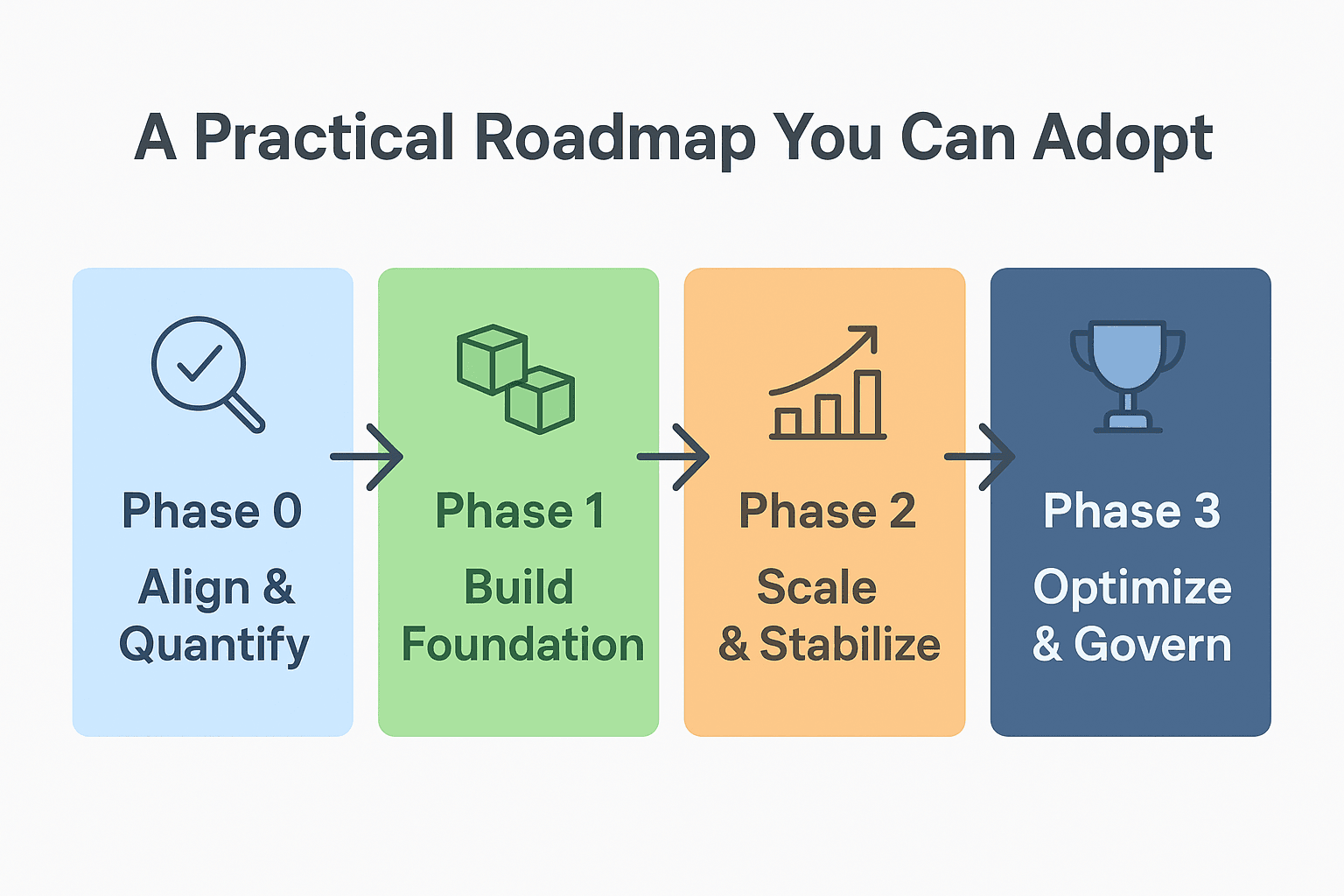
Phase 0: Align & Quantify
The first steps here involve analyzing the current state of your software quality. The team has to work to note down and review the recent product release, including its features, bugs, and updates delivered in the last few months. You have to find the defects that have reached production, like functional errors or any sort of performance failures. Additionally, identify the area that has caused the most downtime and failure in the software.
When such information is in hand, it is crucial to turn the team’s view into actionable and measurable data. This helps in prioritizing improvement and tracks the process of software quality. Some of the common metrics you can track are:
- Mean Time To Detect (MTTD): How long it takes to identify a defect in production.
- Mean Time To Repair (MTTR): How long it takes to fix a defect after detection.
- Escaped defects per release: Number of issues reported by customers after release.
- Test coverage of critical flows: Percentage of high-impact workflows covered by automated tests.
Example:
A mid-sized SaaS company looked at last year’s releases. They found that most production bugs came from one area, user account management. By tracking how long it took to find and fix these issues, they could focus on improving this key workflow and monitor progress as changes were made.
Phase 1: Build Foundation
With a clear understanding of the current state of the software quality, it's now time to set the foundation to improve it. The organization has to focus more on important areas in software quality. These are features users use the most or where failures cause the biggest problems. Examples are login, payment processing, and main business workflows.
Automated testing for such critical flow is important for an organization to reduce any repeated defects. For this, add simple security checks and dependency scans in your CI/CD pipelines. This prevents vulnerabilities and old libraries from reaching production.
Example:
The SaaS team automated tests for the top 20 percent of user actions. These caused 80 percent of past defects, like login, password reset, and subscription checkout. They also added dependency scanning to catch outdated libraries before deployment. This foundation of automation cut repeated defects and made releases more stable.
Phase 2: Scale & Stabilize
After the foundation is ready, expand test coverage. Include more workflows and system parts. Organization must also add APIs, end-to-end flows, and performance-critical features. You can use production data and user behavior to make tests reflect real-world use.
This phase helps catch complex interactions and edge cases. These often show up only in real conditions. Scaling tests carefully keep the system reliable as it grows.
Example:
The team added tests for third-party integrations, like payment gateways and analytics. They watched production errors to create regression tests for hidden edge cases. One case, involving simultaneous payments, was caught early. This prevented potential downtime.
Phase 3: Optimize & Govern
The final phase is about improving workflows and keeping quality consistent over time. Start using AI to create regression tests and prioritize defects. This reduces repetitive manual work and frees teams to focus on more important tasks.
At the same time, track key metrics and adjust priorities when needed. Set clear quality goals for every team and hold regular reviews. This structured approach makes quality measurable and part of daily work.
Example:
AI generated regression tests and ranked defects by business impact. Leadership reviewed progress every quarter, which reduced escaped defects and steadily improved test coverage.
By following this roadmap, organizations can catch defects earlier, release more reliable software, and maintain consistent quality across all releases.
Expected Benefits & ROI
Implementing the above phased quality strategy delivers both short-term wins and long-term returns across people, process, and product dimensions.
| Investment Area | Key Actions | Measurable Outcome | Estimated ROI Timeline |
|---|---|---|---|
| Test Automation & CI/CD Integration | Automate high-impact workflows and integrate continuous testing | 25–40% faster release cycles, 30% less manual effort | 3–6 months |
| Defect Prevention & Root Cause Analysis | Identify and fix defects early; improve test coverage | 30–50% reduction in post-release defect costs | 6–9 months |
| Security & Dependency Scanning | Add automated scans to pipelines | Reduced vulnerability risk and compliance costs | 3–6 months |
| AI-Driven Test Optimization | Use AI for test generation and defect prioritization | 20–30% higher team productivity; faster issue triage | 9–12 months |
| Production Monitoring & Feedback Loops | Use real-world data to create regression tests | 40% fewer escaped defects; improved stability | 6–9 months |
| Quality Governance & Metrics Tracking | Set measurable quality goals across teams | Aligned QA & Dev objectives; predictable release quality | Continuous (ongoing benefit) |
How Automation Helps In Improving Software Quality
The QA team sees automation as the central focus role in improving the software quality in an organization. As already stated, it shortens the software delivery cycle and achieves maximum ROI and benefit as described above. However, organizations still face challenges in maintaining automated tests to fully realize their impact on quality.
Benefits of Test Automation
By minimizing human error and increasing test consistency, automation directly improves software quality. It is well know fact that automated tests run faster and more reliably. This gives instant feedback on every build about software quality and functionality.
If compared with manual testing, it can take 3–5 days for full execution, while automated tests can finish in just hours. This speed allows QA teams to run more frequent and comprehensive checks — improving defect detection and reducing production issues. Not only this, but in less time, more tests can be performed, which eventually increases test coverage. Further, the team can also validate the functionality of the software across multiple environments, browsers, and devices. This makes sure that every feature of the software performs as expected.
Automation In Improving Release Quality
When an organization automates the quality checks of the software, the software testing aligns with the continuous integration and delivery cycles. As a result, the automated pipelines allow the team to execute the complete regression suite whenever changes are made to the software. This helps the team to detect errors before they reach production.
Automation Supports Continuous Testing
Automation plays a key role in continuous testing. It helps teams check quality at every stage of development, not just at the end.
With AI-driven test generation, self-healing scripts, and CI/CD integration, testing becomes more proactive. Teams can spot issues early instead of waiting for them to appear later. This change leads to better software overall — with stronger functionality, higher reliability, and a smoother user experience.
Role of AI in Software Quality
In the current time, AI is changing the way organizations approach achieving software quality. With AI integration in the testing process, it is now possible to have reactive problem fixing and proactive quality assurance. It is still suggested to the organization that just depending on traditional automation is not a way out. However, with AI integrated with automation, it is easy to identify risk, predict defects, and adapt tests when software development evolves.
Enhancing Test Automation
AI makes automation smarter. It can create new test scripts and update existing ones automatically. It also suggests ways to improve test coverage. This reduces repetitive work. QA teams can focus on designing meaningful tests and analyzing results.
For example, if a UI changes, AI can detect it and adjust scripts. This avoids delays and stops defects from reaching users.
Supporting Test Design and Analysis
AI studies past results, app behavior, and usage patterns. It recommends tests to the QA team and developers that find hidden defects or weak coverage. It can also generate test data. With this, testing becomes more complete and realistic. AI analyzes results fast and highlights anomalies or trends. Developers can fix issues before users notice.
Predictive and Self-Healing Capabilities
In improving software quality, AI is most likely to predict areas in software that could fail. This allows teams to focus on the testing where it matters most. Self-healing scripts adjust to small software changes. This reduces failures and maintenance work.
Expanding QA Impact
AI goes beyond routine tasks. It generates test documentation automatically. It improves UI testing with image recognition, checking visuals across devices. AI does not replace QA teams. It makes their work more effective. By handling repetitive tasks, predicting defects, and adapting tests, AI helps deliver software faster and with higher quality.
Why Organization Choose Robonito’s Scalable Test Execution Platform
Robonito’s testing process uses the SPARK framework. It is simple and easy to remember. SPARK stands for Smart Planning, Parameterization, AI Assistant Interaction, Robust Execution and Reporting, and Knowledge Capture. This framework makes complex testing clear and easy to follow. AI is used at every step, helping tests work smoothly and stay focused on business goals. This lets CIOs focus on important tasks rather than routine maintenance.
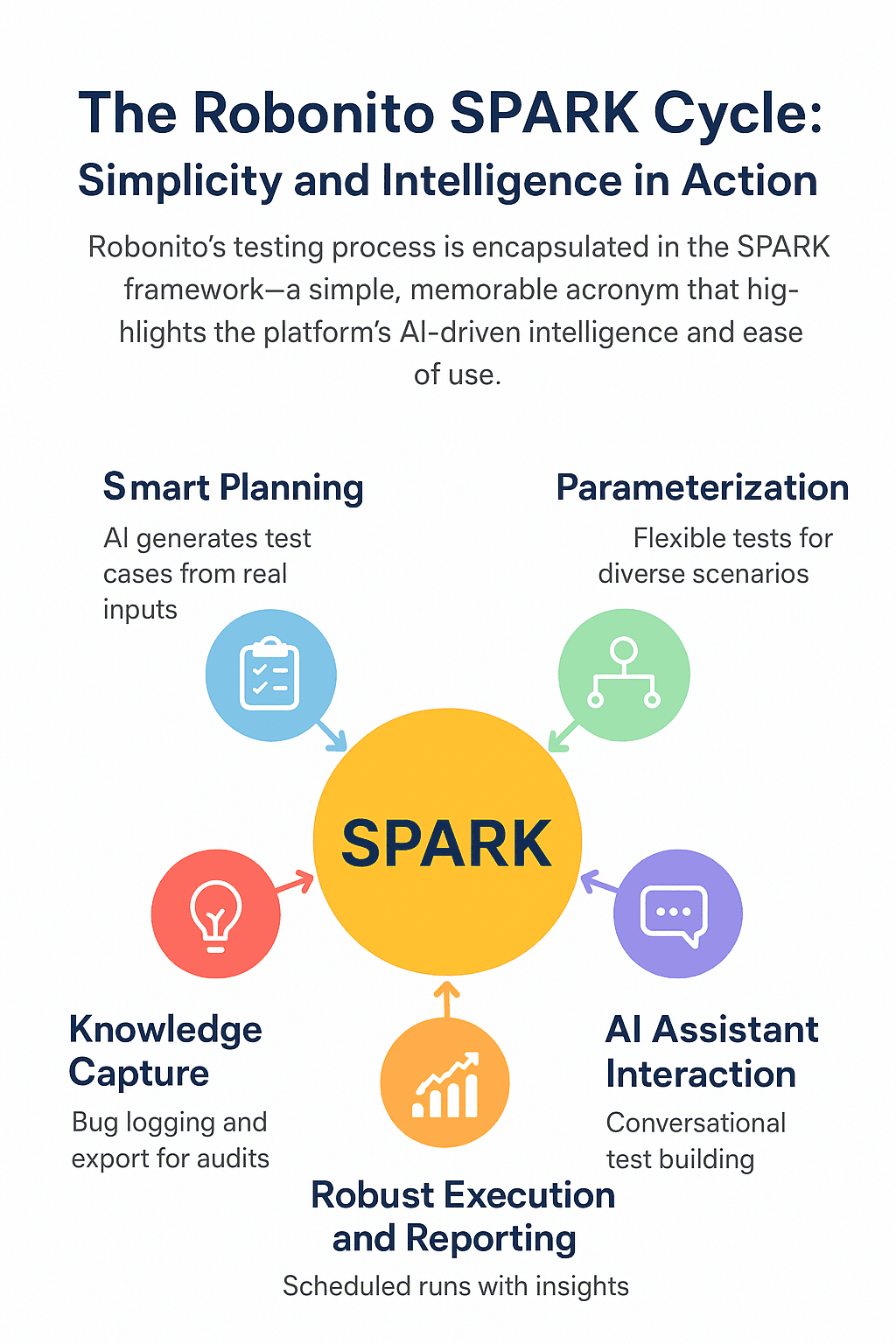
S: Smart Planning – AI Creates Test Cases from Actual Inputs
Robonito’s AI looks at application pages, flows, or JIRA user stories. It then creates test scenarios automatically, such as checking login processes or cart updates. This reduces guesswork and helps cover important parts of the application. In other words, smart planning lets AI suggest what to test based on the actual project details.
P: Parameterization – Flexible Tests for Different Scenarios
Parameterization lets you set variables like user types, currencies, or locations. A single test can then handle many different cases. This saves time and covers various situations. Think of it like a template—you change the settings (data) to test different cases.
A: AI Assistant Interaction – Conversational Test Building
Test workflows can be explained in plain language through a chat assistant, or manual steps can be pasted and instantly turned into automated tests. This allows non coders, like business analysts or product managers, to be directly involved in quality assurance. It makes the process faster and reduces the need for technical team support. In simple terms, the AI assistant is a helpful partner that turns regular instructions into automated actions.
R: Robust Execution and Reporting – Scheduled Runs with Insights
Tests can run on demand or automatically when code changes. They capture logs, reports, accessibility checks, and performance data in real-time. This keeps testing active, spots problems early, and handles UI changes without extra effort. In plain words, robust execution means dependable testing that runs by itself and gives clear results.
K: Knowledge Capture – Bug Logging and Export for Audits
When tests fail, the system can create ready-to-use code if needed, log bugs with screenshots, videos, and text logs, and export the data for audits or compliance. This builds a complete record, helps fix problems faster, and shows quality efforts to stakeholders. Simply put, knowledge capture is like a digital evidence locker where everything is stored and shared easily.
The SPARK framework shows Robonito’s strengths. It keeps testing simple with natural-language inputs and automation. At the same time, AI adds intelligence by planning, adjusting, and learning from workflows. This reduces complexity, lowers errors, and grows with the team. It delivers quick benefits through faster releases, fewer defects, and better software quality.
About Robonito
Robonito is an AI-driven QA platform designed to make testing faster and easier. It lets teams create and run automated tests without any coding. Both technical and non-technical users can use it.
The platform combines visual test building with smart automation. Tests can run at the same time on different browsers and devices, without extra tools. Its self-fixing tests, clear workflows, and detailed reports help teams deliver software faster and spend less time on upkeep.
Robonito works for web apps, APIs, and mobile (beta). It connects with your existing systems through CI/CD, handles test data automatically, and checks results intelligently.
Companies of all sizes use Robonito to save time, improve software quality, and make testing easier for everyone on the team. It makes software testing simple, smart, and code-free.