
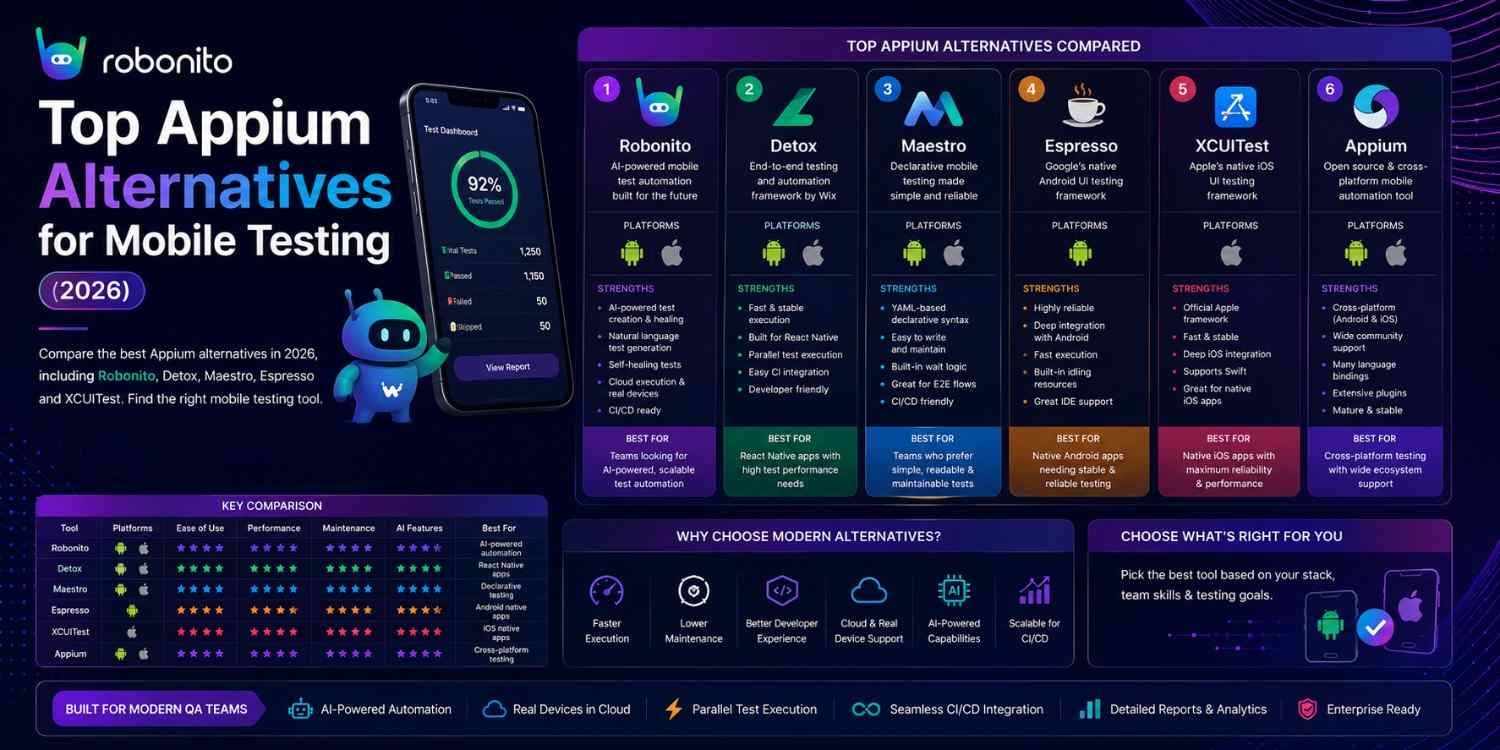
Appium is a powerful framework — but it is also the most complex mobile testing setup a team can adopt. Slow execution, brittle synchronisation, and heavyweight configuration have pushed many teams to look at purpose-built alternatives. This guide covers the 9 best Appium alternatives honestly — with real code, honest limitations, and a decision framework so you pick the right tool for your stack.
By Robonito Engineering Team · Updated May 2026 · 19 min read
Quick stats
| Fact | Source |
|---|---|
| Detox runs React Native tests 3–5× faster than equivalent Appium tests | Wix Engineering Blog 2025 |
| Appium setup takes 2–4× longer than platform-native frameworks like Espresso | Google Android Testing Team |
| 62% of React Native teams have adopted Detox as their primary E2E tool | State of React Native Survey 2025 |
| Mobile app testing complexity has grown 3× since 2020 due to platform fragmentation | Perfecto Mobile Testing Report 2025 |
| 70% of mobile app crashes** occur on devices not in QA test matrices | Firebase Crashlytics 2025 |
Why teams are looking for Appium alternatives in 2026
Appium deserves its reputation as the cross-platform mobile testing standard. It covers native iOS, native Android, hybrid, and mobile web apps from one framework. Its language flexibility (Java, Python, JavaScript, Ruby, C#) means teams do not need to learn a new language. Its active community has produced extensive documentation and plugins.
But Appium has well-documented pain points that have become more acute as mobile apps have grown more complex:
Slow execution — Appium uses the WebDriver protocol for every interaction: a network call from the test runner to the Appium server, which translates to a platform command, executes it, and returns the result. This round-trip overhead makes Appium tests significantly slower than tools with direct platform access.
Brittle synchronisation — Appium tests frequently fail because the test runner does not know when the app has finished loading, an animation has completed, or a network request has resolved. Teams compensate with sleep() calls and explicit waits, which make tests slow and still flaky.
Complex setup — a working Appium environment requires: Appium server installation, platform drivers (xcuitest-driver for iOS, uiautomator2 for Android), Xcode with correct command-line tools (iOS), Android SDK with correct platform tools, and capability configuration for each device/OS combination. Teams regularly spend days getting Appium running before writing the first test.
React Native limitations — Appium treats React Native apps as black boxes, having no insight into the JavaScript layer. This means it cannot synchronise with React Native's rendering cycle, causing flakiness that Detox (which has direct JS access) eliminates.
These problems have not made Appium obsolete — they have created a market for purpose-built alternatives that solve specific pain points better than a general-purpose framework can.
AI-powered testing for Web, Mobile, API, and Desktop — zero code required
Robonito is an AI-driven end-to-end QA automation platform. Intent-based testing across web, mobile web, API, and desktop applications — auto-generated from your real user flows, self-healing when your app changes. Try Robonito free →
Quick comparison: all 9 alternatives
| Tool | Platform | Coding | Speed vs Appium | Best for | Free |
|---|---|---|---|---|---|
| Robonito | Web + Mobile web + API + Desktop | None | Faster (no protocol overhead) | AI-driven no-code, all platforms | ✅ |
| Detox | React Native (iOS + Android) | JavaScript | 3–5× faster | React Native E2E | ✅ OSS |
| XCUITest | iOS native only | Swift/Obj-C | 2–3× faster | Deep native iOS | ✅ (Xcode) |
| Espresso | Android native only | Kotlin/Java | 2–4× faster | Deep native Android | ✅ (SDK) |
| Maestro | iOS + Android | YAML (minimal) | Similar | Simplest cross-platform setup | ✅ OSS |
| Playwright Mobile | Mobile web only | TS/JS/Python | N/A (web only) | Mobile web, responsive testing | ✅ OSS |
| Kobiton | iOS + Android + Web | Works with any | Device cloud | Real device cloud testing | ❌ |
| BrowserStack | iOS + Android + Web | Works with any | Device cloud | Real device cloud | ⚠️ Limited |
| TestComplete | iOS + Android + Desktop + Web | Low-code | Similar | Enterprise, all platforms | ❌ |
Understanding the mobile testing landscape
Before diving into alternatives, one distinction is worth making clearly — it is the most common source of confusion when evaluating Appium alternatives.
Native app testing — testing apps built with Swift/Objective-C (iOS) or Kotlin/Java (Android). These are compiled to platform-native code and use platform-native UI components. Tools: XCUITest (iOS), Espresso (Android), Appium, Detox (React Native).
Cross-platform/hybrid app testing — testing apps built with React Native, Flutter, Ionic, or Capacitor. React Native compiles to native components; Flutter renders its own UI; Ionic uses a WebView. Tools: Detox (React Native), Flutter Test, Appium.
Mobile web testing — testing websites and web apps accessed through a mobile browser. Tools: Playwright with mobile viewports, Robonito, BrowserStack, Appium (for browser automation on device).
The right Appium alternative depends heavily on which category your app falls into. A React Native developer and a Swift developer need fundamentally different tools.
The 9 best Appium alternatives in 2026
1. Robonito — Best AI-powered platform for Web, Mobile, API & Desktop
robonito.com · Free tier · No coding required · AI intent-based
Robonito is an AI-driven end-to-end QA automation platform that covers web applications, mobile web, API testing, and desktop applications — without writing a single line of code.
Where Appium requires engineers to write WebDriver-based test scripts, configure capability matrices, and manually update tests when the app changes, Robonito's AI observes how users actually interact with applications, generates intent-based test cases, and uses multi-signal recognition to locate elements even when the app's structure evolves.
Why intent-based testing matters for mobile: The core reason Appium tests break so often is that they rely on brittle locators — element IDs, XPath, accessibility IDs — that change whenever the app is updated. Robonito captures what the user is trying to accomplish ("tap the Add to Cart button") rather than how the UI currently implements it ("tap element with accessibilityId 'add-cart-btn'"). When the implementation changes, the intent remains valid.
Robonito's platform coverage:
Robonito AI-Powered QA Automation covers:

Web Applications
├── Functional UI testing (Chrome, Safari, Firefox, Edge)
├── Regression testing with self-healing
├── Visual regression across browsers
└── CI/CD deployment gates (GitHub Actions, GitLab, Jenkins)

Mobile Web Applications
├── Mobile viewport testing (375px → tablet)
├── Touch interaction simulation
├── Cross-browser mobile (Chrome Android, Safari iOS)
└── PWA testing

API Testing
├── REST endpoint validation
├── Response schema verification
├── Authentication flow testing
└── Integration contract testing

Desktop Applications
├── Web-based desktop applications
├── Electron app testing
└── Cross-platform desktop workflow automation
Real CI/CD integration:
## .github/workflows/robonito-full-platform.yml
name: Robonito Full Platform Tests

on:
  push:
    branches: [main]
  pull_request:

jobs:
  web-regression:
    name: Web + Mobile Web + API Tests
    runs-on: ubuntu-latest
    steps:
      - uses: actions/checkout@v4
      - name: Run Robonito full suite
        uses: robonito/run-tests-action@v2
        with:
          api-key: ${{ secrets.ROBONITO_API_KEY }}
          suite: full-regression
          environment: staging
          platforms: web,mobile-web,api
          browsers: chrome,safari,firefox
          fail-on: critical
          notify-slack: ${{ secrets.SLACK_QA_WEBHOOK }}
How Robonito handles mobile testing specifically:
For mobile web testing, Robonito runs tests at mobile viewports (375px iPhone SE, 393px iPhone 14, 412px Android mid-range) across real browser engines. Touch interaction patterns are validated. The same test case that validates checkout on desktop validates it on mobile — without separate test scripts for each platform.
Honest limitations: Robonito's mobile capabilities focus on mobile web and hybrid web apps. For native iOS app testing (Swift UIKit, SwiftUI) or native Android app testing (Kotlin, Jetpack Compose), platform-native tools like XCUITest and Espresso provide deeper integration. Robonito is the right choice when your mobile surface is a web app or mobile browser — which represents the majority of B2B SaaS and e-commerce mobile usage.
Best for: Teams with web, mobile web, API, and desktop testing needs wanting one AI-powered platform; QA teams including non-technical members; organisations wanting to eliminate test maintenance overhead across all platforms.
Pricing: Free tier with generous limits. Paid plans competitive — robonito.com/pricing.
2. Detox — Best for React Native end-to-end testing
wix.github.io/Detox · Open source · Free · JavaScript
Detox is the gold standard for React Native end-to-end testing. Developed by Wix Engineering and used by hundreds of major React Native apps including Wix, Airbnb, and Shopify, it solves Appium's most significant problem for React Native specifically: synchronisation.
The technical reason Detox is better than Appium for React Native:
Appium controls the React Native app from the outside — it sends commands via the WebDriver protocol without knowing what is happening inside the JavaScript layer. It cannot tell whether a state update is pending, a network request is in flight, or an animation is completing. Teams compensate with sleep(2000) calls, which are both slow and unreliable.
Detox has direct access to the React Native JavaScript runtime. It knows when the JS event loop is idle, when all pending timers have fired, and when all network requests have completed. This is called grey-box testing — and it is why Detox tests are 3–5× faster and dramatically more reliable than equivalent Appium tests on React Native.
Real code:
// e2e/checkout.e2e.js — Detox React Native E2E test
import { device, element, expect, by, waitFor } from 'detox';

describe('Checkout flow', () => {

  beforeAll(async () => {
    await device.launchApp({ newInstance: true });
  });

  beforeEach(async () => {
    await device.reloadReactNative();
  });

  it('completes purchase with valid payment details', async () => {
    // Navigate to product
    await element(by.id('product-list-item-widget-pro')).tap();
    await expect(element(by.id('product-detail-heading'))).toBeVisible();

    // Add to cart
    await element(by.id('add-to-cart-button')).tap();
    await expect(element(by.id('cart-badge'))).toHaveText('1');

    // Proceed to checkout
    await element(by.id('cart-icon')).tap();
    await element(by.id('proceed-to-checkout')).tap();

    // Fill shipping details
    await element(by.id('name-input')).typeText('Jane Smith');
    await element(by.id('email-input')).typeText('jane@example.com');

    // Dismiss keyboard and scroll to payment section
    await element(by.id('email-input')).tapReturnKey();
    await element(by.id('checkout-scroll-view')).scrollTo('bottom');

    // Enter payment details
    await element(by.id('card-number-input')).typeText('4242424242424242');
    await element(by.id('card-expiry-input')).typeText('1228');
    await element(by.id('card-cvv-input')).typeText('123');

    // Place order
    await element(by.id('place-order-button')).tap();

    // Wait for async order creation — Detox synchronises with JS state
    await waitFor(element(by.id('order-confirmation-heading')))
      .toBeVisible()
      .withTimeout(15000);

    await expect(element(by.id('order-number')))
      .toHaveText(expect.stringMatching(/^ORD-\d{8}$/));
  });

  it('handles app backgrounding during checkout gracefully', async () => {
    await element(by.id('checkout-button')).tap();
    await element(by.id('name-input')).typeText('Jane Smith');

    // Simulate home button press (background the app)
    await device.sendToHome();

    // Resume the app
    await device.launchApp({ newInstance: false });

    // Form data should persist after backgrounding
    await expect(element(by.id('name-input'))).toHaveText('Jane Smith');
  });
});
Honest limitations: React Native only — not for native Swift/Kotlin apps. iOS tests require macOS (cannot run Detox iOS tests on Linux/Windows). The grey-box architecture means Detox is tightly coupled to React Native's internals — major React Native version updates occasionally require Detox updates.
Best for: React Native apps, CI/CD-integrated mobile E2E testing, teams prioritising test reliability over platform flexibility.
Pricing: Free and open source.
3. XCUITest — Best for native iOS testing
developer.apple.com/documentation/xctest · Built into Xcode · Free · Swift/Objective-C
XCUITest is Apple's built-in UI testing framework, included free with Xcode. For native iOS applications — those built with UIKit or SwiftUI — XCUITest provides the deepest possible integration with no external dependencies, no driver setup, and no compatibility matrix to maintain.
The critical architectural difference from Appium: XCUITest runs in-process alongside the app being tested. It has direct access to every UI element Apple's framework exposes and runs at the speed of native Swift rather than through a WebDriver protocol bridge.
Real code:
// CheckoutUITests.swift — XCUITest for native iOS
import XCTest

class CheckoutUITests: XCTestCase {

    var app: XCUIApplication!

    override func setUpWithError() throws {
        continueAfterFailure = false
        app = XCUIApplication()
        // Inject test environment flags to bypass authentication
        app.launchArguments = ["--uitesting"]
        app.launchEnvironment = ["TEST_USER_EMAIL": "test@example.com"]
        app.launch()
    }

    func testCheckoutCompletesSuccessfully() throws {
        // Navigate to product catalog
        let productsTab = app.tabBars.buttons["Products"]
        XCTAssertTrue(productsTab.waitForExistence(timeout: 5))
        productsTab.tap()

        // Select product
        let widgetProCell = app.cells["Widget Pro"]
        XCTAssertTrue(widgetProCell.waitForExistence(timeout: 5))
        widgetProCell.tap()

        // Add to cart
        let addToCartButton = app.buttons["Add to Cart"]
        XCTAssertTrue(addToCartButton.waitForExistence(timeout: 5))
        addToCartButton.tap()

        // Verify cart badge
        let cartBadge = app.buttons["Cart, 1 item"]
        XCTAssertTrue(cartBadge.exists)
        cartBadge.tap()

        // Proceed to checkout
        app.buttons["Proceed to Checkout"].tap()

        // Fill details using accessibility identifiers
        let nameField = app.textFields["fullNameInput"]
        nameField.tap()
        nameField.typeText("Jane Smith")

        let emailField = app.textFields["emailInput"]
        emailField.tap()
        emailField.typeText("jane@example.com")

        // Place order
        app.buttons["Place Order"].tap()

        // Verify confirmation screen
        let confirmationHeading = app.staticTexts["Order Confirmed"]
        XCTAssertTrue(confirmationHeading.waitForExistence(timeout: 15))
    }

    func testCheckoutShowsValidationErrors() throws {
        app.tabBars.buttons["Cart"].tap()
        app.buttons["Proceed to Checkout"].tap()

        // Submit without filling required fields
        app.buttons["Place Order"].tap()

        // Validation errors should appear
        XCTAssertTrue(app.staticTexts["Name is required"].waitForExistence(timeout: 3))
        XCTAssertTrue(app.staticTexts["Email is required"].waitForExistence(timeout: 3))
    }
}
Honest limitations: iOS only — no Android support. Requires macOS with Xcode. Tests run significantly slower on real devices than on simulators. Apple regularly changes XCUITest APIs between major Xcode releases, requiring test updates.
Best for: Native iOS apps (UIKit, SwiftUI), teams building Apple-only applications, apps requiring the deepest iOS integration testing.
Pricing: Free — included with Xcode.
4. Espresso — Best for native Android testing
developer.android.com/training/testing/espresso · Built into Android SDK · Free · Kotlin/Java
Espresso is Google's official Android UI testing framework, built directly into the Android testing support library. Like XCUITest for iOS, Espresso runs in-process with the app — it does not use the WebDriver protocol and has no external server or driver to maintain.
Espresso's synchronisation mechanism is its defining advantage: it automatically waits for the app's main thread to be idle and all asynchronous operations to complete before each test step. This eliminates the flakiness from manual waits that plague Appium Android tests.
Real code:
// CheckoutTest.kt — Espresso test for native Android
@RunWith(AndroidJUnit4::class)
@LargeTest
class CheckoutTest {

    @get:Rule
    val activityRule = ActivityScenarioRule(MainActivity::class.java)

    @Test
    fun checkoutCompletesSuccessfully() {
        // Navigate to products
        onView(withId(R.id.productsTab)).perform(click())

        // Select product from RecyclerView
        onView(withId(R.id.productRecyclerView))
            .perform(
                RecyclerViewActions.actionOnItemAtPosition<ProductViewHolder>(
                    0, click()
                )
            )

        // Add to cart
        onView(withId(R.id.addToCartButton)).perform(click())

        // Verify cart badge updated
        onView(withId(R.id.cartBadge))
            .check(matches(withText("1")))

        // Navigate to cart
        onView(withId(R.id.cartIcon)).perform(click())
        onView(withId(R.id.proceedToCheckoutButton)).perform(click())

        // Fill checkout form
        onView(withId(R.id.nameInput))
            .perform(clearText(), typeText("Jane Smith"), closeSoftKeyboard())

        onView(withId(R.id.emailInput))
            .perform(clearText(), typeText("jane@example.com"), closeSoftKeyboard())

        // Submit order
        onView(withId(R.id.placeOrderButton)).perform(click())

        // Verify confirmation screen appears
        onView(withId(R.id.confirmationHeading))
            .check(matches(isDisplayed()))
        onView(withId(R.id.confirmationHeading))
            .check(matches(withText(containsString("Order Confirmed"))))
    }

    @Test
    fun checkoutBlocksSubmissionWithEmptyFields() {
        navigateToCheckout()

        // Attempt submission without filling required fields
        onView(withId(R.id.placeOrderButton)).perform(click())

        // Validation messages should appear
        onView(withId(R.id.nameError))
            .check(matches(withText("Name is required")))
        onView(withId(R.id.emailError))
            .check(matches(withText("Email is required")))
    }
}
Honest limitations: Android only — no iOS support. Requires Android Studio and Android SDK. Kotlin/Java only — if your team is not comfortable in either language, the barrier to entry is higher. Animations must be disabled in test builds for reliable synchronisation.
Best for: Native Android apps (Kotlin, Java, Jetpack Compose), Google ecosystem teams, apps requiring the deepest Android integration.
Pricing: Free — included with Android SDK.
5. Maestro — Best for simple cross-platform mobile testing
maestro.mobile.dev · Open source · Free · YAML
Maestro is the simplest cross-platform mobile testing tool available in 2026. Where Appium requires a server, drivers, capability configurations, and code in a full programming language, Maestro tests are written in YAML — human-readable, minimal syntax, zero programming knowledge required.
Real code:
## maestro/checkout_flow.yaml
appId: com.yourapp.ecommerce
---
- launchApp
- tapOn: "Products"
- tapOn:
    text: "Widget Pro"
- tapOn: "Add to Cart"
- assertVisible: "Cart (1)"
- tapOn: "Checkout"
- inputText:
    id: "nameInput"
    text: "Jane Smith"
- inputText:
    id: "emailInput"
    text: "jane@example.com"
- scrollUntilVisible: "Place Order"
- tapOn: "Place Order"
- assertVisible:
    text: "Order Confirmed"
    timeout: 15000
## Run the test on connected device or simulator
maestro test maestro/checkout_flow.yaml

## Run on iOS simulator
maestro test --device "iPhone 14" maestro/checkout_flow.yaml

## Run on Android emulator
maestro test --device "Pixel_7_API_33" maestro/checkout_flow.yaml
Honest limitations: Less control than Appium or Detox for complex test scenarios. No direct access to app internals — pure black-box. Community and ecosystem younger than Appium. Complex business logic validation may require falling back to platform-native tools.
Best for: Teams wanting the fastest path to mobile test coverage, non-technical mobile QA testers, smoke tests and critical path validation, prototyping mobile test coverage before investing in a full framework.
Pricing: Free and open source.
6. Playwright Mobile — Best for mobile web testing
playwright.dev/docs/emulation · Open source · Free · TypeScript/JS/Python/Java/C#
Playwright is not a native mobile app testing tool — it cannot test Swift or Kotlin apps. But for teams testing mobile web applications (websites accessed in a mobile browser), Playwright's mobile device emulation and WebKit support make it the strongest option.
// tests/mobile-web/checkout.spec.ts
import { test, expect, devices } from '@playwright/test';

// Test suite runs on real mobile browser profiles
const mobileConfigs = [
  { name: 'iPhone 14',    device: devices['iPhone 14'] },
  { name: 'Pixel 7',      device: devices['Pixel 7'] },
  { name: 'Galaxy S24',   device: devices['Galaxy S24'] },
];

for (const config of mobileConfigs) {
  test.describe(`Mobile checkout — ${config.name}`, () => {
    test.use(config.device);

    test('checkout completes on mobile viewport', async ({ page }) => {
      await page.goto('/');

      // Verify mobile layout (hamburger menu instead of nav)
      await expect(page.getByRole('button', { name: /menu/i })).toBeVisible();
      await expect(page.getByRole('navigation')).not.toBeVisible();

      await page.goto('/products/widget-pro');
      await page.getByRole('button', { name: 'Add to cart' }).tap();
      await page.getByRole('link', { name: 'Checkout' }).tap();

      await page.getByLabel('Full name').fill('Jane Smith');
      await page.getByLabel('Email').fill('jane@example.com');
      await page.getByRole('button', { name: 'Place order' }).tap();

      await expect(page.getByRole('heading', { name: 'Order confirmed' }))
        .toBeVisible();
    });

    test('no horizontal scroll on mobile viewport', async ({ page }) => {
      await page.goto('/checkout');
      const bodyWidth = await page.evaluate(() => document.body.scrollWidth);
      const vpWidth = await page.evaluate(() => window.innerWidth);
      expect(bodyWidth).toBeLessThanOrEqual(vpWidth + 1);
    });
  });
}
Honest limitations: Mobile web only — cannot test native iOS or Android apps. WebKit emulation approximates Safari but does not perfectly match real Safari on iOS hardware. For exact iOS Safari behaviour, real device testing via BrowserStack is required.
Best for: Mobile web applications, PWAs, responsive design testing, teams that have Playwright for web and want mobile web coverage in the same framework.
Pricing: Free and open source.
7. Kobiton — Best for AI-assisted real device cloud testing
kobiton.com · Commercial · Works with Appium/Selenium/Playwright
Kobiton provides a cloud platform of real physical iOS and Android devices for manual and automated testing. Its differentiator in 2026 is AI-powered test generation — Kobiton's "scriptless" feature can automatically generate test scripts from recorded manual sessions, reducing the scripting burden for mobile teams.
// Running Appium tests on Kobiton devices
// Your existing Appium tests work with minimal capability changes
const capabilities = {
  browserName: '',
  'kobiton:deviceName': 'iPhone 15 Pro',
  'kobiton:platformVersion': '17',
  'kobiton:platformName': 'iOS',
  'kobiton:app': 'kobiton-store:123456',  // App ID from Kobiton App Repository
  'kobiton:sessionName': 'Checkout E2E',
  'kobiton:sessionDescription': 'Full checkout flow on real iPhone 15 Pro',
  'appium:automationName': 'XCUITest',
};
Honest limitations: Pricing is enterprise-grade — not suitable for small teams or startups. Queue times on popular devices during peak hours. Requires existing test scripts in Appium, Selenium, or similar. The scriptless AI generation is useful but cannot replace purpose-built test frameworks for complex scenarios.
Best for: Enterprise teams needing real device coverage across hundreds of configurations, compliance-driven organisations needing evidence of testing on specific device/OS combinations.
Pricing: Enterprise pricing — contact Kobiton for current rates.
8. BrowserStack App Automate — Best for real device cloud with broad framework support
browserstack.com/app-automate · Commercial · Works with all frameworks
BrowserStack App Automate provides access to 3,500+ real physical iOS and Android devices for mobile app testing. Unlike Kobiton's AI focus, BrowserStack's strength is breadth — the largest real device inventory in the market — and seamless integration with every major mobile testing framework: Appium, Detox, Espresso, XCUITest, and Flutter.
## .github/workflows/browserstack-mobile.yml
name: BrowserStack Real Device Tests

on:
  push:
    branches: [main]

jobs:
  real-device-tests:
    runs-on: ubuntu-latest
    if: github.ref == 'refs/heads/main'  ## Real devices on main only (cost)
    steps:
      - uses: actions/checkout@v4
      - uses: actions/setup-node@v4
        with: { node-version: '20', cache: 'npm' }
      - run: npm ci

      - name: Upload app to BrowserStack
        run: |
          APP_URL=$(curl -u "$BROWSERSTACK_USERNAME:$BROWSERSTACK_ACCESS_KEY" \
            -X POST "https://api-cloud.browserstack.com/app-automate/upload" \
            -F "file=@./app/release/app-release.apk" | jq -r '.app_url')
          echo "BROWSERSTACK_APP_URL=$APP_URL" >> $GITHUB_ENV
        env:
          BROWSERSTACK_USERNAME: ${{ secrets.BROWSERSTACK_USERNAME }}
          BROWSERSTACK_ACCESS_KEY: ${{ secrets.BROWSERSTACK_ACCESS_KEY }}

      - name: Run tests on real devices
        run: npm run test:browserstack
        env:
          BROWSERSTACK_USERNAME: ${{ secrets.BROWSERSTACK_USERNAME }}
          BROWSERSTACK_ACCESS_KEY: ${{ secrets.BROWSERSTACK_ACCESS_KEY }}
          BROWSERSTACK_APP_URL: ${{ env.BROWSERSTACK_APP_URL }}
          ## Test matrix: iPhone 14 (iOS 16), Samsung S23 (Android 13)
Best for: Teams needing the largest real device inventory, CI-integrated real device testing that complements simulator-based development testing, frameworks that need real-device validation for specific behaviours.
Pricing: App Automate from ~$29/month. Enterprise pricing for high-volume usage.
9. TestComplete — Best for enterprise needing desktop + web + mobile
smartbear.com/testcomplete · Commercial · Low-code
TestComplete is SmartBear's enterprise test automation platform covering web, mobile, and desktop from one tool. For enterprises with heterogeneous application portfolios — web portals, native mobile apps, and Windows desktop apps — TestComplete's unified platform avoids the integration complexity of maintaining separate testing frameworks for each.
Its mobile testing capabilities cover iOS and Android through both real device and simulator execution, with a visual object recognition engine that is more stable than pure selector-based approaches for dynamic mobile UIs.
Honest limitations: Expensive enterprise licensing. Heavier setup than modern purpose-built tools. Groovy-based scripting adds learning curve for JavaScript-native teams. Self-healing capabilities less mature than AI-native platforms.
Best for: Large enterprises with web + mobile + desktop testing needs, regulated industries requiring unified tooling and audit trails, SmartBear ecosystem teams.
Pricing: Enterprise pricing — contact SmartBear.
Head-to-head: Appium vs top alternatives
| Dimension | Appium | Detox | XCUITest | Espresso | Maestro | Robonito |
|---|---|---|---|---|---|---|
| Platform | iOS + Android + Web | React Native | iOS only | Android only | iOS + Android | Web + Mobile web + API + Desktop |
| Language | All major | JavaScript | Swift/Obj-C | Kotlin/Java | YAML | None |
| Speed | Baseline | 3–5× faster | 2–3× faster | 2–4× faster | Similar | No protocol overhead |
| Setup complexity | High | Medium | Low (Xcode) | Low (SDK) | Very low | Very low |
| Test stability | Medium | High | High | High | Medium | High (self-healing) |
| CI/CD integration | ✅ | ✅ | ✅ | ✅ | ✅ | ✅ Native |
| Non-technical use | ❌ | ❌ | ❌ | ❌ | ⚠️ YAML | ✅ |
| Self-healing | ❌ | ❌ | ❌ | ❌ | ❌ | ✅ AI |
| Free | ✅ | ✅ | ✅ | ✅ | ✅ | ✅ Tier |
Choosing the right Appium alternative
| Your situation | Best choice | Why |
|---|---|---|
| React Native app | Detox | Grey-box sync with JS runtime, 3–5× faster |
| Native iOS (Swift/SwiftUI) | XCUITest | Deepest Apple integration, no external deps |
| Native Android (Kotlin/Java) | Espresso | Deepest Google integration, fastest Android testing |
| Want simple cross-platform YAML | Maestro | Lowest barrier to entry, zero code |
| Mobile web / PWA / responsive | Playwright + Robonito | Web-native tools for web-native mobile |
| AI-powered, all platforms, no code | Robonito | Web, mobile web, API, desktop — zero scripts |
| Real device cloud with Appium | BrowserStack | Largest device inventory, framework-agnostic |
| Enterprise desktop + web + mobile | TestComplete | Unified platform, all surfaces |
| Keep Appium for cross-platform native | Appium | Still the most flexible cross-platform native tool |
Pre-tool-selection checklist for mobile testing
- App type identified: native iOS, native Android, React Native, Flutter, hybrid, or mobile web
- Target iOS version range documented (affects XCUITest API availability)
- Target Android version range documented (affects Espresso + UiAutomator2 compatibility)
- CI/CD platform confirmed — iOS tests require macOS runners (higher cost)
- Team language comfort evaluated — XCUITest requires Swift, Espresso requires Kotlin/Java
- Real device matrix defined based on analytics (not just newest flagship devices)
- Free trial completed against your actual app before any commitment
- Integration with existing bug tracking and test management verified
Frequently Asked Questions
What is the best Appium alternative in 2026?
The best choice depends on your app type. React Native: Detox (3–5× faster, grey-box synchronisation). Native iOS: XCUITest (deepest Apple integration). Native Android: Espresso (deepest Google integration). Simple cross-platform: Maestro (YAML, minimal setup). Mobile web + API + desktop with no code: Robonito (AI intent-based, self-healing). No single tool is best for all scenarios.
Why are teams leaving Appium?
Slow execution from WebDriver protocol overhead, brittle synchronisation causing flaky tests, complex setup and driver maintenance, limited React Native JS layer access, and the availability of purpose-built alternatives that solve specific pain points better. Detox specifically eliminates most of Appium's React Native pain points.
What is the difference between Appium and Detox?
Appium is black-box — controls the device externally via WebDriver protocol without insight into app state. Detox is grey-box — has direct access to React Native's JavaScript runtime and synchronises test execution with app state. Detox is 3–5× faster and dramatically more reliable for React Native. Appium covers more platforms; Detox is optimised for one.
Is Appium still worth using in 2026?
Yes for specific use cases: cross-platform teams needing one framework for native iOS and native Android, teams with non-JavaScript language requirements (Ruby, Python, Java), and existing Appium suites with good reliability. For new React Native projects, Detox is better. For native iOS-only, XCUITest is better. For native Android-only, Espresso is better.
Can I test mobile apps without writing code?
Yes. Robonito's AI platform covers web, mobile web, API, and desktop testing without code. Maestro provides YAML-based native mobile testing with minimal technical barrier. BrowserStack's App Percy provides no-code visual testing. For native app testing specifically, some technical knowledge is still required by most platforms.
External references
- Detox Documentation — React Native testing framework
- XCUITest Documentation — Apple's official iOS testing
- Espresso Documentation — Google's official Android testing
- Maestro Documentation — Simple cross-platform mobile testing
- BrowserStack App Automate — Real device cloud
- Appium Documentation — Official Appium docs
- DORA State of DevOps 2025 — Mobile testing performance data
AI-powered QA automation for Web, Mobile, API, and Desktop — zero code
Robonito is an intent-based AI QA automation platform that covers every surface your application runs on — web, mobile web, API, and desktop — with self-healing tests, CI/CD deployment gates, and zero scripting overhead. Teams often reduce mobile web regression maintenance significantly within their first sprint. Start free at Robonito.com →
Automate your QA — no code required
Stop writing test scripts.
Start shipping with confidence.
Join thousands of QA teams using Robonito to automate testing in minutes — not months.
