
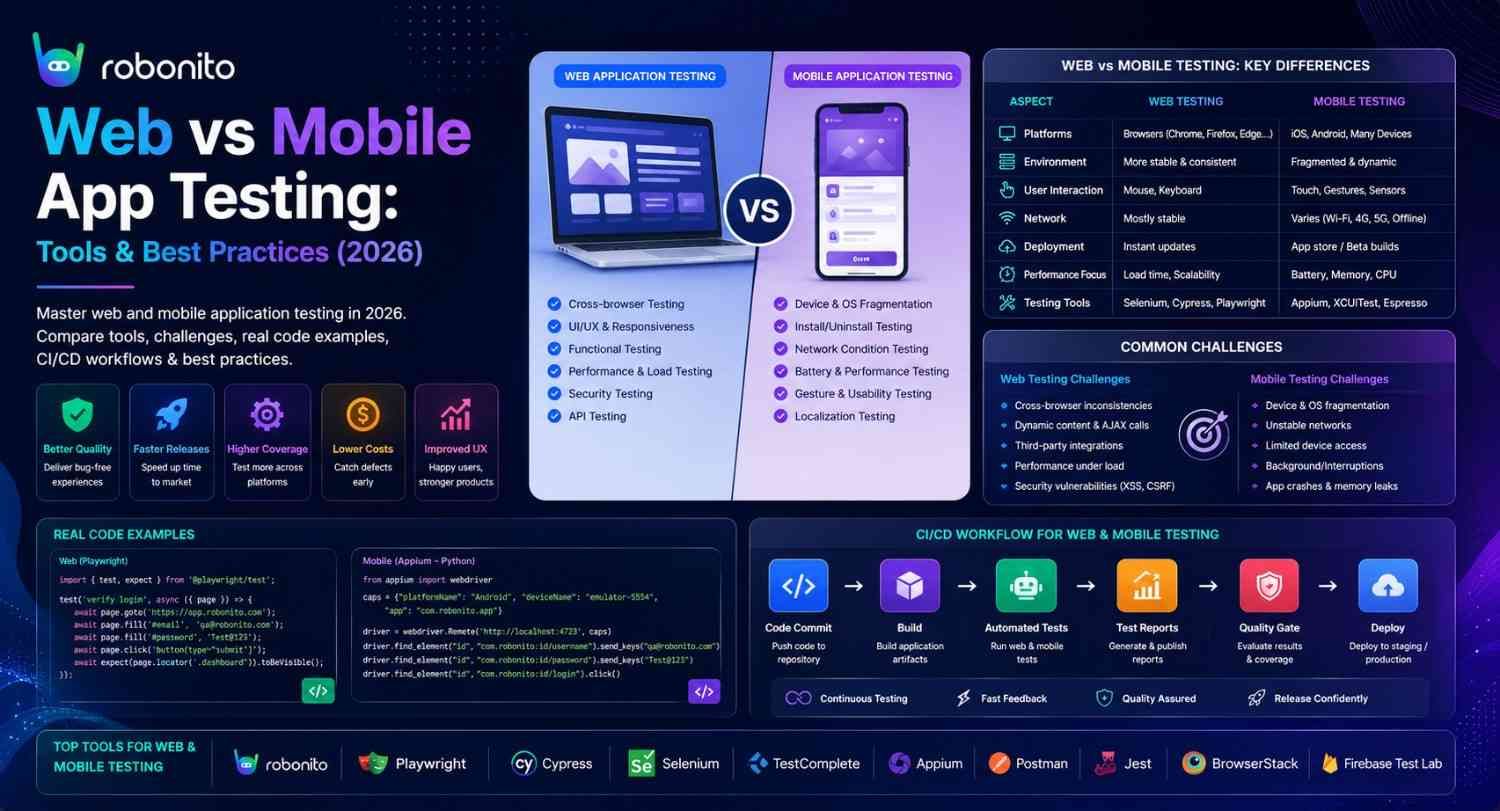
A Playwright test that passes on desktop Chrome tells you nothing about how your app behaves when an Android user taps a button with their thumb on a 4G connection in offline mode. Web and mobile testing are not the same discipline with different names — they are fundamentally different engineering challenges. This guide explains every key difference, with real tools, real code, and a testing strategy for each.
By Robonito Engineering Team · Updated May 2026 · 18 min read
Quick stats
| Fact | Source |
|---|---|
| There are over 24,000 distinct Android device models in active use | OpenSignal Device Fragmentation Report 2025 |
| 55% of global web traffic comes from mobile devices | Statista 2025 |
| Mobile apps have 3× more test configurations than web apps on average | Perfecto Mobile Testing Report 2025 |
| 70% of mobile app crashes occur on devices not included in QA test matrices | Crashlytics / Firebase 2025 |
| Cross-browser compatibility issues affect 49% of web app users at least monthly | BrowserStack State of Testing 2025 |
Table of Contents
- The fundamental distinction — what makes them different
- Complete comparison: web vs mobile testing
- Web application testing — what it requires
- Mobile application testing — what it requires
- The unique challenges of mobile testing
- Tool comparison — web testing tools vs mobile testing tools
- Real code examples — web and mobile
- Mobile web testing — the third category
- CI/CD integration for web and mobile testing
- Testing strategy recommendations by app type
- When Teams Choose Robonito
- Pre-release testing checklist — web and mobile
- Frequently Asked Questions
Test web and mobile applications — without writing test scripts
Robonito auto-generates and maintains tests across:
- Web applications
- Mobile web applications
- Native iOS apps
- Native Android apps
- Hybrid applications Run tests in CI/CD and automatically recover from UI changes with self-healing automation. Try Robonito free →
Robonito auto-generates and maintains tests across:
- Web applications
- Mobile web applications
- Native iOS apps
- Native Android apps
- Hybrid applications
1. The fundamental distinction — what makes them different
One-sentence definition for featured snippets: Web application testing validates software accessed through browsers using DOM-based interaction and cross-browser compatibility techniques; mobile application testing validates native or hybrid apps on iOS and Android devices using platform-specific tools, real hardware testing, and mobile-specific scenarios like touch gestures, offline mode, and push notifications.
The difference is not superficial. It runs through every layer of the testing stack: the tools, the test environments, the scenarios you need to cover, the challenges you will face, and the CI/CD infrastructure required to run tests reliably.
Web applications live in the browser. The browser provides a standardised runtime that abstracts most hardware differences away. A web test verifies that HTML elements are present and interactive, that CSS renders correctly, and that JavaScript executes as expected. The primary variable is the browser engine — Chromium, WebKit, Gecko — and the test environment is the browser itself.
Mobile applications live on the device. The device's hardware, OS version, screen density, available memory, network condition, and battery state all directly affect how the app behaves. A mobile test verifies that the app works correctly on a Samsung Galaxy S23 running Android 14 with 6GB RAM on a 4G connection — and that those same assertions hold on a five-year-old iPhone SE with 2GB RAM in an area with intermittent connectivity.
This is why the same test written for a web application cannot simply be reused for its mobile counterpart. The execution environment is fundamentally different.
2. Complete comparison: web vs mobile testing
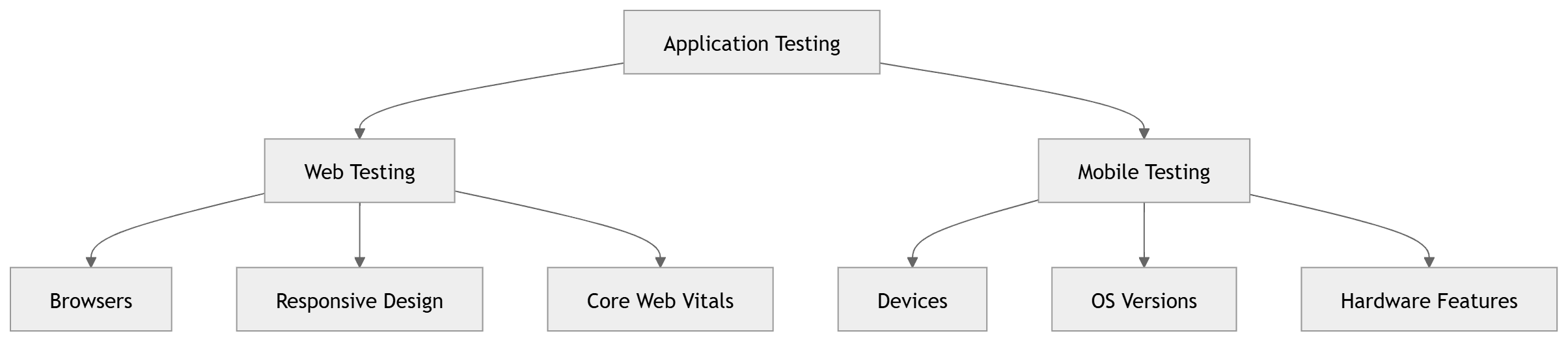
| Dimension | Web Application Testing | Mobile Application Testing |
|---|---|---|
| Test execution environment | Browser (Chromium, Firefox, WebKit) | Real device or emulator (iOS Simulator, Android Emulator) |
| Primary fragmentation variable | Browser engine and version | Device model, OS version, screen density |
| Interaction paradigm | Mouse, keyboard, click events | Touch, swipe, pinch, long-press, hardware buttons |
| Network testing | Throttling via DevTools or proxy | Real network switching (WiFi → 4G → offline) |
| Hardware integration | Limited (camera via browser API) | Camera, GPS, Bluetooth, NFC, accelerometer, biometrics |
| Deployment | Instant — push to server | App store submission + review (1–7 days) |
| Update delivery | Immediate — users always get latest | User must update app; old versions persist in the wild |
| Primary test tools | Playwright, Cypress, Selenium | Appium, Detox, XCUITest, Espresso |
| Device/browser matrix | 3–5 browsers + versions | 50–200+ device/OS combinations for full coverage |
| Offline testing | Service worker testing | Full offline mode, local data sync, conflict resolution |
| Performance testing | Core Web Vitals, page load speed | App launch time, scroll frame rate, battery drain |
| CI/CD complexity | Medium — browser containers | High — simulators, real devices, signing certificates |
| App store compliance | Not applicable | Mandatory — Apple App Store, Google Play policies |
3. Web application testing — what it requires
Cross-browser compatibility
The primary web-specific testing challenge is ensuring consistent behaviour across browser engines. Chrome, Safari, Firefox, and Edge render CSS differently, implement JavaScript APIs differently, and handle edge cases in forms, media, and animations differently.
2026 browser usage — what to prioritise:
| Browser | Engine | Desktop share | Mobile share | Priority |
|---|---|---|---|---|
| Chrome | Blink/V8 | ~65% | ~65% | Must test |
| Safari | WebKit | ~19% | ~26% | Must test |
| Edge | Blink/V8 | ~4% | ~1% | Should test |
| Firefox | Gecko | ~3% | ~0.5% | Should test |
| Samsung Internet | Blink | ~0.5% | ~4% | Mobile priority |
The critical insight here: Safari (WebKit) is the second most-used browser globally and behaves fundamentally differently from Chrome. CSS gap in flexbox, scroll behaviour, date input rendering, and numerous JavaScript APIs produce different results in Safari versus Chrome. Any web testing strategy that tests only Chrome misses 19% of desktop users and 26% of mobile users.
Responsive design testing
Web applications must adapt to every viewport size from 320px (old iPhones) to 3840px (4K monitors). Responsive testing verifies that:
- Layouts reflow correctly at each breakpoint
- Touch targets meet minimum size requirements (44×44px)
- No horizontal scrollbar appears on mobile viewports
- Navigation collapses correctly on small screens
- Text remains readable without zooming
Performance — Core Web Vitals
Google's Core Web Vitals are the standard performance benchmarks for web applications, directly affecting search ranking:
| Metric | Measures | Good | Needs work | Poor |
|---|---|---|---|---|
| LCP (Largest Contentful Paint) | Page load speed | < 2.5s | 2.5–4s | > 4s |
| INP (Interaction to Next Paint) | Input responsiveness | < 200ms | 200–500ms | > 500ms |
| CLS (Cumulative Layout Shift) | Visual stability | < 0.1 | 0.1–0.25 | > 0.25 |
4. Mobile application testing — what it requires
Types of mobile applications and why it matters for testing
Native apps (Swift/Objective-C for iOS, Kotlin/Java for Android) — built for one platform, use platform APIs directly. Best performance, deepest hardware access, hardest to test across platforms. Tools: XCUITest (iOS), Espresso (Android).
Cross-platform apps (React Native, Flutter) — one codebase, compiles to native on each platform. Most teams today. Tools: Detox (React Native), Flutter's built-in test framework.
Hybrid apps (Ionic, Capacitor, Cordova) — web views wrapped in a native container. Web testing approaches partially apply. Tools: Appium, Cypress (for web layer), native tools for container.
Progressive Web Apps (PWAs) — web apps installed on device home screen. Mostly testable with web tools but require real-device testing for push notifications, offline mode, and install behaviour.
The type of app determines which testing tools are available and which scenarios require the most attention.
Mobile-specific test scenarios that have no web equivalent
These scenarios do not exist in web testing. Every mobile test strategy must address them:
Interruptions and state transitions:
- Incoming phone call during active session — does the app pause and resume correctly?
- App moved to background mid-transaction — is the state preserved?
- App killed by OS due to low memory — does it restart to the correct state?
- Device rotation mid-interaction — does the form data persist?
Hardware integration:
- Camera access — permissions, capture, processing
- GPS location — permission flow, accuracy, mock location testing
- Biometric authentication — Face ID, Touch ID, fingerprint
- Push notifications — delivery, deep link handling, permission flow
Network conditions:
- Transition from WiFi to cellular mid-request — does it recover?
- Complete offline mode — does the app degrade gracefully?
- Slow network (2G simulation) — does the app timeout or queue requests?
App-specific lifecycle:
- Cold start time (app not in memory)
- Warm start time (app in background)
- Battery consumption during extended use
5. The unique challenges of mobile testing
Challenge 1: Device fragmentation
This is the defining challenge of mobile testing and has no equivalent in web testing.
There are over 24,000 distinct Android device models in active use globally (OpenSignal 2025). Each combination of manufacturer, device model, Android version, and screen density can produce different rendering, performance, and compatibility behaviour. An app that runs perfectly on a Samsung Galaxy S24 (Android 14, 6.7-inch display, 120Hz) may crash on a Xiaomi Redmi 9 (Android 11, 6.5-inch display, 60Hz) due to differences in GPU drivers, available memory, or manufacturer Android customisations.
Practical approach to device fragmentation:
You cannot test on 24,000 devices. You choose a device matrix that covers your actual user base. At minimum:
| Category | Devices | Why |
|---|---|---|
| Current flagship iOS | iPhone 15 Pro | Latest iOS, most demanding users |
| Mid-range iOS | iPhone 13 | High volume, older iOS version |
| Small iOS | iPhone SE (3rd gen) | Smallest supported screen |
| Current flagship Android | Samsung Galaxy S24 | Largest Android market share |
| Mid-range Android | Google Pixel 7 | Pure Android, developer reference |
| Budget Android | Samsung Galaxy A15 | Represents typical emerging market device |
| Older Android | Any device on Android 12 | Still represents ~20% of Android users |
Use real device cloud platforms (BrowserStack App Automate, AWS Device Farm, Firebase Test Lab) for the full matrix. Run your core test suite locally on 2–3 physical devices you own for fast development feedback.
Challenge 2: Network variability
Mobile users do not always have reliable high-speed connections. An app used by commuters moves through varying network conditions multiple times per session. An app used in rural areas may operate primarily on 3G or with intermittent connectivity.
Testing under degraded network conditions is essential:
// Simulating network conditions in Detox (React Native)
// Set before tests that depend on network behaviour

import { device } from 'detox';

describe('Offline mode behaviour', () => {

  beforeEach(async () => {
    await device.launchApp({ newInstance: true });
  });

  it('shows cached content when offline', async () => {
    // First, load content with network available
    await element(by.id('product-list')).tap();
    await expect(element(by.id('product-item-001'))).toBeVisible();

    // Simulate going offline
    await device.setURLBlacklist(['.*']);  // Block all network requests

    // Navigate away and back
    await element(by.id('home-tab')).tap();
    await element(by.id('products-tab')).tap();

    // Cached content should still appear
    await expect(element(by.id('product-item-001'))).toBeVisible();
    // Offline indicator should appear
    await expect(element(by.id('offline-banner'))).toBeVisible();
  });

  it('queues actions taken offline and syncs when reconnected', async () => {
    await device.setURLBlacklist(['.*']);  // Go offline

    // Take an action that should sync later
    await element(by.id('add-to-favourites-001')).tap();

    // Restore network
    await device.setURLBlacklist([]);

    // Verify the action was synced
    await waitFor(element(by.id('sync-success-indicator')))
      .toBeVisible()
      .withTimeout(10000);
  });
});
Challenge 3: App store compliance
Every iOS app must pass Apple's App Review before reaching users. Google Play has its own review process for Android. Both platforms have detailed guidelines covering content, functionality, privacy, performance, and user experience that your app must comply with before release.
Common app store rejection reasons that require testing:
Apple App Store:
- App crashes during review (automated testing priority)
- Incomplete or broken functionality
- Privacy nutrition label inaccuracies (what data the app collects)
- Use of private APIs
- Poor performance on older supported devices
Google Play:
- Permission requests not justified in the store listing
- App targets outdated API level (Google enforces minimum target SDK)
- Deceptive behaviour or broken functionality
6. Tool comparison — web testing tools vs mobile testing tools
Web testing tools
| Tool | Engine support | Language | Best for | Pricing |
|---|---|---|---|---|
| Playwright | Chromium, Firefox, WebKit | TS/JS/Python/Java/C# | Modern web, cross-browser, visual regression | Free OSS |
| Cypress | Chromium, Firefox (limited Safari) | JavaScript only | SPA component testing, developer experience | Free OSS + Cloud |
| Selenium | All browsers | All major languages | Legacy, maximum flexibility | Free OSS |
| Robonito | All browsers | None (no-code) | No-code web regression | Free tier + paid |
| WebdriverIO | All browsers + mobile | JavaScript | Unified web + mobile (via Appium) | Free OSS |
Mobile testing tools
| Tool | Platform | Language | Best for | Pricing |
|---|---|---|---|---|
| Robonito | iOS, Android, Mobile Web | No-code | AI-powered mobile testing, regression automation, self-healing tests | Free tier + paid |
| Detox | React Native (iOS + Android) | JavaScript | React Native E2E, gray-box testing | Free OSS |
| XCUITest | iOS native only | Swift/Objective-C | Deep iOS native testing | Free (Xcode) |
| Espresso | Android native only | Kotlin/Java | Deep Android native testing | Free (Android SDK) |
| Appium | iOS + Android + Desktop | All major languages | Cross-platform, existing Selenium teams | Free OSS |
| Flutter Test | Flutter (iOS + Android) | Dart | Flutter apps | Free (Flutter SDK) |
| Maestro | iOS + Android | YAML | Simple mobile flows, no-code friendly | Free OSS |
Real device cloud platforms (for both)
| Platform | Device count | Best for | Pricing |
|---|---|---|---|
| BrowserStack | 3,500+ real devices | Both web and mobile, CI/CD integration | From $29/mo |
| AWS Device Farm | 2,000+ real devices | AWS ecosystem teams, pay-per-use | $0.17/device-minute |
| Firebase Test Lab | Android physical + virtual | Android-focused, Google ecosystem | Free tier + pay-per-use |
| LambdaTest | 3,000+ browsers/devices | Budget-friendly, cross-browser + mobile | From $15/mo |
7. Real code examples — web and mobile
7.1 Web application test — Playwright cross-browser
// tests/web/checkout.spec.ts — runs on Chromium, Firefox, and WebKit
import { test, expect, devices } from '@playwright/test';

// playwright.config.ts should include these projects:
// { name: 'chromium', use: { ...devices['Desktop Chrome'] } }
// { name: 'webkit', use: { ...devices['Desktop Safari'] } }
// { name: 'mobile-safari', use: { ...devices['iPhone 14'] } }

test.describe('Checkout — cross-browser', () => {

  test('completes purchase on all supported browsers', async ({ page, browserName }) => {
    await page.goto('/products/widget-pro');
    await page.getByRole('button', { name: 'Add to cart' }).click();
    await page.getByRole('link', { name: 'Checkout' }).click();

    // Touch-specific assertion for mobile browsers
    if (browserName === 'webkit') {
      // Safari handles date inputs differently
      await expect(page.getByLabel('Delivery date')).toHaveAttribute('type', 'date');
    }

    await page.getByLabel('Full name').fill('Test User');
    await page.getByLabel('Email').fill('test@example.com');
    await page.getByRole('button', { name: 'Place order' }).click();

    await expect(page.getByRole('heading', { name: 'Order confirmed' })).toBeVisible();
  });

  test('layout is correct on mobile viewport', async ({ page }) => {
    await page.setViewportSize({ width: 375, height: 812 }); // iPhone SE
    await page.goto('/');

    // Desktop nav should be hidden, hamburger menu visible
    await expect(page.getByRole('navigation')).not.toBeVisible();
    await expect(page.getByRole('button', { name: /menu/i })).toBeVisible();

    // No horizontal scrollbar
    const bodyWidth = await page.evaluate(() => document.body.scrollWidth);
    const viewportWidth = await page.evaluate(() => window.innerWidth);
    expect(bodyWidth).toBeLessThanOrEqual(viewportWidth);
  });
});
7.2 React Native test — Detox E2E
// e2e/checkout.e2e.js — Detox test for React Native app
import { device, element, expect, by, waitFor } from 'detox';

describe('Checkout flow — React Native', () => {

  beforeAll(async () => {
    await device.launchApp();
  });

  beforeEach(async () => {
    await device.reloadReactNative();
  });

  it('completes purchase with valid payment', async () => {
    // Navigate to product
    await element(by.id('product-list-item-001')).tap();
    await element(by.id('add-to-cart-button')).tap();

    // Verify cart badge updated
    await expect(element(by.id('cart-badge'))).toHaveText('1');

    // Proceed to checkout
    await element(by.id('checkout-button')).tap();

    // Fill shipping form
    await element(by.id('full-name-input')).typeText('Test User');
    await element(by.id('email-input')).typeText('test@example.com');

    // Dismiss keyboard before scrolling
    await element(by.id('email-input')).tapReturnKey();

    // Scroll to payment section on small screens
    await element(by.id('checkout-scroll-view')).scrollTo('bottom');

    await element(by.id('card-number-input')).typeText('4242424242424242');
    await element(by.id('expiry-input')).typeText('1228');
    await element(by.id('cvv-input')).typeText('123');

    await element(by.id('place-order-button')).tap();

    // Wait for async order creation
    await waitFor(element(by.id('order-confirmation-heading')))
      .toBeVisible()
      .withTimeout(10000);

    await expect(element(by.id('order-number'))).toHaveText(
      expect.stringMatching(/^ORD-\d{8}$/)
    );
  });

  it('handles interruption by incoming call gracefully', async () => {
    await element(by.id('product-list-item-001')).tap();
    await element(by.id('add-to-cart-button')).tap();
    await element(by.id('checkout-button')).tap();
    await element(by.id('full-name-input')).typeText('Test User');

    // Simulate incoming call (app goes to background)
    await device.sendToHome();
    await device.launchApp({ newInstance: false }); // Resume from background

    // Form data should be preserved after interruption
    await expect(element(by.id('full-name-input'))).toHaveText('Test User');
  });

  it('shows appropriate feedback on slow network', async () => {
    // Simulate slow 3G connection
    await device.setURLBlacklist([]); // Clear any existing blacklist

    await element(by.id('checkout-button')).tap();
    await element(by.id('full-name-input')).typeText('Test User');
    await element(by.id('place-order-button')).tap();

    // Loading indicator should appear immediately
    await expect(element(by.id('loading-spinner'))).toBeVisible();

    // User should not be able to tap Place Order again (prevents duplicate)
    await expect(element(by.id('place-order-button'))).not.toBeEnabled();
  });
});
7.3 Appium test — cross-platform iOS and Android
## tests/mobile/test_login_appium.py — runs on iOS and Android
import pytest
from appium import webdriver
from appium.webdriver.common.appiumby import AppiumBy
from selenium.webdriver.support.ui import WebDriverWait
from selenium.webdriver.support import expected_conditions as EC

## Configuration for iOS
IOS_CAPABILITIES = {
    "platformName": "iOS",
    "appium:platformVersion": "17.0",
    "appium:deviceName": "iPhone 15",
    "appium:app": "/path/to/YourApp.app",
    "appium:automationName": "XCUITest",
}

## Configuration for Android
ANDROID_CAPABILITIES = {
    "platformName": "Android",
    "appium:platformVersion": "14",
    "appium:deviceName": "Pixel 7",
    "appium:app": "/path/to/YourApp.apk",
    "appium:automationName": "UiAutomator2",
}

class TestLoginFlow:

    def test_login_with_valid_credentials(self, driver):
        wait = WebDriverWait(driver, 15)

        ## Find login elements using accessibility IDs (works on both iOS and Android)
        email_field = wait.until(
            EC.presence_of_element_located((AppiumBy.ACCESSIBILITY_ID, "email-input"))
        )
        email_field.send_keys("testuser@example.com")

        password_field = driver.find_element(AppiumBy.ACCESSIBILITY_ID, "password-input")
        password_field.send_keys("TestPass2026!")

        login_button = driver.find_element(AppiumBy.ACCESSIBILITY_ID, "login-button")
        login_button.click()

        ## Verify navigation to dashboard
        dashboard = wait.until(
            EC.presence_of_element_located((AppiumBy.ACCESSIBILITY_ID, "dashboard-heading"))
        )
        assert dashboard.is_displayed()

    def test_biometric_authentication_prompt(self, driver):
        """Test that biometric auth is offered to returning users"""
        biometric_prompt = driver.find_element(
            AppiumBy.ACCESSIBILITY_ID, "biometric-auth-prompt"
        )
        assert biometric_prompt.is_displayed()
        ## Note: actual biometric authentication must be tested on real devices,
        ## not simulators — simulators cannot simulate biometric sensors
8. Mobile web testing — the third category
Mobile web testing sits between web testing and native mobile testing — and it is the category teams most frequently handle incorrectly.
A mobile web app is a website accessed through a mobile browser (Chrome for Android, Safari for iOS). It is not the same as a native mobile app, but it is also not the same as the desktop web app. It has distinct characteristics that require specific testing attention:
What web tests cover for mobile web: Viewport rendering, touch event handling (via Playwright's mobile device profiles), responsive layout, basic performance.
What web tests do NOT cover for mobile web:
- Safari on iOS renders differently from Chrome on iOS (different WebKit versions)
- iOS Safari's handling of form inputs, date pickers, and select dropdowns is unique
- PWA installation, service workers, and offline mode need real device testing
- Touch scroll momentum, rubber-banding, and overscroll behaviour
- Status bar and notch interactions on specific devices
When to use real devices vs browser emulation for mobile web
Playwright mobile emulation sufficient for:
✅ Viewport size and responsive layout verification
✅ Touch event simulation for basic interactions
✅ JavaScript and CSS behaviour (Chromium + WebKit)
✅ Performance measurement (Core Web Vitals)

Real device testing required for:
🔴 Safari-specific iOS behaviours (form inputs, scroll, date picker)
🔴 PWA installation and home screen behaviour
🔴 Push notification permission flow and delivery
🔴 Device-specific input methods (e.g., iOS autocorrect, predictive text)
🔴 Network transitions (WiFi to cellular)
🔴 Any test where "does it feel right on mobile?" is the question
9. CI/CD integration for web and mobile testing
Web and mobile CI/CD pipelines differ significantly in complexity and execution time.
Web testing CI pipeline (GitHub Actions)
## .github/workflows/web-tests.yml
name: Web Application Tests

on: [push, pull_request]

jobs:
  cross-browser-tests:
    runs-on: ubuntu-latest
    steps:
      - uses: actions/checkout@v4
      - uses: actions/setup-node@v4
        with: { node-version: '20', cache: 'npm' }
      - run: npm ci
      - run: npx playwright install --with-deps chromium webkit firefox
      - run: npm run start:test &
      - run: npx wait-on http://localhost:3000 --timeout 30000
      - run: npx playwright test
        ## Runs all projects: chromium, webkit, firefox, mobile-chrome, mobile-safari
      - uses: actions/upload-artifact@v4
        if: failure()
        with:
          name: playwright-report
          path: playwright-report/
Mobile testing CI pipeline (GitHub Actions + BrowserStack)
## .github/workflows/mobile-tests.yml
name: Mobile App Tests

on:
  push:
    branches: [main]
  pull_request:

jobs:
  build-app:
    runs-on: macos-latest  ## Required for iOS builds
    steps:
      - uses: actions/checkout@v4

      - name: Build iOS app for testing
        run: |
          xcodebuild build-for-testing \
            -scheme YourApp \
            -destination 'generic/platform=iOS Simulator' \
            -derivedDataPath DerivedData

      - name: Upload iOS build
        uses: actions/upload-artifact@v4
        with:
          name: ios-build
          path: DerivedData/Build/Products/Debug-iphonesimulator/YourApp.app

  detox-tests:
    runs-on: macos-latest
    needs: build-app
    steps:
      - uses: actions/checkout@v4
      - uses: actions/setup-node@v4
        with: { node-version: '20', cache: 'npm' }

      - name: Download iOS build
        uses: actions/download-artifact@v4
        with:
          name: ios-build

      - run: npm ci
      - run: npx detox build --configuration ios.sim.release

      - name: Start iOS Simulator
        run: xcrun simctl boot "iPhone 15"

      - name: Run Detox tests
        run: |
          npx detox test \
            --configuration ios.sim.release \
            --cleanup
        env:
          CI: true

  browserstack-real-devices:
    runs-on: ubuntu-latest
    needs: build-app
    if: github.ref == 'refs/heads/main'  ## Real device tests on main only
    steps:
      - uses: actions/checkout@v4
      - uses: actions/setup-node@v4
        with: { node-version: '20', cache: 'npm' }
      - run: npm ci

      - name: Run tests on BrowserStack real devices
        run: npm run test:browserstack
        env:
          BROWSERSTACK_USERNAME: ${{ secrets.BROWSERSTACK_USERNAME }}
          BROWSERSTACK_ACCESS_KEY: ${{ secrets.BROWSERSTACK_ACCESS_KEY }}
CI pipeline comparison
| Aspect | Web testing CI | Mobile testing CI |
|---|---|---|
| Build required | No (start dev server) | Yes (compile app) |
| OS requirement | Linux (any) | macOS (required for iOS) |
| Execution time | 5–15 minutes | 15–45 minutes |
| Infrastructure cost | Low | High (macOS runners 10× more expensive) |
| Parallelisation | Easy | Complex (simulator limits) |
| Real device | Via BrowserStack (optional) | Recommended for pre-release |
10. Testing strategy recommendations by app type
Use this to define your testing investment based on what you are building:
Pure web application (SaaS, e-commerce, content):
- Playwright for cross-browser E2E + visual regression
- axe-core for accessibility
- k6 for performance (Core Web Vitals baseline)
- OWASP ZAP for security
- Robonito for no-code regression automation
React Native mobile app:
- Robonito for AI-powered end-to-end regression testing across mobile user journeys without maintaining large automation suites
- Jest + React Native Testing Library for component unit tests
- Detox for E2E (grey-box, tight React Native integration)
- BrowserStack App Automate for real device matrix testing
- Firebase Test Lab for Android distribution testing
- XCUITest via Xcode for deep iOS integration scenarios
Native iOS app:
- Robonito for no-code regression testing of critical user flows and release validation
- XCTest/XCUITest for all automated testing
- TestFlight for beta distribution and pre-release testing
- Instruments for performance profiling and memory leak detection
- Firebase Crashlytics for production crash monitoring
Native Android app:
- Robonito for end-to-end regression coverage across Android devices without maintaining Espresso test suites
- Espresso for UI testing
- JUnit for unit testing
- Firebase Test Lab for device matrix testing
- Android Profiler for performance testing
Hybrid app (React web + Appium):
- Robonito for unified web, mobile web, and hybrid application regression automation
- Playwright for web layer testing
- Appium for native container and device-specific testing
- Real device testing for bridge interactions
Teams prioritising speed and low maintenance:
- Robonito for AI-powered web, mobile web, native mobile, and hybrid application testing
- Self-healing automation reduces maintenance overhead
- Suitable for teams without dedicated automation engineers
- Integrates with CI/CD pipelines and existing QA workflows
11. When Teams Choose Robonito
Robonito is typically chosen when teams need:
- Web and mobile testing in one platform
- Faster test creation without coding
- Reduced maintenance through self-healing automation
- CI/CD integration without managing complex test frameworks
- Coverage across browsers, devices and user journeys
Rather than replacing tools like Playwright, Detox, Espresso or XCUITest for specialist engineering workflows, Robonito helps teams automate end-to-end testing at scale with significantly less maintenance effort.
| Need | Traditional Frameworks | Robonito |
|---|---|---|
| Test Creation | Manual scripting | AI-assisted |
| Maintenance | High | Self-healing |
| Cross-browser | Yes | Yes |
| Mobile Testing | Yes | Yes |
| CI/CD Integration | Yes | Yes |
| Coding Required | Yes | No |
12. Pre-release testing checklist — web and mobile
Web application pre-release
- Functional tests passing on Chrome and Safari (minimum)
- Responsive layout verified at 375px, 768px, 1280px, 1920px
- No horizontal scrollbar on mobile viewports
- LCP < 2.5 seconds, INP < 200ms, CLS < 0.1 (Lighthouse audit)
- axe-core accessibility scan: zero WCAG 2.2 AA violations
- All keyboard navigation paths verified
- OWASP ZAP security scan: zero Critical/High findings
- Cross-browser visual regression: no unexpected differences
Mobile application pre-release
- Core user flows tested on minimum 4 real devices (2 iOS, 2 Android)
- App tested on oldest supported iOS version and oldest supported Android version
- Interruption testing: incoming call, app backgrounded, device rotated
- Offline mode: app degrades gracefully, queues actions, syncs on reconnect
- Push notification delivery and deep link handling verified
- Biometric authentication flow tested on real device (not simulator)
- App launch time < 3 seconds cold start on mid-range device
- No memory leaks during 20-minute usage session (Instruments/Android Profiler)
- App store compliance review completed (content, permissions, API targets)
- Beta testing completed via TestFlight (iOS) and Google Play Internal Testing (Android)
- Crash-free rate > 99.5% during beta period (Firebase Crashlytics)
Frequently Asked Questions
What is the difference between web application testing and mobile application testing?
Web application testing validates software accessed through browsers, focusing on cross-browser compatibility, responsive layouts, and DOM-based interactions. Mobile application testing validates native or hybrid apps on iOS and Android devices, focusing on touch gestures, hardware integration, offline behaviour, app state management, and performance across thousands of device/OS combinations. The tools, test environments, and challenges are fundamentally different.
What are the biggest challenges unique to mobile app testing?
Device fragmentation (24,000+ Android models), network variability (testing on 2G through 5G and offline), hardware integration (camera, GPS, biometrics), app state management (foreground/background/killed), app store compliance, and battery/performance constraints on low-end devices. None of these exist in web testing.
What is the best tool for mobile app testing in 2026?
The best tool depends on your team and application architecture.
- Robonito is well suited for teams that want to automate native mobile and mobile web testing without maintaining large automation frameworks.
- Detox is excellent for React Native applications.
- XCUITest is best for native iOS development teams.
- Espresso is best for native Android development teams.
- Appium remains popular for cross-platform automation.
What is the best tool for web application testing in 2026?
Playwright is the current gold standard — it supports all major browsers including Safari via WebKit, has first-class TypeScript support, and includes visual regression testing. Cypress is excellent for React/Vue/Angular SPAs. Robonito provides no-code web testing for teams without dedicated automation engineers.
Should mobile web testing use web tools or mobile tools?
Web tools like Playwright with mobile device profiles cover most mobile web testing scenarios. For Safari-specific iOS behaviours, PWA installation, push notifications, and network transitions, real device testing with BrowserStack or native tools is required. Use emulation for speed, real devices for accuracy on platform-specific scenarios.
How does the CI/CD pipeline differ between web and mobile testing?
Web CI pipelines run on Linux, require no compilation, complete in 5–15 minutes, and are straightforward to parallelise. Mobile CI pipelines require macOS for iOS builds, compile the app before testing, take 15–45 minutes, and are significantly more expensive due to macOS runner costs. Real device testing on BrowserStack or AWS Device Farm adds further time and cost but is essential for production releases.
External references
- Playwright Mobile Testing — Mobile emulation documentation
- Detox Documentation — React Native testing framework
- Appium Documentation — Cross-platform mobile automation
- BrowserStack App Automate — Real device cloud
- Firebase Test Lab — Android device testing
- Apple XCUITest — iOS native testing
- Google Espresso — Android native testing
Automate web and mobile web regression — without a single script
Robonito generates and maintains regression tests for web and mobile web applications automatically — running across browsers in CI and self-healing when your UI changes. Start free at Robonito.com →
Automate your QA — no code required
Stop writing test scripts.
Start shipping with confidence.
Join thousands of QA teams using Robonito to automate testing in minutes — not months.
