
Most developers test string inputs as an afterthought — a quick check that the login field doesn't accept numbers, maybe a length limit on a comment box. Then production gets a support ticket: a user whose name contains an apostrophe can't create an account. Or a search query with a percent sign breaks the URL. Or someone submits <script>alert('xss')</script> into a feedback form and it renders on the admin dashboard.
String testing is the discipline that catches these failures before your users do. This guide covers what it actually involves, the techniques that find real bugs, and how to build string test coverage that scales.
Originally published 2023. Updated May 2026.
Key Takeaways
- String bugs are responsible for a disproportionate share of security vulnerabilities — XSS, SQL injection, and buffer overflow attacks all exploit inadequate string validation
- Most string test failures come from four categories: boundary lengths, special characters, encoding/Unicode, and null/empty inputs
- Automated string testing pays for itself fastest on forms and APIs — the highest-surface-area parts of any web application
- A string that works in English may break completely in Arabic, Japanese, or any right-to-left or double-byte character language
- No-code testing tools now let QA teams run comprehensive string test suites without writing regex or parsing code
What Is String Testing in Software Testing?
String testing is the practice of validating how a software application handles string inputs — text data that users enter, that systems exchange, or that the application stores and retrieves. It's a subset of functional testing focused specifically on text processing behavior.
In modern web applications, strings are everywhere:
- Form fields: Names, email addresses, passwords, search queries
- API parameters: URL parameters, request bodies, headers
- Database operations: Queries, stored values, retrieved text
- User interface content: Labels, error messages, dynamic text
- Configuration values: Connection strings, file paths, environment variables
Every one of these is a potential failure point. String testing systematically works through each one to confirm the application handles expected inputs correctly — and handles unexpected ones gracefully.
The Difference Between String Testing and General Input Validation
Input validation is part of string testing, but it's not the whole picture. String testing also covers:
- What happens to valid strings after they're accepted (storage, retrieval, display)
- How strings behave when processed (concatenation, splitting, comparison)
- Whether string operations maintain performance under volume
- How the application handles strings in different languages and character sets
A form that validates email format correctly but stores the address with leading whitespace stripped inconsistently — causing login failures — has passed input validation and failed string testing.
Why String Testing Gets Skipped — And Why That's a Problem
String testing gets deprioritized for a predictable reason: it feels like obvious territory. Of course the name field handles normal names. Of course the search box works with regular words.
The cases that break applications aren't the obvious ones. They're the edge cases that nobody thought to try:
- A user whose legal name is
O'Brien— the apostrophe breaks an unescaped SQL query - A customer whose company name is
AT&T— the ampersand breaks a URL parameter - An admin user whose email contains a
+sign — treated as a space in some URL encodings, causing authentication failures - A product with a description containing
</div>— breaks the page layout in an application that renders HTML without sanitization - A search term of 10,000 characters — causes a timeout that takes down the search service for every user
None of these are exotic. Every one has caused a production incident for a real application.
The Four Categories of String Failures

Understanding where string bugs come from makes test design much more efficient. Almost every string-related defect falls into one of four categories.
1. Boundary Length Failures
Applications set length limits on string inputs — sometimes explicitly, sometimes implicitly through database column sizes or API constraints. Boundary failures happen when:
- A string exactly at the maximum length is rejected (off-by-one error)
- A string one character over the limit causes a database truncation error rather than a validation message
- A zero-length string bypasses a "required field" check
- An extremely long string (10,000+ characters) causes a performance degradation or timeout
What to test: Empty string, single character, typical length, maximum allowed length, maximum + 1, extremely long string (1,000–10,000 characters).
2. Special Character Failures
Special characters break string handling when the application passes them to contexts that interpret them — SQL queries, HTML rendering, URL construction, shell commands. The result ranges from a broken UI element to a full SQL injection vulnerability.
Common breaking characters:
'and"— SQL injection in unparameterized queries<,>,&— HTML rendering issues and XSS vectors%,+,#— URL encoding issues\,/— Path traversal in file operations\n,\r,\0— Line break and null byte injection;,|,&&— Command injection in shell contexts
What to test: Each special character type in isolation, then combinations. Pay particular attention to inputs that flow into any interpreted context (SQL, HTML, URLs).
3. Encoding and Unicode Failures
A string that works perfectly in English may fail completely when it contains characters from other scripts. Unicode support issues are among the most common string bugs in applications with international users.
Common encoding failures:
- Arabic and Hebrew characters (right-to-left scripts) breaking layout
- Chinese, Japanese, Korean characters (double-byte) hitting single-byte column size limits
- Emoji characters (
😀) — stored as 4 bytes in UTF-8, breaking databases configured for 3-byte UTF-8 - Accented characters (
é,ü,ñ) — corrupted in Latin-1 encoded databases - Zero-width characters and directional control characters —invisible but present, causing comparison failures
What to test: Strings containing characters from each major Unicode block relevant to your user base. Test storage and retrieval— encoding bugs often don't appear until a string is written to the database and read back.
4. Null and Empty String Failures
The simplest string inputs — nothing at all — cause a surprising number of failures. Applications frequently fail to distinguish between:
null— no value was provided""— an empty string was provided" "— a string containing only whitespace
These three states often need different handling. A required field should reject all three. A username comparison should probably treat "robonito" and " robonito " as the same. A middle name field should accept an empty string but not null.
What to test: Null input (if the interface allows it), empty string, whitespace-only string, string with leading/trailing spaces, string with internal multiple spaces.
String Testing Techniques
Boundary Value Analysis
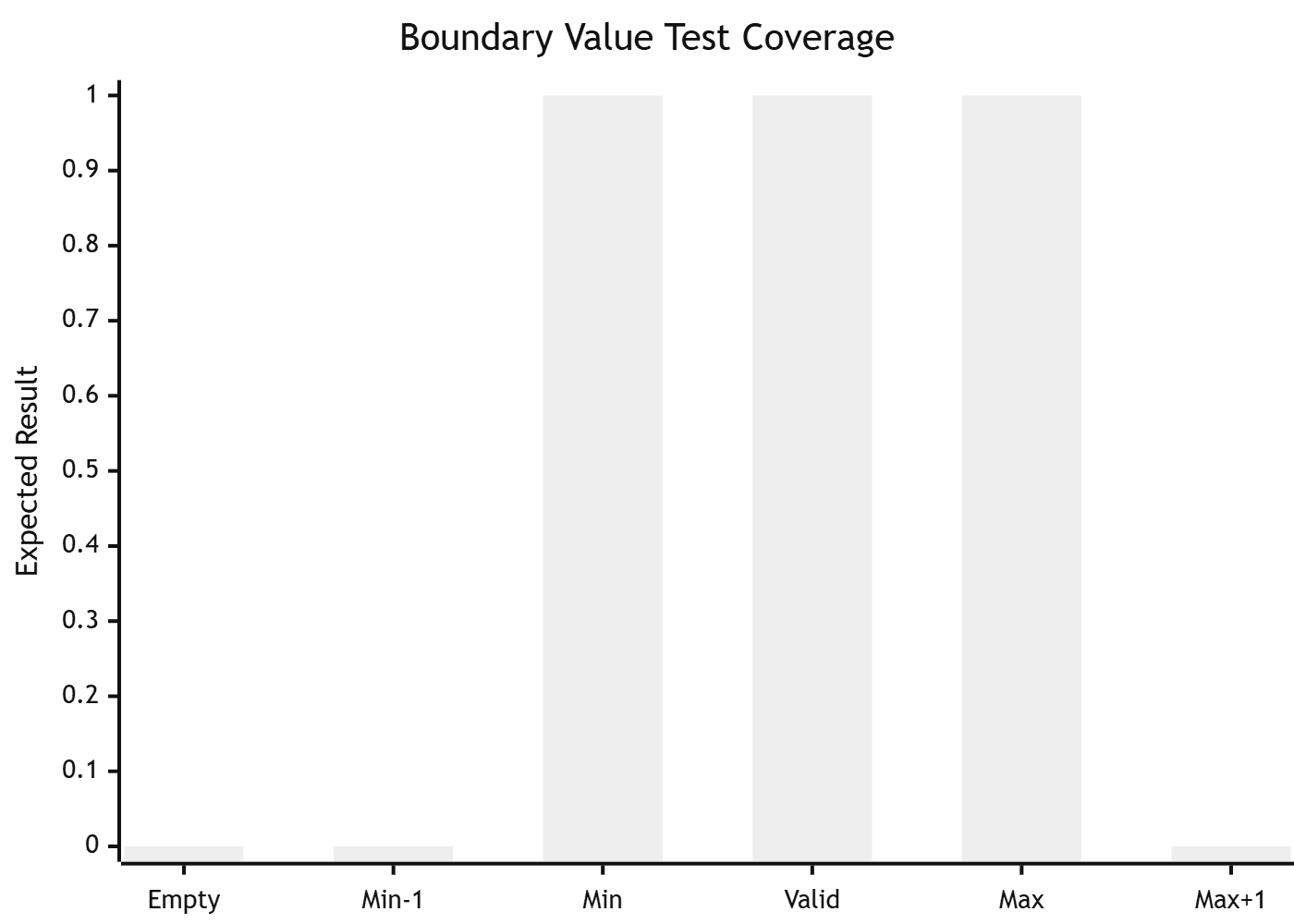
Test the boundaries of your string length constraints — not just the limits themselves, but the values immediately above and below them. If your password field requires 8–64 characters:
- 0 characters (empty)
- 7 characters (one below minimum)
- 8 characters (minimum — should pass)
- 9 characters (one above minimum)
- 64 characters (maximum — should pass)
- 65 characters (one above maximum — should fail cleanly)
- 200 characters (well above maximum — should fail cleanly without error)
The cases that break applications most often aren't the extremes — they're the off-by-one values on either side of the boundary.
Equivalence Partitioning
Instead of testing every possible string (impossible), divide inputs into groups that should behave the same way, and test one representative from each group. For an email address field:
- Valid email format (
user@example.com) — should pass - Missing @ symbol (
userexample.com) — should fail - Missing domain (
user@) — should fail - Special characters in local part (
user+tag@example.com) — should pass - International domain (
user@example.中文) — behavior depends on requirements - Empty string — should fail with "required" message
One well-chosen test case per partition gives you coverage across the realistic input space without testing every permutation.
Error Guessing
Experienced testers build intuition for where string handling breaks. Error guessing is the practice of deliberately trying inputs that have historically caused failures:
- SQL metacharacters (
'; DROP TABLE users; --) - XSS payloads (
<img src=x onerror=alert(1)>) - Format strings (
%s%s%s%s%s%s%s%s%s%s) - Null bytes (
\0) - Unicode edge cases (
\uFEFFbyte order mark,\u200Bzero-width space) - Very long repeated characters (
AAAAAAAAAA...× 10,000)
This isn't just security testing — many of these inputs also trigger bugs in legitimate string processing code that has nothing to do with security.
Mutation Testing for Strings
Mutation testing modifies strings that should pass validation to check whether the validation logic is actually working. If a valid email address passes, test small mutations:
- Remove the
@ - Add a second
@ - Replace
.comwith. com(space before TLD) - Change to uppercase (
USER@EXAMPLE.COM) - Add a trailing space
If any of these mutations still passes, the validation has a gap.
String Testing in Web Application Testing
Web applications have particularly high string testing surface area because user input drives most of their functionality. Every text input, search box, form field, URL parameter, and API endpoint is a string testing target.
Form Input Testing
For any form field, the minimum string test coverage should include:
- Empty submission
- Single character
- Maximum length content
- Maximum length + 1 character
- Whitespace-only input on required fields
- SQL injection pattern (
' OR 1=1 --) - XSS pattern (
<script>alert(1)</script>) - Unicode content relevant to your user base
Search Functionality
Search fields deserve special attention because they typically pass the string directly into a query or search index:
- Empty search
- Single character
- Very long query (500+ characters)
- Query containing special characters (
"exact phrase",+required,-excluded) - Query containing HTML/script tags
- Query in a non-Latin script
API Parameter Testing
APIs expose string inputs through URL parameters, request headers, and request bodies. All are string testing targets. An API parameter that accepts a username should be tested the same way as a form field — most developers only test the happy path in API testing.
How Robonito automates web application testing across forms and APIs
How to Structure a String Testing Plan

Step 1: Inventory Your String Inputs
List every point in the application where string data enters the system. Include user-facing forms, API endpoints, imported data files, and configuration values. Prioritize by risk: inputs that flow into SQL queries, HTML rendering, or authentication are highest priority.
Step 2: Define Expected Behavior for Each Category
For each input, document:
- Valid input range (length limits, format requirements)
- How each of the four failure categories should be handled
- What error messages should appear for each failure type
Without documented expected behavior, test results are ambiguous. You need a specification to test against.
Step 3: Build Your Test Matrix
| Input | Empty | Max length | Max+1 | Special chars | Unicode | SQL pattern | XSS pattern |
|---|---|---|---|---|---|---|---|
| Username | Reject | Accept | Reject | Reject special | Accept | Reject | Reject |
| Reject | Accept | Reject | Accept + only | Accept | Reject | Reject | |
| Search | Reject | Accept | Reject | Accept all | Accept | Sanitize | Sanitize |
| Comment | Reject | Accept | Reject | Accept all | Accept | Sanitize | Sanitize |
Step 4: Automate the Repetitive Cases
Boundary length tests, special character tests, and null/empty tests are highly repetitive — the same test logic with different input values. These are ideal candidates for automation. A no-code testing tool can run 50 string test variations against a form field in the time it takes to manually test 5.
Step 5: Run String Tests on Every Deployment

String behavior can break when application code changes upstream — when a query gets refactored, when a new sanitization library is introduced, or when a character encoding setting changes. String tests should run automatically on every deployment to catch regressions immediately.
How to set up automated regression testing that runs on every PR
Tools for String Testing
Manual Testing Tools
- Browser DevTools: Inspect how strings render in the DOM and identify encoding issues
- Postman / Insomnia: Test API string inputs with full control over encoding and special characters
- Browser extensions for XSS/injection: Generate common attack string payloads automatically
Automated Testing Frameworks
- JUnit / pytest / Jest: Unit testing frameworks that support parameterized string tests — run the same test logic against a large list of input values
- Selenium / Playwright: Browser automation frameworks for testing string behavior in web UIs — require scripting to set up and maintain
- No-code testing tools (e.g., Robonito): Build and run string test suites against web application forms and APIs without writing code — practical for teams where QA members don't have scripting backgrounds
Specialized String Testing Tools
- OWASP ZAP: Automated scanning for string-based security vulnerabilities
- Burp Suite: Manual and automated testing for injection and encoding issues
- i18n testing tools: Validate string behavior across locales and character sets
Common String Testing Mistakes
Testing only the happy path. Most string test suites validate that valid inputs work. The bugs live in the edge cases.
Ignoring the storage/retrieval cycle. A string that displays correctly immediately after input might corrupt on write to the database and show differently when retrieved. Test round-trip behavior, not just input display.
Treating security testing as someone else's job. XSS and injection testing belong in the QA string testing process, not only in a separate security audit. Security teams find vulnerabilities that got through QA — they shouldn't find vulnerabilities that QA never checked.
Skipping localization scenarios. If your application serves users in more than one language, Unicode and encoding tests are not optional.
Not running string tests after refactoring. String handling bugs frequently appear after code changes that weren't intended to affect string processing. Every string test should be in your regression suite.
Frequently Asked Questions
What is string testing in software testing?
String testing is the practice of validating how a software application handles text data — verifying that strings are correctly accepted, rejected, stored, retrieved, displayed, and processed. It covers scenarios including boundary lengths, special characters, Unicode encoding, null inputs, and injection patterns that exploit string handling vulnerabilities.
What are the most important types of string testing?
The four categories that cover most string bugs are boundary length testing (empty, minimum, maximum, over-maximum), special character testing (SQL metacharacters, HTML/script tags, URL-encoding characters), Unicode and encoding testing (non-Latin scripts, emoji, double-byte characters), and null/empty input testing. Security-focused testing for SQL injection and XSS patterns also belongs in every string testing plan.
How does string testing relate to security testing?
String testing and security testing overlap significantly. SQL injection, cross-site scripting (XSS), command injection, and path traversal vulnerabilities are all string handling failures. Testing these attack patterns should be part of routine QA string testing, not reserved for periodic security audits.
Can string testing be automated?
Yes — and it's one of the best candidates for automation because many string test cases follow the same pattern with different input values. A parameterized automated test can run 50 string variations against a form field in seconds. No-code testing tools make this accessible to QA teams without scripting backgrounds.
How do you handle string testing for international applications?
Internationalization string testing should include: strings in every supported language's script, right-to-left text (Arabic, Hebrew), double-byte characters (Chinese, Japanese, Korean), emoji and extended Unicode, and strings with characters that have special meaning in different locales (date separators, decimal points). Test storage and retrieval specifically — encoding bugs often only appear after a round-trip to the database.
What is the difference between string testing and input validation testing?
Input validation testing verifies that the application correctly accepts or rejects inputs at the point of entry. String testing is broader — it also covers what happens to accepted strings during processing, storage, retrieval, and display. A field can pass all input validation tests and still have string bugs if it stores the value incorrectly or renders it unsafely.
How often should string tests run?
String tests should run on every deployment that touches code handling user input, database operations, or string processing. Critical string tests — particularly those covering injection patterns and authentication fields — should run on every pull request. Localization and encoding tests can run on a daily or weekly schedule unless string processing code changed.
Testing String Inputs Across Your Entire Application
If your web application has forms, search fields, or APIs, you have hundreds of string inputs that need test coverage. Robonito lets your QA team build and run comprehensive string test suites without writing code — boundary tests, special character tests, and regression runs all in one place.
Start free — no credit card required:
Need to see how it handles your specific application's string scenarios? Book a 15-minute demo and we'll test your actual forms, not a canned example.
Automate your QA — no code required
Stop writing test scripts.
Start shipping with confidence.
Join thousands of QA teams using Robonito to automate testing in minutes — not months.
