
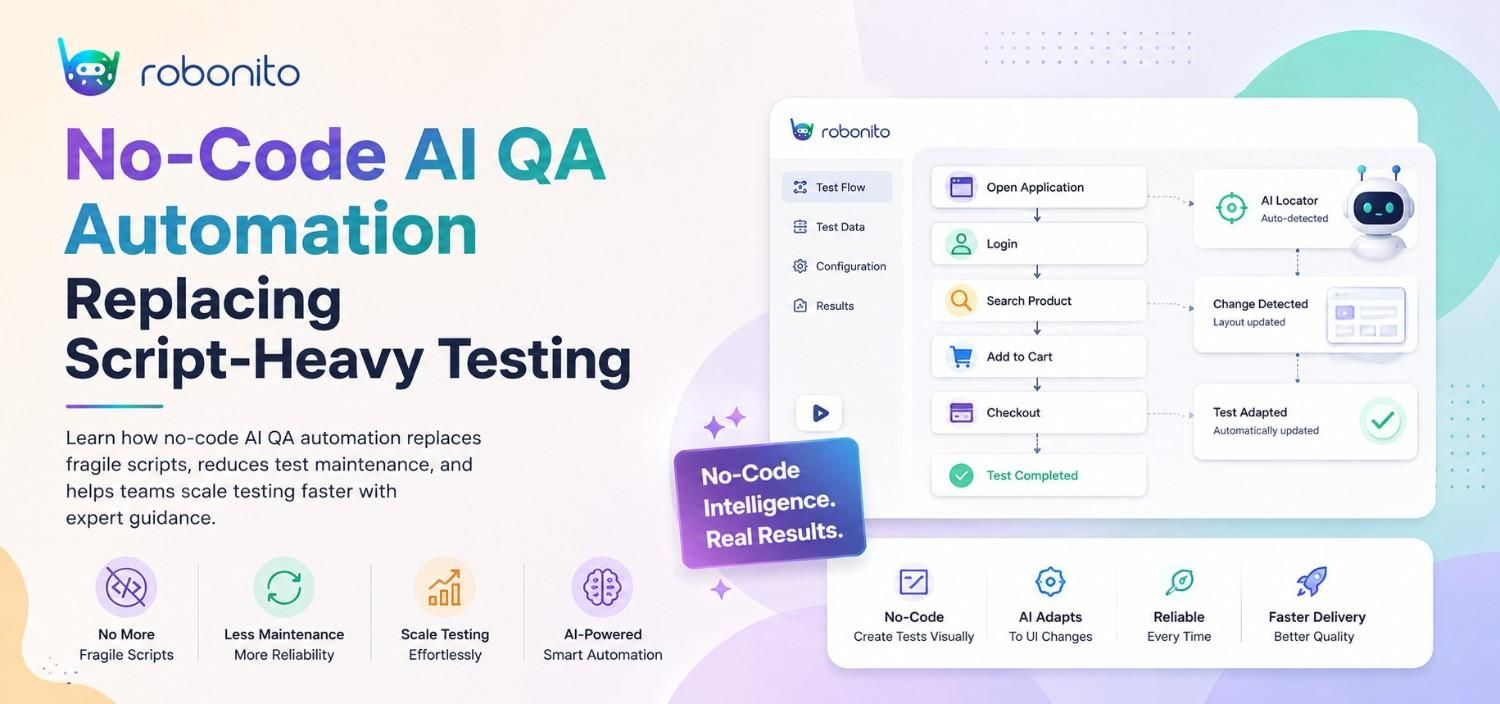
Your QA team is spending more time fixing broken tests than finding real bugs. This guide explains why that happens, why no-code AI automation fixes it, and how to evaluate whether it is the right move for your team.
By Robonito Engineering Team · Updated May 2026 · 16 min read
The real cost of script-heavy QA nobody talks about
Here is a number that should stop you mid-sprint: according to the World Quality Report 2025, QA teams spend between 40 and 60 percent of their total automation effort not on building new tests — but on maintaining the ones they already have.
Read that again. More than half your automation investment goes into keeping pace with change, not into expanding coverage or catching new bugs.
This is not a people problem. It is not a discipline problem. It is a structural problem with how traditional test automation was designed.
Script-based automation was built for a slower, more stable world. Release cycles happened quarterly. UIs stayed the same for months. A dedicated automation engineer could own the test suite, keep selectors updated, and stay ahead of breakage. That model worked because the rate of change was manageable.
That world is gone. Modern applications ship multiple times a day. Interfaces are dynamic. Components render conditionally. A/B tests change layouts mid-sprint. In this environment, every UI deployment is a potential test-suite breakage event — and someone has to fix it before the next release.
That someone is your QA team. And they are increasingly spending more time on test maintenance than on actual quality assurance.
No-code AI QA automation exists to solve this specific problem. Not by writing better scripts, but by removing the dependency on hand-written scripts altogether.
Stop Maintaining Tests. Start Trusting Them.
Robonito auto-generates your test suite from real user workflows, self-heals when your UI changes, and runs in CI — zero scripts required. Try Robonito Free →
Table of Contents
- Why traditional test automation is breaking down
- What no-code AI QA automation actually is
- How self-healing tests work
- No-code vs low-code vs scripted automation: honest comparison
- Who benefits most and who does not
- Robonito vs TestRigor vs Mabl: full comparison
- How to migrate from scripted to no-code AI automation
- CI/CD integration guide
- Is no-code AI automation right for your team?
- Frequently Asked Questions
1. Why Traditional Test Automation Is Breaking Down
The promise of test automation was simple: write tests once, run them forever, ship with confidence. In practice, most teams discover a very different reality within 6 to 12 months.
The maintenance spiral
Traditional automation tools — Selenium, Playwright, Cypress — are excellent tools. The problem is not the tools. The problem is that they require human-authored, human-maintained test logic. Every selector, every step sequence, every assertion was written by an engineer and must be updated by an engineer when the application changes.
Consider what happens in a typical sprint:
- A designer updates the checkout button from
id="checkout-btn"todata-testid="checkout-button" - A developer restructures the login form into a modal
- A product manager adds a new step to the onboarding flow
Each of these changes is routine. Each one breaks a set of automated tests. Each broken test requires a QA engineer or developer to find, understand, and update the affected scripts before the next deployment.
Multiply this by a 2-week sprint with 10 engineers committing changes daily, and you begin to understand why maintenance overhead compounds so rapidly.
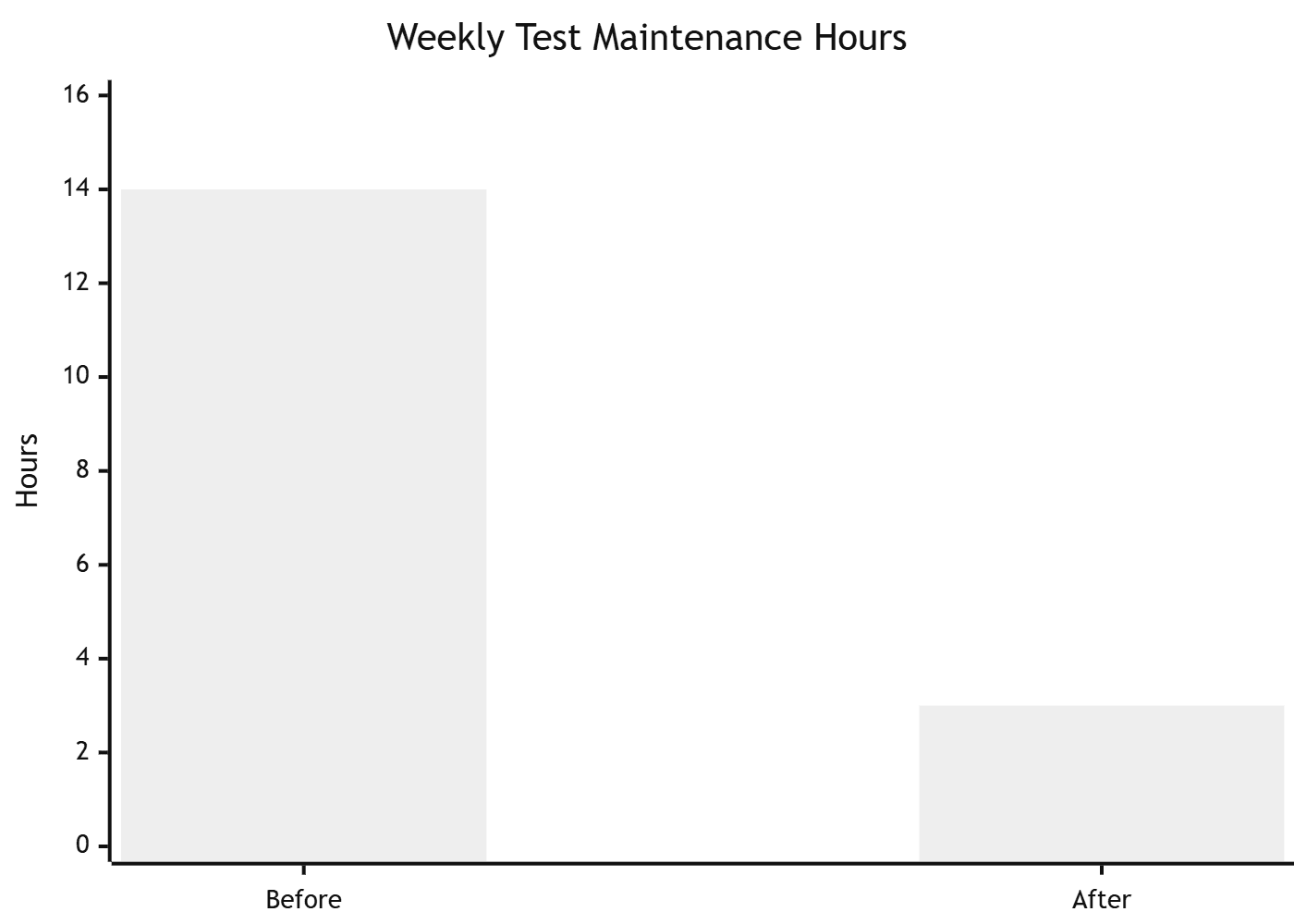
One SaaS team we worked with was spending nearly half a sprint every month fixing broken Selenium tests after UI updates. After moving to AI-driven self-healing automation, their weekly maintenance time dropped from around 14 hours to under 3.
The biggest difference was not faster execution — it was finally trusting the test suite again.
The skill bottleneck
Traditional automation also requires programming expertise. Selenium needs Java or Python. Playwright needs TypeScript or JavaScript. This means most QA analysts — who understand the product and user behaviour deeply — cannot contribute to automation directly. They file requests, wait for an automation engineer, and watch coverage stagnate because the bottleneck is always human capacity.
The Capgemini World Quality Report consistently shows that skill gaps are among the top three reasons automation initiatives fail. You cannot automate faster than your team can write and maintain scripts.
The trust erosion problem
Perhaps the most damaging consequence of high maintenance overhead is what it does to trust. When a test suite fails every other sprint due to environment issues, selector breakage, or stale data — rather than real bugs — teams stop trusting it. Developers start ignoring red CI pipelines. QA teams manually verify things the automation was supposed to cover. The suite exists but delivers no value.
A test suite that nobody trusts is worse than no test suite at all, because it provides false security while consuming real resources.
2. What No-Code AI QA Automation Actually Is

No-code AI QA automation is a testing approach where an AI system generates, executes, and maintains test cases based on how your application actually behaves — without requiring engineers to write or update test scripts manually.
This is not simply a record-and-playback tool with a friendlier interface. The distinction matters. Record-and-playback tools capture static sequences of actions. When anything changes, the recording breaks. You are back to manual maintenance.
Genuine AI-powered QA platforms work differently. They:
Understand intent, not just actions. Instead of recording "click the element at coordinates (450, 230)", AI systems understand "the user is completing the checkout form" — and can execute that intent even when the form layout changes.
Learn from real user behaviour. Rather than asking engineers to define every test scenario from scratch, AI platforms can analyse real traffic patterns, common user journeys, and high-frequency workflows to generate test coverage automatically.
Adapt without human intervention. When a UI change occurs, self-healing algorithms detect that a previously-working element has changed, locate the equivalent new element through semantic understanding rather than brittle selectors, and update the test logic automatically.
Validate outcomes, not just steps. The test succeeds when the user can complete the intended workflow and the expected outcome occurs — not when a specific sequence of CSS selectors resolves in a specific order.
The result is a test suite that evolves with your application rather than lagging behind it.
3. How Self-Healing Tests Work
Self-healing is the technical capability that separates genuine AI automation platforms from traditional tools. Understanding how it works helps you evaluate whether a platform's self-healing is real or marketing language.
The problem with CSS selectors
Traditional automated tests locate elements using CSS selectors, XPaths, or element IDs. These identifiers are implementation details — they describe where an element lives in the DOM structure, not what it means to a user.
// Traditional selector — breaks when the DOM changes
driver.find_element(By.XPATH, "//div[@class='checkout-wrapper']/button[2]")

// This breaks the moment the developer wraps the button in a new div
// or changes the class name in a refactor
How AI-based element resolution works
AI-powered platforms build a semantic model of each element — combining its visual properties (position, size, colour, rendered text), its role in the page structure (is it a primary action? a navigation item? a form field?), its proximity to other elements, and its historical identifier patterns.
When an element changes, the AI does not simply fail. It evaluates the semantic model against the updated DOM and identifies the most likely match. If the checkout button moved from the bottom of the form to a sticky footer, a self-healing system finds it because it understands "this is the primary purchase action on the checkout page" — not because it knows an XPath.
Robust self-healing platforms also log every healing event, so your team can review what changed and confirm the resolution was correct. Transparency matters here — you want to know when healing happens, not just trust that it did.
What self-healing does not cover
Self-healing handles structural and locator changes well. It does not automatically handle intentional business logic changes — if the checkout flow gains a new required step, that step needs to be added to the test. The distinction is between an implementation change (same feature, different DOM) and a behavioural change (different feature). Self-healing handles the first. Humans handle the second.
4. No-Code vs Low-Code vs Scripted Automation: Honest Comparison
| Dimension | Scripted automation | Low-code automation | No-code AI automation |
|---|---|---|---|
| Who can create tests | Engineers only | Engineers + some QA | Entire QA team |
| Setup time | Days to weeks | Hours to days | Minutes to hours |
| Maintenance overhead | High (40–60% of effort) | Medium (20–35%) | Low (5–15%) |
| Handles UI changes | Manual update required | Partial — still needs fixes | Self-heals automatically |
| Maximum flexibility | Unlimited | High | Moderate |
| CI/CD integration | Full — requires configuration | Full — requires configuration | Full — often native |
| Cost to scale | Linear with headcount | Moderate | Sub-linear |
| Best for | Complex custom logic, APIs, performance | Mid-size teams with some coders | Fast-moving teams, non-technical QA |
The honest verdict on each approach
Scripted automation remains the right choice when you need maximum flexibility — custom performance testing, complex API contract validation, fine-grained assertion logic, or integration with bespoke internal tooling. If your team has strong engineering capability and your test suite needs to do things no platform provides out of the box, scripts give you unlimited control. The cost is maintenance ownership in perpetuity.
Low-code automation is a reasonable middle ground for teams that have some technical capability but want to reduce the pure coding burden. Tools like TestRigor and Mabl fall here. They reduce syntax friction but still rely on human-authored test logic, which means maintenance overhead reduces but does not disappear.
No-code AI automation is the right choice when your priority is coverage velocity, maintenance reduction, and enabling non-engineering QA team members to contribute directly. It trades maximum flexibility for dramatically lower overhead. For most product teams shipping web and mobile applications, that trade-off is worth it.
5. Who Benefits Most and Who Does Not
Teams that benefit most
Fast-moving SaaS teams shipping weekly or daily face the highest maintenance burden with scripted automation. No-code AI automation scales with release velocity because self-healing absorbs most of the breakage that previously required manual intervention.
QA teams with limited engineering support — where QA analysts outnumber automation engineers — gain the most productivity lift. When every QA team member can create and run tests without writing code, coverage expands without headcount increasing.
Teams modernising legacy automation stacks built on Selenium 3 or outdated TestNG configurations often find that the maintenance cost of the existing suite has become prohibitive. Migrating to a no-code AI platform resets the maintenance baseline and accelerates coverage expansion.
Agile teams with frequent UI redesigns experience constant test breakage with script-based tools. Self-healing automation absorbs UI churn without interrupting sprint delivery.
Teams where scripted automation still makes sense
Performance and load testing requires scripted tools like k6 or JMeter. No-code AI platforms are designed for functional and regression testing, not traffic simulation.
Deep API contract testing with complex assertion logic, chained requests, and schema validation is still better served by tools like pytest or REST Assured where you control every detail.
Highly regulated industries requiring complete audit trails of every test assertion and explicit human sign-off on every test case may find scripted frameworks give more traceable documentation.
Teams with strong existing automation that is well-maintained and trusted should not migrate for its own sake. If your Playwright suite is stable and your team is productive, incremental improvement beats wholesale migration.
6. Robonito vs TestRigor vs Mabl: Full Comparison
The no-code AI QA market has several credible players. Here is an honest comparison of the three most commonly evaluated platforms in 2026.
| Feature | Robonito | TestRigor | Mabl |
|---|---|---|---|
| Setup time | Under 30 minutes | 1–3 hours | 3–8 hours |
| Coding required | None | None | None |
| AI test generation | ✅ From real workflows | ✅ From plain-English commands | ✅ From recorded sessions |
| Self-healing tests | ✅ Automatic | ✅ Automatic | ✅ Automatic |
| API testing | ✅ Native | ⚠️ Limited | ✅ Native |
| Cross-browser testing | ✅ All major browsers | ✅ All major browsers | ✅ All major browsers |
| CI/CD integration | ✅ Native (GH Actions, GitLab, Jenkins) | ✅ Via webhook | ✅ Native |
| Free tier | ✅ Available | ❌ No free tier | ❌ No free tier |
| Pricing model | Competitive / usage-based | High — per-test pricing | Medium — per-seat |
| Best for | Full-stack QA teams wanting fast setup | Teams preferring plain-English test authoring | Enterprise teams needing deep analytics |
Robonito's differentiators
Robonito stands out on three specific dimensions that matter for fast-moving teams:
Fastest time to first test. You connect your application URL, Robonito analyses real navigation patterns, and your first test suite is ready to run in under 30 minutes. No recording sessions, no setup scripts, no environment configuration beyond your URL.
Native API + UI testing in one platform. Most no-code platforms focus on UI testing and bolt on API testing as an afterthought. Robonito treats both as first-class citizens, which matters if your architecture relies on APIs that your UI depends on.
Free tier with real coverage. Both TestRigor and Mabl are paid-only. Robonito offers a free tier that lets your team validate the platform against your actual application before committing budget. That matters when you are evaluating whether no-code AI automation fits your stack.
7. How to Migrate from Scripted to No-Code AI Automation
Migration does not have to be a big-bang replacement. The most successful transitions follow a phased approach that preserves working scripted tests while expanding coverage through no-code automation.
Phase 1: Audit your existing test suite (Week 1)
Before migrating anything, understand what you have. Run your existing suite and categorise every test:
- Green and trusted — tests that reliably pass and catch real bugs. Keep these.
- Flaky — tests that pass and fail intermittently without code changes. These are migration candidates.
- Permanently broken — tests that have not passed in over a sprint and nobody is fixing. Delete these immediately.
- High-maintenance — tests that break on every UI change and require regular manual updates. These are your highest-priority migration targets.
For most teams, 30–50% of their existing scripted suite falls into the flaky or high-maintenance categories. These are the tests that no-code AI automation will immediately replace with better coverage.
Phase 2: Set up Robonito alongside your existing suite (Week 2)
Connect Robonito to your staging environment. Let it observe real user journeys. In most cases, your highest-traffic workflows — login, onboarding, core feature use, checkout — will generate test coverage automatically within hours.
Run Robonito's generated tests in parallel with your existing scripted suite in CI. Do not replace anything yet. Compare coverage and failure rates.
Phase 3: Replace flaky and high-maintenance tests (Weeks 3–4)
For every flaky or high-maintenance test identified in Phase 1, check whether Robonito's generated suite already covers the same workflow. If it does, delete the scripted version. If it does not, use Robonito's manual test creation to fill the gap without writing code.
Track maintenance hours per sprint before and after. Teams typically see a 50–70% reduction in test maintenance effort within the first month of this phased migration.
Phase 4: Expand coverage proactively (Month 2+)
With maintenance overhead dramatically reduced, your QA team has capacity it did not have before. Use it to expand coverage into areas that were previously too expensive to automate — edge cases, secondary user journeys, localisation testing, accessibility checks.
This is where no-code AI automation delivers its second-order benefit: not just less maintenance, but more coverage from the same team.
8. CI/CD Integration Guide
Every credible no-code AI QA platform integrates with modern CI/CD pipelines. Here is how Robonito integrates with the three most common platforms.
GitHub Actions
## .github/workflows/robonito-tests.yml
name: Robonito QA Tests

on:
  push:
    branches: [main, develop]
  pull_request:

jobs:
  qa-tests:
    name: Run Robonito test suite
    runs-on: ubuntu-latest
    steps:
      - uses: actions/checkout@v4

      - name: Trigger Robonito test run
        run: |
          curl -X POST https://api.robonito.com/v1/runs \
            -H "Authorization: Bearer ${{ secrets.ROBONITO_API_KEY }}" \
            -H "Content-Type: application/json" \
            -d '{
              "suite_id": "${{ vars.ROBONITO_SUITE_ID }}",
              "environment": "staging",
              "trigger": "ci",
              "branch": "${{ github.ref_name }}"
            }'

      - name: Wait for results and assert pass
        run: |
          npx robonito-cli wait-for-run \
            --api-key ${{ secrets.ROBONITO_API_KEY }} \
            --suite ${{ vars.ROBONITO_SUITE_ID }} \
            --fail-on-error
GitLab CI
## .gitlab-ci.yml
robonito-qa:
  stage: test
  image: node:20-alpine
  script:
    - npx robonito-cli run
        --api-key $ROBONITO_API_KEY
        --suite $ROBONITO_SUITE_ID
        --environment staging
        --fail-on-error
  artifacts:
    reports:
      junit: robonito-results.xml
    when: always
What to run and when
| Trigger | Test scope | Target time |
|---|---|---|
| Every PR | Smoke suite (critical paths only) | < 5 min |
| Merge to main | Full regression suite | < 15 min |
| Nightly scheduled | Full suite + edge case scenarios | < 30 min |
| Pre-release | Full suite on all browsers | < 45 min |
9. Is No-Code AI Automation Right for Your Team?
Answer these five questions honestly. They will tell you whether no-code AI automation is the right move right now.
1. How much of your QA team's time goes to test maintenance each sprint? If the answer is more than 20%, no-code AI automation will deliver immediate ROI. If it is under 10%, your existing approach is working and a migration may not be worth the disruption.
2. Can your non-engineering QA team members currently contribute to automation? If only 1–2 engineers own the test suite and everyone else is locked out, no-code automation expands the contributing team instantly. If your whole team already writes scripts comfortably, the benefit is smaller.
3. How often does a UI change break your test suite? If the answer is "every sprint", self-healing automation is solving your exact problem. If the answer is "rarely", your application may be stable enough that scripted tests are not a significant burden.
4. What is your test coverage percentage on critical user journeys? If you have low coverage because building tests is slow and expensive, no-code AI automation expands coverage faster than scripted approaches. If coverage is already high and trusted, the incremental gain is lower.
5. Do you have budget for a platform versus engineering time? No-code platforms carry a subscription cost that scripted tools (open source) do not. The ROI calculation requires comparing platform cost against the engineering time currently spent on maintenance. For most teams, the break-even is reached within 2–3 months.
Frequently Asked Questions
What is no-code AI QA automation?
No-code AI QA automation is a testing approach where AI generates, executes, and maintains test cases automatically from your application's real behaviour — without requiring engineers to write or maintain test scripts. The AI adapts when your UI changes, reducing maintenance overhead from the industry average of 40–60% of QA effort to under 15%.
How is it different from record-and-playback tools?
Record-and-playback tools capture static action sequences. When the UI changes, recordings break and need manual updates — the same maintenance problem as scripted automation. AI-powered platforms understand intent and self-heal when element locators change, which is a fundamentally different capability.
Does no-code automation work for complex multi-step workflows?
Yes. Platforms like Robonito handle multi-step user journeys, conditional logic, authentication flows, dynamic content, API calls within UI flows, and cross-browser execution. Complexity is handled by the AI, not by your QA team writing additional logic.
Can it integrate with our existing CI/CD pipeline?
Yes. Robonito integrates natively with GitHub Actions, GitLab CI, Jenkins, CircleCI, and Azure DevOps. See Section 8 for working configuration examples for the most common platforms.
What happens when it gets something wrong?
No AI system is perfect. All leading platforms provide dashboards where your team reviews test results, confirms self-healing decisions, and flags incorrect behaviour. The goal is not to remove human judgment from QA — it is to remove repetitive mechanical work so human judgment focuses where it adds the most value.
How long does migration from scripted automation take?
A phased migration typically takes 4–6 weeks. The first week is audit and setup. Weeks 2–4 are parallel running and replacement of flaky tests. Month 2 onwards is coverage expansion. You do not need to migrate everything at once — running both approaches in parallel is the safest path.
- DORA State of DevOps 2025 — Engineering performance research
- OWASP Testing Guide — Security testing reference
- Shift-Left Testing — IBM — Shift-left methodology explained
- Google Testing Blog — Engineering insights from Google's QA team
Your QA Team Deserves Better Than Broken Scripts
Robonito replaces fragile test scripts with AI-generated, self-healing tests that run in CI, cover your full stack, and need no maintenance every sprint. Start free — no credit card required →
Automate your QA — no code required
Stop writing test scripts.
Start shipping with confidence.
Join thousands of QA teams using Robonito to automate testing in minutes — not months.
