
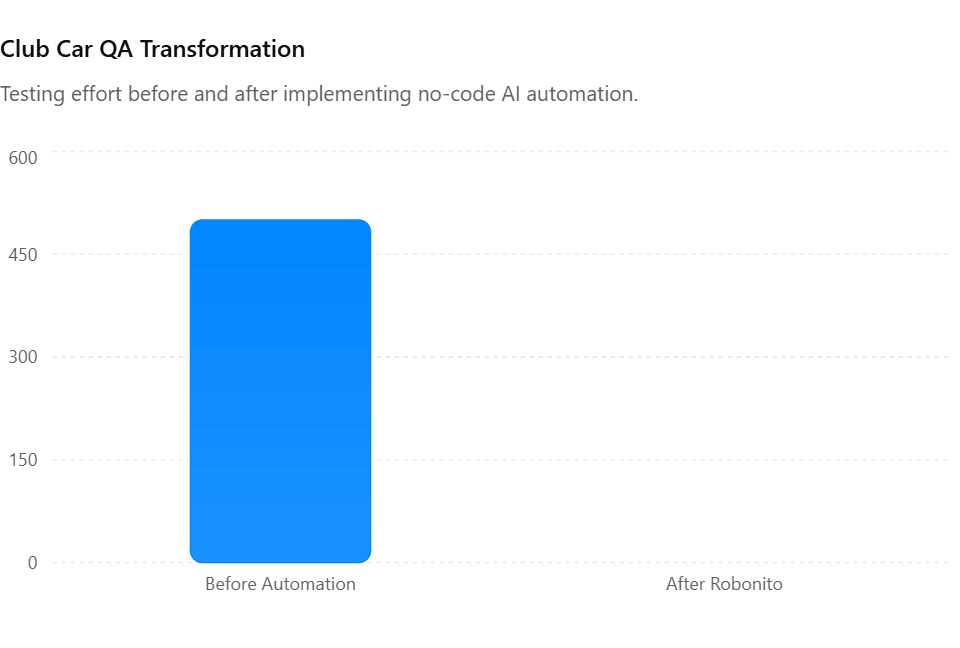
Club Car, one of the world's largest electric vehicle manufacturers, reduced their testing time from 500 hours to just 2 hours after switching to no-code test automation. That is a 99.6% reduction. This guide explains exactly how results like that are possible — and how your team can achieve the same.
By Robonito Engineering Team · Updated May 2026 · 16 min read
The testing problem nobody talks about honestly
Nearly 40% of software development budgets go toward testing and test automation, according to KindGeek's industry analysis. That is a significant investment. The uncomfortable question is: how much of it is actually finding bugs versus maintaining the infrastructure that is supposed to find bugs?
In most organisations, the honest answer is: too much of it goes to maintenance.
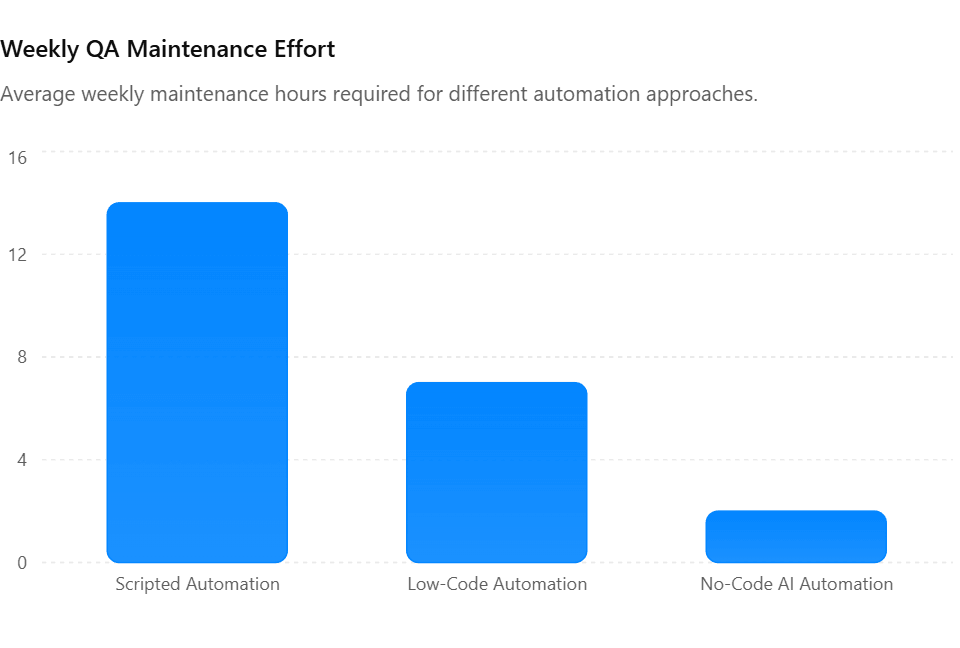
Script-based automation frameworks require dedicated engineers to write tests, manage selectors, update broken scripts after every UI change, and babysit a test suite that seems to need constant attention. The bigger the application grows, the more maintenance the suite demands. Teams hire more automation engineers not because they need more test coverage, but because they need more people to keep existing tests from falling apart.
No-code test automation was built to fix this specific problem. Not by removing rigour from QA — but by removing the scripting overhead that consumes engineering time without adding testing value.
This guide covers what no-code test automation actually is, how it works under the hood, ten evidence-backed reasons to adopt it, an honest look at its limitations, and a practical step-by-step guide to getting started without disrupting your current workflow.
See no-code automation in action — free
Robonito auto-generates your test suite from real user flows, heals broken tests automatically, and runs in your CI pipeline from day one. No scripts. No selectors. No maintenance sprints. Start your free trial at Robonito.com →
Table of Contents
- What is no-code test automation?
- How it works: the technical mechanisms
- No-code vs low-code vs scripted: the real differences
- 10 reasons to adopt no-code test automation
- Real-world proof: Club Car cuts testing from 500 to 2 hours
- Honest limitations: what no-code does not do well
- How to get started: a 5-step adoption plan
- CI/CD integration
- Choosing the right no-code test automation platform
- Frequently Asked Questions
1. What is no-code test automation?
No-code test automation is a testing approach that uses visual interfaces, drag-and-drop workflows, AI-powered object recognition, and natural language inputs to create and execute automated tests — without writing a single line of code.
Instead of an automation engineer writing driver.find_element(By.CSS_SELECTOR, "#checkout-btn").click() and then updating that script every time the button's class name changes, a no-code platform lets a tester describe the action visually or in plain English — "click the checkout button and verify the confirmation page appears" — and handles the underlying mechanics automatically.
This matters because it changes who can write tests. In a scripted automation environment, only engineers with programming knowledge can create or maintain tests. In a no-code environment, QA analysts, product managers, and business stakeholders can all contribute test coverage directly — without waiting for an automation engineer to translate their requirements into code.
The result is broader coverage, faster test creation, and a test suite that is maintained by the platform's AI rather than by a rotation of engineers.
One-sentence definition for featured snippets: No-code test automation enables teams to build, execute, and maintain automated test suites using visual tools and AI — without writing or managing test scripts.
2. How it works: the technical mechanisms
Understanding what happens behind the scenes helps you evaluate platforms properly and set realistic expectations.
Test recording and element capture
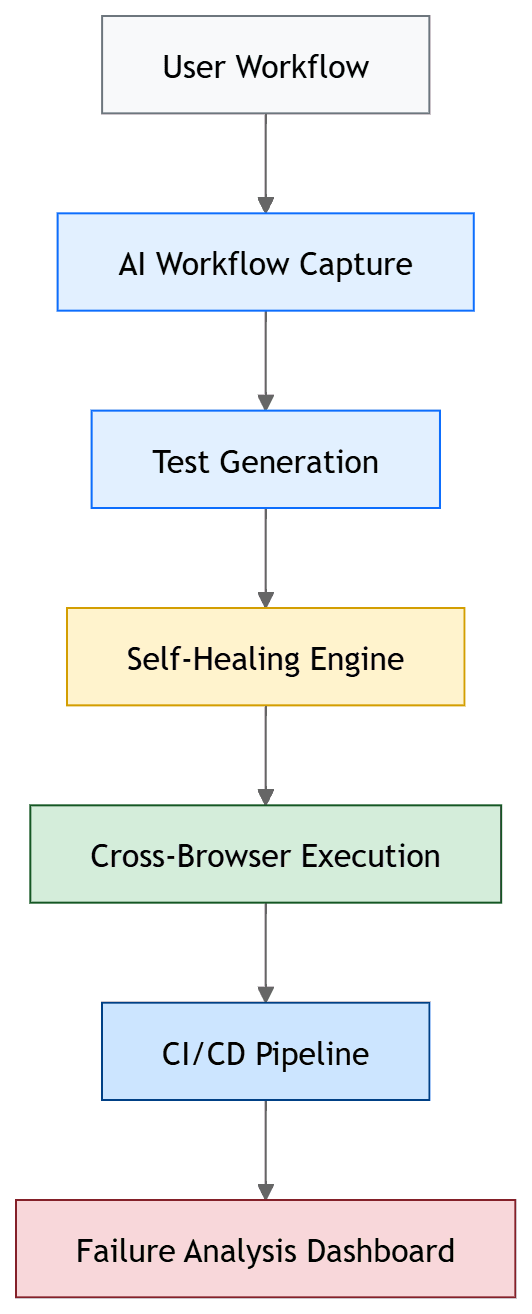
When you record a user interaction, a no-code platform does not just capture the CSS selector of the clicked element — that would be just as fragile as a scripted test. Instead, it captures a rich fingerprint of the element: its ARIA role, visible text, position relative to surrounding elements, semantic context, and any stable identifiers. This multi-signal fingerprint is what makes tests resilient.
Self-healing execution
When a test runs and the primary element reference fails — because a class name changed, a button moved, or a new wrapper div was added — the platform works through its fingerprint to locate the element by alternate means. If it finds it successfully, it silently updates the primary reference. This is self-healing, and it eliminates the most common cause of test suite decay.
Not all self-healing is equal. The best platforms use confidence scoring: if the AI is highly confident it found the right element through an alternate signal, it heals silently. If confidence is below threshold, it flags the test for human review rather than silently passing — which would be worse than failing. When evaluating platforms, ask specifically how they handle low-confidence healing.
AI test generation
More advanced platforms generate tests from observed user behaviour or from natural language descriptions. You describe a workflow — "a new user registers, verifies their email, and completes onboarding" — and the platform generates the corresponding test steps, element interactions, and assertions. This compresses test creation from hours to minutes.
Reusable components
Well-designed no-code platforms let you extract common sequences (login, navigation, form submission) as reusable components. When the login flow changes, you update the component once and every test that uses it is automatically updated. This mirrors the modularity of scripted Page Object Model patterns — without requiring the engineering overhead to build and maintain them.
Execution and reporting
Tests run across browsers, viewports, and environments — local, staging, production — and produce real-time dashboards with pass/fail status, screenshots, video recordings of failures, and trend data over time. The reporting is typically richer than what most teams build manually in scripted frameworks.
3. No-code vs low-code vs scripted: the real differences
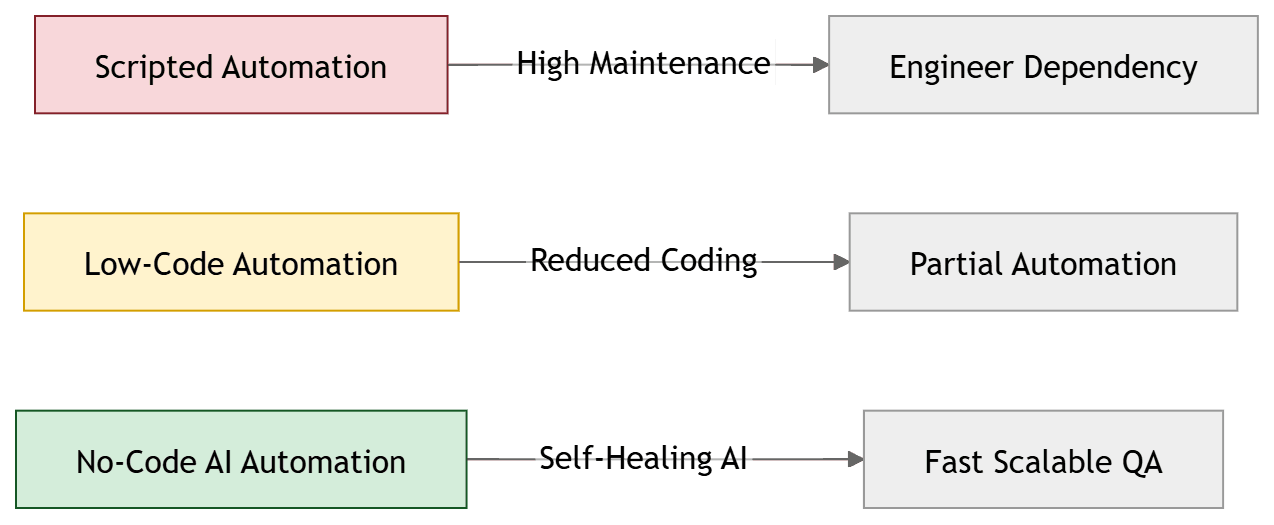
These three terms are used interchangeably and should not be. They represent genuinely different tradeoffs.
| Dimension | Scripted automation | Low-code automation | No-code automation |
|---|---|---|---|
| Who can write tests | Engineers only | Engineers + technical QA | Entire QA team |
| Setup time | 1–2 weeks | 2–5 days | Hours |
| Maintenance overhead | Very high (40–60%) | Medium (20–30%) | Low (5–10%) |
| Flexibility | Maximum | Medium | Medium |
| Resilience to UI changes | Poor | Medium | High |
| CI/CD integration | Native | Native | Native |
| Cost model | Engineer salaries | Platform + reduced salaries | Platform cost |
| Best for | Complex custom logic | Teams with some coding | Fast-moving, agile teams |
The honest framing: no-code is not "scripted automation made easier." It is a different model with different strengths. Scripted automation gives you maximum control and handles the most complex scenarios. No-code automation gives you maximum speed, maximum resilience, and maximum accessibility. Most mature QA organisations end up using both — no-code for functional regression and cross-browser testing, scripted tools for performance testing and complex business logic validation.
4. Ten reasons to adopt no-code test automation
Reason 1: You reclaim 40–60% of automation engineering time
The single biggest cost in traditional automation is maintenance — not writing new tests, but keeping existing ones from breaking. Capgemini's World Quality Report consistently shows 40–60% of automation effort goes to maintenance. No-code platforms with self-healing AI shift that overhead to the platform. Your engineers spend their time finding new bugs, not fixing existing tests.
Reason 2: Testing cycles shrink dramatically
Test creation that takes a senior automation engineer three hours takes a no-code platform user twenty minutes. When you multiply that across an entire sprint's worth of new features, the cumulative time saving is enormous. Teams report shortening their QA cycles by 60–80% in the first quarter after adoption — which directly accelerates release velocity.
Reason 3: Any team member can contribute test coverage
When tests require code, a single automation engineer is the bottleneck. Everything — new test cases, test updates, edge case coverage — flows through one person. No-code automation removes that bottleneck entirely. QA analysts create tests for their own scenarios. Product managers verify acceptance criteria directly. Business stakeholders confirm that the workflows they defined actually work. This is not a minor efficiency gain — it fundamentally changes the capacity of your QA function.
Reason 4: Test coverage gets dramatically broader
When creating a test takes twenty minutes instead of three hours, teams create more tests. More scenarios, more edge cases, more input variations. It is simple economics: lower the cost of something and you get more of it. Teams that switch to no-code test automation consistently report 3–5× increases in test coverage within the first six months, simply because the barrier to creating a new test is so much lower.
Reason 5: Cross-browser and cross-device coverage becomes effortless
In scripted automation, running tests across Chrome, Firefox, Safari, and Edge at multiple viewport sizes requires either duplicated scripts or complex parameterisation that takes an engineer days to set up correctly. In no-code platforms, cross-browser execution is a configuration switch. You define your target environments once and every test runs across all of them automatically. This is one of the most immediate practical benefits teams notice after switching.
Reason 6: CI/CD integration is immediate, not a project
Integrating a scripted automation framework into a CI/CD pipeline typically involves configuring test runners, managing environment variables, handling parallel execution, and wiring up reporting — often a two-day project in itself. No-code platforms provide native CI/CD integration out of the box. Connecting to GitHub Actions, GitLab CI, or Jenkins takes under an hour. Tests trigger on every commit, results appear in your pipeline, and failures block merges automatically.
Reason 7: Collaboration between development and QA genuinely improves
Scripted test suites live in a code repository that QA engineers own and developers rarely look at. No-code test suites live in a shared platform that everyone can access, read, and contribute to. Developers can see exactly which scenarios are tested. Product managers can verify coverage maps to requirements. QA can update tests immediately when they are in a planning meeting and a requirement changes. The shared visibility changes the culture around quality.
Reason 8: Onboarding new QA team members takes days, not weeks
Getting a new automation engineer up to speed on a scripted framework — understanding the page object model, the test runner configuration, the CI setup, the data management strategy — typically takes two to four weeks. Getting a new team member productive in a no-code platform typically takes one to three days. For growing teams or organisations with high QA turnover, this operational advantage is significant.
Reason 9: Test suite reliability builds confidence in continuous delivery
One of the hidden costs of a fragile test suite is that teams stop trusting it. When tests fail 30% of the time for maintenance reasons rather than real bugs, engineers start ignoring failures. Ignored failures mean real bugs get through. A no-code platform's self-healing dramatically reduces false failures, which means a failing test actually signals a real problem. That trustworthiness is what makes continuous delivery genuinely safe rather than optimistically risky.
Reason 10: Scalability matches release velocity, not headcount
With scripted automation, scaling test coverage means hiring more automation engineers. The ratio is roughly linear — more features means more tests means more engineers to write and maintain them. No-code automation breaks that ratio. The platform scales through configuration, not headcount. You can double your release velocity without doubling your QA team.
5. Real-world proof: Club Car cuts testing from 500 to 2 hours
Club Car, the world-renowned manufacturer of electric-powered vehicles used in golf, transportation, and industrial applications, faced a testing challenge common to manufacturers adding software to physical products: a rapidly growing application surface, limited automation engineering resources, and QA cycles that were slowing down product launches.
Their testing process relied heavily on manual testing and fragile scripted automation. Each release cycle required approximately 500 hours of QA effort — a figure that had grown as the product expanded and was on track to keep growing.
After implementing Robonito's no-code test automation platform, Club Car achieved three outcomes:
Testing time: 500 hours → 2 hours. A 99.6% reduction. The same test coverage that previously consumed 500 person-hours now runs in two hours, fully automated, triggered by the CI pipeline on every release candidate.
Improved product reliability. Automated validation across every release means defects that previously slipped through manual testing are now caught before reaching customers. Product quality scores improved measurably.
Faster time-to-market. With QA no longer the bottleneck in the release process, Club Car shortened their product launch timelines and gained a competitive advantage in a market where product update speed matters.
The Club Car result is not an outlier — it is representative of what happens when an organisation replaces manual and script-heavy testing with a platform designed for the way modern software actually ships.
6. Honest limitations: what no-code does not do well
Any guide that only tells you the benefits is a marketing brochure, not a useful evaluation resource. Here is what no-code test automation genuinely does not handle well.
Complex business logic validation
If you need to verify that a tax calculation produces the mathematically correct result for a specific combination of product categories, jurisdiction rules, and discount codes — you need scripted tests with explicit numerical assertions and data-driven parametrisation. No-code platforms can verify that a number appeared on screen. They cannot independently verify that the number is correct without being explicitly told the expected value.
Performance and load testing
No-code QA platforms test functional correctness. They are not designed to simulate 50,000 concurrent users hitting your API. For load testing and performance benchmarking, you still need dedicated tools like k6 or Apache JMeter.
Security penetration testing
Automated security scanning — injection attacks, authentication bypass, OWASP API vulnerability detection — requires specialist tools like OWASP ZAP or Burp Suite. No-code test automation platforms are not security testing platforms. Organisations that need comprehensive security testing should treat it as a separate capability.
Highly dynamic, real-time interfaces
Applications with complex real-time data visualisations, collaborative editing with concurrent user state, or heavily animated interfaces can be challenging for AI test generation. The AI needs reasonably consistent element behaviour to generate reliable tests. Highly dynamic components sometimes need scripted tests for the dynamic parts while no-code handles the stable flows.
The right mental model for most teams: use no-code automation for 80–90% of your functional regression, cross-browser, and API testing. Keep scripted tools for the 10–20% that genuinely requires their precision.
7. How to get started: a 5-step adoption plan
The biggest adoption mistake is trying to migrate everything at once. Teams that attempt a big-bang migration almost always stall halfway through and end up with two half-maintained test suites instead of one good one. The right approach is incremental and confidence-building.
Step 1: Audit what you actually have (Week 1)
Before creating anything new, understand what exists. List every automated test currently in your suite. Identify which ones are reliably passing, which are skipped or ignored, and which break regularly. In most organisations, 30–40% of the existing suite is either broken or trusted by nobody. There is no point migrating tests that do not work.
Also identify your top 10 most critical user flows — the workflows that, if broken, would cause the most immediate user impact. These are your migration starting point.
Step 2: Recreate your smoke suite first (Week 2)
Do not start with your largest, most complex tests. Start with your smoke suite — the 10–15 tests covering your most critical paths. Create these in the no-code platform. Run them in parallel with your existing scripted equivalents for one week. Compare results. Build confidence that the platform behaves correctly in your environment before you commit to it more broadly.
Step 3: Expand regression coverage for existing features (Weeks 3–4)
Once your smoke suite is stable and trusted, expand to your full regression suite for existing features. Prioritise tests that break most frequently in your current scripted suite — these are the ones where self-healing will give you the most immediate relief.
Step 4: New features go directly into no-code (Week 4 onward)
Establish a team policy: all new test coverage for new features is created in the no-code platform. Do not create new scripted tests. This stops the scripted suite from growing while the no-code suite expands organically with every sprint.
Step 5: Retire scripted tests progressively
As the no-code suite coverage matches your existing scripted coverage for a given module, retire the scripted equivalents. Keep scripted tests only for genuinely complex scenarios the no-code platform cannot handle. Track the ratio of no-code to scripted over time — watching it shift is one of the most motivating indicators of progress.
8. CI/CD integration
No-code test automation is only as valuable as its integration with your development workflow. Tests that run manually on demand catch bugs occasionally. Tests that run automatically on every commit catch bugs consistently.
Here is how Robonito integrates with GitHub Actions:
## .github/workflows/robonito-qa.yml
name: Robonito QA Suite

on:
  push:
    branches: [main, develop]
  pull_request:

jobs:
  smoke-tests:
    name: Smoke tests (every PR)
    runs-on: ubuntu-latest
    steps:
      - uses: actions/checkout@v4

      - name: Run Robonito smoke suite
        uses: robonito/run-tests-action@v2
        with:
          api-key: ${{ secrets.ROBONITO_API_KEY }}
          suite: smoke
          environment: staging
          browsers: chrome
          fail-on: critical

  regression-tests:
    name: Full regression (on merge to main)
    runs-on: ubuntu-latest
    needs: smoke-tests
    if: github.ref == 'refs/heads/main'
    steps:
      - uses: actions/checkout@v4

      - name: Run Robonito regression suite
        uses: robonito/run-tests-action@v2
        with:
          api-key: ${{ secrets.ROBONITO_API_KEY }}
          suite: regression
          environment: staging
          browsers: chrome,firefox,safari
          parallel: true
          notify-slack: ${{ secrets.SLACK_WEBHOOK_QA }}
Pipeline strategy
On every pull request, the smoke suite runs — 10–15 critical path tests completing in under 3 minutes. This gives developers immediate feedback and blocks merge on critical failures.
On every merge to main, the full regression suite runs across all three browsers in parallel. Results post to your Slack QA channel. AI-healed tests are flagged in the Robonito dashboard for human review.
This two-tier approach balances speed on PRs with comprehensive coverage on merges — the same pattern recommended for scripted automation, now available without the scripting overhead.
9. Choosing the right no-code test automation platform
Not all tools marketed as no-code or AI-powered solve the same problem. Some add a visual interface on top of an underlying scripted model — meaning you still maintain scripts, just through a GUI. Here is what genuinely separates the platforms.
What to look for
True self-healing, not just smart selectors. Ask how the platform handles an element when all its captured attributes change simultaneously — not just when a class name changes. The answer reveals how robust the healing actually is.
Confidence scoring on healed tests. A platform that silently heals everything is dangerous — it can mask real failures as structural changes. Look for platforms that flag low-confidence heals for human review.
Native API testing, not just UI testing. A complete no-code QA platform should test your API layer as well as your UI layer, ideally in the same test flows. Separate tools for UI and API creates unnecessary context-switching.
Real CI/CD integration, not export-to-script. Some platforms let you "export" tests as scripts for CI integration. That defeats the purpose — you are back to maintaining scripts. Look for native action-based CI integration that runs tests directly from the platform.
Transparent pricing with a free tier. Any platform worth evaluating should offer a free tier so you can verify it works in your environment before committing budget.
Platform comparison
| Feature | Robonito | TestRigor | Mabl |
|---|---|---|---|
| No coding required | ✅ | ✅ | ✅ |
| Setup time | Under 1 hour | 2–4 hours | Half a day |
| AI test generation | ✅ Flows + natural language | ✅ Natural language | ✅ Recorded sessions |
| Self-healing with confidence scoring | ✅ | ✅ Basic | ✅ Advanced visual |
| Native API testing | ✅ | ⚠️ Limited | ✅ |
| Cross-browser | ✅ | ✅ | ✅ |
| Native CI/CD integration | ✅ GitHub, GitLab, Jenkins | ✅ | ✅ |
| Free tier | ✅ | ❌ | ❌ |
| Pricing | Competitive | Enterprise pricing | Mid-range per-seat |
Robonito is the strongest choice for teams that need both API and UI test automation in one platform, want the fastest setup, and need a free tier for evaluation. TestRigor leads on natural language authoring for non-technical stakeholders. Mabl leads on visual regression depth for design-heavy applications.
Frequently Asked Questions
What is no-code test automation?
No-code test automation uses visual interfaces, AI-powered tools, and natural language inputs to create and run automated tests without writing code. It allows QA teams, product managers, and business stakeholders to build comprehensive test suites without programming knowledge, while platforms handle test maintenance through self-healing AI.
How is no-code test automation different from traditional automation?
Traditional automation requires engineers to write and maintain code-based scripts. When the application changes, scripts break and someone manually fixes them — accounting for 40–60% of automation effort. No-code automation uses self-healing AI that adapts automatically to application changes, dramatically reducing maintenance overhead and freeing teams to focus on finding real bugs.
Can non-technical team members use no-code test automation?
Yes, and this is one of its primary advantages. QA analysts, product managers, and business stakeholders can create and run tests without programming knowledge. This removes the bottleneck of depending on dedicated automation engineers and significantly increases team-wide coverage contribution.
Does no-code testing integrate with CI/CD pipelines?
Yes. All mature no-code platforms integrate natively with GitHub Actions, GitLab CI, Jenkins, CircleCI, and other standard CI/CD tools. Tests trigger automatically on every commit or pull request, providing the same rapid feedback loop as scripted automation — without the scripting overhead.
What are the limitations of no-code test automation?
No-code automation handles functional UI testing, API testing, cross-browser testing, and regression testing excellently. It is less suited for complex custom business logic validation requiring precise assertions, performance load testing at scale, or security penetration testing — which benefit from specialist scripted tools. Most mature teams use no-code for 80–90% of their testing and scripted tools for the remaining specialist needs.
How long does it take to get started?
Most teams have their first tests running within an hour of signing up for a no-code platform. A basic smoke suite covering critical user flows is typically ready within a day. Full regression coverage migration from a scripted suite usually takes two to four weeks when approached incrementally.
Is no-code test automation suitable for enterprise teams?
Yes. Enterprise adoption is growing fastest in the no-code testing space because the maintenance cost reduction is most impactful at enterprise scale. Large QA organisations with hundreds of test cases benefit disproportionately from self-healing — every percentage point reduction in maintenance overhead translates to significant engineering time recovered.
Conclusion
No-code test automation is not a shortcut around rigorous QA — it is a smarter infrastructure for delivering it. The traditional model of script-heavy automation made sense when software changed slowly and dedicated automation engineers were affordable. Neither of those conditions reliably applies in 2026.
The evidence is clear. Club Car reduced testing time by 99.6%. Teams using no-code automation report 60–80% shorter QA cycles. Organisations recover 40–60% of their automation engineering time from maintenance. These are not edge cases — they are predictable outcomes of a testing model designed for how modern software actually ships.
The question is not whether to adopt no-code test automation. It is when, and which platform fits your team.
External references
- Capgemini World Quality Report 2025 — Test maintenance cost benchmarks
- DORA State of DevOps 2025 — Engineering delivery performance
- TestGuild Podcast: Low-Code Success with Rudolf Groetz — Practitioner case study
Start automating without a single line of code
Robonito auto-generates your test suite, runs cross-browser tests in CI, and self-heals broken tests automatically. Club Car went from 500 hours of testing to 2. Your team can too. Try Robonito free — no credit card needed →
Automate your QA — no code required
Stop writing test scripts.
Start shipping with confidence.
Join thousands of QA teams using Robonito to automate testing in minutes — not months.
