
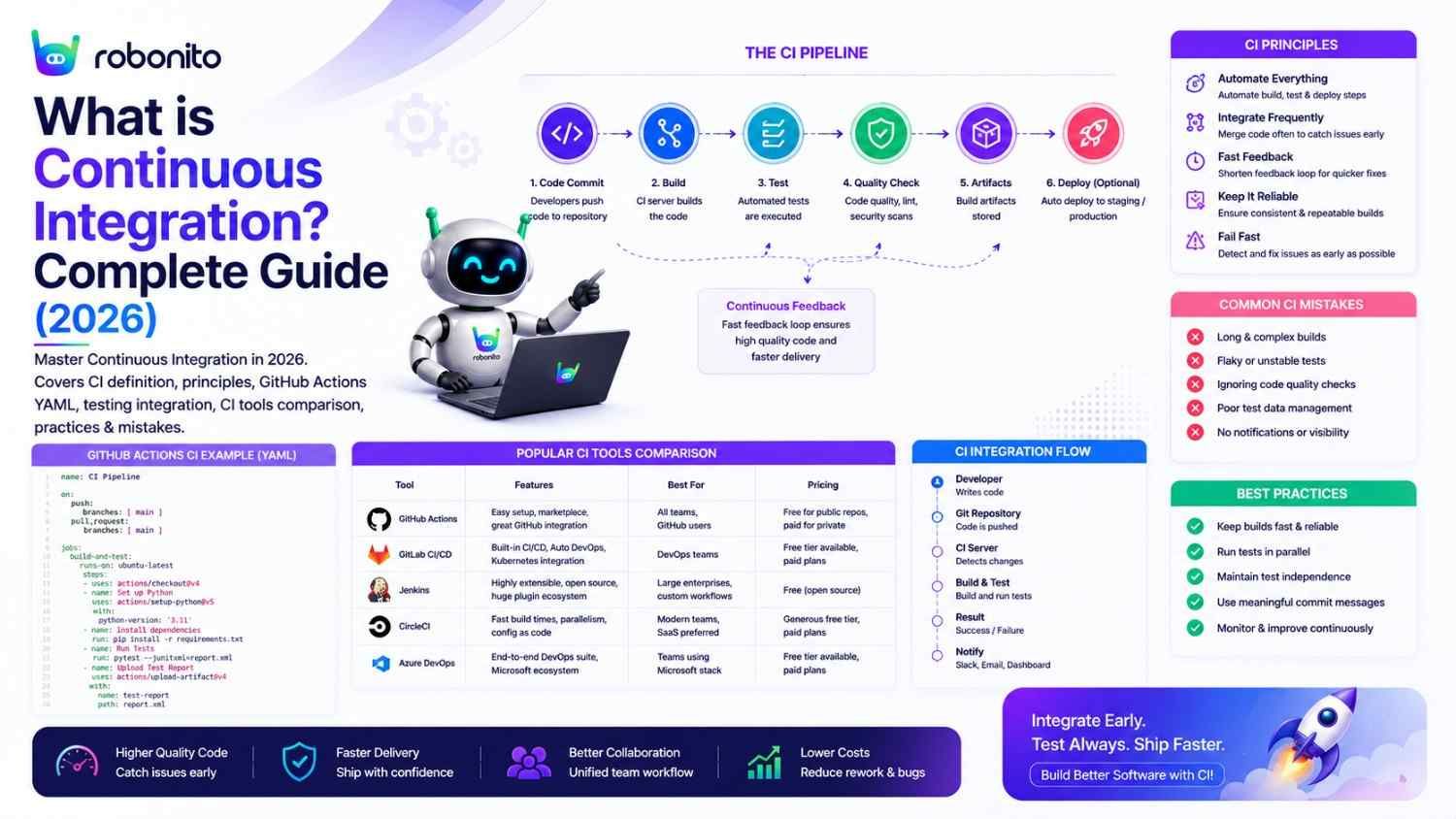
A team that runs tests manually before each release will release bugs that automated CI would have caught within five minutes. The fundamental promise of Continuous Integration is simple: catch integration problems immediately — not the night before a release, not in a three-day QA cycle, not in a post-mortem after a production incident. This guide covers CI from first principles through production-ready pipeline configuration, with real GitHub Actions YAML you can use today.
By Robonito Engineering Team · Updated June 2026 · 19 min read
Quick stats
| Fact | Source |
|---|---|
| Teams using CI detect failures 200× faster than teams without | DORA State of DevOps 2025 |
| CI reduces the cost of defect fixing by up to 80% compared to finding bugs in production | IBM Systems Sciences Institute |
| 94% of high-performing engineering teams use CI as a standard practice | DORA 2025 |
| Mean time to detect a regression with CI: < 30 minutes vs 24-48 hours without | DORA 2025 |
| GitHub Actions is the most-used CI tool in 2026, used by over 90 million repositories | GitHub Octoverse 2025 |
Table of Contents
- What is Continuous Integration?
- CI vs Continuous Delivery vs Continuous Deployment
- The core principles of CI
- How a CI pipeline works — step by step
- Building your first CI pipeline — real GitHub Actions YAML
- The testing strategy inside CI
- CI tools compared (2026)
- CI best practices — what separates effective from ineffective pipelines
- Common CI mistakes and how to fix them
- CI in DevOps and Agile teams
- Testing in CI — where Robonito fits
- Pre-CI implementation checklist
- Frequently Asked Questions
Add self-healing automated tests to your CI pipeline — no scripts required
Robonito runs as a deployment gate in your CI/CD pipeline — blocking releases when critical flows fail and auto-healing when your UI changes, covering web, mobile, API, and desktop. Try Robonito free →
1. What is Continuous Integration?
One-sentence definition for featured snippets: Continuous Integration (CI) is a software development practice where developers merge code changes into a shared repository frequently — typically multiple times per day — and each merge automatically triggers a pipeline that builds the application and runs tests, detecting integration problems within minutes.
The "integration" in Continuous Integration refers to bringing together code written by different developers — or by the same developer across different branches — into a unified codebase. Without CI, teams integrate code infrequently, often at the end of a feature cycle. When integration finally happens, conflicts and incompatibilities that have accumulated for days or weeks all surface simultaneously — a phenomenon historically called "integration hell."
CI solves integration hell by making integration continuous. Small, frequent merges — each automatically verified — mean conflicts are small and caught immediately.
What CI does in concrete terms:
Without CI (traditional):
  Developer A: works on feature-auth for 2 weeks → merges
  Developer B: works on feature-checkout for 2 weeks → merges
  Result: merge conflicts, broken tests, 2 days of integration work
  Time to detect conflicts: 2 weeks
  Cost to fix: High

With CI:
  Developer A: merges to main 8 times in 2 weeks (multiple daily)
  Developer B: merges to main 10 times in 2 weeks
  Each merge: automated build + tests run in 10-15 minutes
  Any conflict: detected within 15 minutes of introduction
  Cost to fix: Low (context still fresh, change is small)
What CI is not:
CI is not just a set of tools — it is a practice. A team that sets up GitHub Actions but only runs it once per week is not practicing CI. CI requires the cultural commitment to merge frequently and treat failing tests as an immediate priority, not a future problem.
Continuous Integration vs Traditional Development
| Area | Traditional Development | Continuous Integration |
|---|---|---|
| Merge Frequency | Weekly or monthly | Multiple times daily |
| Testing | Manual | Automated |
| Feedback Time | Days or weeks | Minutes |
| Integration Risk | High | Low |
| Release Confidence | Variable | Consistent |
2. CI vs Continuous Delivery vs Continuous Deployment
These three terms form a progression. Each builds on the previous. Understanding the distinctions prevents the common confusion where teams conflate all three under "CI/CD."
Continuous Integration (CI):
  Scope: Code → Build → Test
  Trigger: Every commit / every PR
  Output: Verified artifact (build that passed all tests)
  Human gate: None — fully automated
  Question answered: "Is the code correct?"

Continuous Delivery (CD):
  Scope: CI + Deploy to staging + Quality gates
  Trigger: Every merge to main
  Output: Production-ready software waiting for approval
  Human gate: YES — human approves production deployment
  Question answered: "Is the software ready to ship?"

Continuous Deployment:
  Scope: CI + CD + Automatic production deployment
  Trigger: Every merge to main that passes all gates
  Output: Change automatically live in production
  Human gate: None — quality gates ARE the approval
  Question answered: "Is this deployed?"
Visual representation:

Code commit
    ↓
┌─────────────────────────────────────────────┐
│              CI (always)                    │
│  Build → Unit tests → Integration tests    │
│  Exit 1 on failure → PR blocked            │
└─────────────────────────┬───────────────────┘
                          ↓ (passes)
┌─────────────────────────────────────────────┐
│         Continuous Delivery adds:           │
│  → Deploy staging → Quality gates           │
│  → HUMAN APPROVES → Deploy production   │
└─────────────────────────┬───────────────────┘
                          ↓ (approval)
┌─────────────────────────────────────────────┐
│      Continuous Deployment adds:            │
│  → Remove human gate → Auto-deploy prod    │
│  → Post-deploy smoke → Auto-rollback        │
└─────────────────────────────────────────────┘
Most teams start with CI alone, add Continuous Delivery as test reliability improves, and graduate to Continuous Deployment when test DRE (Defect Removal Efficiency) consistently exceeds 90%.
3. The core principles of CI
Principle 1: Merge frequently — small changes, multiple times per day
The entire benefit of CI compounds when integration is genuinely continuous. A developer who works for three days on a branch and merges once defeats the purpose — three days of divergence creates three days of potential conflicts.
CI frequency targets:
  High-performing teams: 3-10 merges per developer per day
  Healthy teams: 1-3 merges per developer per day
  Struggling with CI: < 1 merge per developer per day

The small batch principle: a 50-line change merged today
  is infinitely easier to review, test, and debug than
  a 1,500-line change merged at the end of the week.
Principle 2: Never break the build — fix failing CI immediately
A broken CI build is a production fire, not a developer inconvenience. The moment CI fails, that failure is the team's highest priority:
CI failure response protocol:
  1. Developer receives notification within 2 minutes of failure
  2. Developer investigates immediately (not "after this PR")
  3. If fix is not obvious within 15 minutes:
     → Revert the breaking commit
     → Investigate on a branch
     → Re-merge once fixed
  4. Never: leave a failing build for tomorrow

Why this matters:
  A broken build breaks every other developer's pipeline
  A build broken for hours means hours of lost fast feedback
  A team that tolerates broken builds loses trust in CI entirely
Principle 3: Automated tests are the quality signal — not manual QA
CI pipelines run automated tests. The quality of the CI signal is exactly equal to the quality of the tests inside it. Poor tests produce false confidence (CI passes but bugs reach production) or false alarms (CI fails for non-bug reasons, training the team to ignore it).
Principle 4: Build and test in a clean environment
Every CI run should start from a fresh, reproducible environment. Tests that pass on a developer's machine but fail in CI — or vice versa — indicate environment contamination. Use containerisation (Docker) to guarantee environment consistency.
Principle 5: Fast feedback is the primary goal
A CI pipeline that takes 45 minutes to run forces developers to context-switch while waiting. Target:
Unit tests:           < 5 minutes
Integration tests:    < 20 minutes
Full CI pipeline:     < 25 minutes

If your pipeline exceeds 25 minutes: parallelise, optimise,
or restructure. Long pipelines get skipped.
4. How a CI pipeline works — step by step
Developer workflow with CI:

1. Developer creates feature branch from main
   → git checkout -b feature/checkout-discount

2. Developer makes code changes (small, focused)
   → Implements discount code validation logic

3. Developer pushes branch and opens a pull request
   → git push origin feature/checkout-discount

4. CI pipeline triggers automatically (on: pull_request):

   Step 1: Checkout code (2s)
   → Clones repository at PR commit

   Step 2: Setup environment (30s)
   → Install Node.js, install npm packages (cached)

   Step 3: Lint and type check (15s)
   → ESLint, TypeScript tsc --noEmit
   → Failure: code style or type errors → PR blocked

   Step 4: Unit tests (2 min)
   → Jest: 350 unit tests
   → Coverage gate: ≥ 80% line coverage
   → Failure: broken logic or coverage regression → PR blocked

   Step 5: Build artifact (1 min)
   → npm run build
   → Failure: compilation error → PR blocked

   Step 6: Integration tests (8 min)
   → pytest: 50 API integration tests
   → Real PostgreSQL service container
   → Failure: API regression → PR blocked

   Total CI time: ~12 minutes

5. CI posts green checkmark to PR
   → Code review can proceed with confidence

6. Reviewer approves PR

7. Merge to main triggers additional pipeline:
   → Full E2E regression (30 min)
   → Staging deployment
   → Quality gates

8. Developer moves to next task while CI validates merge
5. Building your first CI pipeline — real GitHub Actions YAML
GitHub Actions is the default CI platform in 2026 for GitHub-hosted projects. Here is a complete, production-quality CI pipeline that a team can use as-is or adapt.
Minimal working CI pipeline (start here)
## .github/workflows/ci.yml
## Minimal CI pipeline — start here, expand incrementally

name: CI

on:
  push:
    branches: [main]       ## Run on every push to main
  pull_request:            ## Run on every PR to any branch

jobs:
  ci:
    name: Build and Test
    runs-on: ubuntu-latest  ## Fresh Ubuntu VM for every run

    steps:
      ## Step 1: Get the code
      - name: Checkout code
        uses: actions/checkout@v4

      ## Step 2: Set up runtime
      - name: Set up Node.js
        uses: actions/setup-node@v4
        with:
          node-version: '20'
          cache: 'npm'  ## Cache node_modules — speeds up reruns

      ## Step 3: Install dependencies
      - name: Install dependencies
        run: npm ci  ## Faster than npm install, uses package-lock.json

      ## Step 4: Lint and type check
      - name: Lint
        run: npm run lint

      - name: Type check
        run: npm run type-check

      ## Step 5: Unit tests with coverage
      - name: Unit tests
        run: npm test -- --coverage --ci

      ## Step 6: Enforce coverage gate
      - name: Coverage gate (80% minimum)
        run: |
          COVERAGE=$(cat coverage/coverage-summary.json | python3 -c \
            "import sys,json; d=json.load(sys.stdin); \
             print(d['total']['lines']['pct'])")
          echo "Line coverage: ${COVERAGE}%"
          python3 -c "exit(0 if float('${COVERAGE}') >= 80 else 1)" || \
            (echo "❌ Coverage ${COVERAGE}% below 80% minimum" && exit 1)

      ## Step 7: Build artifact
      - name: Build
        run: npm run build

      ## Upload coverage report for review
      - name: Upload coverage report
        uses: actions/upload-artifact@v4
        if: always()
        with:
          name: coverage-report
          path: coverage/
          retention-days: 7
Complete CI pipeline — adding integration tests and notifications
## .github/workflows/ci-complete.yml
## Complete CI pipeline with integration tests, notifications, and caching

name: CI — Complete Pipeline

on:
  push:
    branches: [main, develop]
  pull_request:

jobs:
  ## ── Job 1: Fast unit tests ───────────────────────────────────────
  unit-tests:
    name: Unit Tests
    runs-on: ubuntu-latest
    steps:
      - uses: actions/checkout@v4
      - uses: actions/setup-node@v4
        with: { node-version: '20', cache: 'npm' }
      - run: npm ci
      - run: npm run lint && npm run type-check
      - run: npm test -- --coverage --ci
      - name: Coverage gate
        run: |
          COV=$(cat coverage/coverage-summary.json | python3 -c \
            "import sys,json; print(json.load(sys.stdin)['total']['lines']['pct'])")
          python3 -c "exit(0 if float('${COV}') >= 80 else 1)" || \
            (echo "❌ Coverage ${COV}% below 80%" && exit 1)
      - uses: actions/upload-artifact@v4
        if: always()
        with:
          name: unit-test-results
          path: coverage/

  ## ── Job 2: Python API integration tests ─────────────────────────
  integration-tests:
    name: Integration Tests
    runs-on: ubuntu-latest
    needs: unit-tests  ## Only run if unit tests pass

    services:
      ## Real PostgreSQL for integration tests — not mocked
      postgres:
        image: postgres:16
        env:
          POSTGRES_DB: testdb
          POSTGRES_USER: testuser
          POSTGRES_PASSWORD: testpassword
        options: >-
          --health-cmd pg_isready
          --health-interval 5s
          --health-timeout 5s
          --health-retries 5
        ports: ['5432:5432']

      ## Redis for session and cache testing
      redis:
        image: redis:7
        options: --health-cmd "redis-cli ping"
        ports: ['6379:6379']

    steps:
      - uses: actions/checkout@v4
      - uses: actions/setup-python@v5
        with: { python-version: '3.12' }
      - name: Install Python test dependencies
        run: pip install -r requirements-test.txt --break-system-packages

      - name: Run database migrations
        run: python manage.py migrate
        env:
          DATABASE_URL: postgresql://testuser:testpassword@localhost:5432/testdb
          REDIS_URL: redis://localhost:6379

      - name: Run API integration tests
        run: pytest tests/integration/ -v --tb=short --timeout=30
        env:
          DATABASE_URL: postgresql://testuser:testpassword@localhost:5432/testdb
          REDIS_URL: redis://localhost:6379
          BASE_URL: http://localhost:8000

      - uses: actions/upload-artifact@v4
        if: always()
        with:
          name: integration-test-results
          path: pytest-results.xml

  ## ── Job 3: Build and artifact ────────────────────────────────────
  build:
    name: Build Artifact
    runs-on: ubuntu-latest
    needs: unit-tests
    steps:
      - uses: actions/checkout@v4
      - uses: actions/setup-node@v4
        with: { node-version: '20', cache: 'npm' }
      - run: npm ci
      - run: npm run build
      - uses: actions/upload-artifact@v4
        with:
          name: build-${{ github.sha }}
          path: dist/
          retention-days: 30

  ## ── Notification on failure ──────────────────────────────────────
  notify-on-failure:
    name: Notify Team on Failure
    runs-on: ubuntu-latest
    needs: [unit-tests, integration-tests, build]
    if: failure()
    steps:
      - name: Slack notification
        uses: 8398a7/action-slack@v3
        with:
          status: failure
          text: |
            ❌ CI failed on `${{ github.ref_name }}`
            Commit: ${{ github.sha }}
            Author: ${{ github.actor }}
            See: ${{ github.server_url }}/${{ github.repository }}/actions/runs/${{ github.run_id }}
        env:
          SLACK_WEBHOOK_URL: ${{ secrets.SLACK_CI_CHANNEL }}
Branch protection — making CI enforcement mandatory
CI is only effective if failing CI blocks code from merging. Configure branch protection rules in GitHub:
Repository Settings → Branches → Branch protection rules → main:

✅ Require a pull request before merging
✅ Require status checks to pass before merging
   → Add required checks: "Unit Tests", "Integration Tests", "Build Artifact"
✅ Require branches to be up to date before merging
✅ Do not allow bypassing the above settings
With these rules, no code can merge to main unless CI passes — even for administrators.
6. The testing strategy inside CI
The tests running inside CI determine whether the pipeline is a genuine quality gate or a slow rubber stamp. Getting the test strategy right is as important as getting the pipeline configuration right.
The three-tier testing strategy for CI
Tier 1 — On every commit (< 5 minutes):
  Unit tests: 350 tests covering functions, classes, business logic
  Coverage gate: ≥ 80% line coverage
  Lint + type check: code quality enforcement

  Trigger: Any git push, any PR update
  Failure: Blocks the PR from merging
  Purpose: Catch logic errors immediately while context is fresh

Tier 2 — On every PR (10-20 minutes):
  Integration tests: API contracts, database interactions,
                     service-to-service communication
  Build verification: Compilation succeeds, artifact created

  Trigger: PR opened or updated
  Failure: Blocks the PR from merging
  Purpose: Catch integration issues before they reach main

Tier 3 — On every merge to main (30-60 minutes):
  E2E regression: Complete user journeys, all browsers
  Performance gate: p95 response time thresholds
  Security scan: OWASP ZAP, dependency vulnerability check

  Trigger: Code merged to main
  Failure: Blocks deployment to staging/production
  Purpose: Final verification before any deployment
Test quality requirements for CI to be trustworthy
Metric                    Minimum for reliable CI
───────────────────────────────────────────────────
Unit test coverage        ≥ 80% line coverage
Test false positive rate  < 5% (< 1 in 20 failures not real bugs)
Pipeline execution time   < 25 minutes for Tiers 1+2
Flaky test rate           < 5% per test
E2E suite execution       < 60 minutes for Tier 3

A CI pipeline with 20%+ false positives trains developers
to ignore failures — the opposite of the intended effect.
7. CI tools compared (2026)
The 2026 CI landscape
| Tool | Best for | Key strength | Free tier | Hosting |
|---|---|---|---|---|
| GitHub Actions | GitHub-hosted teams | Native GitHub integration, 15,000+ actions | ✅ Generous | Cloud (GitHub) |
| GitLab CI | GitLab teams | All-in-one DevOps platform | ✅ | Cloud + Self-hosted |
| Jenkins | Enterprise, on-premises | Maximum flexibility, plugin ecosystem | ✅ OSS | Self-hosted |
| CircleCI | Speed-focused teams | Fastest parallel execution | ✅ Free tier | Cloud + Self-hosted |
| Azure DevOps | Microsoft/Azure teams | Full ALM suite, Azure integration | ✅ Free tier | Cloud |
| Bitbucket Pipelines | Atlassian ecosystem | Jira + Bitbucket integration | ✅ | Cloud |
GitHub Actions vs Jenkins — the most common decision
Choose GitHub Actions when:
- Your team is already hosted on GitHub
- You want zero infrastructure to manage
- You need the 15,000+ marketplace actions ecosystem
- Your team is small to medium and does not need custom runner infrastructure
Choose Jenkins when:
- Your team has on-premises requirements (security, compliance, air-gapped)
- You need highly customised pipeline logic that YAML cannot express
- You have an existing Jenkins investment with significant configuration
- You need integration with legacy enterprise tools that GitHub Actions does not support
## GitHub Actions — simplest to start with (2026 default)
## 2 files: this YAML + branch protection rules

name: CI
on: [push, pull_request]
jobs:
  test:
    runs-on: ubuntu-latest
    steps:
      - uses: actions/checkout@v4
      - uses: actions/setup-node@v4
        with: { node-version: '20' }
      - run: npm ci && npm test

## Jenkins equivalent requires:
## - Jenkins server installation
## - Plugin installation
## - Jenkinsfile creation
## - Agent configuration
## Significantly more infrastructure overhead
What to avoid in 2026
Travis CI — Travis CI removed free tiers for open source in 2020 and has seen substantial adoption decline since. GitHub Actions covers the same use cases with better GitHub integration and a more active ecosystem.
Buildbot — A niche Python-based CI tool maintained by a small community. Not appropriate for teams starting fresh in 2026.
8. CI best practices — what separates effective from ineffective pipelines
Practice 1: Fail fast — put the fastest checks first
jobs:
  ## First: lint (10 seconds) — fastest possible failure
  lint:
    runs-on: ubuntu-latest
    steps:
      - uses: actions/checkout@v4
      - run: npm run lint  ## Fails in 10s if obvious errors

  ## Second: unit tests (3 minutes) — faster than integration
  unit-tests:
    needs: lint  ## Don't run if lint fails
    runs-on: ubuntu-latest
    steps:
      - run: npm test

  ## Third: integration tests (12 minutes) — only if units pass
  integration-tests:
    needs: unit-tests
    ## ...
Failing fast means developers get feedback in 10 seconds for a lint error rather than waiting 15 minutes for the full pipeline to reach the same conclusion.
Practice 2: Cache dependencies aggressively
## Without caching: npm install = 2-4 minutes every run
## With caching: restore from cache = 5-15 seconds

- uses: actions/setup-node@v4
  with:
    node-version: '20'
    cache: 'npm'  ## Caches ~/.npm directory between runs
For a team with 50 CI runs per day, caching npm dependencies saves 25-50 minutes of pipeline time daily.
Practice 3: Run jobs in parallel where possible
## Sequential (slow): total time = lint + unit + integration = 18 min
## Parallel (fast): total time = max(lint, unit, integration) = 12 min

jobs:
  lint:
    runs-on: ubuntu-latest
    ## runs independently

  unit-tests:
    runs-on: ubuntu-latest
    ## runs independently, in parallel with lint

  integration-tests:
    needs: unit-tests  ## depends on unit tests, not lint
    runs-on: ubuntu-latest
Practice 4: Never let a broken build linger
Establish a team agreement: a failing CI build is the team's current highest priority. Every developer is blocked by a broken shared build. Fix it within 30 minutes or revert.
Broken build protocol:
  0-15 min: Responsible developer investigates and fixes
  15-30 min: Developer cannot fix → reverts the breaking commit
  30+ min: A broken build that persists means the revert was not done

This protocol makes CI trustworthy — developers know that
a green build means the codebase is actually healthy.
Practice 5: Tests must block merges — not just report
## ❌ Tests run but cannot block merges:
steps:
  - run: npm test
    continue-on-error: true  ## This line makes CI decorative

## ✅ Tests block merges when they fail:
steps:
  - run: npm test
  ## Default: non-zero exit code fails the job → merge blocked
Combined with branch protection requiring CI to pass, this creates an actual quality gate rather than an informational dashboard.
9. Common CI mistakes and how to fix them
Mistake 1: Only running CI on main, not on PRs
## ❌ CI only on main — feedback arrives AFTER merge (too late)
on:
  push:
    branches: [main]

## ✅ CI on PRs — feedback arrives BEFORE merge (when it matters)
on:
  push:
    branches: [main]
  pull_request:  ## This is the important addition
Mistake 2: No coverage gate — coverage regresses silently
## ❌ Tests run but coverage is never enforced
- run: npm test -- --coverage
## Coverage report generated, nobody checks it

## ✅ Coverage gate blocks the pipeline when coverage drops
- run: npm test -- --coverage
- name: Enforce 80% coverage
  run: |
    COV=$(cat coverage/coverage-summary.json | python3 -c \
      "import sys,json; print(json.load(sys.stdin)['total']['lines']['pct'])")
    python3 -c "exit(0 if float('${COV}') >= 80 else 1)" || exit 1
Mistake 3: Using production secrets in CI without protection
## ❌ Hardcoded secrets in pipeline YAML (visible in git history)
env:
  DATABASE_URL: postgresql://user:realpassword@prod-db.example.com/db

## ✅ Secrets from encrypted store
env:
  DATABASE_URL: ${{ secrets.TEST_DATABASE_URL }}
  ## Set in: Repository Settings → Secrets and variables → Actions
Mistake 4: Non-deterministic tests (flakiness)
Symptoms: CI passes 9/10 times, fails 1/10 with no code change
Causes:
  - Shared test data state between tests
  - Timing-dependent assertions (sleep() calls)
  - Network calls to external services
  - Random data not seeded

Fix:
  - Isolate test data (each test creates and cleans up its own)
  - Replace sleep() with explicit waits
  - Mock external API calls in unit/integration tests
  - Seed random data with fixed seed in tests
  - Track flaky tests: quarantine any test failing > 3× without code change
Mistake 5: Pipeline configuration as an afterthought
Common pattern:
  Month 1: App development starts, no CI
  Month 3: CI added "quickly" — runs basic tests
  Month 6: CI pipeline is slow, fragile, trusted by nobody
  Month 12: Team considers "fixing CI" as a project

Better pattern:
  Day 1: CI pipeline created before any application code
  Week 1: Branch protection enabled — CI required for all merges
  Week 2: First unit tests added to pipeline
  Week 4: Integration tests added
  Month 2: E2E tests added as coverage grows
10. CI in DevOps and Agile teams
CI in Agile sprints
Sprint integration:

Sprint planning:
  → CI pipeline reviewed: are there flaky tests to address?
  → Coverage targets confirmed for new features
  → New test requirements identified for sprint stories

During sprint (daily):
  → Every PR triggers CI before code review begins
  → Broken builds treated as sprint blockers
  → Test coverage maintained above threshold on every merge

Sprint close:
  → CI metrics reviewed: pass rate, flakiness rate, execution time
  → Slow tests optimised before next sprint
  → New test coverage added for all shipped features
CI metrics to track
## Weekly CI health metrics — track these to measure improvement

weekly_ci_metrics = {
    ## Pipeline reliability
    "ci_pass_rate": 97.2,           ## % of CI runs that pass
    "false_positive_rate": 2.1,      ## % of failures not caused by real bugs
    "flaky_test_count": 3,           ## Tests failing intermittently

    ## Speed
    "avg_pipeline_time_minutes": 14.2,  ## Average CI run duration
    "p95_pipeline_time_minutes": 18.5,  ## 95th percentile (catches outliers)

    ## Coverage
    "line_coverage_pct": 84.3,      ## Current code coverage
    "new_code_coverage_pct": 91.2,  ## Coverage on code added this week

    ## Quality outcome
    "dre_pct": 88.4,                ## Defect Removal Efficiency
    "production_bugs_this_week": 2,  ## Bugs that escaped CI
}

## Healthy benchmarks:
## ci_pass_rate > 95%
## false_positive_rate < 5%
## avg_pipeline_time < 20 minutes
## line_coverage_pct > 80%
## dre_pct > 85%
11. Testing in CI — where Robonito fits
Robonito is designed specifically to integrate with CI pipelines as a quality gate — the E2E regression layer that determines whether a deployment to staging or production proceeds.
The problem Robonito solves in CI pipelines specifically
Traditional E2E tests in CI pipelines break constantly — not because bugs are introduced, but because UI elements change. CSS classes renamed, components restructured, design systems updated. Each change breaks a cohort of tests, producing false positives that block legitimate code merges.
When this happens repeatedly, teams learn to ignore CI failures. The pipeline becomes a speed bump rather than a safety net.
Robonito's intent-based self-healing prevents this: when UI elements change, Robonito automatically updates element references using multi-signal recognition (ARIA role, accessible name, visual position, surrounding context). Tests continue running without human intervention.
Adding Robonito to an existing CI pipeline
## Add to your existing .github/workflows/ci.yml
## Insert after staging deployment

  ## Tier 3: E2E regression gate (runs on merge to main)
  e2e-regression:
    name: E2E Regression (Robonito)
    runs-on: ubuntu-latest
    needs: [unit-tests, integration-tests]
    if: github.ref == 'refs/heads/main'

    steps:
      - uses: actions/checkout@v4

      - name: Deploy to staging
        run: ./scripts/deploy-staging.sh ${{ github.sha }}

      - name: Wait for staging health
        run: |
          for i in {1..20}; do
            curl -sf ${{ secrets.STAGING_URL }}/health && exit 0
            sleep 10
          done; exit 1

      ## Robonito: web + mobile + API + desktop — one step
      - name: Robonito regression suite
        uses: robonito/run-tests-action@v2
        with:
          api-key:       ${{ secrets.ROBONITO_API_KEY }}
          suite:         regression
          environment:   staging
          browsers:      chrome,safari,firefox,edge
          platforms:     web,mobile-web,api
          healing_mode:  intent     ## Auto-heal on UI changes
          fail-on:       critical   ## P0/P1 failures block deployment
          notify-slack:  ${{ secrets.SLACK_QA_CHANNEL }}
          post-pr-comment: true    ## Results posted to PR automatically

      ## What Robonito generates automatically on any failure:
      ## - Screenshot at exact failure point
      ## - Video of full test execution
      ## - Console log at failure
      ## - Complete reproduction steps
      ## No manual bug report writing required
The CI pipeline with Robonito provides:
Every commit:   Unit tests (< 5 min) — logic errors caught immediately
Every PR:       Integration tests (15 min) — API regressions caught pre-merge
Every main merge: Robonito E2E (20-30 min) — functional regressions caught
                  Performance gate (5 min) — speed regressions caught
                  Security scan (15 min) — vulnerabilities caught

Mean time to detect regression: < 30 minutes for functional issues
                                < 5 minutes for logic errors
False positive rate: < 2% (self-healing eliminates selector-change failures)
12. Pre-CI implementation checklist
Before setting up CI
- Version control confirmed: all code in Git (GitHub, GitLab, or Bitbucket)
- CI platform selected: GitHub Actions, GitLab CI, or Jenkins
- At least 5-10 unit tests exist (CI needs something to run)
- Build command confirmed:
npm run buildor equivalent completes cleanly - Team agreement: breaking CI is the team's immediate top priority
Pipeline configuration
- Pipeline triggers on: push to main AND pull_request
- Dependencies cached (npm cache, pip cache, Maven cache)
- Unit tests run with coverage report generated
- Coverage gate enforced (80% minimum recommended)
- No
continue-on-error: trueon test steps - Secrets stored in repository secrets, not YAML files
- Test artifacts uploaded (reports, coverage) on success and failure
Branch protection (GitHub)
- Branch protection enabled on main branch
- Required status checks: all CI jobs must pass
- PR required before merging (no direct pushes to main)
- Branches must be up to date before merging
Team process
- Notification channel for CI failures configured (Slack/Teams)
- Team agreement on broken build response (fix or revert within 30 min)
- Weekly CI metrics review scheduled (pass rate, flakiness, speed)
- E2E tests planned for next quarter if not yet implemented
CI, CD and GitOps
GitOps extends CI/CD by using Git as the single source of truth for infrastructure and deployment state.
Popular GitOps tools include:
- Argo CD
- Flux
Benefits:
- Auditability
- Rollbacks
- Declarative deployments
- Kubernetes-native workflows
Frequently Asked Questions
What is Continuous Integration?
Continuous Integration is a software development practice where developers merge code changes into a shared repository multiple times per day, and each merge automatically triggers a pipeline that builds the application and runs tests. The goal is to detect integration problems within minutes of introduction rather than discovering them days or weeks later.
What is the difference between CI, Continuous Delivery, and Continuous Deployment?
CI automates building and testing on every merge. Continuous Delivery extends CI with automated staging deployment, making software always ready to ship with a human approval gate for production. Continuous Deployment removes the human gate — every change that passes automated tests deploys to production automatically. Each builds on the previous.
What tests should run in a CI pipeline?
Three tiers: unit tests on every commit (< 5 minutes, ≥ 80% coverage), integration tests on every PR (10-20 minutes, API contracts and database interactions), and full E2E regression on every merge to main (30-60 minutes, all critical user flows across all browsers). All tests must block the pipeline on failure — tests that run but do not block are decorative.
What is the best CI tool in 2026?
GitHub Actions for GitHub-hosted teams — most widely adopted, 15,000+ marketplace actions, generous free tier. GitLab CI for GitLab teams — all-in-one DevOps platform. Jenkins for on-premises enterprise with complex custom requirements. CircleCI for speed-focused teams. Azure DevOps for Microsoft ecosystem teams.
How do you set up a CI pipeline?
Choose a platform (GitHub Actions is the default for most teams), create a YAML configuration file (.github/workflows/ci.yml), define triggers (on: [push, pull_request]), add test steps, enforce branch protection requiring CI to pass before merging. A minimal working pipeline can be created in under 30 minutes.
External references
- GitHub Actions Documentation — Official GitHub Actions reference
- GitLab CI Documentation — Official GitLab CI reference
- Jenkins Documentation — Official Jenkins reference
- DORA State of DevOps 2025 — CI performance benchmarks
- Google Testing Blog — Testing best practices
- Playwright CI Integration — E2E testing in CI
- OWASP ZAP GitHub Action — Security in CI
Add self-healing E2E regression to your CI pipeline — free to start
Robonito integrates with GitHub Actions, GitLab CI, and Jenkins as a one-step deployment gate — running automated regression across web, mobile, API, and desktop with AI self-healing that prevents false positives from breaking your pipeline. Add Robonito to your CI pipeline in under an hour with the free tier. Start free at Robonito.com →
Automate your QA — no code required
Stop writing test scripts.
Start shipping with confidence.
Join thousands of QA teams using Robonito to automate testing in minutes — not months.
