
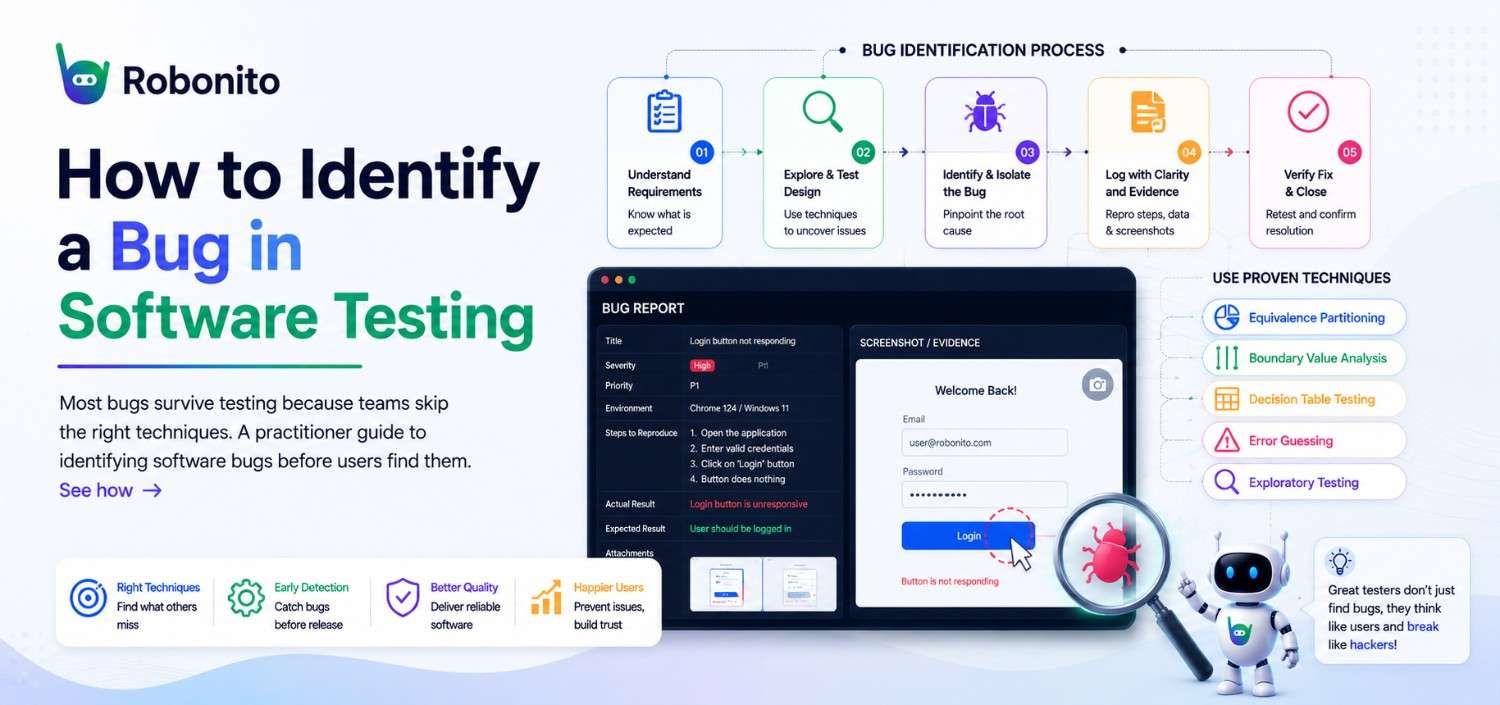
Your QA cycle ran green across the board. Every test passed. Staging looked clean. Then three hours after release, a user reports that the checkout button stops responding whenever the cart contains more than five items — a bug that was there the entire time, hiding just outside the paths you tested.
Identifying bugs in software testing is not just about finding crashes. It is about knowing where to look, when to look, and how to distinguish a real defect from expected behavior or a test environment anomaly. This guide covers the techniques, checklists, and mindset shifts that help QA engineers catch more bugs earlier — and keep them out of production.
Key Takeaways
- A bug is a deviation between actual and expected behavior — not every unexpected result is a defect
- Exploratory testing surfaces bugs that scripted test suites systematically miss
- Boundary value analysis catches the majority of input-related defects with the fewest test cases
- Bugs found during requirements review cost a fraction of what production defects cost to fix
- A reliable automated regression baseline frees testers to focus on exploratory sessions where novel bugs hide
What Counts as a Bug? Defect vs. Error vs. Failure
Before you can reliably identify bugs, your team needs a shared vocabulary. Three terms are used interchangeably in most teams but mean different things:
| Term | Definition | Who introduces it |
|---|---|---|
| Error | A human mistake in code, design, or requirements | Developer or analyst |
| Defect (Bug) | A flaw in the code that may cause incorrect behavior | Present in the codebase |
| Failure | The observable incorrect behavior when a defect executes | Visible to end users |
A defect can exist for years without causing a failure — until specific conditions trigger it. Your job as a QA engineer is to create those conditions before real users do.
6 Techniques to Identify Bugs in Software Testing
1. Exploratory Testing
Exploratory testing is simultaneous learning, test design, and execution. Instead of following pre-written scripts, the tester investigates the application with a goal in mind — for example, "try to complete a purchase as a guest user whose session expires mid-checkout."
This technique consistently uncovers defects that scripted tests miss because it follows the natural chaos of real user behavior rather than the happy path assumed at design time.
When to use it: Early sprint cycles, new features, high-risk modules, and whenever scripted tests keep passing but something still feels wrong.
2. Boundary Value Analysis (BVA)
Most input-related bugs cluster at the edges of valid ranges, not in the middle. BVA tests the minimum, maximum, just-below-minimum, and just-above-maximum values for any input field.
For a quantity field that accepts values 1–100, test: 0, 1, 2, 99, 100, 101
Any form that accepts prices, ages, ZIP codes, or quantities is a BVA candidate. This is one of the highest ROI testing techniques available — a small number of test cases covers the most defect-prone territory.
3. Equivalence Partitioning
Rather than testing every possible input, divide inputs into classes that should behave identically and test one representative from each class.
For a password field requiring 8–20 characters, test one from each partition:
- Invalid short (< 8 characters)
- Valid (8–20 characters)
- Invalid long (> 20 characters)
If the code handles one case in a partition incorrectly, it handles them all incorrectly. This technique dramatically reduces test case volume without reducing coverage.
4. Regression Testing
Every bug fix and every new feature is a potential regression source. Regression testing re-runs previously passing tests after any change to confirm that nothing broke elsewhere in the system.
Without a maintained regression suite, regressions surface in production — sometimes weeks after the offending commit, with no clear trail back to the cause.
5. Log Analysis
Application logs, browser console errors, and server error logs surface bugs that are completely invisible at the UI level. A page might render correctly while logging 500 Internal Server Error responses on every third API call.
Make log review part of every test session — not just a post-mortem step after something fails.
6. Session Replay and Real User Monitoring
Session replay tools record exactly what a real user did before an error occurred. This turns vague bug reports ("the page broke") into reproducible test cases with specific steps, browser versions, device types, and network conditions attached.
Before You Start: Pre-Testing Checklist
Running tests before the environment is stable produces false positives and wastes cycle time. Complete this before any test session begins:
- Requirements and acceptance criteria documented and reviewed by the team
- Test environment configuration matches production (OS, browser versions, database state)
- Test data prepared, realistic, and isolated from production data
- Access credentials and permissions verified across all user roles
- Application deployed to the correct build version and confirmed by the build pipeline
- Logging and monitoring enabled on the test environment
- Bug tracking system accessible with an agreed-upon defect entry template
Real-World Scenario: Catching a Checkout Bug Before Launch
The setup: An e-commerce team is one week from launch. Automated UI tests cover the standard checkout flow — add one item, enter details, submit payment. All tests pass consistently.
What exploratory testing found: A tester tried adding six items, removing two, then re-adding one while the page was already loaded. The cart total updated correctly, but the "Place Order" button rendered as disabled and could not be clicked. No error message appeared.
Root cause: A JavaScript event listener that enabled the submit button was attached once on initial page load and was not re-attached after cart state changed. The automated test suite never modified the cart after load, so the defect was invisible to every scripted test.
Resolution: Found in staging on day four of the sprint. The developer fix took 45 minutes. Had it reached production, it would have silently blocked purchases for any user who changed their cart — with no error, no alert, and no way for support to reproduce it from user reports alone.
This is the gap that exploratory testing closes.
Best Practices for Bug Identification
1. Write a reproduction case before logging a bug. A bug report without clear reproduction steps is not actionable — it is a complaint. Confirm you can reproduce the defect at least twice, in a clean environment, before raising it.
2. Separate identification from reporting. During exploratory sessions, note potential issues in a scratchpad without context-switching to the bug tracker. Investigate fully first, then write the report. Premature reporting interrupts flow and often produces incomplete tickets.
3. Test with realistic data, not clean data. QA databases typically contain perfect, normalized records. Real users have names with apostrophes, addresses with special characters, and accounts with legacy edge-case data. Seed your test environment with messy, realistic records before any test cycle.
4. Re-test after every deployment, not only after targeted bug fixes. Deployment pipelines introduce risk beyond the specific change. Run a smoke test suite after every deployment — not just when the release notes mention fixes in that area.
5. Version-lock your test environments and document them. A bug that appears on Chrome 123 but not Chrome 124 is still a bug. Log the exact environment configuration — OS, browser version, screen resolution, network conditions — in every UI defect report.
Common Mistakes That Let Bugs Slip Through
1. Only testing the happy path. Most test suites heavily cover the intended user flow and under-test error paths, empty states, permission edge cases, and multi-step interactions. Bugs overwhelmingly live in the paths no one wrote scripts for.
2. Marking tests passed after partial verification. If the test step says "verify the confirmation email was sent" but the tester only confirmed the success page loaded, the test was not passed — it was abandoned. Incomplete verification produces false confidence, not coverage.
3. Treating "works on my machine" as a valid resolution. Environment-specific bugs are real bugs. A defect that appears in Firefox but not Chrome, or on Windows but not macOS, is not resolved until the root cause is understood and fixed across configurations.
4. Closing bugs without verifying the fix in a fresh environment. A developer fixes a bug, retests locally with cached state and a slightly different configuration, marks it resolved. The tester re-closes it without a clean retest. The original defect reaches production untouched.
5. Skipping regression runs because "only one line changed." Single-line changes have caused complete system outages. The size of a change does not predict its impact radius — only a regression suite can.
Manual vs. Automated Bug Detection
| Factor | Manual Testing | Automated (Cypress / Robonito / Selenium) |
|---|---|---|
| Best for | Exploratory, UX, one-off scenarios | Regression, smoke tests, repetitive flows |
| Speed at scale | Slow | Fast across hundreds of test cases |
| Setup cost | Low | Medium–high (initial scripting investment) |
| Detects UI anomalies | Yes — visual, contextual | Partial — depends on assertions written |
| Maintenance required | None | Required as the UI evolves |
| CI/CD integration | No | Yes |
The strongest QA teams use both. Automation handles regression coverage so that humans are free to focus on exploratory sessions — where novel defects actually hide.
The Testing Discipline That Keeps Bugs Out of Production
Bug identification is a skill built on method, not luck. The techniques covered here — exploratory testing, boundary value analysis, regression suites, log review, and realistic test data — are most effective as a layered defense, not used in isolation.
No single technique catches every defect. Teams that pair rigorous pre-test preparation with disciplined exploratory sessions, a maintained regression baseline, and realistic test data consistently find more bugs earlier — and ship with justified confidence rather than crossed fingers.
The cost of identifying a bug in testing is always lower than the cost of explaining it to a user.
Frequently Asked Questions
What is the difference between a bug and a feature request?
A bug is a deviation from documented requirements or agreed acceptance criteria. If the behavior in question was never specified, it may be an enhancement request rather than a defect. When in doubt, trace it back to the original acceptance criteria — not to assumptions about what the feature "should" do.
How do you identify a bug that only happens intermittently?
Intermittent bugs are typically caused by race conditions, timing issues, or state-dependent logic. Start by establishing a reproduction rate — run the same scenario repeatedly to understand frequency. Then pull logs from runs where the failure occurred and compare them against passing runs. Adding targeted logging around the suspected code path usually surfaces the triggering pattern within a few cycles.
Should testers fix bugs they find, or only report them?
Testers should document and report, not fix — even when they technically can. Fixing code outside the developer's review process bypasses version control, code review, and traceability. The exception is test code and test data: testers own their scripts and should maintain them directly without a separate ticket cycle.
How detailed should a bug report be?
A complete report includes: environment (OS, browser, version), numbered reproduction steps, expected behavior, actual behavior, severity and priority, and a screenshot or screen recording. A report that cannot be reproduced from its description alone is not actionable and will waste a developer's triage time.
When should a bug be marked "not a bug"?
When the behavior matches documented requirements, when it is an environmental issue outside the application's control, or when the report reflects a misunderstood feature. Always include the specific reasoning in the resolution note — without it, a different tester will raise the same issue in the next cycle.
How should bugs be prioritized when there are too many to fix before a deadline?
Severity and priority are separate axes. Severity describes the technical impact on the system; priority describes the business urgency of fixing it. A minor visual glitch on a checkout page may have low severity but high priority because it erodes purchase confidence. Triage using both dimensions together, not severity alone.
Automate Your Regression Baseline, Explore the Rest
If your team spends hours manually re-running the same login, checkout, or form-submission flows after every release, that is testing time not spent on exploratory work where real bugs hide.
Robonito is a UI and end-to-end test automation tool that lets QA engineers build automated test flows without writing code. Record a user journey once and Robonito re-runs it on every deployment — surfacing regressions before they reach staging.
Teams that automate their regression baseline recover manual testing hours for the exploratory sessions that scripted suites cannot replace. If you are still running regression tests by hand, it is worth seeing how much of that can be handed off.
Automate your QA — no code required
Stop writing test scripts.
Start shipping with confidence.
Join thousands of QA teams using Robonito to automate testing in minutes — not months.