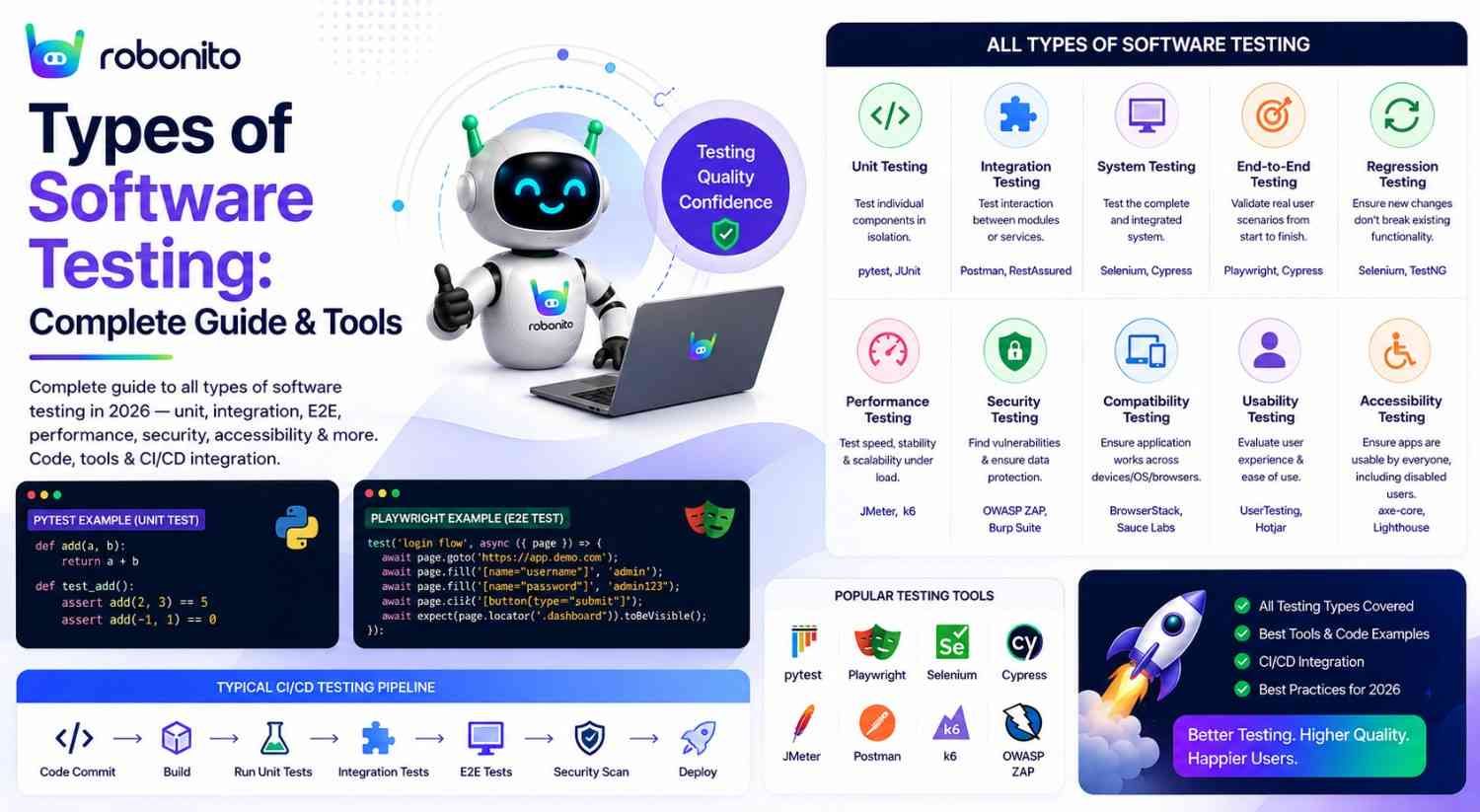
Every category of software testing exists because a specific class of bug exists that the other categories miss. Unit tests catch logic errors that E2E tests cannot isolate. Security scans catch vulnerabilities that functional tests are not designed to find. Performance tests catch scalability failures that pass all functional gates. Understanding which type of testing catches which class of bug — and which tools automate each type — is the foundation of any effective QA strategy. This guide covers all 12 types in full, with real code examples.
By Robonito Engineering Team · Updated June 2026 · 22 min read
Quick stats
| Fact | Source |
|---|---|
| A bug found in production costs 10× more to fix than in testing | IBM Systems Sciences Institute |
| 46% of production incidents are regressions testing should have caught | Tricentis State of Testing 2025 |
| Teams running comprehensive automated testing deploy 208× more frequently | DORA State of DevOps 2025 |
| Automated accessibility scans catch only 30-40% of WCAG violations — manual required too | Deque Systems Research 2025 |
| The average production application requires 5-7 different testing types for complete quality coverage | Capgemini World Quality Report 2025 |
The two testing categories — and why both are required
All software testing divides into two fundamental categories. Understanding the distinction prevents the most common testing strategy error: believing that functional test coverage is sufficient quality coverage.
Functional testing — "Does it do what it should?"
  Unit testing         → individual functions correct?
  Integration testing  → modules work together?
  E2E testing          → user flows complete?
  API testing          → endpoints behave correctly?
  Regression testing   → changes haven't broken anything?
  Smoke testing        → build is alive?
  Acceptance testing   → meets business requirements?

Non-functional testing — "How well does it do it?"
  Performance testing  → fast enough under load?
  Security testing     → resistant to attacks?
  Accessibility testing → usable by everyone?
  Visual regression    → looks correct across browsers?
  Compatibility testing → works on all target devices/browsers?
  Usability testing    → intuitive for users?
A production system can pass every functional test while simultaneously being too slow under load, vulnerable to SQL injection, inaccessible to screen reader users, and visually broken on Safari. These are not edge cases — they are common production failures that functional testing cannot detect.
The testing pyramid — getting the ratio right
                    ┌──────────────────────────────────┐
                    │    E2E / UI Tests (10%)           │
                    │  Few, slow, highest value         │
                 ┌──┴──────────────────────────────────┴──┐
                 │     Integration / API Tests (20%)       │
                 │   Moderate count, moderate speed        │
             ┌───┴─────────────────────────────────────────┴───┐
             │              Unit Tests (70%)                    │
             │    Many, fast, cheap — the foundation            │
         ────┴─────────────────────────────────────────────────┴────
              Static Analysis + Security Scanning (always running)
The pyramid ratio matters because of maintenance cost and execution speed. Unit tests fail instantly and cheaply. E2E tests take 30-60 seconds each, break when UIs change, and require framework maintenance. A suite with 70% E2E tests and 10% unit tests is slow, fragile, and expensive — the inverted pyramid that most teams who are struggling with automation have accidentally built.
Cover every critical testing type in one no-code platform
Robonito covers web, mobile, API, and desktop testing with AI self-healing — complete functional coverage without any scripting overhead. Try Robonito free →
Functional testing types
1. Unit testing
What it is: Testing individual functions, methods, and components in complete isolation from the rest of the application — no database, no network, no external dependencies.
What it catches: Logic errors, incorrect calculations, null handling failures, boundary value bugs, incorrect conditional logic.
When to run: On every code commit. Unit tests should complete in under 5 minutes — if they take longer, they are too large or need parallelisation.
Tools: Jest (JavaScript/TypeScript), pytest (Python), JUnit (Java), NUnit (C#), GoogleTest (C++).
// tests/unit/order-calculator.test.js — Jest unit tests
// Tests business logic in complete isolation — no API, no database

import { calculateOrderTotal, applyDiscount } from '../../src/cart/calculator';

describe('calculateOrderTotal', () => {

  test('calculates subtotal, VAT, and total correctly', () => {
    const items = [
      { price: 29.99, quantity: 2, vatRate: 0.20 }
    ];
    const result = calculateOrderTotal(items);
    expect(result.subtotal).toBeCloseTo(59.98, 2);
    expect(result.vat).toBeCloseTo(11.996, 2);
    expect(result.total).toBeCloseTo(71.976, 2);
  });

  test('returns zero totals for empty cart', () => {
    const result = calculateOrderTotal([]);
    expect(result.total).toBe(0);
    expect(result.subtotal).toBe(0);
  });

  // Boundary values — always test edges
  test.each([
    [0,    0,    'zero items'],
    [1,    1,    'minimum valid'],
    [99,   99,   'near maximum'],
    [100,  100,  'maximum valid'],
  ])('quantity %i → %i items in total (%s)', (quantity, expected) => {
    const items = [{ price: 1.00, quantity, vatRate: 0 }];
    expect(calculateOrderTotal(items).subtotal).toBe(expected);
  });

  test('throws RangeError when quantity exceeds 100', () => {
    const items = [{ price: 1.00, quantity: 101, vatRate: 0 }];
    expect(() => calculateOrderTotal(items)).toThrow(RangeError);
  });
});

describe('applyDiscount', () => {

  test('SAVE10 reduces total by exactly 10%', () => {
    expect(applyDiscount(100.00, 'SAVE10').finalTotal).toBeCloseTo(90.00, 2);
  });

  test('expired code returns original price with valid:false', () => {
    const result = applyDiscount(100.00, 'EXPIRED2023');
    expect(result.finalTotal).toBe(100.00);
    expect(result.codeValid).toBe(false);
    expect(result.error).toBe('Discount code has expired');
  });

  test('null code does not throw — returns no discount', () => {
    expect(() => applyDiscount(100.00, null)).not.toThrow();
    expect(applyDiscount(100.00, null).discountAmount).toBe(0);
  });
});
Coverage target: ≥ 80% line coverage on business logic layer. Track in CI and block merges when coverage drops below threshold.
2. Integration testing
What it is: Testing how multiple components work together — a function combined with a database query, an API endpoint with its authentication middleware, or two services communicating.
What it catches: Data format mismatches between services, authentication failures between modules, database schema inconsistencies, incorrect API contract implementation.
When to run: On every pull request — after unit tests pass. Target completion in under 20 minutes.
Tools: pytest + httpx (Python), Supertest (Node.js), REST Assured (Java), TestContainers (any — spins up real databases in Docker).
## tests/integration/test_orders_integration.py — pytest integration tests
## Tests how order service, discount service, and database work together

import pytest
import httpx

BASE_URL = "https://staging.yourapp.com"

@pytest.fixture(scope="module")
def auth_client():
    auth = httpx.post(f"{BASE_URL}/api/auth/login", json={
        "email": "test@example.com",
        "password": "TestPass2026!"
    })
    token = auth.json()["access_token"]
    return httpx.Client(
        base_url=BASE_URL,
        headers={"Authorization": f"Bearer {token}"},
        timeout=15.0
    )

class TestOrderDiscountIntegration:

    def test_discount_applied_correctly_through_full_stack(self, auth_client):
        """Integration test: discount service → cart service → order service."""
        response = auth_client.post("/api/v1/orders", json={
            "product_id": "prod-widget-pro",
            "quantity": 1,
            "discount_code": "SAVE10"
        })
        assert response.status_code == 201
        order = response.json()
        ## Verify discount was applied through the full integration
        assert order["discount_applied"] == "SAVE10"
        assert order["discount_amount"] == pytest.approx(
            order["subtotal"] * 0.10, rel=0.01
        )

    def test_order_appears_in_user_history_after_creation(self, auth_client):
        """Integration test: order creation → order list consistency."""
        create_res = auth_client.post("/api/v1/orders", json={
            "product_id": "prod-widget-pro",
            "quantity": 1
        })
        new_order_id = create_res.json()["order_id"]

        list_res = auth_client.get("/api/v1/orders?limit=5&sort=created_desc")
        recent_ids = [o["order_id"] for o in list_res.json()["items"]]
        assert new_order_id in recent_ids, "New order not in recent list"

    def test_out_of_stock_returns_422_not_500(self, auth_client):
        """Integration test: inventory service correctly returns 422."""
        response = auth_client.post("/api/v1/orders", json={
            "product_id": "prod-out-of-stock-test",
            "quantity": 1
        })
        assert response.status_code == 422  ## Not 500 (unhandled error)
        assert "stock" in str(response.json()).lower()
3. End-to-end (E2E) testing
What it is: Testing complete user journeys through the deployed application — from the browser, simulating exactly what a real user does. Also called UI testing or system testing.
What it catches: Full-stack integration failures, broken user flows, JavaScript errors in production build, cross-browser rendering issues, authentication and session management bugs.
When to run: On every merge to main. Target 30-60 minutes for full E2E regression.
Tools: Playwright (multi-language, native WebKit), Robonito (no-code, self-healing), Cypress (JavaScript, best debugger), Selenium (legacy).
// tests/e2e/checkout.spec.ts — Playwright E2E test
// Tests the complete checkout flow from product page to order confirmation

import { test, expect } from '@playwright/test';

test.describe('Checkout — E2E critical path', () => {

  test.beforeEach(async ({ page }) => {
    // API auth: faster than UI login, not part of checkout test
    await page.request.post('/api/auth/login', {
      data: { email: 'test@example.com', password: 'TestPass2026!' }
    });
  });

  test('complete purchase across browsers', async ({ page, browserName }) => {
    await page.goto('/products/widget-pro');
    await page.getByRole('button', { name: 'Add to cart' }).click();
    await expect(page.getByTestId('cart-count')).toHaveText('1');

    await page.goto('/checkout');
    await page.getByLabel('Full name').fill('Jane Smith');
    await page.getByLabel('Email').fill('jane@example.com');
    await page.getByLabel('Street address').fill('123 Test St');
    await page.getByLabel('City').fill('London');
    await page.getByLabel('Postcode').fill('EC1A 1BB');
    await page.getByLabel('Card number').fill('4242424242424242');
    await page.getByLabel('Expiry').fill('12/28');
    await page.getByLabel('CVC').fill('123');

    await page.getByRole('button', { name: 'Place order' }).click();

    await expect(
      page.getByRole('heading', { name: 'Order confirmed' })
    ).toBeVisible({ timeout: 15000 });

    const orderNum = await page.getByTestId('order-number').textContent();
    expect(orderNum).toMatch(/^ORD-\d{8}$/);
    console.log(`✅ E2E checkout passed on ${browserName}`);
  });
});
4. API testing
What it is: Testing application programming interfaces directly — verifying that API endpoints return correct status codes, accurate response schemas, proper authentication enforcement, and correct error handling, independently of any UI.
What it catches: Incorrect HTTP status codes, wrong response schemas, authentication bypass vulnerabilities, missing input validation, API contract drift.
When to run: On every pull request, alongside integration tests.
Tools: pytest + httpx (Python), Postman + Newman (low-code), REST Assured (Java), Supertest (Node.js), Robonito (no-code API testing).
## tests/api/test_auth_api.py — API contract tests

import httpx, pytest, os

BASE_URL = os.environ.get("BASE_URL", "https://staging.yourapp.com")

class TestAuthAPI:

    def test_valid_credentials_return_jwt_token(self):
        response = httpx.post(f"{BASE_URL}/api/auth/login", json={
            "email": "test@example.com",
            "password": "TestPass2026!"
        })
        assert response.status_code == 200
        data = response.json()
        assert "access_token" in data
        assert data["token_type"] == "bearer"
        ## JWT has three base64 parts separated by dots
        assert len(data["access_token"].split(".")) == 3

    def test_wrong_password_returns_401_not_500(self):
        """401 Unauthorized — not 403 (Forbidden) or 500 (error)."""
        response = httpx.post(f"{BASE_URL}/api/auth/login", json={
            "email": "test@example.com",
            "password": "wrongpassword"
        })
        assert response.status_code == 401
        ## Must not leak credentials in error response
        body = response.text.lower()
        assert "password" not in body
        assert "hash" not in body

    def test_protected_route_rejects_missing_token(self):
        response = httpx.get(f"{BASE_URL}/api/v1/orders")
        assert response.status_code == 401

    @pytest.mark.parametrize("email,expected", [
        ("not-an-email",  422),
        ("",              422),
        ("a" * 256 + "@example.com", 422),  ## Too long
        ("test@example.com", 200),  ## Valid
    ])
    def test_email_validation(self, email, expected):
        response = httpx.post(f"{BASE_URL}/api/auth/login", json={
            "email": email, "password": "TestPass2026!"
        })
        assert response.status_code == expected
5. Regression testing
What it is: Re-running previously passing tests after code changes to verify that changes have not broken existing functionality. The most frequent type of automated testing in active development.
What it catches: Regressions — bugs introduced by new code that break previously working features.
When to run: On every merge to main. The regression suite is the CI/CD deployment gate.
Tools: Same as E2E + API testing tools — regression testing is the purpose, not a separate tool category. Robonito's AI self-healing is particularly valuable here — it prevents the false positives (tests failing due to UI changes, not bugs) that make regression suites unreliable.
The self-healing advantage for regression testing:
Traditional regression suite maintenance cost:
  UI changes per sprint: 12 (normal for active product)
  Tests broken per UI change: 1.5 on average
  Tests broken per sprint: ~18
  Time to fix each: 30 minutes
  Annual maintenance: 18 × 26 × 0.5h × £65/hr = £15,210/year

With Robonito self-healing:
  80% of breaks auto-healed → 3.6 manual fixes per sprint
  Annual maintenance: 3.6 × 26 × 0.5 × £65 = £3,042/year
  Annual saving: £12,168 from regression suite alone
6. Smoke testing
What it is: A rapid preliminary test of the most critical functions to verify a build is stable enough to proceed to full testing. Covers 10-20 scenarios in 5-15 minutes.
What it catches: Catastrophic build failures — application will not load, login is completely broken, primary feature inaccessible.
When to run: After every deployment to every environment (staging and production). Acts as a gate before the full regression suite runs.
Purpose: If smoke tests fail, the full 45-minute regression suite does not run — saving time on a fundamentally broken build.
Tools: Playwright (smoke project), pytest (API smoke), Robonito (no-code smoke gate).
## CI: smoke gate before full regression
jobs:
  smoke:
    name: Smoke Gate
    steps:
      - run: npx playwright test --project=smoke --grep @smoke
        ## 8-10 minutes, one browser

  regression:
    needs: smoke  ## Only runs if smoke passes
    name: Full Regression
    steps:
      - run: npx playwright test  ## 45-60 minutes, all browsers
7. User acceptance testing (UAT)
What it is: Validation by end users or business stakeholders that the software meets their requirements and is ready for production use. The final gate before release.
What it catches: Requirements misunderstood during development, business workflow gaps, features that work technically but do not match actual business process.
When to run: After QA sign-off, before production deployment. Manual by design.
Who performs it: Business users, product owners, client representatives — not developers or QA engineers.
Tools: UAT is primarily manual. Test management tools (TestRail, Zephyr Scale) track UAT results. No automation tool replaces the business domain expertise UAT provides.
Non-functional testing types
8. Performance testing
What it is: Verifying that the application meets speed, scalability, and reliability requirements under defined load conditions.
Sub-types and their specific purpose:
| Sub-type | What it tests | k6 scenario |
|---|---|---|
| Load testing | Behaviour under expected traffic | Ramp to normal concurrent users |
| Stress testing | Breaking point and failure behaviour | Push beyond expected maximum |
| Spike testing | Sudden traffic surge handling | Instant jump to 10× normal traffic |
| Soak testing | Performance degradation over time | Sustained moderate load for hours |
| Core Web Vitals | Google's page quality metrics | Lighthouse CI measurement |
Tools: k6 (JavaScript, CI-native), JMeter (GUI, enterprise), Lighthouse CI (Core Web Vitals).
// load-tests/checkout-performance.js — k6 performance acceptance gate

import http from 'k6/http';
import { check, sleep } from 'k6';

export const options = {
  // Performance acceptance criteria — fail CI if not met
  thresholds: {
    'http_req_duration{name:homepage}':   ['p(95)<2000'],  // 95th% < 2s
    'http_req_duration{name:checkout}':   ['p(95)<2000'],  // 95th% < 2s
    'http_req_duration{name:api_orders}': ['p(95)<500'],   // API < 500ms
    'http_req_failed':                     ['rate<0.01'],  // < 1% errors
  },
  scenarios: {
    load_test: {
      executor: 'ramping-vus',
      stages: [
        { duration: '2m', target: 50 },   // Ramp: 0→50 users
        { duration: '5m', target: 50 },   // Hold at 50
        { duration: '2m', target: 200 },  // Spike to 200
        { duration: '3m', target: 200 },  // Hold peak
        { duration: '2m', target: 0 },    // Ramp down
      ],
    },
  },
};

const BASE_URL = __ENV.BASE_URL || 'https://staging.yourapp.com';

export default function () {
  const home = http.get(BASE_URL, { tags: { name: 'homepage' } });
  check(home, { 'homepage 200': r => r.status === 200 });

  const order = http.post(`${BASE_URL}/api/v1/orders`,
    JSON.stringify({ product_id: 'prod-widget-pro', quantity: 1 }),
    { headers: { 'Content-Type': 'application/json' }, tags: { name: 'api_orders' } }
  );
  check(order, { 'order created': r => r.status === 201 });

  sleep(1);
}
9. Security testing
What it is: Identifying vulnerabilities that could allow unauthorised access, data breaches, or malicious manipulation of the application.
What it catches: SQL injection, XSS (Cross-Site Scripting), CSRF, insecure authentication, dependency vulnerabilities, misconfigurations, insecure headers.
Sub-types:
| Type | What it does | Tool |
|---|---|---|
| SAST | Scans source code for vulnerabilities | SonarQube, Semgrep |
| DAST | Scans running application for vulnerabilities | OWASP ZAP, Burp Suite |
| Dependency scan | Finds vulnerable packages | Snyk, npm audit, Trivy |
| Penetration testing | Manual expert attack simulation | Human security engineers |
Tools: OWASP ZAP (DAST, free), Snyk (dependency, free tier), SonarQube (SAST, free community).
## CI: automated security gate
- name: Dependency vulnerability scan
  run: npx snyk test --severity-threshold=high
  env: { SNYK_TOKEN: ${{ secrets.SNYK_TOKEN }} }
  ## Fails if any high/critical CVE found in dependencies

- name: OWASP ZAP dynamic security scan
  uses: zaproxy/action-full-scan@v0.10.0
  with:
    target: ${{ secrets.STAGING_URL }}
    fail_action: true
    cmd_options: '-a'  ## Include ajax spider for SPA support
Important: Automated security tools catch common patterns but cannot replace security engineering expertise. Threat modelling, business logic vulnerabilities, and authentication bypass chains require human security specialists.
10. Accessibility testing
What it is: Verifying that the application is usable by people with disabilities — conforming to WCAG (Web Content Accessibility Guidelines) standards.
Legal context: WCAG 2.2 AA compliance is a legal requirement in the EU (European Accessibility Act), UK (Equality Act 2010), and US (ADA Section 508). Non-compliance carries legal risk, not just reputation risk.
What automated tools catch vs what requires manual testing:
Automated accessibility scans catch (~30-40% of WCAG violations):
  ✅ Missing alt text on images
  ✅ Insufficient colour contrast ratios
  ✅ Missing form labels
  ✅ Missing page landmarks (header, main, nav)
  ✅ Missing document language declaration

Must be tested manually with real assistive technology:
  ❌ Screen reader reading order (logical flow)
  ❌ Keyboard-only navigation completeness
  ❌ Focus indicator visibility during navigation
  ❌ Error message accessibility at time of error
  ❌ Complex widget interaction (date pickers, dropdowns)
Tools: axe-core (WCAG scan, integrates with Playwright/Cypress/Jest), Pa11y (CI-native), Lighthouse (Core Web Vitals + accessibility).
// tests/accessibility/pages.spec.ts — WCAG 2.2 AA automated scan
import { test, expect } from '@playwright/test';
import AxeBuilder from '@axe-core/playwright';

const criticalPages = [
  { path: '/',          name: 'Homepage' },
  { path: '/login',     name: 'Login' },
  { path: '/checkout',  name: 'Checkout' },
];

for (const { path, name } of criticalPages) {
  test(`${name} — zero WCAG 2.2 AA violations`, async ({ page }) => {
    await page.goto(path);

    const results = await new AxeBuilder({ page })
      .withTags(['wcag2a', 'wcag2aa', 'wcag21aa', 'wcag22aa'])
      .analyze();

    if (results.violations.length > 0) {
      const summary = results.violations.map(v =>
        `[${v.impact?.toUpperCase()}] ${v.id}: ${v.description}\n` +
        `  Affected: ${v.nodes.map(n => n.target.join(', ')).join(' | ')}`
      ).join('\n\n');
      throw new Error(`WCAG violations on ${name}:\n\n${summary}`);
    }

    expect(results.violations).toHaveLength(0);
  });
}
11. Visual regression testing
What it is: Detecting unintended visual changes between builds by comparing screenshots of the application at different points in time.
What it catches: Layout shifts, colour changes, missing UI elements, broken responsive layouts, CSS regression, rendering differences across browsers.
Why functional tests miss visual regressions:
Scenario: A developer accidentally removes a CSS rule that
  positions the checkout button — button is still clickable
  but has shifted 80px from its expected position.

Functional test result: PASS
  (button exists ✅, button is clickable ✅, order creates ✅)

Visual regression test result: FAIL
  (button position changed 80px from baseline ❌)
Tools: Playwright built-in screenshot comparison (free), Applitools Eyes (AI visual, most sophisticated), Percy (Browserstack-backed).
// tests/visual/checkout-visual.spec.ts
import { test, expect } from '@playwright/test';

test.describe('Visual regression — checkout', () => {

  test('checkout renders consistently', async ({ page, browserName }) => {
    await page.goto('/checkout');
    await page.waitForLoadState('networkidle');

    // Mask dynamic content that changes legitimately
    await expect(page).toHaveScreenshot(`checkout-${browserName}.png`, {
      maxDiffPixelRatio: 0.02,  // Allow 2% variation for rendering differences
      mask: [
        page.getByTestId('countdown-timer'),
        page.getByTestId('live-price'),
      ],
    });
  });

  test('no horizontal overflow on mobile viewport', async ({ page }) => {
    await page.setViewportSize({ width: 375, height: 812 });
    await page.goto('/checkout');
    const scrollWidth = await page.evaluate(() => document.body.scrollWidth);
    expect(scrollWidth).toBeLessThanOrEqual(376);
    await expect(page.locator('main')).toHaveScreenshot('checkout-mobile-375.png');
  });
});
12. Compatibility testing
What it is: Verifying that the application functions correctly across different browsers, operating systems, devices, and screen sizes.
What it catches: Browser-specific CSS bugs, JavaScript API differences between engines (Chrome V8 vs WebKit), mobile viewport rendering issues, touch interaction failures.
2026 browser market share context:
Desktop browser market share (StatCounter, 2026):
  Chrome:  65.2%  → Must test (Chromium engine)
  Safari:  19.1%  → Must test (WebKit engine — different from Chrome)
  Edge:    4.1%   → Should test (Chromium, but different defaults)
  Firefox: 3.2%   → Should test (Gecko engine)

Mobile browser market share:
  Chrome (Android): 68.4%  → Must test
  Safari (iOS):     28.7%  → Must test (different rendering from desktop Safari)

Minimum compatibility testing target:
  Chrome + Safari = 84% of all users covered
  Add Firefox + mobile Safari = 97%+ coverage
Tools: Playwright (native WebKit + Chromium + Firefox, free), Robonito (all four browsers in CI, no-code), BrowserStack (real device cloud, enterprise).
// playwright.config.ts — compatibility testing configuration
export default defineConfig({
  projects: [
    { name: 'chromium', use: { ...devices['Desktop Chrome'] } },
    { name: 'webkit',   use: { ...devices['Desktop Safari'] } },
    { name: 'firefox',  use: { ...devices['Desktop Firefox'] } },
    { name: 'mobile-safari', use: { ...devices['iPhone 14'] } },
    { name: 'mobile-chrome', use: { ...devices['Pixel 7'] } },
  ],
});
// Run all five browsers in CI — zero extra cost with Playwright
The complete testing type reference table
| Testing type | Category | Automation | Speed | Frequency | Primary tool |
|---|---|---|---|---|---|
| Unit | Functional | ✅ Must automate | Seconds | Every commit | Jest, pytest |
| Integration | Functional | ✅ Must automate | 10-20 min | Every PR | pytest, Supertest |
| E2E / UI | Functional | ✅ Should automate | 30-60 min | Every main merge | Playwright, Robonito |
| API | Functional | ✅ Must automate | 10-20 min | Every PR | pytest, Postman |
| Regression | Functional | ✅ Must automate | 30-60 min | Every main merge | Playwright, Robonito |
| Smoke | Functional | ✅ Must automate | 5-15 min | Every deployment | Playwright, Robonito |
| UAT | Functional | ❌ Manual by design | Hours-days | Pre-release | TestRail, Zephyr |
| Performance | Non-functional | ✅ Must automate | 15-30 min | Every main merge | k6, JMeter |
| Security | Non-functional | ✅ Partial | 15-30 min | Every main merge | OWASP ZAP, Snyk |
| Accessibility | Non-functional | ✅ Partial (30-40%) | 5-10 min | Every main merge | axe-core, Pa11y |
| Visual regression | Non-functional | ✅ Should automate | 10-20 min | Every main merge | Playwright, Applitools |
| Compatibility | Non-functional | ✅ Via E2E | 30-60 min | Every main merge | Playwright, Robonito |
| Exploratory | Manual | ❌ Cannot automate | Hours | Per sprint | Human judgment |
| Usability | Manual | ❌ Cannot automate | Days | Pre-release | Human observation |
How Robonito covers multiple testing types in one platform
Robonito covers functional testing across the broadest surface of any single platform — web UI (all browsers), mobile web, API, and desktop — without requiring any scripting:
Testing type          Robonito covers    How
─────────────────────────────────────────────────────────────────
E2E / UI testing      ✅                Record user flows → AI generates tests
API testing           ✅                API tests generated from recorded flows
Regression testing    ✅                Full regression suite in CI, self-healing
Smoke testing         ✅                Smoke tier in CI, runs every deployment
Compatibility         ✅                Chrome, Safari, Firefox, Edge — all in CI
Mobile web            ✅                Real viewport testing included
Visual regression     ✅                Screenshot comparison built in
Performance           ❌ (use k6)
Security              ❌ (use OWASP ZAP)
Accessibility         ❌ (use axe-core)
Exploratory           ❌ (manual)
UAT                   ❌ (manual)
The combination of Robonito (functional coverage, no-code) + k6 (performance) + OWASP ZAP (security) + axe-core (accessibility) covers all testable quality dimensions from one CI/CD pipeline.
Complete CI/CD pipeline covering all testing types
## .github/workflows/complete-testing-pipeline.yml
name: Complete Quality Pipeline

on:
  push:
    branches: [main]
  pull_request:

jobs:
  ## Tier 1: Every commit (< 5 minutes)
  unit-tests:
    runs-on: ubuntu-latest
    steps:
      - uses: actions/checkout@v4
      - uses: actions/setup-node@v4
        with: { node-version: '20', cache: 'npm' }
      - run: npm ci
      - run: npm test -- --coverage
      - name: Security: dependency scan
        run: npx snyk test --severity-threshold=high
        env: { SNYK_TOKEN: ${{ secrets.SNYK_TOKEN }} }

  ## Tier 2: Every PR (15-25 minutes)
  integration-and-api:
    needs: unit-tests
    runs-on: ubuntu-latest
    steps:
      - uses: actions/checkout@v4
      - uses: actions/setup-python@v5
        with: { python-version: '3.12' }
      - run: pip install pytest httpx --break-system-packages
      - run: pytest tests/api/ tests/integration/ -v

  ## Tier 3: Every merge to main (45-60 minutes)
  full-quality-gates:
    needs: integration-and-api
    if: github.ref == 'refs/heads/main'
    runs-on: ubuntu-latest
    steps:
      - uses: actions/checkout@v4
      - uses: actions/setup-node@v4
        with: { node-version: '20', cache: 'npm' }
      - run: npm ci
      - run: npx playwright install --with-deps

      ## Deploy to staging
      - run: ./scripts/deploy-staging.sh ${{ github.sha }}

      ## Functional regression (Robonito: web + mobile + API, self-healing)
      - uses: robonito/run-tests-action@v2
        with:
          api-key: ${{ secrets.ROBONITO_API_KEY }}
          suite: regression
          environment: staging
          browsers: chrome,safari,firefox,edge
          platforms: web,mobile-web,api
          healing_mode: intent
          fail-on: critical

      ## Visual regression (Playwright screenshots)
      - run: npx playwright test tests/visual/

      ## Performance gate (k6)
      - run: |
          curl -sL https://github.com/grafana/k6/releases/latest/download/k6-linux-amd64.tar.gz \
            | tar xz && sudo mv k6*/k6 /usr/local/bin/
          k6 run --threshold 'http_req_duration{p(95)}<2000' load-tests/smoke.js
        env: { BASE_URL: ${{ secrets.STAGING_URL }} }

      ## Security DAST scan (OWASP ZAP)
      - uses: zaproxy/action-full-scan@v0.10.0
        with:
          target: ${{ secrets.STAGING_URL }}
          fail_action: true

      ## Accessibility (axe-core via Playwright)
      - run: npx playwright test tests/accessibility/

      - uses: actions/upload-artifact@v4
        if: failure()
        with:
          name: quality-failure-evidence
          path: playwright-report/
Frequently Asked Questions
What are the types of software testing?
Software testing divides into functional (does it work?) and non-functional (how well does it work?). Functional types: unit, integration, E2E, API, regression, smoke, and UAT. Non-functional types: performance, security, accessibility, visual regression, compatibility, and usability. Most production software requires all of these types for complete quality coverage.
What is the difference between functional and non-functional testing?
Functional testing verifies that software does what it is supposed to do — features work, flows complete, data is processed correctly. Non-functional testing verifies how well it does it — speed under load, resistance to attacks, WCAG compliance, visual consistency across browsers. Both are required: functional testing cannot detect performance bottlenecks or security vulnerabilities.
What is the difference between unit testing and integration testing?
Unit tests verify individual functions in complete isolation — no database, no API calls, no external dependencies. Integration tests verify that multiple components work correctly together — a function combined with a database query, two services communicating via API. Unit tests are faster and more numerous; integration tests catch a different class of bugs that unit tests cannot find.
What is the software testing pyramid?
The testing pyramid defines the ideal ratio: 70% unit tests (fast, cheap, numerous), 20% integration tests (moderate), 10% E2E tests (slow, valuable). This ratio produces fast feedback and low maintenance cost. Inverting the pyramid (mostly E2E) creates slow, brittle, expensive suites that teams struggle to maintain.
Which types of software testing can be automated?
Unit, integration, E2E, API, regression, smoke, performance, security scanning (partial), accessibility scanning (partial), and visual regression testing can all be automated. Testing types that must remain manual: exploratory testing, UAT, usability evaluation, accessibility testing with real assistive technology, and first-pass new feature testing.
External references
- WCAG 2.2 Guidelines — Accessibility standard reference
- OWASP Testing Guide — Security testing reference
- DORA State of DevOps 2025 — Testing deployment data
- k6 Documentation — Performance testing
- axe-core GitHub — Accessibility scanning
- Playwright Documentation — E2E testing
- Capgemini World Quality Report 2025 — Testing statistics
Cover all critical testing types from one no-code platform
Robonito handles functional regression across web, mobile, API, and desktop — with AI self-healing, cross-browser coverage, and CI/CD integration — so your team can focus on the testing types that require human judgment: exploratory, usability, and UAT. Start free and have your first regression suite running in CI today. Start free at Robonito.com →
Automate your QA — no code required
Stop writing test scripts.
Start shipping with confidence.
Join thousands of QA teams using Robonito to automate testing in minutes — not months.