01 / 03
Release windows are tight
The preview window before a feature release goes fast. Manual regression across HR and finance rarely finishes, so teams test the obvious and hope.
Workday Testing
Workday testing gets harder each time a major feature release lands on top of your own configuration changes. Robonito's AI agents run your HR and finance business processes end to end and flag what changed, before payroll notices.
Free forever plan · No code required
Teams that refuse to trade speed for quality ship with Robonito







01The problem
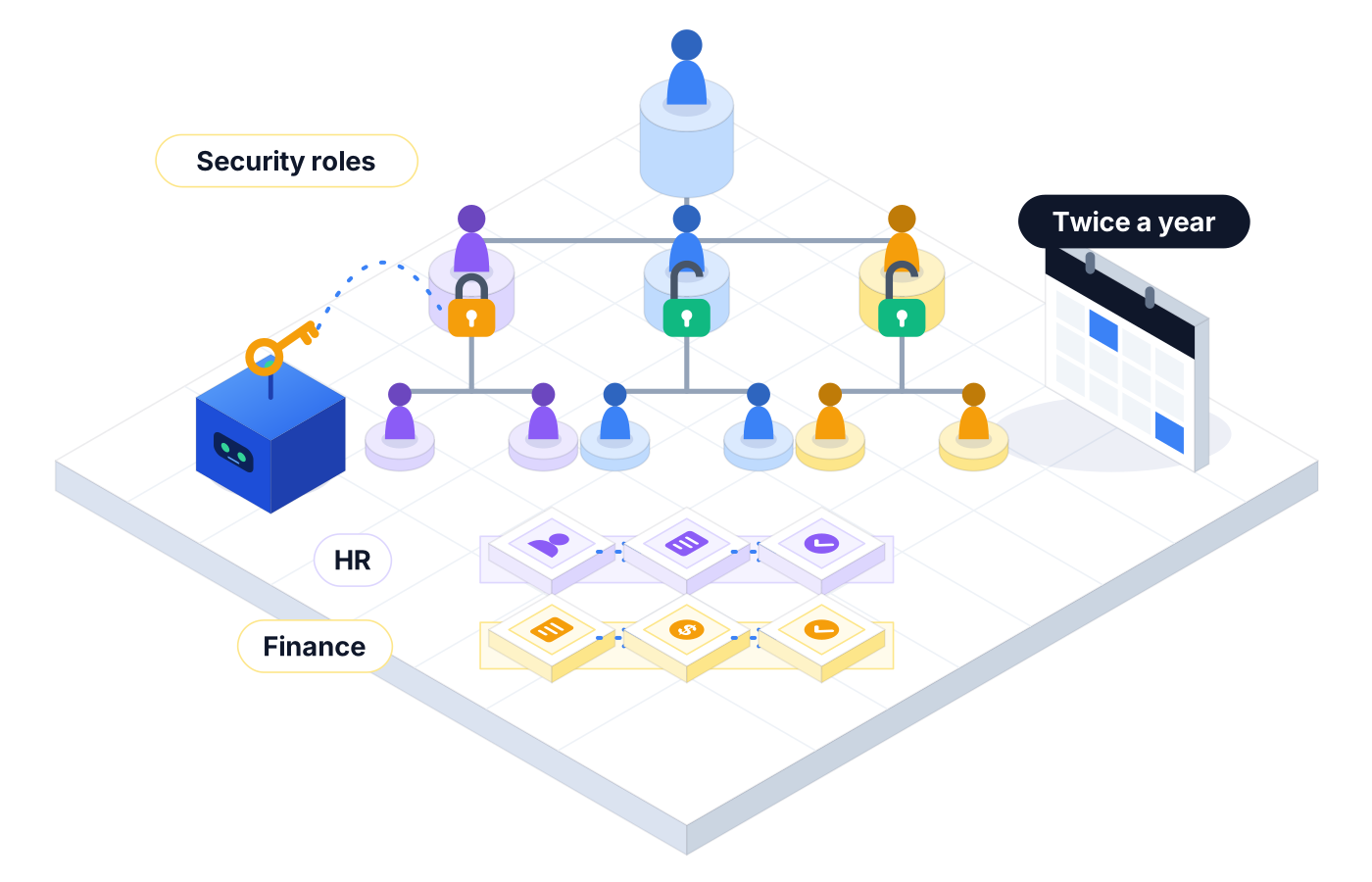
Workday ships major feature releases twice a year, and your team adds business process steps, security changes, and reports all the time. The testing window is short, and the stakes are pay and people.
01 / 03
The preview window before a feature release goes fast. Manual regression across HR and finance rarely finishes, so teams test the obvious and hope.
02 / 03
A small change to a security group can let someone see compensation they shouldn't, or stop a manager from approving time off. Happy-path tests rarely catch it.
03 / 03
A hire touches recruiting, HR, compensation, and payroll setup. Each team tests its own piece, and the handoffs go unchecked.
02What you get
Robonito lets the people who own Workday processes test them in plain language, without waiting in line for an automation engineer.
01
Run hire, job change, termination, expense, and supplier invoice processes from start to finish, including each approval step.
02
Sign in as different test users and confirm who can see and do what, so a security change doesn't expose data or block approvals.
03
Build a regression suite once and run it in your preview tenant ahead of each feature release, instead of rebuilding tests every time.
04
When a release reshapes a page or renames a field, the agent adapts the step instead of failing the run.
05
HRIS analysts describe a test in plain words or record it once, and the AI agent turns it into a reusable test case.
06
Each failure comes with screenshots, logs, and a root cause, so analysts can tell a configuration gap from a release change.
03How it works
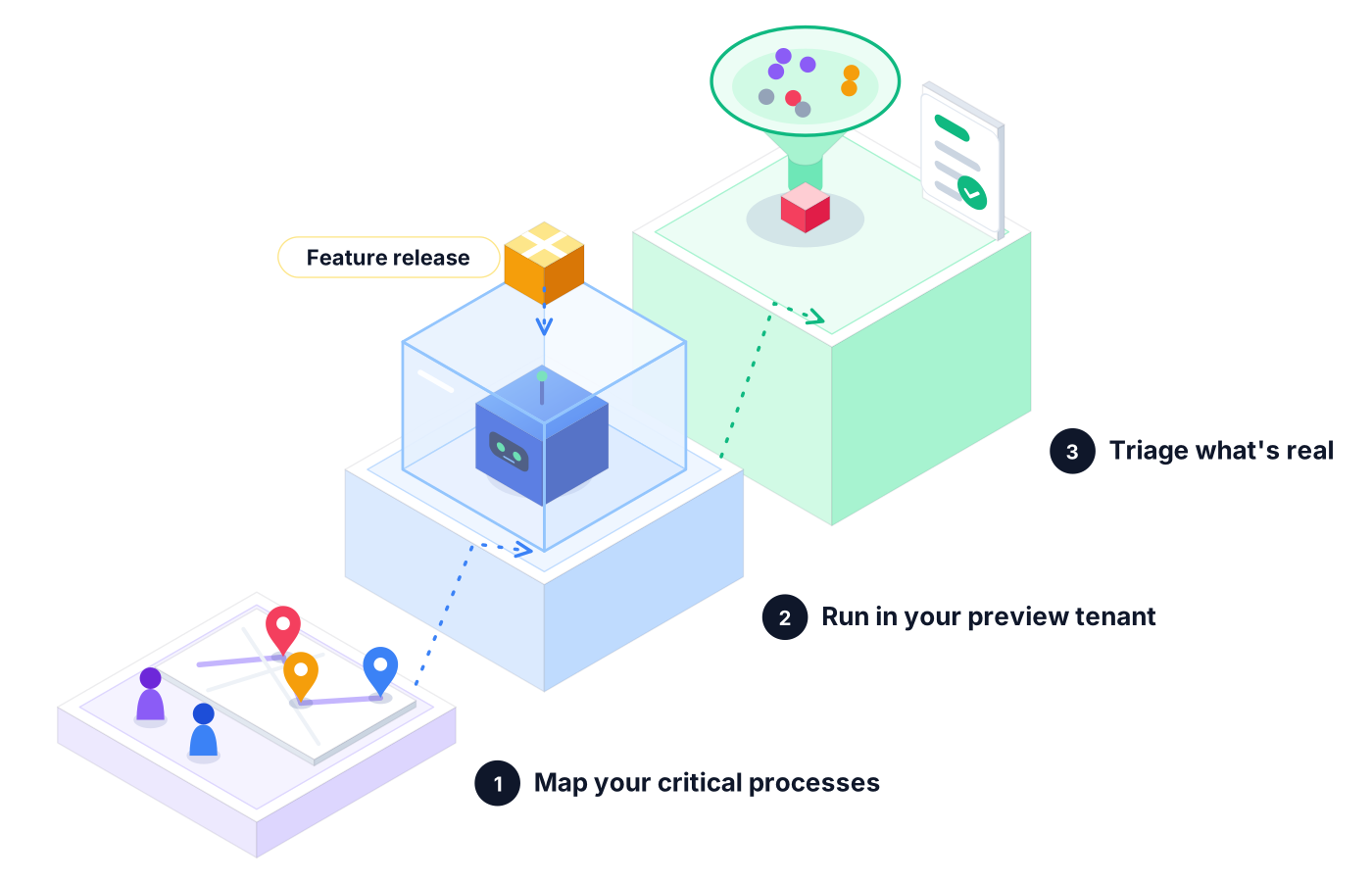
List the business processes and roles that would hurt most if they broke. Describe each one as a test in plain language.
When a feature release reaches your preview tenant, schedule the full suite and let the agents work through it.
Review failure clusters and root causes, fix configuration gaps, and sign off with a report you can share with HR and finance leads.
04Real-world use
The suite runs a hire, assigns compensation, and checks that the payroll and benefits steps trigger, so day one goes smoothly for the new employee.
After a security group update, the agent signs in as a manager and confirms they can approve time off but can't see their peers' compensation.
Finance changes an approval rule. The agent submits an expense, follows the routing, and checks it lands with the right approver.
05Proof you can share
When the question is 'Are we ready for the release?', you want an answer backed by runs, not memory.
Every action the agent took in each business process, in order, with what it saw.
Proof you get: Step-by-step run log with screenshots
Release-related breaks are grouped together, so you fix the cause once instead of chasing every symptom.
Proof you get: Failure cluster view in Reporting
A clean summary of what ran, what passed, and what failed for the people who approve the release.
Proof you get: Downloadable PDF execution report
06Ways to start
01
Try Robonito on your own web app with the free-forever plan. No code required, and no time limit.
02
Run a no-obligation proof of concept on your real system. You get clear results and a clear recommendation before you commit.
03
Robonito Professional Services helps with test strategy, migration from existing suites, and rollout across your teams.
Explore Professional Services07FAQ
Workday testing confirms that your tenant's business processes, security roles, and reports still work after configuration changes and feature releases. It covers HR processes like hiring and job changes and finance processes like expenses and supplier invoices. Robonito automates it with AI agents that run each process end to end and report root causes when something breaks.
Run a regression suite in your preview tenant as soon as the new release is available there. Workday ships major feature releases twice a year, so a reusable suite saves you from rebuilding tests each time. With Robonito, you schedule the suite, review failures in Reporting, and fix configuration issues before the release reaches production.
Yes. Robonito is no-code. HRIS analysts and finance process owners describe a test in plain language or record it, and the AI agent builds the steps. Self-healing keeps those tests running when a release changes page layouts, so the team spends less time repairing tests and more time reviewing what actually changed.
You run the same task as different users and check what each one can see and do. In Robonito, the agent signs in with test accounts for each role, tries actions like viewing compensation or approving a request, and verifies the expected outcome. That catches access gaps that happy-path testing tends to miss.
Yes. The agent follows a business process through every step and approval, such as a hire that moves through HR, compensation, and payroll setup. Chaining those steps in one test checks the handoffs between teams, which is where many Workday issues show up after a configuration change or a feature release.
Yes. You can run Workday suites on a schedule, on demand, or from your CI/CD pipeline, and connect Robonito to Jira, Azure DevOps, TestRail, Zephyr, and Slack. Results land where your HRIS and finance teams already work, so release readiness is visible to everyone without a status meeting.
Enterprise Apps
Test catalog items, workflows, and approvals
Learn moreEnterprise Apps
Test Fusion Cloud and EBS flows across modules
Learn moreEnterprise Apps
Automate Fiori flows and end-to-end SAP processes
Learn moreAI QA Agents
Full user journeys across web, mobile, API, desktop
Learn moreBook a demo to see Robonito's agents run a Workday business process and a security role check, step by step.