
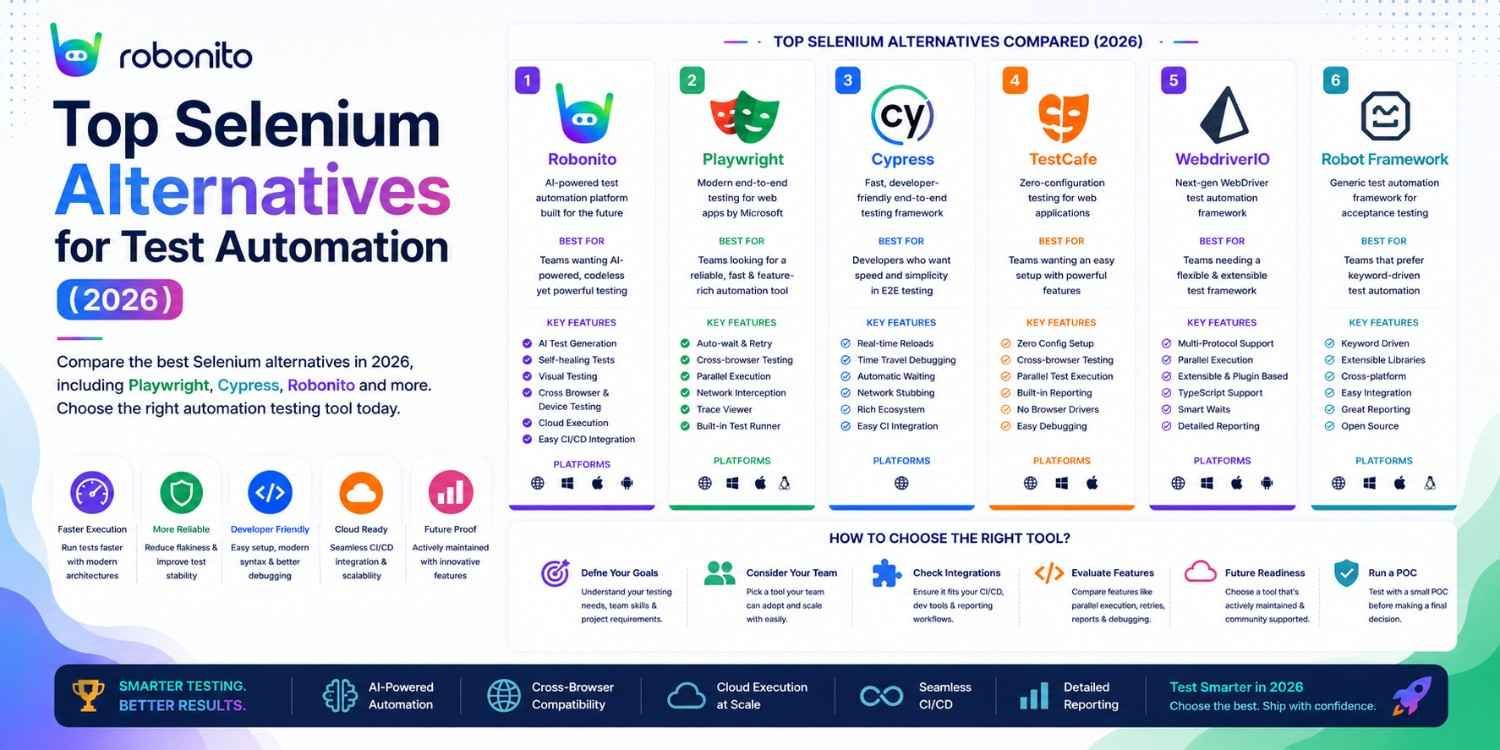
Playwright surpassed Selenium in npm downloads in Q3 2025 — the first time any tool has overtaken Selenium since it launched in 2004. That milestone signals something the QA community has been feeling for years: the testing tool landscape has genuinely shifted. This guide covers the 9 best Selenium alternatives honestly — with real code, actual pricing, and a clear recommendation for each team type.
By Robonito Engineering Team · Updated May 2026 · 18 min read
Quick stats
| Fact | Source |
|---|---|
| Playwright surpassed Selenium in npm weekly downloads in Q3 2025 | npm trends |
| 68% of teams that switched from Selenium report lower test maintenance overhead | Stack Overflow Developer Survey 2025 |
| Selenium test suites have 3–5× more flaky test rates than Playwright equivalents | ThoughtWorks Technology Radar 2025 |
| Teams migrating from Selenium to Playwright complete migration in 1–3 weeks for average-size suites | Microsoft Playwright team research |
| No-code testing adoption grew 340% from 2023 to 2026 | Gartner |
Why teams are leaving Selenium in 2026
Selenium is not broken. For teams with large, stable, well-maintained Selenium suites, there is no urgent reason to migrate. But for teams starting new projects or struggling with existing Selenium setups, the reasons to look elsewhere have become compelling.
The Selenium problems that alternatives solve:
Flaky tests from timing issues — Selenium requires explicit waits. When you forget one, or the application loads slower than expected, the test fails randomly. Playwright's auto-waiting eliminates this class of failure entirely.
High maintenance from fragile selectors — Selenium tests written with XPath or CSS class selectors break every time the UI changes. Updating them consumes engineering time proportional to how fast your UI moves. Modern tools and no-code platforms like Robonito address this with self-healing and ARIA-based selection.
No native Safari/WebKit support — Selenium has no official WebKit browser driver. Testing Safari requires third-party solutions. Playwright includes native WebKit support out of the box.
Slow test execution — Selenium's WebDriver protocol adds network overhead for every browser interaction. Playwright's direct browser API calls are significantly faster.
Complex infrastructure for parallelisation — Selenium requires Selenium Grid for parallel execution, which involves setting up and maintaining a cluster. Playwright parallelises within a single command.
The honest verdict: Selenium remains viable for legacy suites and teams needing maximum language flexibility. For new projects in 2026, Playwright is the better default — and for teams wanting to eliminate scripting overhead entirely, Robonito is the right direction.
Skip the Selenium migration entirely
Robonito replaces Selenium without requiring your team to learn a new scripting framework — auto-generates tests from your user flows, self-heals when your UI changes, and runs in CI with zero configuration. Try Robonito free →
Quick comparison: all 9 alternatives
| Tool | Coding required | Best for | Cross-browser | Self-healing | Free tier |
|---|---|---|---|---|---|
| Robonito | None | No-code teams, fast-changing UIs | ✅ All major | ✅ AI | ✅ |
| Playwright | Yes (multi-lang) | Engineering teams, cross-browser | ✅ Native | ❌ | ✅ OSS |
| Cypress | JS/TS only | JavaScript frontend teams | ✅ Partial | ❌ | ✅ OSS |
| Puppeteer | Yes (JS/TS) | Headless Chrome, scraping, screenshots | ❌ Chrome only | ❌ | ✅ OSS |
| TestComplete | Low (GUI) | Enterprise, desktop + web + mobile | ✅ | ✅ Partial | ❌ |
| WebdriverIO | Yes (JS/TS) | Node.js, unified web + mobile | ✅ | ❌ | ✅ OSS |
| Katalon Studio | Low (Groovy) | All-in-one platform, mixed teams | ✅ | ⚠️ | ❌ |
| Robot Framework | Low (keyword) | BDD, acceptance testing, Python teams | ✅ (via SeleniumLibrary) | ❌ | ✅ OSS |
| Mabl | None | AI-powered no-code, visual testing | ✅ | ✅ Advanced | ❌ |
The 9 best Selenium alternatives in 2026
1. Robonito — Best for no-code, self-healing automation
robonito.com · Free tier available · No coding required
Robonito is the strongest Selenium alternative for teams that want to eliminate the scripting overhead that makes Selenium expensive to maintain — not just replace one scripting framework with another.
Where Selenium (and Playwright and Cypress) require engineers to write selectors, configure test runners, manage environments, and update broken tests when the UI changes, Robonito operates on a fundamentally different model. QA analysts record user flows or describe test scenarios in natural language. Robonito generates the tests. When the UI changes, self-healing AI updates the tests automatically. No selector knowledge required. No maintenance sprints.
Real CI/CD integration:
## .github/workflows/robonito.yml
name: Robonito Regression Tests

on: [push, pull_request]

jobs:
  regression:
    runs-on: ubuntu-latest
    steps:
      - uses: actions/checkout@v4
      - name: Run Robonito regression suite
        uses: robonito/run-tests-action@v2
        with:
          api-key: ${{ secrets.ROBONITO_API_KEY }}
          suite: regression
          environment: staging
          browsers: chrome,safari,firefox,edge
          fail-on: critical
What differentiates Robonito from other no-code tools: Most no-code testing tools record DOM selectors — which is equally fragile as Selenium. Robonito captures intent ("click the primary checkout button") through multi-signal AI recognition — visual position, ARIA role, text content, surrounding context. When the DOM changes, the intent-based recognition still finds the element.
Honest limitations: Not intended to replace dedicated performance-testing platforms such as k6 or JMeter. Teams requiring highly customized framework-level programming may prefer code-first tools like Playwright.
Best for: Web, mobile, desktop, and API automation where teams want to reduce scripting and maintenance through AI-powered, self-healing testing.
Pricing: Free tier with generous limits. Paid plans competitive — robonito.com/pricing.
2. Playwright — Best for engineering-led teams replacing Selenium
playwright.dev · Open source · Free · TypeScript/JS/Python/Java/C#
Playwright is Microsoft's modern browser automation framework and the most direct Selenium replacement for engineering teams. It addresses every major Selenium pain point while maintaining a familiar test structure that makes migration manageable.
What Playwright does better than Selenium:
- Auto-waiting — Playwright automatically waits for elements to be actionable before interacting with them. No explicit
WebDriverWait. No flaky tests from timing. - Native cross-browser — Chromium, Firefox, and WebKit (Safari) from one framework. No third-party drivers.
- Faster execution — direct browser API instead of WebDriver protocol overhead
- ARIA-first selectors —
getByRole('button', { name: 'Submit' })survives UI restructuring far better than XPath - Parallel execution built in — no Selenium Grid setup required
Real code — Playwright vs Selenium comparison:
// ❌ Selenium Java — verbose, fragile, requires explicit waits
WebDriver driver = new ChromeDriver();
driver.get("https://yourapp.com/login");

WebDriverWait wait = new WebDriverWait(driver, Duration.ofSeconds(10));
WebElement emailField = wait.until(
    ExpectedConditions.visibilityOfElementLocated(By.id("email"))
);
emailField.sendKeys("user@example.com");

WebElement passwordField = driver.findElement(By.cssSelector("input[type='password']"));
passwordField.sendKeys("password123");

WebElement loginButton = driver.findElement(By.xpath("//button[@type='submit']"));
loginButton.click();

// Explicit wait for navigation
wait.until(ExpectedConditions.urlContains("/dashboard"));
assertTrue(driver.getCurrentUrl().contains("/dashboard"));
driver.quit();
// ✅ Playwright TypeScript — concise, auto-waiting, ARIA selectors
import { test, expect } from '@playwright/test';

test('user can log in', async ({ page }) => {
  await page.goto('/login');

  // Auto-waits for elements — no explicit waits needed
  await page.getByLabel('Email').fill('user@example.com');
  await page.getByLabel('Password').fill('password123');
  await page.getByRole('button', { name: 'Sign in' }).click();

  // Auto-waits for navigation
  await expect(page).toHaveURL(/dashboard/);
});
// Same test. 50% fewer lines. Zero explicit waits. Runs 3× faster.
Migrating from Selenium to Playwright:
Microsoft provides an official Selenium-to-Playwright migration guide. The core concepts map directly:
| Selenium concept | Playwright equivalent |
|---|---|
WebDriver | page |
findElement(By.id("x")) | page.locator('#x') or page.getByRole(...) |
WebDriverWait + ExpectedConditions | Built-in auto-waiting — remove these |
driver.navigate().to(url) | page.goto(url) |
| Selenium Grid | workers: N in playwright.config.ts |
Honest limitations: Requires coding — not accessible to non-technical QA. No built-in self-healing. CI setup requires some configuration. Younger ecosystem than Selenium for niche language bindings.
Best for: Engineering teams replacing Selenium on modern web apps, TypeScript/JavaScript/Python shops, teams frustrated with Selenium flakiness and cross-browser gaps.
Pricing: Free and open source.
3. Cypress — Best for JavaScript frontend teams
cypress.io · Open source core · JavaScript/TypeScript only
Cypress is the developer-experience-first alternative to Selenium. Where Selenium abstracts browser interaction through the WebDriver protocol, Cypress runs directly inside the browser — giving you real-time test execution in the browser's own JavaScript context with interactive debugging, time-travel through test steps, and automatic screenshot on failure.
Real code:
// cypress/e2e/checkout.cy.js
describe('Checkout flow', () => {
  beforeEach(() => {
    cy.login('test@example.com', 'TestPass2026!');
    cy.visit('/products/widget-pro');
  });

  it('completes purchase and shows confirmation', () => {
    cy.get('[data-testid="add-to-cart"]').click();
    cy.get('[data-testid="cart-count"]').should('have.text', '1');
    cy.get('[data-testid="checkout-link"]').click();

    cy.get('[data-testid="name-input"]').type('Jane Smith');
    cy.get('[data-testid="email-input"]').type('jane@example.com');
    cy.get('[data-testid="place-order"]').click();

    // Cypress auto-waits — no explicit wait needed
    cy.get('[data-testid="confirmation-heading"]')
      .should('be.visible')
      .and('contain', 'Order confirmed');
  });

  it('intercepts payment API and verifies request payload', () => {
    cy.intercept('POST', '/api/v1/orders').as('createOrder');

    cy.get('[data-testid="add-to-cart"]').click();
    cy.get('[data-testid="place-order"]').click();

    cy.wait('@createOrder').then((interception) => {
      expect(interception.request.body.productId).to.equal('widget-pro');
      expect(interception.response.statusCode).to.equal(201);
    });
  });
});
Honest limitations: JavaScript/TypeScript only — no Python, Java, C#. Safari support is experimental as of 2026. Cannot test multiple browser tabs. Cypress Cloud (parallel execution + analytics) adds cost beyond the free OSS tier.
Best for: JavaScript/TypeScript frontend teams, React/Vue/Angular SPAs, developers who want interactive debugging and fast local feedback loops.
Pricing: OSS core free. Cypress Cloud from ~$75/month.
4. Puppeteer — Best for headless Chrome automation
pptr.dev · Open source · Free · JavaScript/TypeScript
Puppeteer is Google's official Node.js library for controlling Chrome and Firefox. It differs from the other tools in this list in an important way: it is primarily an automation library rather than a test framework. It has no built-in test runner, no assertion library, no test reporting. It is the low-level building block that higher-level tools sometimes use under the hood.
When Puppeteer is the right choice over Playwright:
- Specific Chrome DevTools Protocol features not yet in Playwright
- Generating PDFs from web pages programmatically
- Automated screenshot generation for a design system
- Web scraping pipelines that run in Node.js
When Playwright is better:
- Writing UI tests with assertions and reporting
- Cross-browser coverage needed
- Team testing rather than individual automation scripts
Real code:
// Generate PDF from web page — a Puppeteer strength
const puppeteer = require('puppeteer');

async function generateInvoicePDF(invoiceUrl, outputPath) {
  const browser = await puppeteer.launch({ headless: true });
  const page = await browser.newPage();

  await page.goto(invoiceUrl, { waitUntil: 'networkidle0' });

  await page.pdf({
    path: outputPath,
    format: 'A4',
    printBackground: true,
    margin: { top: '20mm', bottom: '20mm', left: '15mm', right: '15mm' }
  });

  await browser.close();
  console.log(`Invoice PDF generated: ${outputPath}`);
}
Honest limitations: Chrome/Firefox only — no Safari/WebKit. Not a test framework — requires Jest, Mocha, or another runner for actual testing. Playwright's API is a superset of Puppeteer and is generally preferred for testing use cases.
Best for: Headless Chrome automation tasks, PDF generation, screenshot utilities, web scraping pipelines in Node.js.
Pricing: Free and open source.
5. TestComplete — Best for enterprise with desktop + web + mobile
smartbear.com/testcomplete · Commercial · Low-code GUI
TestComplete is SmartBear's enterprise test automation platform covering web, desktop, and mobile applications from one tool. It offers both scripted (JavaScript, Python, VBScript) and keyword-driven (no-code) test creation, making it accessible to mixed teams.
It is the right Selenium alternative when your testing scope goes beyond web applications — when you need to test the same desktop application, the web portal, and the mobile app in an integrated suite with one platform and one reporting dashboard.
Honest limitations: Expensive — enterprise licensing starts in the thousands of dollars per user. Heavier and slower than modern web-only tools. Learning curve for the platform itself. Best results require SmartBear's professional services for complex enterprise setups.
Best for: Large enterprises testing desktop + web + mobile in an integrated suite, teams already in the SmartBear ecosystem (Jira, Zephyr).
Pricing: Enterprise licensing — contact SmartBear for pricing.
6. WebdriverIO — Best for Node.js teams wanting Selenium compatibility
webdriver.io · Open source · Free · JavaScript/TypeScript
WebdriverIO is a Node.js-based framework built on the WebDriver protocol — making it the most "Selenium-compatible" alternative in this list. Its test runner, assertion library, and plugin ecosystem are more opinionated than raw Selenium bindings, making it faster to get productive while retaining the flexibility of the WebDriver protocol.
Its standout feature is unified web and mobile testing: the same test framework runs web tests via WebDriver and mobile tests via Appium, with a consistent API across both.
Real code:
// test/specs/login.e2e.js — WebdriverIO
describe('Login', () => {
  it('should login with valid credentials', async () => {
    await browser.url('/login');

    await $('#email').setValue('user@example.com');
    await $('#password').setValue('TestPass2026!');
    await $('button[type="submit"]').click();

    await expect(browser).toHaveUrl(
      expect.stringContaining('/dashboard')
    );
    await expect($('[data-testid="welcome-message"]')).toBeDisplayed();
  });
});
Honest limitations: Steeper initial setup than Playwright. The shared WebDriver protocol means some of Selenium's timing challenges can reappear if not configured carefully. Smaller community than Playwright and Cypress for web-specific testing.
Best for: Node.js teams wanting a more structured Selenium replacement, teams needing unified web and mobile test automation from one framework.
Pricing: Free and open source.
7. Katalon Studio — Best for all-in-one platform teams
katalon.com · Commercial · Low-code (Groovy)
Katalon Studio is a comprehensive test automation platform covering web, mobile, API, and desktop testing in one tool. It was a strong Selenium alternative in 2020–2022 for teams that wanted an all-in-one platform without assembling their own framework stack.
In 2026, Katalon's position is more complicated. The Perforce acquisition has changed the pricing model significantly. The Groovy-based scripting layer requires some technical knowledge despite marketing as "low-code." And teams report substantial maintenance overhead for complex suites.
Honest assessment: Katalon is still a reasonable choice for teams that specifically need the all-in-one platform approach (requirements, test management, execution, and reporting in one tool) and do not want to assemble those capabilities from separate tools. For teams that just need a web testing framework, Playwright is a better starting point.
Honest limitations: Pricing has increased significantly post-acquisition. Groovy scripting requirement is a barrier for non-technical testers despite "low-code" positioning. Self-healing capabilities are less mature than dedicated AI platforms. Heavy resource usage on local machines.
Best for: Teams needing integrated test management + execution in one platform, enterprises with compliance requirements for unified tooling.
Pricing: Free tier with limitations. Paid plans — pricing has changed post-Perforce acquisition; verify current pricing at katalon.com.
8. Robot Framework — Best for keyword-driven and BDD testing
robotframework.org · Open source · Free · Keyword-driven (Python)
Robot Framework is an open-source test automation framework using a keyword-driven approach — tests are written using human-readable keywords rather than programming syntax. "Open Browser," "Click Element," "Input Text," "Close Browser" form the building blocks of test steps.
This makes Robot Framework tests more readable to non-programmers than raw Python or Java code, while still requiring understanding of the keyword library, test structure, and the associated SeleniumLibrary or Browser library for web testing.
Real code:
*** Settings ***
Library    Browser    ## Modern Playwright-based library for Robot Framework

*** Test Cases ***
User Login Flow
    [Documentation]    Verify user can log in with valid credentials
    New Browser        headless=false
    New Page           https://yourapp.com/login

    Fill Text          id=email       user@example.com
    Fill Text          id=password    TestPass2026!
    Click              button[type="submit"]

    Get URL            should end with    /dashboard
    Get Element        [data-testid="welcome-message"]    should be visible

    [Teardown]    Close Browser
Honest limitations: Requires Python knowledge for custom keyword development. The keyword-driven approach can become unwieldy for complex conditional logic. Test debugging is harder than in Playwright or Cypress. The "low-code" positioning requires qualification — you can read tests without code knowledge, but creating and maintaining them requires Python familiarity.
Best for: Python teams wanting a structured keyword-driven framework, organisations needing very readable acceptance tests for business stakeholder review, BDD teams using the Gherkin-compatible approach.
Pricing: Free and open source.
9. Mabl — Best for AI-powered no-code with advanced visual testing
mabl.com · Commercial · No-code
Mabl is the most sophisticated AI-powered no-code testing platform after Robonito. Its primary differentiator is visual testing depth — Mabl's visual AI detects pixel-level rendering differences across browsers with the most advanced visual diffing in the no-code testing market.
How Mabl compares to Robonito:
Both are no-code, AI-powered, self-healing platforms. The primary differences:
- Mabl has deeper visual regression capabilities — better for design-heavy applications where pixel-perfect cross-browser rendering matters most
- Robonito has a more generous free tier and faster onboarding
- Mabl has no free tier — paid plans start at enterprise pricing
- Robonito covers both web UI and API testing natively; Mabl is primarily UI-focused
Honest limitations: No free tier — requires budget commitment before evaluating at scale. Steeper learning curve than Robonito. Per-seat pricing can become expensive for large teams.
Best for: Enterprise teams with budget for advanced visual regression, design-critical applications where cross-browser visual fidelity is the primary quality concern.
Pricing: No free tier. Enterprise pricing — contact Mabl for current rates.
Head-to-head: Robonito vs Playwright vs Cypress
The three most common choices for teams leaving Selenium in 2026 are Robonito, Playwright, and Cypress. Here is the honest comparison:
| Dimension | Robonito | Playwright | Cypress |
|---|---|---|---|
| Coding required | None | Yes (multi-lang) | JS/TS only |
| Setup time | < 1 hour | 1–2 hours | 1–2 hours |
| Self-healing | ✅ AI-powered | ❌ Manual | ❌ Manual |
| Safari/WebKit | ✅ | ✅ Native | ⚠️ Experimental |
| Non-technical users | ✅ Full access | ❌ | ❌ |
| API testing | ✅ Native | ✅ (via fetch) | ✅ cy.request() |
| Visual regression | ✅ | ✅ Built-in | ⚠️ Plugin required |
| CI/CD integration | ✅ Native action | ✅ | ✅ |
| Free tier | ✅ Generous | ✅ OSS | ✅ OSS core |
| Maintenance overhead | Low (AI heals) | Medium | Medium |
| Best for | Agile, fast UI, mixed teams | Engineering-led, cross-browser | JS SPAs, dev experience |
Migrating from Selenium — a practical approach
The most common migration mistake is trying to migrate everything at once. A better approach:
Phase 1: New tests in the new tool (Week 1)
Stop writing new Selenium tests immediately. All new test coverage goes in your chosen alternative (Playwright, Robonito, or Cypress). The existing Selenium suite continues running while the new suite grows.
Phase 2: Migrate high-maintenance Selenium tests (Weeks 2–4)
Identify which Selenium tests break most often (check your CI history). Migrate those first. High-maintenance tests provide the highest immediate ROI when migrated to a more stable tool.
// Playwright migration pattern from Selenium Java
// Before (Selenium):
// driver.findElement(By.cssSelector(".product-card:first-child .add-to-cart")).click();
// wait.until(ExpectedConditions.visibilityOfElementLocated(By.id("cart-badge")));

// After (Playwright) — ARIA selectors, no explicit waits:
await page.getByRole('button', { name: 'Add to cart' }).first().click();
await expect(page.getByTestId('cart-badge')).toBeVisible();
Phase 3: Retire Selenium tests progressively
As Playwright/Robonito coverage matches Selenium coverage for a module, retire the Selenium equivalents. Track the ratio of new-tool tests to Selenium tests over time — the shift is motivating to watch.
Phase 4: Selenium for legacy-only (ongoing)
Some Selenium tests may stay permanently — particularly those testing legacy systems with unusual browser requirements, or complex page object model implementations that would take significant effort to migrate. Keep Selenium for those, and stop feeling obligated to migrate them.
Choosing the right Selenium alternative for your team
| Your situation | Best alternative | Why |
|---|---|---|
| Engineering team, TypeScript/Python/Java | Playwright | Most direct Selenium replacement, better in every way for modern web |
| Non-technical QA team, no automation engineers | Robonito | No code required, self-healing, fastest to value |
| JavaScript SPA, developer-led testing | Cypress | Best developer experience, fast feedback |
| Node.js, need unified web + mobile | WebdriverIO | Consistent API across both platforms |
| Enterprise, desktop + web + mobile | TestComplete | Only tool covering all three from one platform |
| Python, BDD/acceptance testing | Robot Framework | Keyword-driven, business-readable |
| Budget for advanced visual regression | Mabl | Deepest visual AI in no-code category |
| Need headless Chrome for automation scripts | Puppeteer | Purpose-built for the task |
| Keeping Selenium, want better structure | WebdriverIO | WebDriver protocol, Node.js, more opinionated |
Pre-migration checklist
Before switching from Selenium, verify:
- Inventory of all existing Selenium tests with pass/fail rate and maintenance frequency
- Identification of highest-maintenance tests (migrate these first)
- New tool evaluated against your real application on a free trial (not a demo)
- CI/CD integration tested with a simple smoke test before full migration
- Team trained on new tool's core concepts (1–2 days for Playwright, hours for Robonito)
- Migration approach agreed: gradual (preferred) or big-bang
- Rollback plan: Selenium suite remains in CI in parallel until new suite proves reliable
Frequently Asked Questions
What is the best Selenium alternative in 2026?
Playwright for engineering teams — faster, more reliable, native Safari/WebKit, no explicit waits required. Robonito for teams wanting to eliminate scripting overhead entirely — no code, self-healing, non-technical testers can contribute. The right choice depends on whether your team wants a better scripting framework or no scripting at all.
Why are teams moving away from Selenium in 2026?
High maintenance overhead from fragile selectors breaking on UI changes, test flakiness from required explicit waits, slow execution from WebDriver protocol overhead, no native Safari/WebKit support, and complex Selenium Grid setup for parallelisation. Playwright solves all of these; Robonito eliminates most of them by removing scripting from the equation.
Is Selenium still worth using in 2026?
Yes in specific contexts: large existing suites with good reliability, teams needing Ruby or PHP support, established Selenium Grid infrastructure. For new projects, Playwright is a better starting point in every measurable dimension. Selenium is not obsolete — it is no longer the default for greenfield automation.
How hard is it to migrate from Selenium to Playwright?
Manageable. Playwright and Selenium share similar concepts (Page Object Model, locators, assertions), but different APIs. A 100-test Selenium Java suite typically takes 1–2 weeks. Microsoft provides an official migration guide. The recommended approach is gradual: new tests in Playwright, existing Selenium tests retired as Playwright coverage grows.
What is the difference between Playwright and Cypress?
Playwright supports Chromium, Firefox, and WebKit natively; Cypress has limited Safari support. Playwright is multi-language; Cypress is JavaScript/TypeScript only. Both auto-wait and are dramatically better than Selenium for flakiness. Choose Playwright for cross-browser coverage; choose Cypress if your team is JavaScript-first and wants the best developer debugging experience.
External references
- Playwright Documentation — Official Playwright docs
- Playwright Migration from Selenium — Official migration guide
- Cypress Documentation — Official Cypress docs
- WebdriverIO Documentation — Official WebdriverIO docs
- Robot Framework Documentation — User guide
- Puppeteer Documentation — Official Puppeteer docs
- DORA State of DevOps 2025 — Testing and delivery performance
The Selenium alternative that requires zero code — and zero maintenance
Robonito replaces your Selenium suite with AI-generated, self-healing tests that run across all browsers in CI — no selectors to write, no broken tests to fix, no maintenance sprints. Teams switching from Selenium to Robonito often reduce test maintenance effort significantly within the first few sprints. Start free at Robonito.com →
Automate your QA — no code required
Stop writing test scripts.
Start shipping with confidence.
Join thousands of QA teams using Robonito to automate testing in minutes — not months.
