
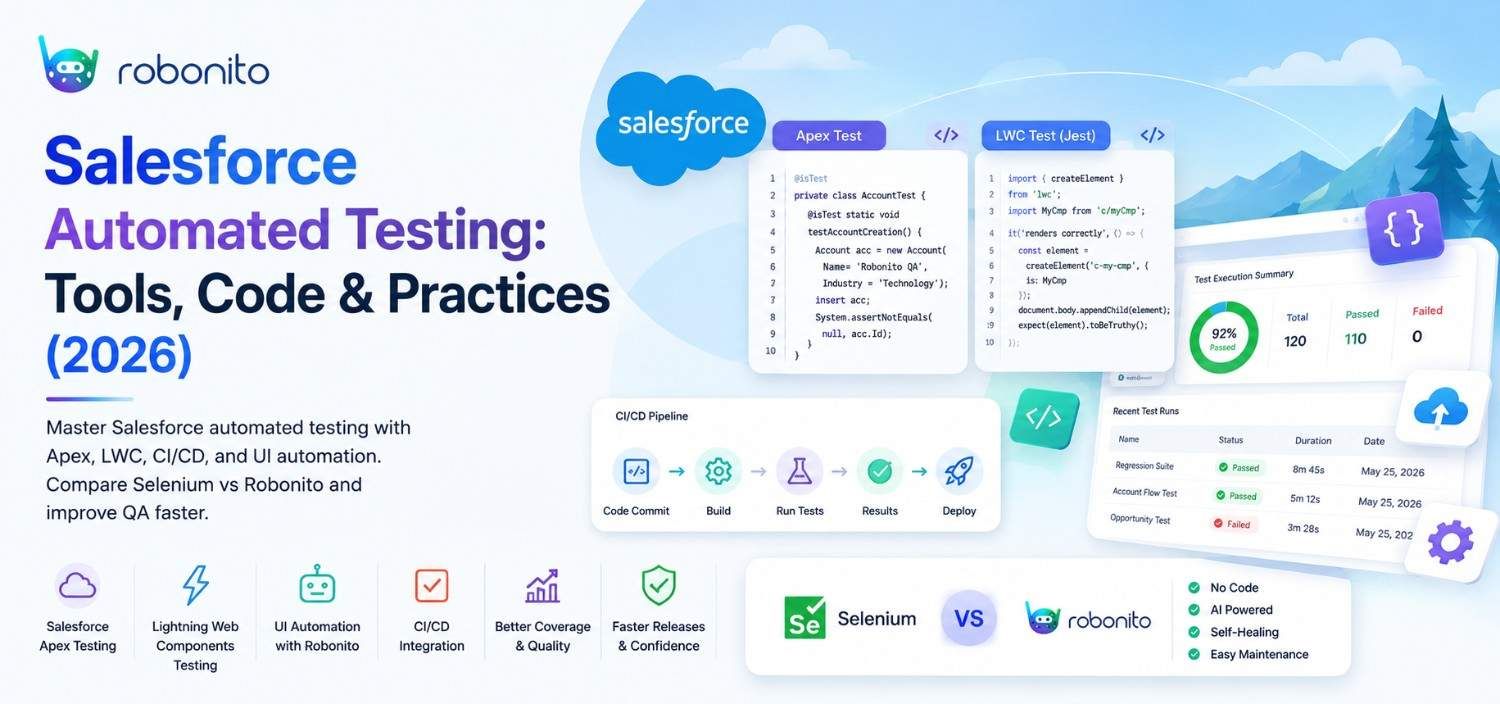
Salesforce releases three major updates every year. Each one can break your UI tests overnight. This guide shows how leading Salesforce teams build automation that survives seasonal releases — with real code, honest tool comparisons, and a CI/CD setup you can implement this sprint.
By Robonito Engineering Team · Updated May 2026 · 17 min read
Why Salesforce testing is uniquely difficult
Most platforms have a stable UI that changes on your schedule. Salesforce does not. Three times a year — Spring, Summer, and Winter — Salesforce pushes major platform updates that can change Lightning component behaviour, introduce new UI elements, and silently break selector-based test automation without warning.
Add to that the complexity of a typical Salesforce org: custom Apex triggers, Lightning Web Components, third-party managed packages, complex page layouts, permission sets with subtle differences between user profiles, and integrations with external systems through named credentials and platform events. Every one of these is a testing surface. Most of them are opaque to standard web UI testing tools.
The result, for teams relying on manual testing or traditional Selenium automation, is a predictable quarterly crisis. A Salesforce seasonal release lands. Twenty percent of UI tests fail. Two QA engineers spend four days triaging and fixing tests. No new features get tested that week.
This guide shows a better model — built on Salesforce-native testing tools, stable selector strategies, and no-code automation that self-heals when the platform updates.
Survive every Salesforce release without breaking your tests
Robonito self-heals Salesforce UI tests automatically when Lightning components update — no selectors to fix, no maintenance sprints, no quarterly crisis. Try Robonito free →
Table of Contents
- The Salesforce testing landscape
- Apex unit testing — the non-negotiable foundation
- Lightning Web Component (LWC) testing
- Salesforce UI testing — tools and selector strategy
- Tool comparison: Selenium vs Playwright vs Robonito
- Salesforce DX and CI/CD pipeline setup
- Handling Salesforce's seasonal release cycle
- Real-world scenario: from 4-day maintenance to 20 minutes
- When to keep manual testing in Salesforce
- Pre-release testing checklist
- Frequently Asked Questions
1. The Salesforce testing landscape
Salesforce testing spans four distinct layers, each requiring different tools and strategies.
| Layer | What it tests | Primary tools | Who owns it |
|---|---|---|---|
| Apex unit tests | Business logic in Apex classes and triggers | Salesforce built-in test framework | Salesforce developers |
| LWC component tests | Individual Lightning Web Components in isolation | Jest + @salesforce/lwc-jest | Frontend developers |
| UI / E2E tests | Full user workflows through the Lightning UI | Selenium, Playwright, Robonito | QA engineers |
| API / integration tests | REST API, Platform Events, external integrations | Postman, pytest, Robonito | Developers + QA |
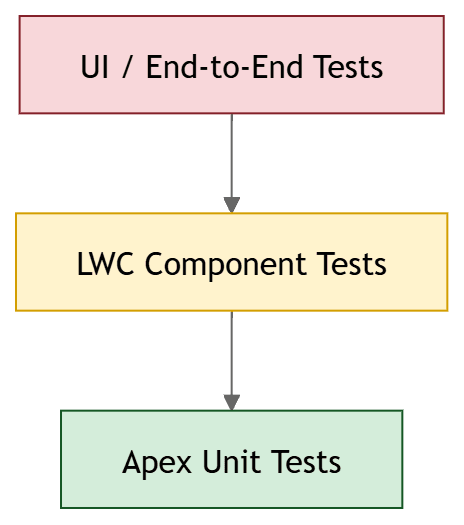
A common mistake is treating Salesforce testing as purely a UI testing problem and reaching straight for Selenium. In reality, the most reliable and maintainable coverage comes from pushing tests as low as possible — Apex unit tests for business logic, LWC tests for component behaviour, and UI tests only for complete end-to-end user flows that cannot be validated at a lower level.
The testing pyramid applies here exactly as it does everywhere else: many fast Apex tests at the base, fewer LWC tests in the middle, and a small suite of critical-path UI tests at the top.
2. Apex unit testing — the non-negotiable foundation
Salesforce mandates a minimum of 75% Apex code coverage before any deployment to production. That minimum is a compliance floor, not a quality target. Mature teams aim for 85–90% coverage with tests that actually validate business logic — not tests written purely to inflate coverage numbers.
What makes a good Apex test
A good Apex test creates its own test data, runs in isolation from org data (@isTest with SeeAllData=false), tests a specific behaviour, and asserts on a specific outcome. It does not rely on data that was manually inserted into the org.
// Good Apex test — OrderService.cls test
@isTest
private class OrderServiceTest {

    // Use TestFactory to create consistent, isolated test data
    @TestSetup
    static void setupTestData() {
        Account testAccount = TestFactory.createAccount('Acme Corp', true);
        Product2 testProduct = TestFactory.createProduct('Widget Pro', 99.99, true);
    }

    @isTest
    static void createOrder_setsStatusToPending_forNewOrder() {
        Account acct = [SELECT Id FROM Account WHERE Name = 'Acme Corp' LIMIT 1];
        Product2 prod = [SELECT Id FROM Product2 WHERE Name = 'Widget Pro' LIMIT 1];

        Test.startTest();
        Order__c order = OrderService.createOrder(acct.Id, prod.Id, 3);
        Test.stopTest();

        Order__c result = [SELECT Status__c, Quantity__c, Total_Amount__c
                           FROM Order__c WHERE Id = :order.Id];

        System.assertEquals('Pending', result.Status__c,
            'New order status should be Pending');
        System.assertEquals(3, result.Quantity__c,
            'Order quantity should match the requested amount');
        System.assertEquals(299.97, result.Total_Amount__c,
            'Total amount should be quantity × unit price');
    }

    @isTest
    static void createOrder_throwsException_whenQuantityIsZero() {
        Account acct = [SELECT Id FROM Account WHERE Name = 'Acme Corp' LIMIT 1];
        Product2 prod = [SELECT Id FROM Product2 WHERE Name = 'Widget Pro' LIMIT 1];

        Test.startTest();
        try {
            OrderService.createOrder(acct.Id, prod.Id, 0);
            System.assert(false, 'Expected AuraHandledException was not thrown');
        } catch (AuraHandledException e) {
            System.assert(e.getMessage().contains('Quantity must be greater than zero'),
                'Exception message should describe the validation failure');
        }
        Test.stopTest();
    }

    @isTest
    static void createOrder_bulkTest_handles200RecordsWithoutGovernorLimitException() {
        Account acct = [SELECT Id FROM Account WHERE Name = 'Acme Corp' LIMIT 1];
        Product2 prod = [SELECT Id FROM Product2 WHERE Name = 'Widget Pro' LIMIT 1];

        List<Order__c> orders = new List<Order__c>();
        Test.startTest();
        // Verify governor limits are not breached at bulk scale
        for (Integer i = 0; i < 200; i++) {
            orders.add(OrderService.createOrder(acct.Id, prod.Id, i + 1));
        }
        Test.stopTest();

        System.assertEquals(200, orders.size(),
            'All 200 orders should be created without hitting governor limits');
    }
}
The three Apex tests every trigger must have
Any Apex trigger without these three tests is incomplete, regardless of line coverage:
- Single record test — one record processed correctly
- Bulk test — 200 records processed without hitting governor limits (SOQL queries, DML statements, CPU time)
- Negative test — validation errors handled gracefully without unhandled exceptions
Governor limit violations in production — the "too many SOQL queries" and "CPU time limit exceeded" errors — are almost always caused by triggers that were only tested with single records.
3. Lightning Web Component (LWC) testing
Lightning Web Components have a first-class JavaScript testing story through Jest and the @salesforce/lwc-jest library. LWC tests run in Node.js — no Salesforce org required, no browser needed, execution in milliseconds.
// force-app/main/default/lwc/orderSummary/__tests__/orderSummary.test.js
import { createElement } from 'lwc';
import OrderSummary from 'c/orderSummary';
import { registerApexTestWireAdapter } from '@salesforce/sfdx-lwc-jest';
import getOrderDetails from '@salesforce/apex/OrderService.getOrderDetails';

// Register the wire adapter mock for the Apex method
const mockGetOrderDetails = registerApexTestWireAdapter(getOrderDetails);

describe('c-order-summary', () => {

    afterEach(() => {
        // Clean up DOM between tests
        while (document.body.firstChild) {
            document.body.removeChild(document.body.firstChild);
        }
    });

    test('renders order details when Apex data loads successfully', () => {
        const element = createElement('c-order-summary', { is: OrderSummary });
        document.body.appendChild(element);

        // Emit mock data from the wire adapter
        mockGetOrderDetails.emit({
            orderId: 'a00xx000001234AAA',
            status: 'Pending',
            totalAmount: 299.97,
            lineItems: [
                { product: 'Widget Pro', quantity: 3, unitPrice: 99.99 }
            ]
        });

        return Promise.resolve().then(() => {
            const statusEl = element.shadowRoot.querySelector('[data-id="order-status"]');
            const totalEl = element.shadowRoot.querySelector('[data-id="order-total"]');

            expect(statusEl.textContent).toBe('Pending');
            expect(totalEl.textContent).toBe('$299.97');
        });
    });

    test('shows error message when Apex call fails', () => {
        const element = createElement('c-order-summary', { is: OrderSummary });
        document.body.appendChild(element);

        // Emit an error from the wire adapter
        mockGetOrderDetails.error({
            body: { message: 'Record not found' },
            status: 404
        });

        return Promise.resolve().then(() => {
            const errorEl = element.shadowRoot.querySelector('[data-id="error-message"]');
            expect(errorEl).not.toBeNull();
            expect(errorEl.textContent).toContain('Record not found');
        });
    });

    test('displays loading spinner while data is fetching', () => {
        const element = createElement('c-order-summary', { is: OrderSummary });
        document.body.appendChild(element);

        // Wire adapter not yet emitted — component should show loading state
        return Promise.resolve().then(() => {
            const spinner = element.shadowRoot.querySelector('lightning-spinner');
            expect(spinner).not.toBeNull();
        });
    });
});
LWC Jest tests are fast (full suite in under 10 seconds), stable (no browser, no Salesforce UI), and catch component logic errors that UI tests would only surface through laborious end-to-end flows. Every LWC component with meaningful logic deserves a Jest test suite.
4. Salesforce UI testing — tools and selector strategy
UI testing is where most Salesforce automation breaks down. The root cause is almost always the same: brittle selectors.
Why Salesforce UI selectors break
Salesforce's Lightning Experience generates dynamic CSS class names that change between releases. A class like slds-button_brand might remain stable, but the generated classes wrapping it can change in any seasonal update. XPath selectors that traverse DOM structure break when Lightning redesigns a component's internal markup.
The stable selector hierarchy for Salesforce
Use selectors in this order of preference — most stable first:
// ✅ Most stable — ARIA roles and accessible names
// These reflect what the user sees and rarely change between releases
await page.getByRole('button', { name: 'Save' });
await page.getByLabel('Account Name');
await page.getByRole('combobox', { name: 'Stage' });

// ✅ Stable — explicit data-id attributes (add these to your LWC components)
// Add data-id to your custom components as part of your development standard
await page.locator('[data-id="submit-order-btn"]');
await page.locator('[data-id="opportunity-stage-picker"]');

// ✅ Stable — Salesforce field API names in standard components
// Standard Salesforce input fields expose the field API name as an attribute
await page.locator('[data-field-api-name="Account_Name__c"]');

// ⚠️ Fragile — CSS class-based selectors
// Use only when no stable alternative exists
await page.locator('.slds-button_brand');

// ❌ Avoid — XPath with structural traversal
// Breaks whenever Lightning redesigns internal component markup
await page.locator('//div[@class="slds-form-element"]/div/input');
Adding data-id attributes to your custom Lightning Web Components as a development standard is the single highest-ROI investment a Salesforce team can make in test stability. It takes seconds per component and makes every test that targets that component resilient to UI restructuring.
A complete Playwright test for a Salesforce opportunity flow
// tests/salesforce/opportunity.spec.ts
import { test, expect } from '@playwright/test';
import { SalesforceLoginPage } from '../pages/SalesforceLoginPage';
import { OpportunityPage } from '../pages/OpportunityPage';

test.describe('Opportunity creation flow', () => {

    test.beforeEach(async ({ page }) => {
        const loginPage = new SalesforceLoginPage(page);
        await loginPage.loginAs({
            username: process.env.SF_TEST_USERNAME!,
            password: process.env.SF_TEST_PASSWORD!,
            instanceUrl: process.env.SF_INSTANCE_URL!
        });
    });

    test('creates opportunity and moves to Closed Won', async ({ page }) => {
        const opportunityPage = new OpportunityPage(page);

        // Create the opportunity
        await opportunityPage.createNew({
            name: 'Acme Corp — Widget Pro Deal',
            accountName: 'Acme Corp',
            closeDate: '12/31/2026',
            stage: 'Prospecting',
            amount: '25000'
        });

        // Verify it was created
        await expect(page.getByRole('heading', {
            name: 'Acme Corp — Widget Pro Deal'
        })).toBeVisible();

        // Progress through stages
        await opportunityPage.moveToStage('Qualification');
        await expect(page.getByRole('option', {
            name: 'Qualification', selected: true
        })).toBeVisible();

        await opportunityPage.moveToStage('Closed Won');
        await expect(page.getByRole('option', {
            name: 'Closed Won', selected: true
        })).toBeVisible();

        // Verify the closed date is set
        await expect(page.getByLabel('Close Date')).not.toBeEmpty();
    });

    test('shows validation error when required fields are missing', async ({ page }) => {
        const opportunityPage = new OpportunityPage(page);
        await opportunityPage.openNewForm();

        // Submit without filling required fields
        await page.getByRole('button', { name: 'Save' }).click();

        // Salesforce standard validation errors use role="alert"
        await expect(page.getByRole('alert')).toBeVisible();
        await expect(page.getByText('Complete this field')).toBeVisible();
    });
});
5. Tool comparison: Selenium vs Playwright vs Robonito
| Feature | Selenium | Playwright | Robonito |
|---|---|---|---|
| Coding required | Yes — Java/Python/JS | Yes — JS/TS/Python | No |
| Setup time | 2–4 hours | 30–60 min | Under 20 min |
| Salesforce Lightning support | ⚠️ Fragile with dynamic classes | ✅ Strong with ARIA selectors | ✅ AI-driven element recognition |
| Self-healing after SF releases | ❌ Manual fix required | ❌ Manual fix required | ✅ Automatic |
| Parallel cross-browser execution | ⚠️ Requires Selenium Grid | ✅ Native | ✅ Native |
| CI/CD integration | ✅ | ✅ | ✅ |
| Maintenance overhead | High | Medium | Low |
| Non-technical QA usable | ❌ | ❌ | ✅ |
| Best for | Legacy Java teams | Engineering-led QA | Agile teams, fast-release orgs |
The honest Selenium verdict for Salesforce
Selenium is not the wrong choice because it requires code. It is the wrong choice for Salesforce specifically because of how Lightning Experience generates its DOM. Selenium tests for Salesforce written with XPath selectors or CSS class selectors break on every seasonal release — not because the business logic changed, but because Salesforce redesigned an internal component. Teams on Selenium spend more time maintaining Salesforce tests than writing new ones.
Playwright is a significantly better foundation for Salesforce UI testing. Its ARIA-first selector philosophy aligns with how Salesforce's accessibility-compliant Lightning components expose their elements. Playwright tests written against roles and labels survive most seasonal releases intact.
Robonito is the right choice when your QA team includes non-technical testers, when you need tests to survive seasonal releases with zero manual intervention, or when test maintenance is already consuming more sprint capacity than test creation.
6. Salesforce DX and CI/CD pipeline setup

Salesforce DX transformed how modern Salesforce teams approach testing. The key concept is the scratch org — a temporary, configurable Salesforce environment spun up from source code in minutes, used for testing, then destroyed.
This enables true CI/CD for Salesforce: every PR gets a fresh scratch org, runs its full test suite in isolation, reports results, and the org is discarded. No shared sandbox pollution. No test data conflicts between developers.
GitHub Actions pipeline with Salesforce DX
## .github/workflows/salesforce-ci.yml
name: Salesforce CI

on:
  push:
    branches: [main, develop]
  pull_request:

jobs:
  validate-and-test:
    name: Deploy to Scratch Org & Run Tests
    runs-on: ubuntu-latest
    timeout-minutes: 60

    steps:
      - uses: actions/checkout@v4

      - name: Install Salesforce CLI
        run: npm install -g @salesforce/cli

      - name: Authenticate to Dev Hub
        run: |
          echo "${{ secrets.SF_DEVHUB_AUTH_URL }}" > auth-url.txt
          sf org login sfdx-url --sfdx-url-file auth-url.txt --alias devhub --set-default-dev-hub

      - name: Create scratch org
        run: |
          sf org create scratch \
            --definition-file config/project-scratch-def.json \
            --alias ci-scratch-org \
            --duration-days 1 \
            --set-default

      - name: Push source to scratch org
        run: sf project deploy start --target-org ci-scratch-org

      - name: Run Apex tests
        run: |
          sf apex run test \
            --target-org ci-scratch-org \
            --test-level RunLocalTests \
            --output-dir test-results \
            --result-format junit \
            --wait 20

      - name: Run LWC Jest tests
        run: npm run test:unit -- --coverage

      - name: Run Robonito UI tests against scratch org
        uses: robonito/run-tests-action@v2
        with:
          api-key: ${{ secrets.ROBONITO_API_KEY }}
          suite: salesforce-regression
          target-url: ${{ steps.scratch-org.outputs.instance-url }}
          fail-on: critical

      - name: Upload test results
        uses: actions/upload-artifact@v4
        if: always()
        with:
          name: test-results
          path: test-results/

      - name: Delete scratch org
        if: always()
        run: sf org delete scratch --target-org ci-scratch-org --no-prompt
Pipeline timing expectations
| Stage | Typical duration |
|---|---|
| Create scratch org | 3–5 minutes |
| Deploy source | 2–4 minutes |
| Apex test run (RunLocalTests) | 5–15 minutes |
| LWC Jest tests | 30–60 seconds |
| UI regression tests (Robonito) | 4–8 minutes |
| Total | 15–35 minutes |
This is a realistic timeline. Teams that complain CI takes too long for Salesforce typically have one of three problems: too many synchronous test classes that could be parallelised, UI tests that use sleep() instead of smart waiting, or scratch org provisioning delays from an overloaded Dev Hub. Each is fixable.
7. Handling Salesforce's seasonal release cycle
Three major releases per year is Salesforce's competitive advantage for customers — and a maintenance headache for QA teams. Here is how to approach each release without a four-day fire drill.
Pre-release sandbox testing (6–8 weeks before GA)
Salesforce provides pre-release sandboxes before each seasonal release goes to production. Sign up at Salesforce Pre-Release Program. Run your full automated test suite against the pre-release sandbox as soon as it is available. Failures identified six weeks before GA give you six weeks to fix — not four days.
Release notes triage
Salesforce publishes detailed release notes for every seasonal update. Before running your pre-release tests, have a developer review the release notes specifically for:
- Changes to Lightning component APIs your customisations use
- Deprecated CSS classes or SLDS design token changes
- New security restrictions or permission changes
- Changes to standard object behaviour
Twenty minutes of release notes review can explain half of your test failures before you even look at them.
Automated release readiness check
## Add this job to your CI pipeline — runs against pre-release sandbox
## Schedule it weekly during the 6-week pre-release window

name: Pre-release Readiness Check
on:
  schedule:
    - cron: '0 6 * * 1'  # Every Monday at 6am UTC

jobs:
  prerelease-check:
    runs-on: ubuntu-latest
    steps:
      - uses: actions/checkout@v4
      - name: Run smoke suite against pre-release sandbox
        uses: robonito/run-tests-action@v2
        with:
          api-key: ${{ secrets.ROBONITO_API_KEY }}
          suite: salesforce-smoke
          environment: prerelease-sandbox
          notify-slack: ${{ secrets.SLACK_QA_WEBHOOK }}
          fail-on: any
Automated weekly pre-release checks mean your team gets notified of breaking changes as they occur, not three weeks later.
8. Real-world scenario: from 4-day maintenance to 20 minutes
A mid-size SaaS company running on Salesforce Service Cloud had built a 180-test regression suite using Selenium over two years. The suite worked well in year one. By year two, three things had happened: the org had grown significantly more complex, the team had moved to two-week sprints, and Salesforce had shipped three seasonal releases.
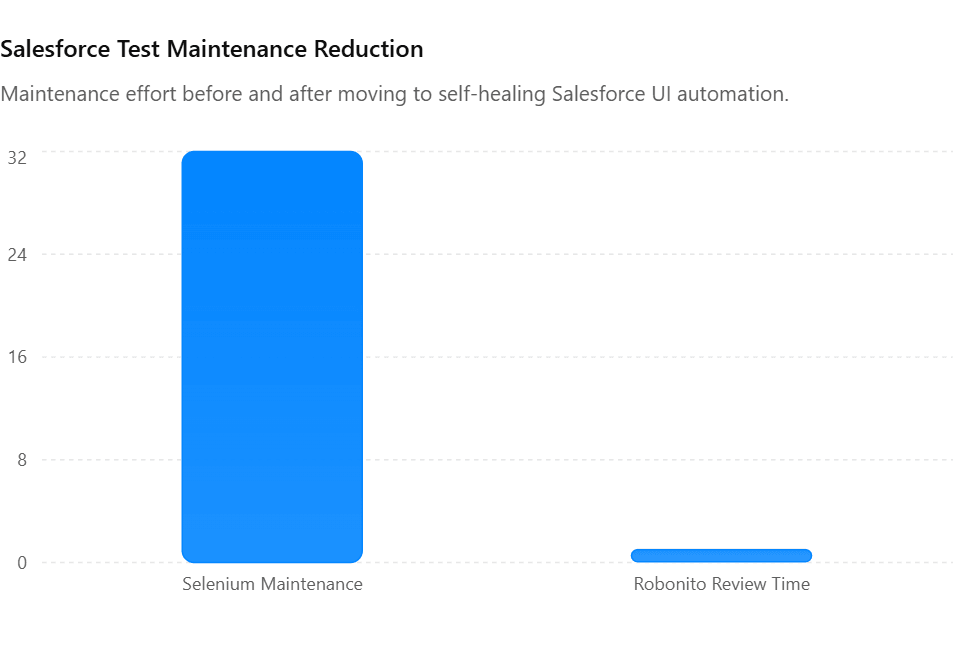
The maintenance pattern had become predictable and painful. Every Salesforce seasonal release broke 25–40 tests. The root cause was always the same: Lightning component internal markup changes had invalidated their XPath selectors. Two QA engineers would spend the first three to four days of the new sprint triaging failures, updating selectors, and re-validating the suite before new feature testing could begin. That was 20–25% of every sprint capacity, every quarter.
After migrating the UI regression suite to Robonito, the same 180 tests ran with self-healing enabled. The next Salesforce seasonal release landed. Robonito's AI detected the element changes, updated its internal references automatically, and flagged three tests for human review — tests where the actual business flow had changed, not just the selector. Total review time: 22 minutes.
The two QA engineers who had been spending four days per release on maintenance redirected that capacity to exploratory testing of new features — and the team's defect leakage rate in production dropped measurably over the following two quarters.
9. When to keep manual testing in Salesforce
Automated testing does not replace manual testing for Salesforce — it protects it. By automating repetitive regression, you free manual testers to do the work that automation genuinely cannot.
Keep manual testing for:
Exploratory testing of new features. When a new Salesforce customisation ships, an experienced QA engineer exploring it with domain knowledge will find issues that no automated test would have thought to check. Automated tests verify known behaviour. Manual testers discover unknown problems.
Permission set and profile validation. Testing that a user with a specific profile cannot see or edit a record they should not access requires nuanced verification that is difficult to automate reliably. Manual spot-checking of critical permission boundaries — especially after permission set changes — is worth the investment.
Salesforce CPQ and complex pricing logic. CPQ pricing rules, discount schedules, and quote generation can produce combinations that are impossible to fully enumerate in automated tests. Manual testing by business analysts who understand the pricing rules catches subtle logic errors that test cases miss.
User acceptance testing before go-live. Business stakeholders need to validate that what was built matches what was requested. This is a human process. Automated tests verify that the application does what the developer coded. UAT verifies that what was coded is what the business actually wanted.
Visual and UX review after Lightning theme changes. Automated visual regression tools catch pixel-level changes. They do not catch "this layout feels confusing" or "the save button is in an unexpected position." Human review of UX changes — especially after a page layout redesign — remains valuable.
10. Pre-release testing checklist
Use this before every Salesforce deployment to production.
Apex and backend
- All Apex classes have minimum 85% test coverage (not just the 75% deployment requirement)
- Every trigger has a bulk test for 200 records
- Governor limit usage verified in Apex test results (SOQL queries, DML, CPU time)
- Every validation rule has a test for the valid AND invalid case
- No
SeeAllData=truein test classes unless explicitly justified - All test classes use
@TestSetupfor data creation, not manual insertion
LWC components
- Jest tests cover happy path, error state, and loading state for all components with Apex wire calls
- Components expose
data-idattributes on all interactive elements - No hardcoded labels — all text goes through Custom Labels for i18n safety
- Accessibility verified: all inputs have associated labels
UI and integration
- Critical path UI tests passing in CI against scratch org
- All Robonito self-healed tests reviewed and approved
- Smoke suite run against UAT sandbox before production deployment
- Permission set validation for all affected profiles
- Integration tests verified against connected sandbox environments
Release readiness
- Salesforce release notes reviewed for current seasonal update
- Pre-release sandbox tests passing (if in pre-release window)
- Rollback plan documented if deployment fails
- Post-deployment smoke test scheduled immediately after production push
Frequently Asked Questions
What is Salesforce automated testing?
Salesforce automated testing is the use of specialised tools and scripts to automatically validate Salesforce applications, Apex code, Lightning Web Components, and UI workflows — without manual intervention. It spans Apex unit tests (required for deployment), LWC Jest tests, and UI automation tools that test the full Lightning Experience interface.
How often do Salesforce releases break automated tests?
Salesforce's three annual seasonal releases (Spring, Summer, Winter) regularly break selector-based UI tests because Lightning component internal markup changes. Teams using XPath or CSS class selectors typically see 15–30% of their UI tests fail after each major release. Teams using ARIA-based selectors or self-healing AI tools like Robonito experience dramatically fewer release-related failures.
What is the minimum Apex test coverage for Salesforce deployment?
Salesforce requires 75% Apex code coverage across all classes and triggers to deploy to production. However, 75% is a compliance floor. Most teams target 85–90% with meaningful tests that validate business logic — not tests written purely to hit the coverage number.
Can I use Playwright for Salesforce testing?
Yes, and it is a significantly better choice than Selenium for Salesforce. Playwright's ARIA-first selector strategy aligns well with Lightning Experience's accessibility-compliant component structure. Tests written against roles and accessible names survive most seasonal releases without modification.
What is a Salesforce scratch org and why does it matter for testing?
A scratch org is a temporary, configurable Salesforce environment that Salesforce DX creates from source code in 3–5 minutes. It enables CI/CD by giving every pipeline run a fresh, isolated Salesforce environment to deploy to and test against. This eliminates the shared sandbox pollution problem — where one developer's changes break another developer's tests — and is the foundation of modern Salesforce DevOps.
How do I reduce test maintenance after Salesforce seasonal releases?
Three practices make the biggest difference: use ARIA role and label selectors instead of XPath, add data-id attributes to all custom LWC components, and adopt a self-healing tool like Robonito for UI regression. Additionally, sign up for Salesforce's pre-release sandbox program to identify breaking changes 6–8 weeks before a release goes live.
External references
- Salesforce Developer Documentation — Official Apex testing and SFDX docs
- Salesforce CLI Reference — SF CLI commands for CI/CD
Stop losing sprint capacity to test maintenance after every Salesforce release
Robonito self-heals your Salesforce UI tests automatically when Lightning components update — no selectors to fix, no quarterly maintenance sprint, no lost capacity. Teams using Robonito for Salesforce testing recover 2–4 days of QA capacity every release cycle. Start your free trial at Robonito.com →
Automate your QA — no code required
Stop writing test scripts.
Start shipping with confidence.
Join thousands of QA teams using Robonito to automate testing in minutes — not months.
