
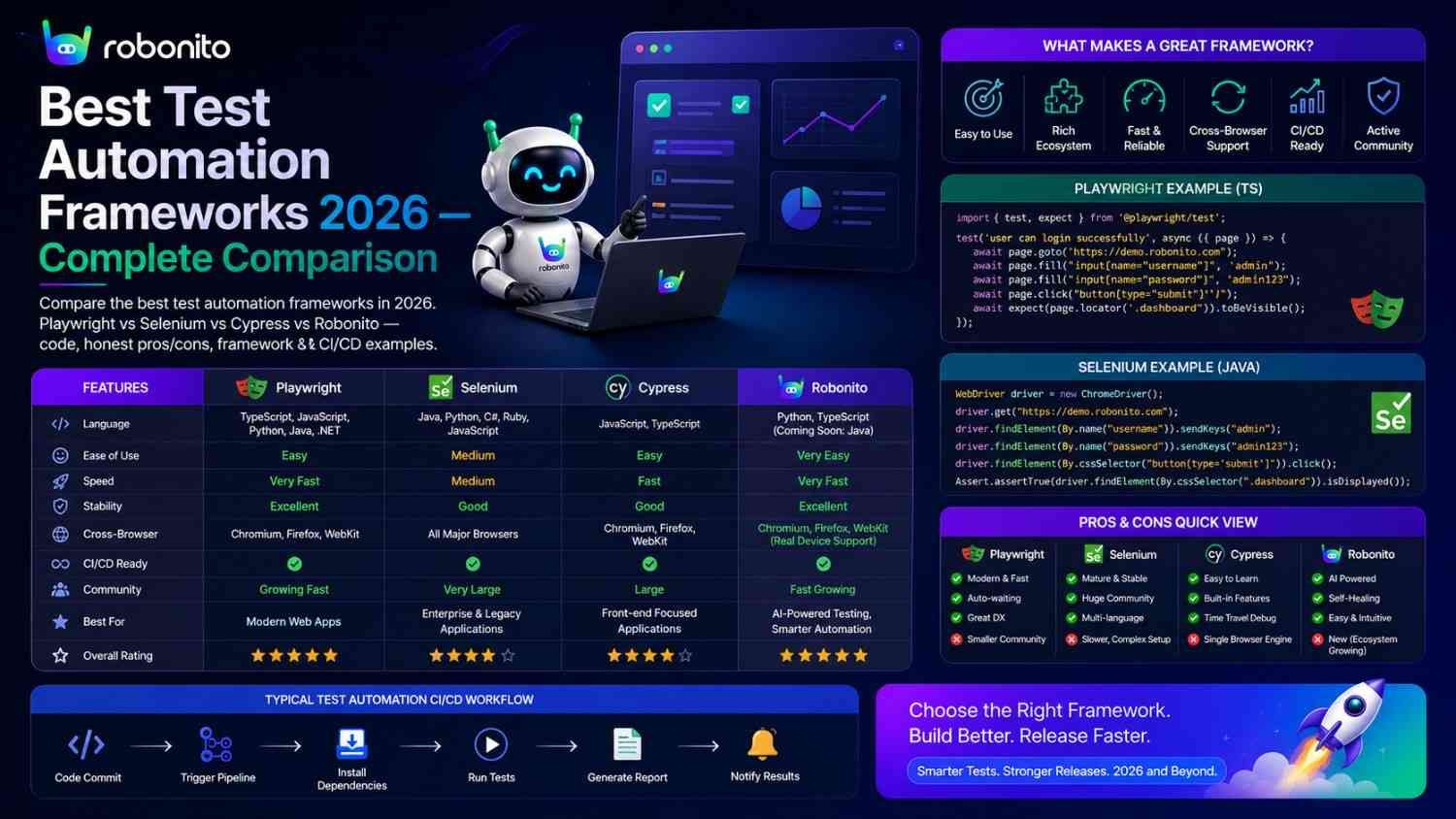
The test automation framework you choose determines who can write tests, how maintainable they remain, how much maintenance they require when UIs change, and whether your CI/CD pipeline stays green or becomes noise developers learn to ignore. This guide covers every major framework category with real working code, honest strengths and limitations, and a direct decision framework so you can match the right tool to your actual situation.
By Robonito Engineering Team · Updated June 2026 · 20 min read
Quick stats
| Fact | Source |
|---|---|
| Playwright surpassed Selenium in weekly npm downloads in 2024 and holds the lead in 2026 | npm trends |
| 40-60% of automation effort goes to test maintenance without self-healing | Capgemini World Quality Report 2025 |
| No-code automation adoption grew 340% from 2023 to 2026 | Gartner |
| Teams using AI test platforms deploy 2.4× more frequently | DORA State of DevOps 2025 |
| The average engineering team uses 3-5 automation frameworks across their full stack | World Quality Report 2025 |
Table of Contents
- What is a test automation framework?
- The framework landscape in 2026 — what changed
- Web UI frameworks — the complete comparison
- Playwright — the 2026 engineering standard
- Robonito — the no-code AI standard
- Cypress — JavaScript-first developer testing
- Selenium — the legacy reference
- API testing frameworks
- Mobile testing frameworks
- BDD frameworks
- Performance testing frameworks
- The framework decision matrix
- Building a multi-framework testing stack
- Frequently Asked Questions
The framework that writes and maintains itself
Robonito generates tests from your user flows and auto-heals them when your UI changes — covering web, mobile, API, and desktop with zero scripting overhead and a free tier to start. Try Robonito free →
1. What is a test automation framework?
One-sentence definition: A test automation framework is a set of tools, libraries, conventions, and guidelines that provide the structure for writing, executing, and maintaining automated tests — determining how tests are authored, how they interact with the application, and how results integrate with CI/CD pipelines.
The framework choice is one of the most consequential technical decisions in a QA strategy. It determines:
Framework choice determines:
├── Who can write tests
│   (Python engineers, JS developers, non-technical QA, anyone)
│
├── What can be tested
│   (Web UI, API, native mobile, desktop, visual regression)
│
├── How maintainable tests are
│   (How often they break when the app changes)
│
├── How fast feedback arrives
│   (10-second unit tests vs 45-second E2E tests)
│
├── What CI/CD integration looks like
│   (Native actions vs custom configuration)
│
└── Total cost of ownership
    (Free OSS, per-seat SaaS, enterprise licensing)
2. The framework landscape in 2026 — what changed
Playwright replaced Selenium as the default web automation framework. Selenium remains the largest codebase by volume — decades of corporate investment in Java and C# test suites will not disappear. But for new projects in 2026, Playwright is the starting point. Its native WebKit support, auto-waiting, multi-language API, and faster execution through Chrome DevTools Protocol have made it the framework engineers choose when starting fresh.
AI-powered no-code platforms matured into production-ready tools. In 2019, "no-code testing" meant record-and-replay tools that broke on every UI change. In 2026, platforms like Robonito use intent-based AI that recognises elements through semantic context rather than brittle selectors — producing tests that survive UI changes automatically. No-code is no longer a junior option; it is the productivity choice for teams whose QA analysts are not automation engineers.
The test stack became multi-framework by default. Most mature testing stacks in 2026 use different frameworks for different testing surfaces: Playwright or Robonito for E2E web, pytest for API, Detox or XCUITest for native mobile, k6 for performance. Choosing "one framework for everything" is usually the wrong question — the right question is "which framework for which surface?"
3. Web UI frameworks — the complete comparison
| Framework | Language | Browsers | Self-healing | Mobile | API | Free | Best for |
|---|---|---|---|---|---|---|---|
| Playwright | TS/JS/Python/Java/C# | Chrome + WebKit + Firefox | ❌ Manual | ✅ Viewport | ✅ Native | ✅ OSS | Engineering teams, cross-browser |
| Robonito | None (no-code) | All 4 browsers | ✅ AI intent | ✅ Mobile web | ✅ Native | ✅ Free tier | No-code teams, full platform |
| Cypress | JS/TS only | Chrome + Firefox (Safari experimental) | ❌ | ✅ Viewport | ❌ Native | ✅ OSS | JS teams, developer testing |
| Selenium | All languages | All via WebDriver | ❌ | ❌ Native | ❌ | ✅ OSS | Legacy, Java/C# codebases |
| WebdriverIO | JS/TS | All via WebDriver | ❌ | ✅ Appium | ❌ | ✅ OSS | Node.js, unified web + mobile |
| mabl | None (no-code) | All | ✅ Visual AI | ✅ Add-on | ✅ Via Postman | ❌ | Enterprise visual regression |
Playwright vs Cypress vs Robonito
For most teams evaluating modern web automation, the decision ultimately comes down to Playwright, Cypress, or a no-code platform like Robonito.
| Area | Playwright | Cypress | Robonito |
|---|---|---|---|
| Coding Required | Yes | Yes | No |
| Safari Support | Yes | Limited | Yes |
| API Testing | Yes | Limited | Yes |
| Self-Healing | No | No | Yes |
| Learning Curve | Medium | Easy | Very Low |
| Best For | Engineers | JS Teams | Mixed Teams |
Quick Recommendation
- Choose Playwright if your team wants maximum flexibility, multi-language support, and complete browser coverage.
- Choose Cypress if developers own testing and your stack is entirely JavaScript or TypeScript.
- Choose Robonito if your team wants broad coverage with minimal scripting and lower maintenance overhead.
4. Playwright — the 2026 engineering standard
playwright.dev · Open source · Free · TypeScript/JavaScript/Python/Java/C#
Playwright is the default choice for engineering teams building automated web tests in 2026. It has surpassed Selenium in developer preference by providing a cleaner API, native cross-browser support including real WebKit/Safari, built-in auto-waiting that eliminates most explicit wait boilerplate, and multi-language support that covers the full range of backend languages.
The four Playwright capabilities that distinguish it from Selenium:
// playwright vs selenium — side by side comparison

// --- CAPABILITY 1: Auto-waiting ---

// Selenium: must write explicit waits for every interaction
driver.manage().timeouts().implicitlyWait(Duration.ofSeconds(10));
WebDriverWait wait = new WebDriverWait(driver, Duration.ofSeconds(10));
WebElement button = wait.until(
    ExpectedConditions.elementToBeClickable(By.id("submit"))
);
button.click();

// Playwright: auto-waits for actionability automatically
await page.getByRole('button', { name: 'Place order' }).click();
// Waits for: visible, enabled, stable, not obscured — no code required

// --- CAPABILITY 2: Native WebKit (real Safari) ---

// Selenium: no official Safari on non-macOS — requires BrowserStack
// Playwright: WebKit included free in the framework
{ name: 'webkit', use: { ...devices['Desktop Safari'] } }
// Real WebKit engine, runs on Ubuntu CI, zero extra cost

// --- CAPABILITY 3: API testing alongside UI ---

// Selenium: cannot test APIs — requires separate tool
// Playwright: first-class API testing in same test file
test('UI + API cross-layer assertion', async ({ page, request }) => {
  // UI interaction
  await page.goto('/checkout');
  await page.getByRole('button', { name: 'Place order' }).click();
  const orderNum = await page.getByTestId('order-number').textContent();
  const orderId = orderNum!.replace('ORD-', '');

  // API verification — same test file, no extra tool
  const response = await request.get(`/api/v1/orders/${orderId}`);
  expect(response.status()).toBe(200);
  const order = await response.json();
  expect(order.status).toBe('pending');
});

// --- CAPABILITY 4: Multi-tab testing ---

// Selenium: multi-tab testing is complex and unreliable
// Playwright: native multi-tab support with clean async API
const [authTab] = await Promise.all([
  context.waitForEvent('page'),
  page.getByRole('button', { name: 'Continue with Google' }).click()
]);
await authTab.waitForLoadState();
await expect(authTab).toHaveURL(/accounts\.google\.com/);
Complete working Playwright test — production quality:
// tests/e2e/checkout.spec.ts — real world Playwright test

import { test, expect } from '@playwright/test';

test.describe('Checkout — critical regression', () => {

  test.beforeEach(async ({ page }) => {
    // API authentication — faster than UI login
    await page.request.post('/api/auth/login', {
      data: { email: 'test@example.com', password: 'TestPass2026!' }
    });
    await page.goto('/products/widget-pro');
  });

  test('completes purchase successfully', async ({ page, browserName }) => {
    await page.getByRole('button', { name: 'Add to cart' }).click();
    await expect(page.getByTestId('cart-count')).toHaveText('1');

    await page.getByRole('link', { name: 'Checkout' }).click();
    await page.getByLabel('Full name').fill('Jane Smith');
    await page.getByLabel('Email').fill('jane@test.com');
    await page.getByLabel('Street address').fill('123 Test St');
    await page.getByLabel('City').fill('London');
    await page.getByLabel('Postcode').fill('EC1A 1BB');
    await page.getByLabel('Card number').fill('4242424242424242');
    await page.getByLabel('Expiry').fill('12/28');
    await page.getByLabel('CVC').fill('123');
    await page.getByRole('button', { name: 'Place order' }).click();

    await expect(
      page.getByRole('heading', { name: 'Order confirmed' })
    ).toBeVisible({ timeout: 15000 });

    const orderNum = await page.getByTestId('order-number').textContent();
    expect(orderNum).toMatch(/^ORD-\d{8}$/);
    console.log(`✅ Checkout passed on ${browserName}`);
  });
});
Playwright configuration — cross-browser from day one:
// playwright.config.ts
export default defineConfig({
  testDir: './tests',
  timeout: 30000,
  retries: process.env.CI ? 1 : 0,
  use: {
    baseURL: process.env.BASE_URL || 'http://localhost:3000',
    screenshot: 'only-on-failure',
    video: 'retain-on-failure',
  },
  projects: [
    { name: 'chromium', use: { ...devices['Desktop Chrome'] } },
    { name: 'webkit',   use: { ...devices['Desktop Safari'] } },
    { name: 'firefox',  use: { ...devices['Desktop Firefox'] } },
    { name: 'mobile',   use: { ...devices['iPhone 14'] } },
  ],
});
Honest limitations: Playwright requires coding — TypeScript, JavaScript, Python, Java, or C#. Non-technical QA analysts cannot write Playwright tests without scripting training. No built-in self-healing — when UI elements change (class renamed, component restructured), selectors require manual updates. This maintenance burden is the primary reason teams consider alternatives like Robonito.
Best for: Engineering-led QA teams, teams needing Safari/WebKit coverage, Python or Java backend teams, teams wanting API + UI from one free framework.
5. Robonito — the no-code AI standard
robonito.com · Free tier · No coding · AI intent-based · Self-healing
Robonito occupies a fundamentally different position in the framework landscape: it is the complete testing platform for teams who want the breadth of coverage that Playwright provides — web, mobile, API, desktop — without requiring any scripting expertise from the QA team.
The core architectural difference from scripted frameworks:
Scripted framework (Playwright, Selenium, Cypress):
  Human writes selectors → Human writes waits → Human writes assertions
  When UI changes: Human updates selectors manually
  Maintenance: ~40-60% of automation effort

Robonito no-code AI:
  QA records user flow → AI generates test with intent recognition
  When UI changes: AI evaluates multi-signal recognition, auto-heals
  Maintenance: ~5-10% of automation effort (review auto-healed tests only)
Intent-based element recognition — the technical difference:
Playwright selector (breaks on CSS class change):
  await page.locator('.checkout-btn-primary-v2').click();
  → Breaks when class renamed: .ds-action-button

Robonito intent recognition (survives redesign):
  "Click the primary checkout action button"
  → Evaluates simultaneously:
     ARIA role:       "button" ✅ (unchanged)
     Accessible name: "Place Order" ✅ (unchanged)
     Visual position: bottom of payment form ✅ (unchanged)
     Context:         follows payment section ✅ (unchanged)
  → Confidence: 0.93 → auto-heals → test continues
What Robonito covers that Playwright requires separate tools for:
Playwright requires separate tools:
  Web UI:     ✅ Playwright handles this
  API:        ✅ Playwright handles this
  Mobile web: ✅ Playwright handles this (viewport)
  Desktop:    ❌ Need separate tool

Robonito covers all four surfaces in one platform:
  Web UI:     ✅ All browsers, all viewports
  API:        ✅ REST + GraphQL, native
  Mobile web: ✅ Real device viewport testing
  Desktop:    ✅ Electron + web-based desktop
CI/CD integration — one step, all platforms:
## One GitHub Actions step replaces multiple framework configurations
- name: Robonito full platform regression
  uses: robonito/run-tests-action@v2
  with:
    api-key:      ${{ secrets.ROBONITO_API_KEY }}
    suite:        regression
    environment:  staging
    browsers:     chrome,safari,firefox,edge
    platforms:    web,mobile-web,api
    healing_mode: intent     ## AI self-healing enabled
    fail-on:      critical   ## P0/P1 failures block deployment

## Equivalent Playwright configuration requires:
## - playwright.config.ts with all browser projects
## - Separate API test configuration
## - Manual selector maintenance when UI changes
## - Multiple CI steps for different platforms
Honest limitations: Robonito's visual AI for pixel-level regression is less granular than Applitools for teams whose primary concern is sub-pixel visual consistency. Native mobile app testing (React Native, Swift, Kotlin native apps) requires dedicated mobile frameworks (Detox, XCUITest, Espresso) — Robonito covers mobile web, not native apps. Complex JavaScript assertions and custom test logic require code-level frameworks. Robonito is also less suitable for teams requiring highly customized code-level assertions, framework extensions, or advanced native mobile automation workflows where direct access to platform-specific APIs is essential.
Best for: Teams with non-technical QA analysts, teams wanting all platform coverage without framework sprawl, teams where test maintenance overhead is the primary pain point.
6. Cypress — JavaScript-first developer testing
cypress.io · Open source core · JavaScript/TypeScript
Cypress is the right framework when developers own tests alongside QA and everyone writes JavaScript. Its interactive runner with time-travel debugging — where every test step is captured with a DOM snapshot you can click back to — makes debugging failed tests dramatically faster than Playwright's trace viewer for teams accustomed to browser-based debugging.
The Cypress capability that Playwright does not match: network interception during tests
// cypress/e2e/checkout.cy.js

describe('Checkout with payment API validation', () => {
  it('verifies exact API payload sent to payment processor', () => {
    // Intercept and spy on the payment API call
    cy.intercept('POST', '/api/v1/payments').as('paymentCall');

    cy.visit('/checkout');
    cy.get('[data-testid="card-number"]').type('4242424242424242');
    cy.get('[data-testid="expiry"]').type('12/28');
    cy.get('[data-testid="cvc"]').type('123');
    cy.get('[data-testid="place-order"]').click();

    // Verify exact request payload — impossible without network interception
    cy.wait('@paymentCall').then((interception) => {
      expect(interception.request.body.currency).to.equal('USD');
      expect(interception.request.body.capture_method).to.equal('automatic');
      expect(interception.request.body.amount).to.be.greaterThan(0);
      expect(interception.response.statusCode).to.equal(201);
    });

    cy.get('[data-testid="confirmation"]').should('be.visible');
  });

  it('handles declined card without calling payment processor twice', () => {
    let callCount = 0;
    cy.intercept('POST', '/api/v1/payments', (req) => {
      callCount++;
      req.reply({ statusCode: 402, body: { error: 'card_declined' } });
    }).as('declinedPayment');

    cy.visit('/checkout');
    cy.get('[data-testid="card-number"]').type('4000000000000002');
    cy.get('[data-testid="place-order"]').click();

    cy.wait('@declinedPayment');
    cy.get('[role="alert"]').should('contain', 'declined');
    cy.url().should('include', '/checkout');

    // Verify payment API was called exactly once (not retried)
    cy.then(() => expect(callCount).to.equal(1));
  });
});
Honest limitations: JavaScript and TypeScript only — Python, Java, and C# teams are excluded. No native Safari support (experimental only in 2026). Cannot test multiple browser tabs simultaneously. Cross-domain testing requires special configuration. Cypress Cloud adds cost for parallelisation and analytics.
Best for: JavaScript/TypeScript frontend teams (React, Vue, Angular), organisations where developers write tests alongside QA, teams prioritising the interactive debugging experience.
7. Selenium — the legacy reference
selenium.dev · Open source · Free · All major languages
Selenium is the original web automation framework — it created the test automation industry and still powers an enormous volume of enterprise test suites in Java, C#, Python, and Ruby. In 2026, Selenium remains relevant for one primary reason: the largest existing codebase of automated tests in the world runs on Selenium, and rewriting working test suites is rarely justified by technical preference alone.
When to choose Selenium in 2026:
Choose Selenium when:
  ✅ Existing large Java/C# test suite invested over years
  ✅ Regulatory requirement for specific browser/driver versions
  ✅ Internal tool integration built around WebDriver protocol
  ✅ Team expertise is deeply invested in Selenium patterns
  ✅ Specific legacy browser or custom browser configuration required

Do NOT start new projects on Selenium:
  ❌ Starting from scratch in 2026: use Playwright
  ❌ Python team with no existing Selenium: use Playwright Python
  ❌ New project, any language: Playwright has better DX and features
Migrating from Selenium to Playwright — selector translation:
// Common Selenium selectors → Playwright ARIA equivalents

// Selenium Java:
driver.findElement(By.id("checkout-submit")).click();
// Playwright TypeScript:
await page.getByRole('button', { name: 'Place order' }).click();

// Selenium:
driver.findElement(By.cssSelector(".email-input")).sendKeys("test@example.com");
// Playwright:
await page.getByLabel('Email address').fill('test@example.com');

// Selenium:
driver.findElement(By.xpath("//h1[contains(text(),'Order confirmed')]"));
// Playwright:
await expect(page.getByRole('heading', { name: 'Order confirmed' })).toBeVisible();

// Selenium explicit wait (10 lines):
WebDriverWait wait = new WebDriverWait(driver, Duration.ofSeconds(10));
WebElement element = wait.until(
    ExpectedConditions.visibilityOfElementLocated(By.id("confirmation"))
);
// Playwright (auto-waits, no explicit wait needed):
await expect(page.getByTestId('confirmation')).toBeVisible();
Honest limitations: No native WebKit/Safari — requires SafariDriver on macOS or BrowserStack. Requires explicit waits everywhere (implicit waits are discouraged but common). Older API design compared to Playwright. Slower through WebDriver protocol vs Chrome DevTools Protocol.
8. API testing frameworks
API testing verifies that your backend functions correctly — correct status codes, accurate response schemas, proper authentication enforcement, and correct error handling — independently of any UI.
pytest + httpx (Python) — recommended for Python teams
## tests/api/test_orders.py — comprehensive API testing with pytest

import pytest
import httpx

@pytest.fixture(scope="module")
def client():
    auth = httpx.post("https://staging.yourapp.com/api/auth/login", json={
        "email": "test@example.com", "password": "TestPass2026!"
    })
    token = auth.json()["access_token"]
    return httpx.Client(
        base_url="https://staging.yourapp.com",
        headers={"Authorization": f"Bearer {token}"},
        timeout=10.0
    )

class TestOrdersAPI:

    def test_create_order_returns_201(self, client):
        response = client.post("/api/v1/orders", json={
            "product_id": "prod-widget-pro", "quantity": 2
        })
        assert response.status_code == 201
        order = response.json()
        assert order["order_id"].startswith("ORD-")
        assert order["status"] == "pending"
        assert order["quantity"] == 2

    def test_unauthenticated_request_returns_401(self):
        response = httpx.get("https://staging.yourapp.com/api/v1/orders")
        assert response.status_code == 401

    @pytest.mark.parametrize("quantity,expected", [
        (1,   201),
        (100, 201),
        (0,   422),
        (-1,  422),
        (101, 422),
    ])
    def test_quantity_boundary_values(self, client, quantity, expected):
        response = client.post("/api/v1/orders", json={
            "product_id": "prod-widget-pro", "quantity": quantity
        })
        assert response.status_code == expected, \
            f"Quantity {quantity}: expected {expected}, got {response.status_code}"
Supertest (JavaScript) — recommended for Node.js teams
// tests/api/orders.test.js — Supertest with Jest

const request = require('supertest');
const app = require('../../src/app');

describe('Orders API', () => {
  let authToken;

  beforeAll(async () => {
    const response = await request(app)
      .post('/api/auth/login')
      .send({ email: 'test@example.com', password: 'TestPass2026!' });
    authToken = response.body.access_token;
  });

  test('POST /api/v1/orders — creates order with valid payload', async () => {
    const response = await request(app)
      .post('/api/v1/orders')
      .set('Authorization', `Bearer ${authToken}`)
      .send({ product_id: 'prod-widget-pro', quantity: 1 });

    expect(response.status).toBe(201);
    expect(response.body.order_id).toMatch(/^ORD-\d{8}$/);
    expect(response.body.status).toBe('pending');
  });

  test('GET /api/v1/orders — rejects unauthenticated request', async () => {
    const response = await request(app).get('/api/v1/orders');
    expect(response.status).toBe(401);
  });
});
API framework comparison
| Framework | Language | Best for | Free |
|---|---|---|---|
| pytest + httpx | Python | Python backends, parametrized API testing | ✅ |
| Supertest | JavaScript | Node.js/Express API testing in same repo | ✅ |
| REST Assured | Java | Java Spring Boot APIs, BDD-style API testing | ✅ |
| Postman + Newman | JavaScript (scripts) | API exploration, manual + automated hybrid | ✅ Free tier |
| Robonito | None (no-code) | No-code API testing alongside UI testing | ✅ Free tier |
9. Mobile testing frameworks
Mobile testing requires different frameworks depending on whether you are testing native apps (compiled Swift/Kotlin/React Native code) or mobile web (browsers on devices).
Mobile web — covered by Playwright and Robonito
// Playwright — mobile web viewport testing
test('checkout works on iPhone 14 viewport', async ({ page }) => {
  await page.setViewportSize({ width: 393, height: 852 });
  await page.goto('/checkout');

  // No horizontal overflow on mobile
  const scrollWidth = await page.evaluate(() => document.body.scrollWidth);
  expect(scrollWidth).toBeLessThanOrEqual(394);

  // Critical elements visible without scrolling
  await expect(page.getByRole('button', { name: 'Place order' })).toBeVisible();
});
Native mobile app testing
| Framework | Platform | Language | Best for |
|---|---|---|---|
| Detox | React Native | JavaScript | React Native apps — best-in-class for RN |
| XCUITest | iOS only | Swift | Native iOS, deepest Apple integration |
| Espresso | Android only | Kotlin/Java | Native Android, Google-maintained |
| Appium | iOS + Android | All languages | Cross-platform, legacy native apps |
// Detox — React Native checkout test
describe('Checkout', () => {
  beforeAll(async () => {
    await device.launchApp({ newInstance: true });
  });

  it('completes purchase on iOS', async () => {
    await element(by.id('product-widget-pro')).tap();
    await element(by.id('add-to-cart-btn')).tap();
    await element(by.id('checkout-nav-btn')).tap();

    await element(by.id('name-input')).typeText('Jane Smith');
    await element(by.id('email-input')).typeText('jane@example.com');
    await element(by.id('card-number-input')).typeText('4242424242424242');
    await element(by.id('place-order-btn')).tap();

    await expect(element(by.id('order-confirmation'))).toBeVisible();
  });
});
10. BDD frameworks
BDD frameworks allow writing tests in Gherkin (Given-When-Then) syntax — making test scenarios readable by non-technical stakeholders and bridging the gap between business requirements and automated verification.
## features/checkout.feature
Feature: Checkout process

  Scenario: Successful checkout with valid payment
    Given I am logged in as a registered customer
    And I have "Widget Pro" in my cart
    When I navigate to checkout
    And I enter valid payment details
    And I click "Place order"
    Then I should see "Order confirmed"
    And I should receive an order number matching "ORD-XXXXXXXX"
// Step definitions with Playwright
import { Given, When, Then } from '@cucumber/cucumber';
import { expect } from '@playwright/test';

Given('I am logged in as a registered customer', async function () {
  await this.page.request.post('/api/auth/login', {
    data: { email: 'test@example.com', password: 'TestPass2026!' }
  });
});

When('I click {string}', async function (label: string) {
  await this.page.getByRole('button', { name: label }).click();
});

Then('I should see {string}', async function (heading: string) {
  await expect(
    this.page.getByRole('heading', { name: heading })
  ).toBeVisible({ timeout: 15000 });
});
BDD framework options:
| Framework | Languages | Best for |
|---|---|---|
| Cucumber | Java/JS/Ruby/Python | Most widely used, large ecosystem |
| SpecFlow | .NET (C#) | .NET teams, Visual Studio integration |
| Behave | Python | Python teams, lightweight |
| Playwright Test | TypeScript | Modern BDD without Gherkin |
11. Performance testing frameworks
Performance frameworks verify that the application meets speed and scalability requirements under load.
// k6 — load test with performance acceptance thresholds
import http from 'k6/http';
import { check, sleep } from 'k6';

export const options = {
  // CI performance gate — fails if thresholds not met
  thresholds: {
    'http_req_duration{name:checkout}': ['p(95)<2000'],  // 95% < 2s
    'http_req_duration{name:api}':      ['p(95)<500'],   // API < 500ms
    'http_req_failed':                   ['rate<0.01'],  // < 1% errors
  },
  stages: [
    { duration: '1m', target: 50 },   // Ramp to 50 users
    { duration: '3m', target: 50 },   // Hold at 50
    { duration: '1m', target: 0 },    // Ramp down
  ],
};

const BASE_URL = __ENV.BASE_URL || 'https://staging.yourapp.com';

export default function () {
  const checkout = http.get(`${BASE_URL}/checkout`, {
    tags: { name: 'checkout' }
  });
  check(checkout, { 'checkout 200': r => r.status === 200 });

  const order = http.post(`${BASE_URL}/api/v1/orders`,
    JSON.stringify({ product_id: 'prod-widget-pro', quantity: 1 }),
    { headers: { 'Content-Type': 'application/json' }, tags: { name: 'api' } }
  );
  check(order, { 'order created': r => r.status === 201 });

  sleep(1);
}
Performance framework comparison:
| Framework | Type | Language | CI-friendly | Free |
|---|---|---|---|---|
| k6 | Load + stress | JavaScript | ✅ Native | ✅ OSS |
| JMeter | Load + SOAP | GUI + XML | ✅ CLI mode | ✅ OSS |
| Gatling | Load | Scala/Java | ✅ | ✅ OSS |
| Lighthouse CI | Core Web Vitals | CLI | ✅ Native | ✅ OSS |
12. The framework decision matrix
Use this matrix to match your situation to the right framework combination.
| Your situation | Web UI | API | Mobile | Performance |
|---|---|---|---|---|
| Engineering team, multi-language | Playwright | pytest / Supertest | Detox / XCUITest | k6 |
| Non-technical QA, no scripting | Robonito | Robonito | Detox (if native mobile) | Lighthouse CI |
| JavaScript-first, developer testing | Cypress | Supertest | Detox | k6 |
| Java/Spring Boot team | Playwright (Java) | REST Assured | Appium | JMeter |
| Enterprise, existing Selenium suite | Playwright (migrate gradually) | REST Assured | Appium | JMeter |
| Mixed team (technical + non-technical) | Robonito + Playwright | pytest | Detox | k6 |
The five-question framework selector
Q1: Do your QA analysts write code?
  YES → Scripted frameworks (Playwright, Cypress, pytest)
  NO  → No-code platform (Robonito)

Q2: Do you need Safari/WebKit testing?
  YES → Playwright (native WebKit) or Robonito
  NO  → Cypress is also viable

Q3: Do you need API + UI in one framework?
  YES → Playwright (free) or Robonito (no-code)
  NO  → Any UI framework + separate API framework

Q4: How fast does your UI change?
  Frequently (every sprint) → Self-healing platform (Robonito)
  Moderately → Playwright with ARIA-first selectors
  Rarely → Any framework viable

Q5: Do you need native mobile app testing?
  YES (React Native) → Detox + web framework
  YES (iOS native)   → XCUITest + web framework
  YES (Android native) → Espresso + web framework
  NO (mobile web only) → Playwright or Robonito cover this
13. Building a multi-framework testing stack
Most production testing stacks use different frameworks for different layers. Here is what a mature stack looks like in 2026:
Production testing stack — full coverage:

Layer                Framework           Runs in CI
─────────────────────────────────────────────────────────
Unit tests          Jest / pytest       Every commit (< 5 min)
API tests           pytest / Supertest  Every PR (10-20 min)
Web E2E             Robonito + Playwright  Every main merge (30-60 min)
Mobile web          Robonito / Playwright  Every main merge
Native mobile       Detox / XCUITest    Every main merge
Performance         k6 / Lighthouse     Every main merge
Accessibility       axe-core            Every main merge
Security            OWASP ZAP           Every main merge
Visual regression   Playwright / Applitools  Every main merge

One GitHub Actions pipeline coordinates all layers.
Each layer runs after the previous passes (fail fast).
Robonito handles web + API + mobile web from one step.
## .github/workflows/full-stack-testing.yml
## All framework layers in one coordinated pipeline

name: Full Stack Testing

on:
  push:
    branches: [main]
  pull_request:

jobs:
  unit:
    runs-on: ubuntu-latest
    steps:
      - uses: actions/checkout@v4
      - run: npm ci && npm test

  api:
    needs: unit
    runs-on: ubuntu-latest
    steps:
      - uses: actions/checkout@v4
      - run: pip install pytest httpx --break-system-packages
      - run: pytest tests/api/ -v

  e2e:
    needs: api
    runs-on: ubuntu-latest
    if: github.ref == 'refs/heads/main'
    steps:
      - uses: actions/checkout@v4
      - run: npm ci
      - run: npx playwright install --with-deps

      ## Playwright for complex engineering scenarios
      - run: npx playwright test tests/e2e/

      ## Robonito for no-code coverage + self-healing
      - uses: robonito/run-tests-action@v2
        with:
          api-key: ${{ secrets.ROBONITO_API_KEY }}
          suite: regression
          browsers: chrome,safari,firefox,edge
          platforms: web,mobile-web,api
          fail-on: critical

      ## Performance
      - run: k6 run --threshold 'http_req_duration{p(95)}<2000' load-tests/smoke.js
        env: { BASE_URL: ${{ secrets.STAGING_URL }} }
Frequently Asked Questions
What is a test automation framework?
A set of tools, libraries, and conventions providing structure for writing, executing, and maintaining automated tests. It determines who can write tests, what can be tested, how maintainable tests are, and how results integrate with CI/CD.
What is the best test automation framework in 2026?
No single framework is universally best. Playwright for engineering teams needing free web + API + cross-browser coverage. Robonito for no-code teams wanting web + mobile + API + desktop with self-healing. Cypress for JavaScript-first developer-owned testing. pytest for Python API teams. The right choice matches your team's technical level, application type, and coverage goals.
What is the difference between Playwright and Selenium?
Playwright is the modern replacement for new projects: native WebKit (real Safari), built-in auto-waiting, multi-tab support, and a cleaner modern API. Selenium's advantage is maximum language support and the largest existing codebase. For new projects in 2026, start with Playwright. For teams with large existing Selenium suites, migrate gradually rather than all at once.
Should I use Playwright or Cypress?
Playwright for: Safari/WebKit testing, multi-language teams, API alongside UI, multi-tab flows. Cypress for: JavaScript/TypeScript teams, developer-owned testing, best interactive debugging experience. If you are not JavaScript-only and need Safari, Playwright wins clearly.
What is the best no-code test automation framework?
Robonito is the leading no-code platform in 2026 — covering web, mobile web, API, and desktop from one platform with AI self-healing, free tier, and native CI/CD integration. For teams where QA analysts do not write code, Robonito provides the broadest coverage with the lowest maintenance overhead.
External references
- Playwright Documentation — Official Playwright reference
- Cypress Documentation — Official Cypress reference
- Selenium Documentation — Official Selenium reference
- pytest Documentation — Python testing framework
- Detox Documentation — React Native testing
- k6 Documentation — Performance testing
- Cucumber Documentation — BDD framework
The framework that generates tests and maintains them for you
Robonito generates tests from your user flows, covers web + mobile + API + desktop in one platform, and auto-heals when your UI changes — giving you the breadth of a multi-framework stack with the maintenance overhead of none. Start completely free — no demo required. Start free at Robonito.com →
Automate your QA — no code required
Stop writing test scripts.
Start shipping with confidence.
Join thousands of QA teams using Robonito to automate testing in minutes — not months.
