
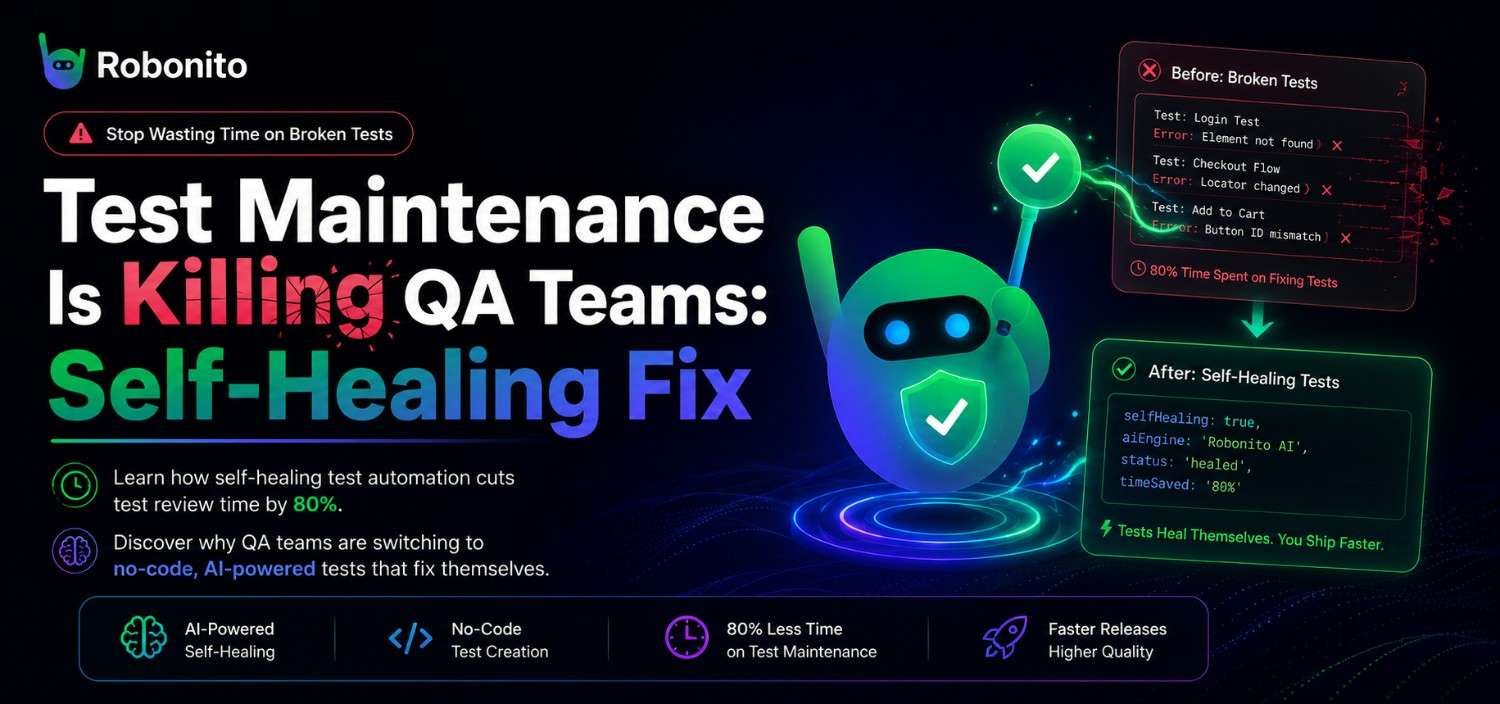
Every QA team hits the same wall eventually. You invest weeks building a comprehensive automated test suite, only to watch it crumble the moment a developer changes a button label or rearranges a dashboard layout. Suddenly, your Monday morning starts with 47 failed test notifications — none of them actual bugs. This is the test maintenance trap, and it's burning out QA engineers across the industry. Self-healing test automation offers a way out: tests that adapt to UI changes automatically, dramatically reducing the time your team spends babysitting broken selectors instead of catching real defects. In this post, we'll break down exactly why test maintenance spirals out of control, how self-healing tests work under the hood, and how teams are using them to cut test review time by up to 80%.
The Hidden Cost of Test Maintenance: Why QA Teams Spend 60% of Their Time Fixing Tests
The numbers are staggering. According to Capgemini World Quality Report 2025 and multiple industry surveys, QA engineers spend between 40% and 60% of their working hours maintaining existing tests rather than writing new ones or doing exploratory testing. For a team of five QA engineers, that's roughly the equivalent of three full-time salaries going toward keeping tests alive — not improving quality.
Here's what this looks like in practice. Imagine a mid-size SaaS company with 1,200 end-to-end tests running nightly. After a routine frontend sprint, the development team updates the navigation structure, renames a few form fields, and swaps out a date picker component. The next morning, the QA lead opens the dashboard and sees 180 test failures. Not one of them represents a real regression. Every single failure is a broken locator or a timing issue caused by the new component rendering differently.
The team now faces a choice: spend the next two days triaging and fixing tests, or disable the broken ones and hope nothing slips through. Neither option is good.
The real cost isn't just time. It's the erosion of trust in automation. When test suites become noisy with false failures, teams start ignoring results. Developers stop blocking merges on test outcomes. The entire investment in automation quietly becomes a liability instead of an asset.
This is why the push to reduce test maintenance time has become one of the highest-priority objectives for engineering leaders. The problem isn't that teams write bad tests — it's that traditional test automation architectures are fundamentally brittle.
Calculate your team's maintenance tax:

Step 1: Count automation engineers on your team:      [A] = ___
Step 2: Average annual fully-loaded cost per engineer: [B] = $___
Step 3: Estimated % of time on maintenance (be honest): [C] = ___%

Annual maintenance cost = A × B × (C ÷ 100)
Your number:             ___ × $___ × ___% = $___/year

Step 4: Apply self-healing recovery (The calculator assumes a conservative 70% reduction based on published industry case studies and early customer observations. Actual results depend on release frequency and UI volatility):
Recoverable annually = Annual maintenance cost × 0.70 = $___

Step 5: Payback period:
Robonito annual cost: $___
Months to payback = (Robonito cost ÷ Annual savings) × 12

Example (2 engineers at $85K, 40% maintenance):
  Annual maintenance cost: 2 × $85,000 × 40% = $68,000
  Recoverable at 70%: $68,000 × 0.70 = $47,600/year
  Payback period: ($7,200 ÷ $47,600) × 12 = 1.8 months

If your number is above $40,000 annually, the business case
for self-healing automation is straightforward to make.
If it is below $20,000, you may still find value in the
coverage and speed benefits rather than the cost argument.
What Causes Flaky Tests and Why Traditional Fixes Don't Scale
Flaky tests — tests that pass and fail intermittently without any code change — are the most insidious form of test maintenance burden. Before you can fix the maintenance problem, you need to understand what drives it.
The most common causes of test flakiness:
- Brittle selectors. Tests that rely on auto-generated CSS selectors like
div.container > div:nth-child(3) > span.labelbreak the instant the DOM structure shifts. Even minor UI refactors cascade into dozens of failures. - Hardcoded waits and race conditions. Tests that use
sleep(3000)instead of intelligent waiting strategies fail unpredictably based on network speed, server load, or rendering time. - Environment inconsistencies. A test that passes on a developer's machine but fails in CI because of differences in screen resolution, browser version, or test data.
- Tightly coupled test data. Tests that depend on specific database records or API states break when shared environments are modified by other tests or users.
Traditional fixes for these problems include writing more robust selectors (using data-testid attributes), implementing retry logic, and building page object models. These approaches work — to a point. But they don't scale.
Consider a team managing 3,000 tests across a rapidly evolving product. Even with disciplined use of data-testid attributes, every major feature release generates selector breakage. The page object model helps with organisation, but someone still needs to manually update every affected locator. Retry logic masks flakiness rather than solving it, and it inflates test execution time.
The fundamental issue is that these are reactive strategies. You're constantly patching tests after they break. A flaky test automation fix that actually scales needs to be proactive — it needs to anticipate and absorb change automatically.
What Are Self-Healing Tests and How Do They Work?
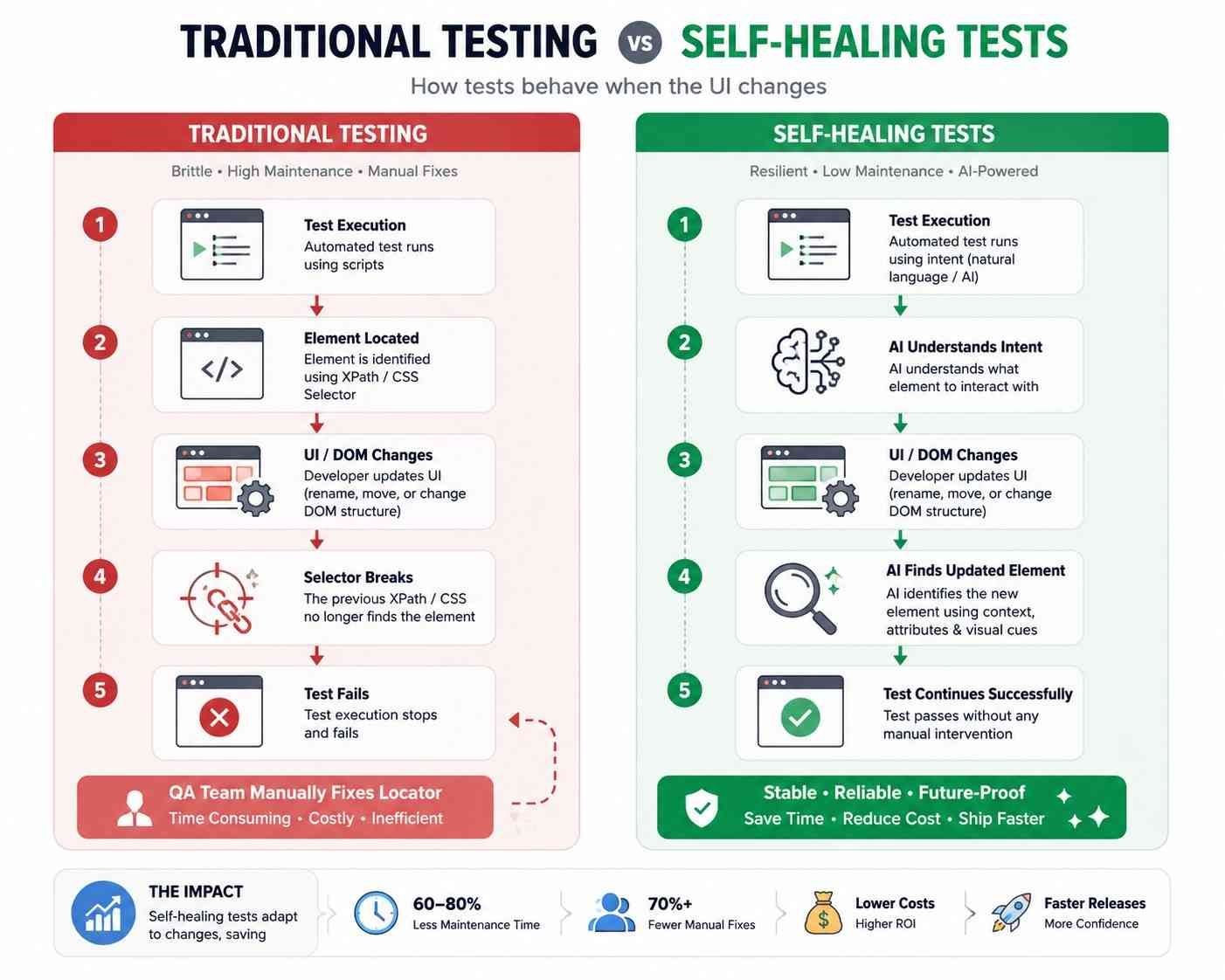
Self-healing tests are automated tests that can detect when a UI element has changed and automatically update their locator strategy to find the correct element — without human intervention and without failing the test run.
Here's the core concept. Instead of relying on a single locator (like an XPath or CSS selector) to find a button, a self-healing system builds a multi-attribute fingerprint of each element. This fingerprint might include:
- The element's text content
- Its position relative to other elements
- Visual characteristics (size, colour, type)
- ARIA labels and accessibility attributes
- Historical interaction patterns
- Surrounding context (nearby labels, headings, form groups)
When a test runs and the primary locator fails, the self-healing engine doesn't immediately report a failure. Instead, it searches the current page for an element that matches the stored fingerprint. If it finds a high-confidence match — say, a button that still reads "Submit Order" but has moved from the third div to the fourth — it proceeds with the test using the updated locator and logs the change for review.
A practical example: Your test includes a step that clicks a "Save Changes" button identified by the selector #main-form > button.btn-primary. A developer refactors the form component, and the button is now located at #settings-panel > div.actions > button.save-btn. A traditional test fails immediately. A self-healing test recognises that there's still a primary action button with the text "Save Changes" in the same functional context, clicks it, and continues. The test passes. The QA engineer sees a log entry noting the healed selector and can approve the change in seconds.
This is fundamentally different from retry logic. Retrying re-executes the same broken step. Self-healing finds a new, correct path forward.
The best AI test maintenance systems continuously learn from these healing events, improving their fingerprinting accuracy over time and reducing the need for even logged reviews.
Visual AI vs. Self-Healing Selectors: Two Approaches to the Same Problem
The test maintenance problem has spawned two major solution categories: visual AI testing (popularised by tools like Applitools) and self-healing selector technology. Both aim to reduce flakiness, but they work very differently and suit different teams.
Visual AI testing captures screenshots at various test checkpoints and uses computer vision algorithms to compare them against baseline images. It can detect visual regressions — a misaligned button, a truncated text label, an overlapping element — that traditional functional tests miss entirely. This is genuinely powerful for catching visual bugs.
However, visual AI has limitations:
- It requires baseline management. Every intentional UI change requires updating visual baselines, which creates its own maintenance burden.
- It doesn't solve the locator problem. Visual AI validates what the page looks like but still needs traditional selectors to interact with elements (clicking buttons, filling forms, navigating flows). If those selectors break, visual AI can't help.
- Expertise and cost. Implementing visual AI effectively requires understanding viewport management, dynamic content masking, and threshold tuning. The tooling tends to carry enterprise-level pricing.
Self-healing selectors take a different approach. Instead of validating visual output, they ensure that your functional tests keep running reliably by adapting to DOM changes in real time. They solve the highest-volume maintenance problem: broken element identification.
For most QA teams — particularly those running end-to-end functional test suites — self-healing tests no-code platforms address the 80% of maintenance pain that comes from selector breakage and UI refactors. Visual AI addresses a different (and also valuable) 20% focused on visual regression.
The ideal scenario is a tool that combines intelligent element identification with self-healing capabilities, requires no selector expertise, and doesn't demand weeks of configuration. That's the approach Robonito takes — but more on that shortly.
| Feature | Selenium | Playwright | Cypress | AI Self-Healing |
|---|---|---|---|---|
| Manual selectors | ✓ | ✓ | ✓ | No/Minimal |
| Auto repair | ✗ | ✗ | ✗ | ✓ |
| Coding required | Yes | Yes | Yes | Often No |
| Maintenance | High | Medium | Medium | Low |
Real-World Impact: How Teams Cut Test Review Time Dramatically
The promise of self-healing tests sounds compelling in theory. What does it look like when teams actually adopt them?
Scenario 1: E-commerce platform with biweekly releases
A mid-market e-commerce company maintained 800 end-to-end tests covering checkout flows, product search, account management, and payment processing. Before adopting self-healing automation, their QA team of four spent an average of 12 hours per sprint cycle triaging and fixing broken tests after each release. Most failures were caused by frontend component library updates that shifted CSS class names and DOM hierarchy.
After migrating to a self-healing platform, their post-release test failure rate dropped from an average of 15% to under 3%. The remaining 3% were legitimate bugs. Test triage time fell from 12 hours to roughly 2 hours per sprint — an 83% reduction. The team reinvested that time into expanding test coverage for their mobile web experience, which had been entirely untested.
Scenario 2: B2B SaaS with a fast-moving frontend team
A project management SaaS product had a React-based frontend with weekly deployments. Their test suite of 2,000 tests experienced 50–100 false failures every week. The QA team had adopted a page object model and used data-testid attributes religiously, but the pace of UI change still outstripped their ability to maintain selectors.
Switching to a self-healing, no-code automation platform eliminated approximately 90% of their false failures. More importantly, it changed their relationship with the development team. Developers no longer dreaded UI refactors because they knew the test suite would absorb the changes gracefully. The QA team reported that test review shifted from "which tests broke this time?" to "what real issues did we catch?" — a fundamental change in workflow.
These scenarios illustrate a consistent pattern across teams adopting test flakiness solutions with self-healing capabilities: maintenance time drops by 60–80%, and the human effort shifts from reactive fixing to proactive quality improvement.
How to Evaluate Self-Healing Capabilities in QA Automation Tools
Not all self-healing implementations are created equal. If you're evaluating tools, here's a practical framework for separating genuine intelligence from marketing buzzwords.
1. Healing accuracy and confidence scoring
Ask the vendor: what's the false-positive healing rate? A good self-healing engine should provide a confidence score for each healed interaction. If it clicks a "Cancel" button instead of the "Submit" button because both are primary buttons in similar positions, that's worse than a test failure. Look for systems that err on the side of failing when confidence is low and healing only when the match is strong.
2. Transparency and auditability
Self-healing should never be a black box. You need a clear log of every healing event: what the original locator was, what changed, what the engine matched on, and the confidence level. This lets your team review and approve changes, maintaining trust in test outcomes.
3. No-code accessibility
Some self-healing tools still require you to write initial tests in code (Selenium, Playwright, Cypress) and layer healing on top. This means you still need coding expertise to build and understand the tests. True self-healing tests no-code platforms let you create, maintain, and benefit from healing without any programming skills.
4. Learning and adaptation over time
The best systems improve with usage. They learn your application's patterns, understand which types of changes are cosmetic vs. functional, and adjust their healing strategies accordingly. Ask whether the tool uses static heuristics or adaptive AI.
5. Integration with your existing workflow
Self-healing tests need to fit into your CI/CD pipeline, your reporting tools, and your team's review process. Evaluate how healing events appear in test reports, whether healed tests are flagged for review, and how easily you can override a healing decision.
Quick evaluation checklist:
- Does it heal based on multiple attributes, not just a fallback selector?
- Does it provide confidence scores and healing logs?
- Can non-technical team members create and maintain tests?
- Does it integrate with your CI/CD pipeline (Jenkins, GitHub Actions, GitLab CI, etc.)?
- Does it support your web application without custom configuration?
Frequently Asked Questions
Why does test maintenance consume so much QA team time?
Test maintenance consumes disproportionate QA time because traditional automated tests are tightly coupled to the UI's implementation details — CSS class names, element IDs, XPath positions — rather than to the functional intent of the test. Every time a developer renames a class, moves an element, or updates a component library, the tests that reference those implementation details break — regardless of whether anything functionally changed. This is not a testing problem; it is an architectural problem. A single component library update can fail dozens of tests simultaneously, and fixing them requires an engineer to investigate each failure, identify the new correct selector, update the test, and re-run — repeating this for every affected test. As applications grow, the frequency of these breaking changes grows with them, which is why maintenance burden tends to compound rather than stabilise over time.
What is self-healing test automation and how does it work?
Self-healing test automation detects when a test element reference has become invalid — because a selector changed, a component moved, or a class was renamed — and automatically repairs the reference without human intervention. Rather than relying on a single brittle locator, self-healing systems capture a multi-signal fingerprint of each element: its ARIA role, accessible name, visual position on the page, and surrounding context. When the primary locator fails, the system evaluates these alternative signals simultaneously and calculates a combined confidence score. If the score exceeds a defined threshold (typically around 0.85), the system heals the test automatically and logs exactly what changed. If confidence is lower, it flags the element for human review rather than guessing. This means the system acts autonomously on the routine majority of UI changes and escalates only the genuinely ambiguous cases.
How much does self-healing test automation actually reduce maintenance time?
Teams adopting self-healing automation typically see 70-85% of UI-change-related test failures resolved automatically without human intervention. The specific saving depends on how frequently the application's UI changes — teams with active design systems or frequent redesigns see the highest impact. For a team spending 40% of their automation effort on maintenance, an 80% reduction means reclaiming approximately 32% of total QA engineering capacity — time that can be redirected to writing new test coverage, conducting exploratory testing, or investigating the categories of defect that automated tests cannot catch. The maintenance reduction also has a secondary effect: when tests stop breaking for irrelevant reasons, team confidence in CI failures recovers, and teams stop ignoring the pipeline alerts that were previously drowning in false positives.
How is self-healing different from simply retrying failed tests?
Retrying a failed test repeats the same action with the same locator and hopes the failure was transient. This addresses timing-related flakiness but does nothing for selector failures — if the CSS class changed, retrying the same broken selector will fail every time. Self-healing addresses a fundamentally different problem: it detects that the primary locator is permanently invalid, evaluates alternative signals to identify the correct current element, and updates the test's element reference rather than re-running it unchanged. A retry is a reaction to uncertainty. Self-healing is an investigation of the failure's cause followed by an appropriate resolution. The two address different failure modes and should not be confused — a well-designed testing system uses both.
What types of UI changes does self-healing test automation handle versus what still requires human intervention?
Self-healing handles the most common categories of UI change automatically: CSS class renames, element ID changes, minor DOM restructuring, component framework updates that change the surrounding HTML structure, and design system migrations that update class naming conventions across multiple components simultaneously. It handles these automatically because the element's functional identity — what it does and where it appears in context — remains the same even when its implementation details change. Self-healing correctly escalates to human review for changes where functional identity is genuinely ambiguous: when an element's accessible name changes (the button label is rewritten), when a feature is moved to a different point in the user flow, when a feature is removed entirely, or when the application's information architecture changes substantially. In these cases, the correct response is not to heal automatically but to present the evidence and ask a human whether the test should be updated or whether the change represents a genuine functional regression.
Getting Started with Self-Healing Tests in Robonito (Zero Code Required)
Robonito was built from the ground up around the principle that test automation should absorb change, not break because of it. Here's what makes Robonito's approach to self-healing different — and how you can be up and running in hours.
No selectors. Period. Most self-healing tools start with selectors and then try to fix them when they break. Robonito doesn't use CSS selectors, XPath, or any DOM-based identifiers in the first place. Instead, you describe your test steps in natural language — "Click the Login button," "Enter 'test@example.com' in the email field," "Verify the dashboard shows 'Welcome back'" — and Robonito's AI identifies the right elements using contextual understanding of your application's UI.
This means there are no selectors to break, which eliminates the most common source of test maintenance entirely.
How Robonito's self-healing works in practice:
- Create your test by describing the user flow in plain English. No recording fragile click coordinates, no inspecting DOM elements.
- Run the test. Robonito's AI engine identifies each element based on its visual and semantic context — labels, placeholder text, position, element type, surrounding content.
- When the UI changes, Robonito re-evaluates the context and finds the updated element. A renamed button? Found by its position and surrounding context. A restructured form? Found by field labels and input types.
- Review healing events in a clear, visual changelog. Approve changes with a single click or flag them for investigation.
Getting started takes three steps:
- Sign up for a free Robonito account.
- Point Robonito at your web application's URL.
- Start writing test steps in natural language.
No browser extensions to install. No test frameworks to configure. No selector strategies to debate. Your team can go from zero to running self-healing tests in a single afternoon.
For QA teams that are spending more time maintaining tests than finding bugs, the shift is immediate and measurable. You stop dreading Monday morning test reports. You stop cancelling exploratory testing sessions to fix broken selectors. You start focusing on what QA was always supposed to be about: making sure your product works for your users.
Ready to stop maintaining tests and start trusting them? Try Robonito free and see how self-healing, no-code test automation can give your QA team their time back. Start your free trial →
Automate your QA — no code required
Stop writing test scripts.
Start shipping with confidence.
Join thousands of QA teams using Robonito to automate testing in minutes — not months.