
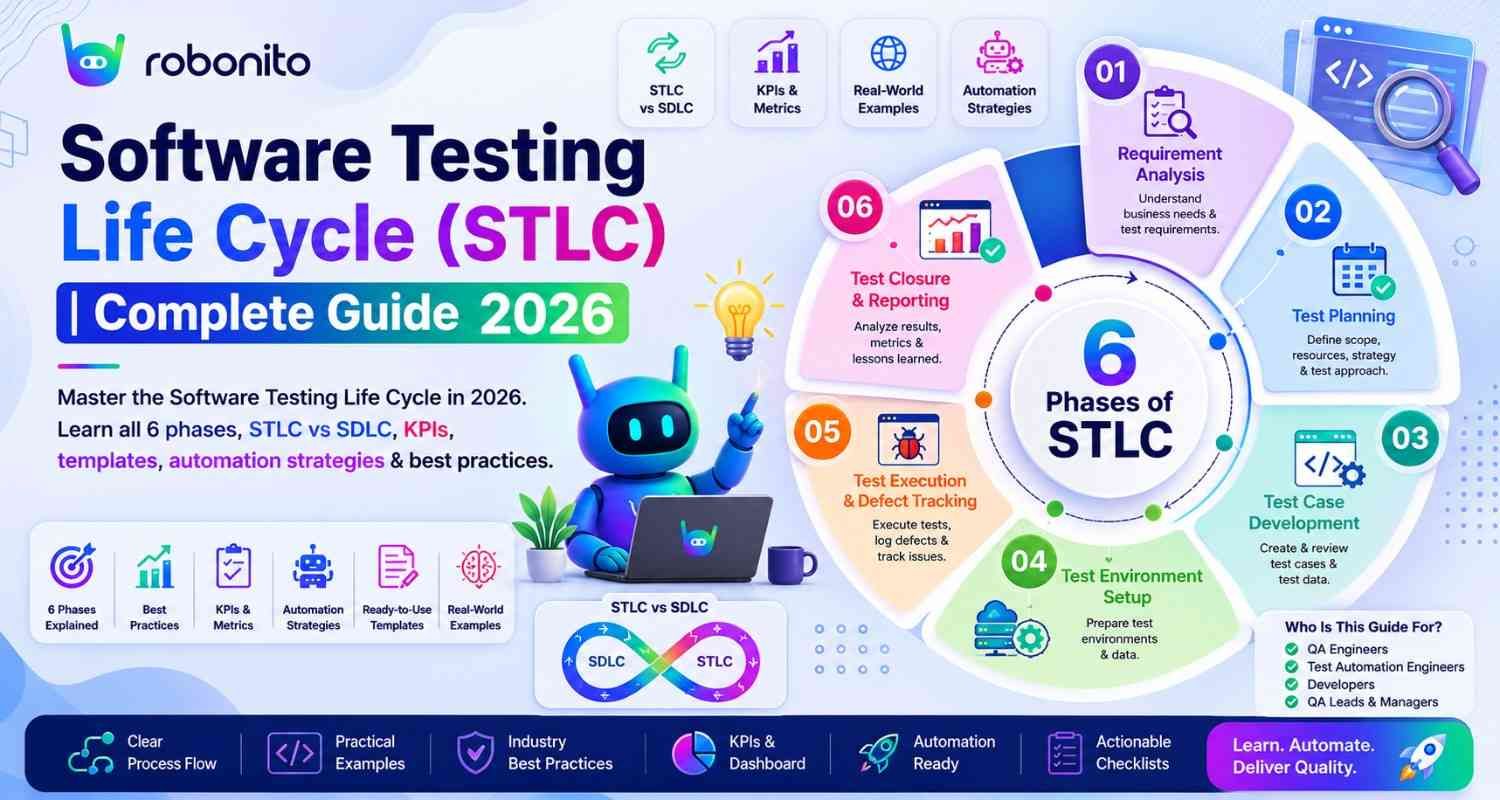
Every QA team goes through the same six activities on every release — whether they have documented it as STLC or not. Teams that make it explicit plan better, execute faster, and ship fewer production defects. This guide covers all six STLC phases with entry/exit criteria templates, real metrics to track, and how modern teams adapt the lifecycle for Agile and CI/CD environments.
By Robonito Engineering Team · Updated May 2026 · 18 min read
Quick stats
| Fact | Source |
|---|---|
| 40–60% of automation effort goes to test maintenance in teams without structured STLC | Capgemini World Quality Report 2025 |
| Defects found and fixed in testing cost 10× less than the same defects found in production | IBM Systems Sciences Institute |
| Teams with documented STLC processes ship 2× fewer production defects | Capgemini World Quality Report 2025 |
| 67% of software projects fail to meet quality expectations at first release | Standish Group CHAOS Report 2025 |
| Structured test planning reduces total test execution time by up to 30% | ISTQB Testing Foundation study |
Table of Contents
- What is the Software Testing Life Cycle?
- STLC vs SDLC — how they work together
- Phase 1: Requirement Analysis
- Phase 2: Test Planning
- Phase 3: Test Case Design and Development
- Phase 4: Test Environment Setup
- Phase 5: Test Execution
- Phase 6: Test Closure
- STLC metrics that actually matter
- STLC in Agile and CI/CD
- Automating STLC phases with modern tools
- Pre-release STLC checklist
- Frequently Asked Questions
Execute your STLC test execution phase automatically
Robonito auto-generates test cases, runs them across browsers in CI, and self-heals when your UI changes — covering the test execution and maintenance phases of STLC without scripting overhead. Try Robonito free →
1. What is the Software Testing Life Cycle?
One-sentence definition for featured snippets: The Software Testing Life Cycle (STLC) is a systematic, phased process that defines all testing activities — from understanding requirements through closing testing — that a QA team follows to ensure software meets quality standards before release.
The analogy that explains why STLC matters: imagine a construction project that starts building without approved blueprints, tests materials only by looking at them, and certifies the building as complete when the workers go home — not when the building meets safety standards. Every serious engineering discipline has a lifecycle that makes quality systematic rather than hopeful. STLC is that lifecycle for software testing.
Without an explicit STLC, testing tends to happen informally — testers start testing when developers say they are done, run tests they remember from last time, and declare testing complete when the release date arrives. The result is inconsistent coverage, missed requirements, and defects that reach production that a structured approach would have caught.
With STLC, testing has a defined start (requirement analysis begins before development), a defined process (each phase has specific activities, entry criteria, and exit criteria), and a defined end (test closure with documented evidence of quality).
The six phases of STLC
Software Testing Life Cycle

1. Requirement Analysis    ← Understand what to test
         │
         ▼
2. Test Planning           ← Plan how to test it
         │
         ▼
3. Test Case Design        ← Create the tests
         │
         ▼
4. Test Environment Setup  ← Prepare where to test
         │
         ▼
5. Test Execution          ← Run the tests
         │
         ▼
6. Test Closure            ← Document and analyse results
2. STLC vs SDLC — how they work together
SDLC and STLC are not sequential processes — one does not start when the other finishes. They run in parallel, with each STLC phase aligned to a corresponding SDLC phase.
| SDLC Phase | Parallel STLC Activity | What QA does |
|---|---|---|
| Requirements | Requirement Analysis | Review requirements, identify testable criteria, flag ambiguities |
| System Design | Test Planning | Define test strategy, estimate effort, allocate resources |
| Architecture Design | Test Case Design | Create test cases, prepare test data |
| Development | Test Environment Setup | Configure environments, prepare test infrastructure |
| Development Complete | Test Execution | Execute tests, log defects, track progress |
| Deployment | Test Closure | Generate reports, archive artifacts, conduct retrospective |
The critical insight is that STLC starts before development starts. A QA team reviewing requirements during requirement analysis catches ambiguities, missing acceptance criteria, and untestable requirements before a developer writes a single line of code. Fixing a requirement ambiguity at this stage takes minutes. Fixing the same issue after development takes days.
STLC vs SDLC — the clean distinction
| Dimension | STLC | SDLC |
|---|---|---|
| Primary focus | Software quality through testing | Software creation end-to-end |
| Who leads it | QA team | Development team |
| Starts when | Requirements are being defined | Project is initiated |
| Ends when | Test closure is signed off | Software is deployed and maintained |
| Key deliverable | Test reports, defect logs, quality metrics | Working software product |
| Success metric | Defect detection rate, coverage, quality gates | On-time delivery, feature completeness |
STLC vs SDLC at a Glance
| Factor | STLC | SDLC |
|---|---|---|
| Focus | Software testing | Software development |
| Owner | QA Team | Engineering Team |
| Goal | Quality assurance | Product delivery |
| Starts | Requirement analysis | Project planning |
| Ends | Test closure | Maintenance |
| Success Metric | Defect detection & quality | Delivery & business outcomes |
3. Phase 1: Requirement Analysis
Purpose: Understand what needs to be tested before a single test case is written.
Requirement analysis is the most valuable phase in STLC and the most consistently skipped. Teams that jump straight to writing test cases without deeply understanding requirements write tests for what they assumed the software should do — not necessarily what was specified. The result is test suites that have 80% coverage of the wrong things.
What QA does during requirement analysis
Review functional requirements — For each requirement, ask: Is this testable? Can I write a specific test case that clearly passes or fails this requirement? "The system shall be fast" is not testable. "The system shall return search results in under 500ms for queries against a dataset of up to 1 million records" is testable.
Identify non-functional requirements — Performance targets, security requirements, accessibility standards (WCAG 2.2), browser compatibility requirements, and regulatory compliance needs. These require different testing approaches than functional requirements.
Flag ambiguities — Questions that requirement analysis surfaces before development: "What happens if a user tries to register with an email address already in the system?" "What is the maximum file size for uploads?" "What error message should appear for invalid payment details?" Each unanswered question is a potential production defect.
Define acceptance criteria — Work with product owners to establish clear, measurable acceptance criteria for each feature. Use Given-When-Then format:
Feature: User login

Scenario: Successful login with valid credentials
  Given the user is on the login page
  When they enter a valid email and correct password
  And click Sign In
  Then they are redirected to the dashboard
  And their name appears in the navigation

Scenario: Account lockout after failed attempts
  Given the user has entered an incorrect password 4 times
  When they enter an incorrect password a 5th time
  Then their account is locked for 15 minutes
  And they receive a lockout notification email
  And they see the error "Account temporarily locked. Check your email."
Entry and exit criteria: Phase 1
| Criteria type | Conditions |
|---|---|
| Entry | Requirements documents available (even draft), product owner accessible for questions |
| Entry | Test team assigned to project |
| Exit | All requirements reviewed and testability confirmed |
| Exit | Ambiguous requirements flagged and clarification requested |
| Exit | Requirement Traceability Matrix (RTM) initiated |
| Exit | Non-functional requirements documented with measurable targets |
Deliverable: Requirement Traceability Matrix (RTM)
RTM Template (initial at requirement analysis, completed through test execution)

| Req ID | Requirement description           | Test Case ID(s)  | Status   |
|--------|-----------------------------------|------------------|----------|
| REQ-01 | User can register with email      | TC-001, TC-002   | Covered  |
| REQ-02 | Password min 8 chars, 1 uppercase | TC-003           | Covered  |
| REQ-03 | Account lockout after 5 attempts  | TC-004, TC-005   | Covered  |
| REQ-04 | Session expires after 8h inactivity| TC-006          | Covered  |
| REQ-05 | WCAG 2.2 AA compliance — login    | TC-007 to TC-012 | Covered  |
4. Phase 2: Test Planning
Purpose: Define how testing will be conducted, by whom, with what resources, and by when.
The test plan is the governing document for all testing activities on a release. A well-written test plan answers every operational testing question before it becomes a blocking question mid-sprint: What is in scope? What is explicitly out of scope? What happens if the environment is unavailable? Who approves the final release?
Test plan components
Testing scope — explicitly state what is and is not being tested:
IN SCOPE:
- All user-facing features listed in sprint 12 release notes
- Regression testing of payment and checkout flows
- Cross-browser testing: Chrome (latest), Safari (latest), Firefox (latest)
- Mobile viewport testing: 375px, 768px, 1280px

OUT OF SCOPE:
- Admin panel (internal tool, separate release)
- Third-party payment processor UI (vendor responsibility)
- Performance load testing (scheduled for Q3 release)
- Browsers with < 1% user traffic (IE11, Opera Mini)
Risk assessment:
| Risk | Probability | Impact | Mitigation |
|---|---|---|---|
| Test environment unavailable | Medium | High | Secondary environment, environment health monitoring |
| Incomplete requirements | Medium | High | Early requirement review, acceptance criteria sign-off |
| Insufficient test time | Low | Medium | Risk-based prioritisation, scope agreement |
| Third-party API instability | Low | High | Mock services for unit/integration tests |
Resource allocation:
Test resource plan — Sprint 12

Testers:
  - Lead QA: Test strategy, review, defect triage (50% capacity)
  - QA Engineer 1: Functional test execution, regression (100%)
  - QA Engineer 2: Exploratory testing, accessibility (75%)
  - Automation: Robonito regression suite maintenance (25%)

Tools:
  - Test management: TestRail (test cases, execution tracking)
  - Defect tracking: Jira (defect lifecycle)
  - Automation: Robonito (regression, cross-browser)
  - API testing: Postman (collection run)
  - Performance: k6 (smoke performance test)

Timeline:
  - Test case review: Day 1-2 of sprint
  - Test execution: Day 3-8 of sprint
  - Defect fix verification: Day 7-9
  - Regression: Day 9-10
  - Test closure: Day 10
Entry and exit criteria: Phase 2
| Criteria type | Conditions |
|---|---|
| Entry | Requirements analysis complete, RTM initiated |
| Entry | Test team confirmed and available |
| Exit | Test plan reviewed and approved by QA lead and product owner |
| Exit | Entry/exit criteria defined for all subsequent phases |
| Exit | Test schedule aligned with development timeline |
5. Phase 3: Test Case Design and Development
Purpose: Create the specific test cases that will be executed during test execution.
Good test cases have five characteristics: they are unambiguous (any competent tester gets the same result), traceable (they map to a specific requirement), atomic (one test case tests one thing), repeatable (same result every time), and complete (the expected result is fully specified before execution).
Test case template
## Test Case: TC-003 — Password complexity validation

**Test Case ID:** TC-003
**Requirement:** REQ-02 — Password must be minimum 8 characters with 1 uppercase
**Priority:** P1 — High
**Type:** Functional
**Created by:** QA Engineer / Date: 2026-05-20

---

### Preconditions
- User is on the registration page
- No existing account with the test email address
- Browser: Chrome latest (primary); run on Safari and Firefox for regression

### Test Steps

| ## | Action | Expected Result |
|---|--------|----------------|
| 1 | Enter email: test-tc003@example.com | Email accepted, no validation error |
| 2 | Enter password: "short" (5 chars, no uppercase) | Inline error: "Password must be at least 8 characters" |
| 3 | Clear password field, enter: "alllowercase1" (13 chars, no uppercase) | Inline error: "Password must contain at least one uppercase letter" |
| 4 | Clear password field, enter: "ALLUPPERCASE1" (13 chars, no lowercase) | Inline error: "Password must contain at least one lowercase letter" |
| 5 | Clear password field, enter: "ValidPass1!" | No validation error displayed |
| 6 | Complete registration form and submit | Registration succeeds, user redirected to onboarding |

### Expected Final State
User account created with email test-tc003@example.com and password stored as bcrypt hash

### Test Data
- Valid password: ValidPass1!
- Invalid passwords: short, alllowercase1, ALLUPPERCASE1, 12345678

### Execution Record
| Date | Tester | Environment | Result | Defect |
|------|--------|-------------|--------|--------|
| | | | | |
Test case prioritisation using risk matrix
Risk scoring: Impact (1-3) × Probability of regression (1-3) = Priority score

P0 (Score 9): Critical — test first, no exceptions
P1 (Score 6): High — test before release
P2 (Score 3-4): Medium — test if time permits
P3 (Score 1-2): Low — test in full regression only

Example scoring for Sprint 12:
Checkout flow (payment changed this sprint):     Impact 3 × Probability 3 = P0
User login (no changes, historically stable):    Impact 3 × Probability 1 = P1
Product search (minor UI change):                Impact 2 × Probability 2 = P2
Admin report export (unrelated to release):      Impact 1 × Probability 1 = P3
Entry and exit criteria: Phase 3
| Criteria type | Conditions |
|---|---|
| Entry | Test plan approved, requirements stable |
| Entry | Acceptance criteria defined and approved by product owner |
| Exit | All test cases written with complete preconditions, steps, and expected results |
| Exit | Test cases reviewed by at least one other team member |
| Exit | Test cases mapped to requirements in RTM |
| Exit | Test data identified and prepared or documented |
6. Phase 4: Test Environment Setup
Purpose: Configure and verify the infrastructure required for testing — before test execution starts.
The test environment is one of the most common sources of false failures. A test that fails because the database seed script was not run, the application version was not deployed, or a third-party API sandbox was down tells the team nothing about software quality. Environment verification before test execution starts saves hours of debugging during execution.
Test environment verification checklist
Before starting test execution, verify ALL of the following:

Application:
□ Correct application version deployed (verify build number/commit hash)
□ Application health check endpoint returns 200
□ All required services running (API, background jobs, email service)

Database:
□ Database schema matches expected version
□ Required test data seeded (test user accounts, test products, etc.)
□ No data from previous test runs interfering with current tests

Third-party integrations:
□ Payment processor sandbox accessible and credentials valid
□ Email service sandbox configured (test emails routing to mail catcher)
□ Authentication service (OAuth/SSO) sandbox reachable

Test tools:
□ Test management tool accessible (TestRail, Jira, etc.)
□ Automation suite connected to test environment
□ Browser testing configured for required versions

Network:
□ Test environment accessible from tester machines
□ Required ports open
□ VPN/proxy configuration correct if needed
Entry and exit criteria: Phase 4
| Criteria type | Conditions |
|---|---|
| Entry | Test cases designed and reviewed, test plan approved |
| Entry | Environment provisioning resources available |
| Exit | All items on environment verification checklist confirmed |
| Exit | Environment baseline documented (version numbers, configuration) |
| Exit | Test data loaded and verified |
| Exit | Smoke test on environment passes (application loads, login works) |
7. Phase 5: Test Execution
Purpose: Run test cases, record results, log defects, and track progress against the exit criteria.
Test execution is where the quality of all previous phases is realised. Well-prepared test cases, a verified environment, and clear entry/exit criteria make test execution straightforward. Poorly prepared predecessors make execution chaotic — testers spend time debugging the environment rather than testing the software.
Test execution tracking
Daily test execution report template

Sprint 12 — Test Execution Status — Day 5 of 10
================================================

Test Execution Progress:
  Total planned:    156 test cases
  Executed:         98 (63%)
  Passed:           84 (86% pass rate)
  Failed:           11 (11%)
  Blocked:          3 (3% — waiting on DEF-047 fix)

Defect Summary:
  P0 Critical:      0 open (1 closed)
  P1 High:          2 open
  P2 Medium:        7 open
  P3 Low:           3 open
  Total open:       12

Critical path status:
  ✅ Checkout flow (P0): 12/12 passed
  ✅ User auth (P1): 18/20 passed (2 minor defects logged)
  🔄 Product search (P2): 8/24 executed — in progress
  ⏳ Admin reports (P3): 0/20 — scheduled day 7-8

Blockers:
  DEF-047 (P1): Cart quantity update fails on Safari — assigned to Dev Team
  ETA: Fix expected Day 6, retest Day 7

Risk to exit criteria:
  ⚠️ Low risk: On track for P0/P1 completion by Day 8
  Current projected completion: Day 9 (1 day buffer before release)
Defect lifecycle during execution
Defect lifecycle — STLC Phase 5

NEW → ASSIGNED → IN PROGRESS → RESOLVED → RETEST → CLOSED
                                    │
                                    └─ REJECTED (not a defect)
                                    └─ DEFERRED (known, post-release)

Severity definitions:
P0 Critical:  Application unusable, data loss, security breach — fix before any testing continues
P1 High:      Core feature broken, no workaround — fix within 24 hours
P2 Medium:    Feature degraded, workaround exists — fix in current sprint
P3 Low:       Minor issue, cosmetic — fix when convenient

Exit criteria for test execution:
□ All P0 and P1 test cases executed
□ Zero open P0 defects
□ Zero open P1 defects (or formally deferred with sign-off)
□ P2 defects reviewed and accepted/deferred
□ Test coverage target achieved (≥ 95% of P0/P1 test cases executed and passed)
□ Regression suite passing (automated regression green)
Entry and exit criteria: Phase 5
| Criteria type | Conditions |
|---|---|
| Entry | Test environment verified and baseline documented |
| Entry | All test cases reviewed and approved |
| Entry | Test data available and verified |
| Entry | Build deployed to test environment and smoke test passing |
| Exit | All P0/P1 test cases executed and passed |
| Exit | Zero open P0 defects |
| Exit | Zero open P1 defects (or formally deferred with documented sign-off) |
| Exit | Test coverage ≥ defined target |
| Exit | Automated regression suite passing |
8. Phase 6: Test Closure
Purpose: Formally complete the testing phase, document results, and capture learnings.
Test closure is the phase teams most consistently skip — and the one that pays the highest long-term dividends. The lessons learned during test closure directly improve the next release's test planning, the next sprint's test case design, and the team's overall testing maturity.
Test closure report structure
## Test Closure Report — Sprint 12 Release
Release: v2.2.0 | QA Lead: [Name] | Date: 2026-05-20

## Summary
- Test execution period: 2026-05-10 to 2026-05-20
- Total test cases: 156 planned / 154 executed / 148 passed
- Final pass rate: 96.1%
- Production defects after release (30-day window): 2 (both P3/cosmetic)

## Coverage
- Requirement coverage: 52/52 requirements (100%) had ≥1 test case
- Automated regression coverage: 78 test cases automated (50%)
- Cross-browser: Chrome ✅, Safari ✅, Firefox ✅, Edge ✅

## Defect Statistics
| Severity | Total found | Fixed | Deferred | Open |
|----------|-------------|-------|----------|------|
| P0       | 1           | 1     | 0        | 0    |
| P1       | 4           | 4     | 0        | 0    |
| P2       | 9           | 7     | 2        | 0    |
| P3       | 8           | 5     | 3        | 0    |

## Defect Removal Efficiency
DRE = (Defects found in testing) / (Defects found in testing + production defects)
    = 22 / (22 + 2) = 91.7%
Target: ≥ 90% ✅ — target met

## Lessons Learned
Worked well:
- Risk-based prioritisation ensured checkout (P0) tested first
- Automated regression caught 3 regressions before manual execution started

Improvements for next sprint:
- Environment setup took 1.5 days vs 0.5 day planned — add environment health
  monitoring to deployment pipeline
- 3 test cases were blocked waiting for payment API sandbox credentials
  — include sandbox credential checklist in sprint planning
- WCAG accessibility testing started too late (Day 7) — start Day 2 next time

## Sign-Off
QA Lead: [Signature]     Date: 2026-05-20
Product Owner: [Signature] Date: 2026-05-20
Release Manager: [Signature] Date: 2026-05-20
Entry and exit criteria: Phase 6
| Criteria type | Conditions |
|---|---|
| Entry | All exit criteria for test execution met |
| Entry | All open P0 and P1 defects resolved |
| Exit | Test closure report completed |
| Exit | All test artifacts archived (test cases, results, defect logs) |
| Exit | RTM finalized — all requirements traced to test results |
| Exit | Lessons learned documented |
| Exit | Sign-off obtained from QA lead and product owner |
9. STLC metrics that actually matter
Measuring the right things is the difference between a QA team that knows its process is improving and one that guesses. These six metrics provide complete visibility into STLC health.
The six essential STLC metrics
1. Test Coverage Rate
Test Coverage = (Requirements with ≥1 test case / Total requirements) × 100

Sprint 12: 52/52 × 100 = 100% requirement coverage
Target: 100% for P0/P1 requirements, ≥ 90% overall

Important caveat: 100% requirement coverage ≠ 100% quality
It means every requirement has at least one test. It does not mean
every path, edge case, or failure mode has been tested.
2. Test Execution Progress
Daily execution rate = (Tests executed today / Total planned) × 100

Plot this daily. A flat line means blocking issues.
Behind schedule by Day 5? Re-prioritise using risk matrix.
3. Pass/Fail Rate
Pass Rate = (Passed tests / Executed tests) × 100

< 80% pass rate: environment or requirement issues, not bugs
80–90% pass rate: normal for early execution
> 95% pass rate: either thorough testing or insufficient coverage — investigate
4. Defect Density
Defect Density = Total defects found / Size measure (test cases, requirements, or KLOC)

Useful for cross-release comparison:
Sprint 11: 22 defects / 148 test cases = 0.15 defects/test case
Sprint 12: 22 defects / 154 test cases = 0.14 defects/test case
Slight improvement — consistent with refactoring work in Sprint 12
5. Defect Removal Efficiency (DRE)
DRE = Defects found in testing / (Defects in testing + Post-release defects) × 100

The most important quality metric:
- DRE < 80%: Testing is missing significant defects — investigate coverage gaps
- DRE 80–90%: Acceptable, room for improvement
- DRE > 90%: Strong testing process — Sprint 12 achieved 91.7%
- DRE > 95%: Excellent — rarely achieved without significant automation
6. Mean Time to Detect (MTTD)
MTTD = Average time from defect introduction to detection

Defect introduced in Sprint 10 development (Day 1 of sprint)
Detected in test execution Sprint 10 (Day 8 of sprint)
MTTD = 7 days

Goal: reduce MTTD through earlier testing and CI/CD integration
With automated regression in CI: MTTD can be reduced to hours
10. STLC in Agile and CI/CD
Traditional STLC assumes sequential phases across weeks or months. Agile teams run two-week sprints. CI/CD teams deploy multiple times per day. The phases do not disappear in these environments — they compress and become continuous.
Agile STLC mapping
| STLC Phase | Waterfall timing | Agile equivalent | When it happens |
|---|---|---|---|
| Requirement Analysis | Before project begins | Story refinement | Every sprint, before stories enter sprint |
| Test Planning | Week 1-2 | Sprint planning | Day 1 of sprint |
| Test Case Design | Week 3-4 | Concurrent with development | Days 1-5 of sprint |
| Environment Setup | Week 5 | Continuous (DevOps) | Before sprint starts, maintained continuously |
| Test Execution | Week 6-8 | Throughout sprint | Days 3-9 of sprint |
| Test Closure | Week 9 | Sprint retrospective | Day 10 of sprint |
CI/CD integration — continuous STLC
## .github/workflows/stlc-ci.yml
## STLC phases automated in CI/CD pipeline

name: STLC CI Pipeline

on:
  push:
    branches: [main, develop]
  pull_request:

jobs:
  ## Phase 3 output executing continuously:
  unit-tests:
    name: Unit Tests (Test Case Design output)
    runs-on: ubuntu-latest
    steps:
      - uses: actions/checkout@v4
      - uses: actions/setup-node@v4
        with: { node-version: '20', cache: 'npm' }
      - run: npm ci
      - run: npm test -- --coverage
        ## Every commit runs the test cases designed in Phase 3

  ## Phase 4 verification before Phase 5:
  environment-health:
    name: Test Environment Health Check
    runs-on: ubuntu-latest
    needs: unit-tests
    steps:
      - name: Verify staging environment
        run: |
          curl -sf https://staging.yourapp.com/health || \
          (echo "❌ Staging environment not healthy" && exit 1)
          echo "✅ Test environment verified"

  ## Phase 5 automation:
  functional-regression:
    name: Test Execution — Robonito Regression
    runs-on: ubuntu-latest
    needs: environment-health
    steps:
      - uses: actions/checkout@v4
      - name: Run automated regression suite
        uses: robonito/run-tests-action@v2
        with:
          api-key: ${{ secrets.ROBONITO_API_KEY }}
          suite: regression
          environment: staging
          browsers: chrome,safari,firefox
          fail-on: critical  ## P0/P1 failures block deployment

  ## Phase 5 continued:
  performance-baseline:
    name: Test Execution — Performance Acceptance
    runs-on: ubuntu-latest
    needs: functional-regression
    steps:
      - name: Install k6
        run: |
          curl https://github.com/grafana/k6/releases/download/v0.50.0/k6-v0.50.0-linux-amd64.tar.gz \
            -L | tar xvz && sudo cp k6*/k6 /usr/local/bin
      - name: Performance acceptance criteria
        run: |
          k6 run --vus 50 --duration 60s \
            --threshold 'http_req_duration{p(95)}<500' \
            load-tests/smoke.js

  ## Phase 6 metrics captured automatically:
  test-reporting:
    name: Test Closure — Generate Metrics
    runs-on: ubuntu-latest
    needs: [functional-regression, performance-baseline]
    if: always()
    steps:
      - name: Generate test closure report
        run: |
          ## Collect pass/fail rates, coverage, execution time
          echo "STLC Phase 6: Test metrics captured automatically"
          ## In practice: Allure report, TestRail integration, or custom dashboard
11. Automating STLC phases with modern tools
Different phases benefit from different automation:
| STLC Phase | Automation opportunity | Tool examples |
|---|---|---|
| Requirement Analysis | Automated acceptance criteria generation from user stories | Jira AI, automated RTM tools |
| Test Planning | Risk scoring automation, effort estimation models | TestRail, Zephyr |
| Test Case Design | AI-powered test case generation from user flows | Robonito, Tricentis, ACCELQ |
| Environment Setup | Infrastructure-as-code, container orchestration | Terraform, Docker Compose |
| Test Execution | Automated regression, cross-browser, API testing | Robonito, Playwright, k6 |
| Test Closure | Automated reporting, metric dashboards | Allure, TestRail reports |
Where Robonito fits in STLC
Robonito directly automates two of the most time-consuming STLC phases:
Test Case Design (Phase 3): Robonito's AI generates test cases from recorded user flows — the same user interactions that QA analysts perform during exploratory testing become documented, executable test cases automatically. This compresses test case design time from days to hours.
Test Execution (Phase 5): Robonito runs the generated test cases across Chrome, Safari, Firefox, and Edge automatically in CI. Self-healing handles UI changes without manual test case updates — eliminating the maintenance burden that makes traditional Phase 5 automation expensive.
## Robonito in the STLC pipeline
## Phase 5: Automated test execution as a CI deployment gate

- name: STLC Phase 5 — Automated Test Execution
  uses: robonito/run-tests-action@v2
  with:
    api-key: ${{ secrets.ROBONITO_API_KEY }}
    suite: regression
    environment: staging
    browsers: chrome,safari,firefox,edge
    fail-on: critical
    ## Results automatically feed into Phase 6 metrics
12. Pre-release STLC checklist
Use this before every production deployment to verify all six STLC phases completed correctly.
Phase completion verification
- Phase 1: All requirements reviewed, RTM initiated, ambiguities resolved
- Phase 2: Test plan approved with defined scope, resources, and timeline
- Phase 3: All test cases written with preconditions, steps, expected results, and requirement mapping
- Phase 4: Environment verification checklist passed, baseline documented
- Phase 5: All exit criteria met — P0/P1 test cases passed, zero open P0/P1 defects, coverage target achieved
- Phase 6: Test closure report completed, RTM finalised, sign-offs obtained
Quality gates
- Test coverage: ≥ 100% of P0/P1 requirements, ≥ 90% overall
- Pass rate: ≥ 95% of executed test cases passing
- Defect status: Zero P0 open, zero P1 open (or formally deferred)
- Automated regression: Green across all configured browsers
- Performance acceptance criteria: p95 < 500ms under baseline load
- Accessibility: axe-core scan passes (WCAG 2.2 AA)
- DRE target: Previous release DRE ≥ 90% (if historical data available)
Documentation
- Test closure report completed and filed
- All defects closed or formally deferred in Jira
- RTM updated with final test results
- Lessons learned captured
- Product owner and release manager sign-offs obtained
Frequently Asked Questions
What is the Software Testing Life Cycle (STLC)?
The STLC is a systematic, phased process defining all testing activities — from requirement analysis through test closure — that a QA team follows to ensure software meets quality standards before release. The six phases are Requirement Analysis, Test Planning, Test Case Design, Test Environment Setup, Test Execution, and Test Closure.
What is the difference between STLC and SDLC?
SDLC covers the entire software development process from planning through deployment. STLC is the testing-specific subset running in parallel with SDLC, focused exclusively on quality assurance. Each STLC phase aligns to a corresponding SDLC phase: requirement analysis to requirements, test execution to development, test closure to deployment.
What are entry and exit criteria in STLC?
Entry criteria are conditions that must be true before a phase can begin. Exit criteria are conditions that must be true for a phase to be considered complete. Defining them explicitly prevents phases from starting without adequate preparation and prevents testing from concluding before quality targets are met.
What are the key metrics for STLC?
The six essential metrics are: test coverage rate, daily test execution progress, pass/fail rate, defect density, defect removal efficiency (DRE), and mean time to detect (MTTD). DRE — the percentage of all defects found before production — is the single most important indicator of testing process effectiveness.
How does STLC work in Agile?
In Agile, STLC phases compress into each sprint. Requirement analysis happens during story refinement, test planning during sprint planning, test case design concurrently with development, execution throughout the sprint, and closure during the sprint retrospective. The phases do not disappear — they become iterative and continuous rather than sequential.
When should test automation be introduced in STLC?
Test case design (Phase 3) and test execution (Phase 5) have the highest automation ROI. Automated regression covers the repetitive execution that would otherwise consume disproportionate time in Phase 5. Tools like Robonito auto-generate test cases in Phase 3 and execute them with self-healing in Phase 5 — eliminating the scripting overhead that has historically made automation expensive to sustain.
External references
- ISTQB Foundation Level Syllabus — STLC official reference
- IEEE 829 — Test Documentation Standard — Test plan and closure standards
- Capgemini World Quality Report 2025 — Testing practice benchmarks
- Standish Group CHAOS Report 2025 — Project quality statistics
- DORA State of DevOps 2025 — Continuous testing performance data
- IBM Defect Cost Research — Cost of defects by phase
Automate STLC Phase 3 and Phase 5 — no scripts, no maintenance
Robonito generates test cases from your user flows (Phase 3) and runs them as self-healing regression tests in CI (Phase 5) — compressing two of the most time-intensive STLC phases from days to hours. Start free at Robonito.com →
Automate your QA — no code required
Stop writing test scripts.
Start shipping with confidence.
Join thousands of QA teams using Robonito to automate testing in minutes — not months.
