
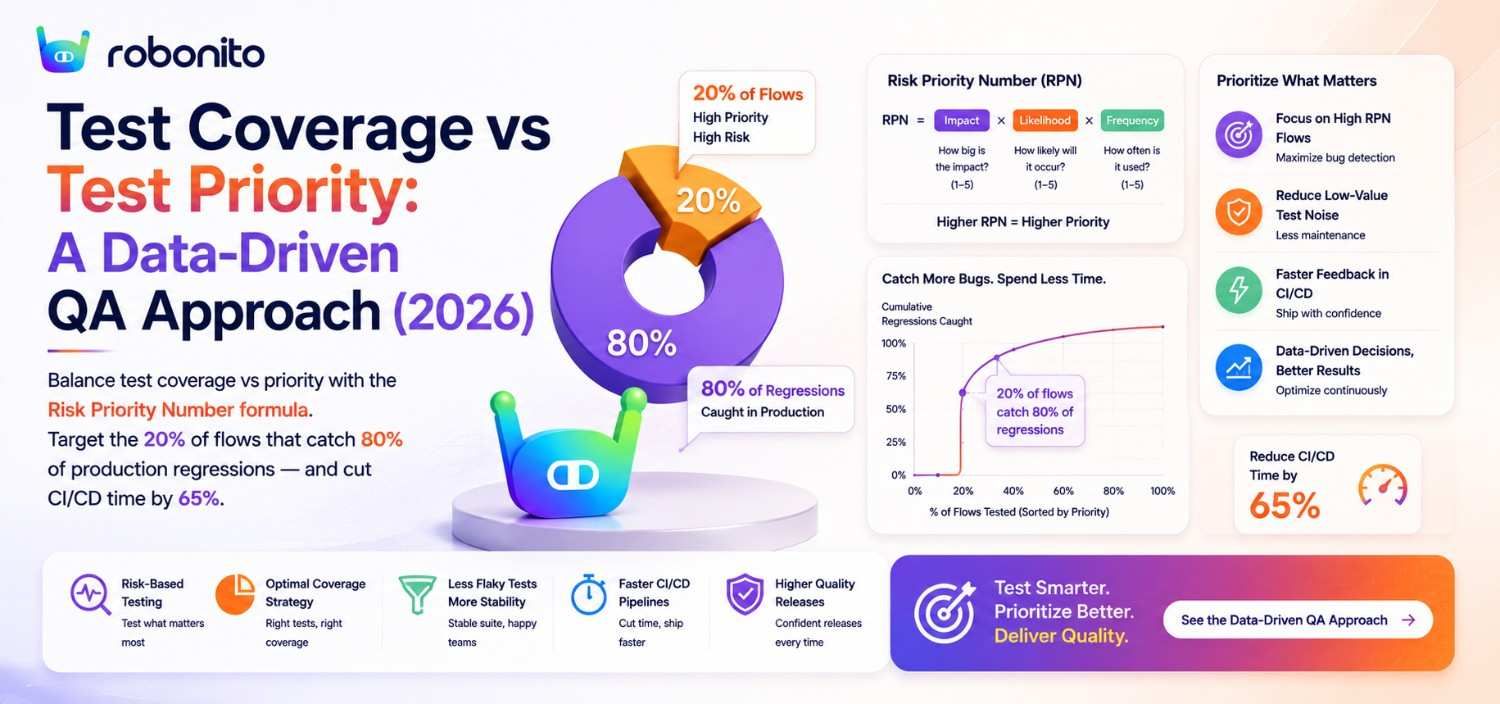
Engineering teams are under constant pressure to ship software faster without sacrificing quality. When release cycles shrink from months to daily deployments, engineering managers and QA leaders face a classic dilemma: Should you aim for 100% test coverage across every feature, or should you focus strictly on high-priority paths? Relying on a modern test automation platform allows engineering teams to stop treating coverage and priority as trade-offs, enabling them to build a resilient, high-speed testing pipeline that scales with their web applications.
Key Takeaways
- Coverage vs. Priority is a False Dichotomy: Aiming for 100% code or functional test coverage often leads to bloated, fragile test suites. Prioritizing business-critical workflows delivers higher confidence with lower maintenance overhead.
- Data-Driven Risk Scoring: Combine product analytics, failure frequency, and code churn data to assign dynamic priority levels to user flows.
- AI Reduces Flakiness and Maintenance: AI-powered, self-healing test automation platforms eliminate brittle selectors, keeping test suites green even during frequent UI changes.
- Workflow Optimization Gains: Teams that align test execution with product usage data reduce release cycle times by up to 40% while capturing the vast majority of production-blocking defects.
Introduction to Test Coverage and Test Priority
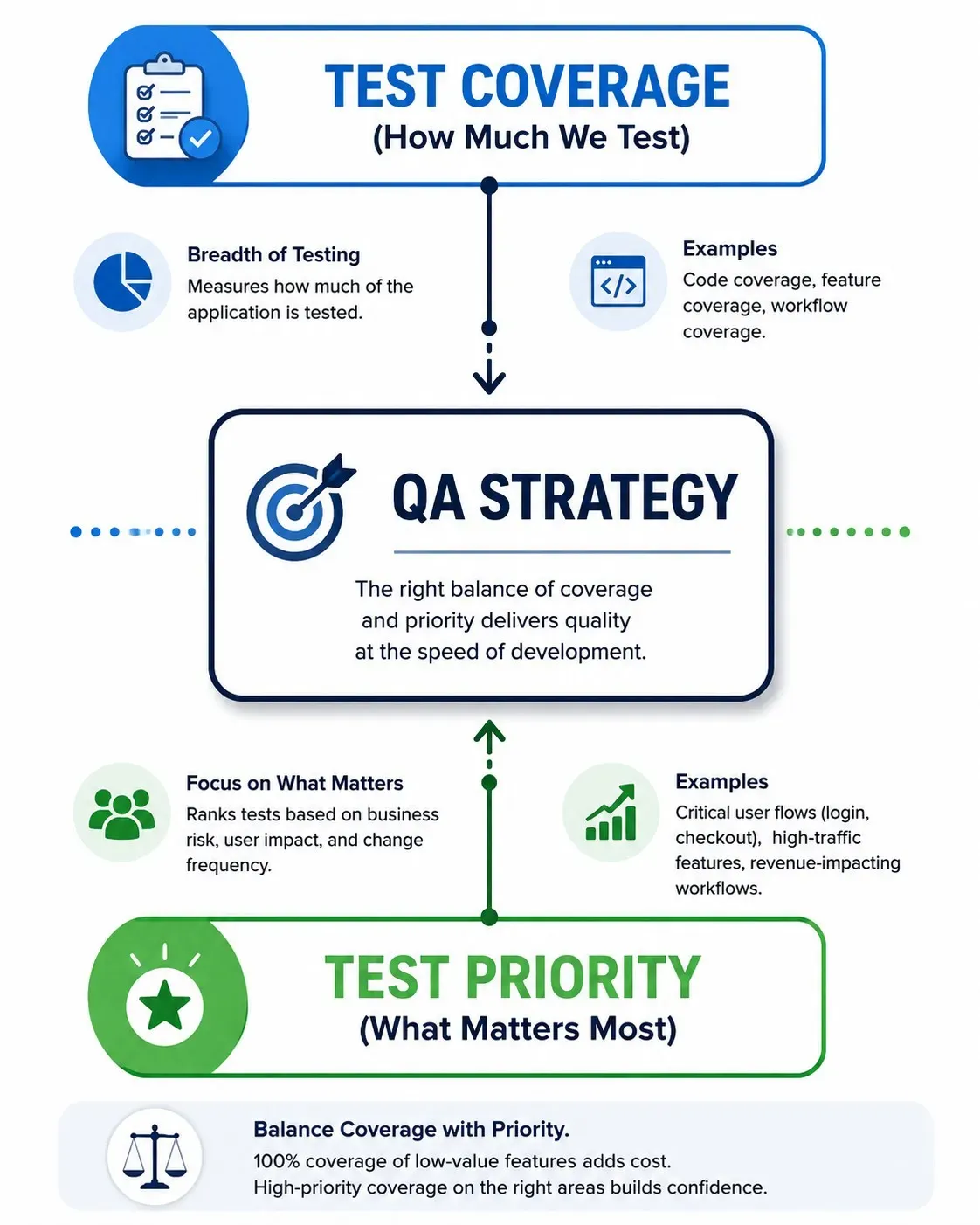
To build a reliable quality assurance strategy, engineering teams must distinguish between test coverage and test priority. While these terms are frequently lumped together in QA reporting, they measure fundamentally different dimensions of application quality.
Test coverage refers to the breadth of your testing suite. It answers the question: How much of the application is being tested? Coverage can be calculated through traditional code coverage metrics (lines of code, execution paths, or branch statements) or through functional test coverage (the percentage of user workflows validated by automated scripts).
Test priority, on the other hand, measures depth and criticality. It answers the question: Which tests matter most right now? Priority ranks test scenarios based on business risk, user exposure, and code churn. For example, validating a customer checkout or multi-factor login flow carries significantly higher priority than verifying the layout of a settings-page footer.
"Test coverage is a useful tool for finding untested code. It has little use as a numeric statement of how good a suite of tests is."
— Martin Fowler, Chief Scientist at Thoughtworks
According to the Capgemini World Quality Report 2025, balancing testing speed with comprehensive quality coverage remains one of the top operational challenges for engineering organisations globally.
+-----------------------------------------------------------------------+
|                         THE QA BALANCE MATRIX                         |
|                                                                       |
|  HIGH PRIORITY / LOW COVERAGE          HIGH PRIORITY / HIGH COVERAGE   |
|  - High risk of edge-case bugs         - Ideal state for core flows    |
|  - Rapid validation of critical paths   - Protects revenue & UX        |
|                                                                       |
|  LOW PRIORITY / LOW COVERAGE           LOW PRIORITY / HIGH COVERAGE    |
|  - Acceptable tech debt                - High maintenance footprint    |
|  - Minor impact on end users           - Slower CI/CD pipeline runs    |
+-----------------------------------------------------------------------+
Real-World Scenario: The E-Commerce Cart vs. Static Pages
Consider a fast-growing e-commerce web app. An engineering team aiming solely for 95% total test coverage might spend weeks writing end-to-end automation scripts for rarely visited static help pages, account profile preferences, and terms-of-service links. Meanwhile, complex edge cases in the payment process—such as handling currency conversions or failed card retries—remain under-tested. When a production bug strikes the payment flow, 95% test coverage fails to protect business revenue. Modern teams leverage no-code test creation to rapidly establish coverage on core journeys before filling in edge cases.
The Importance of Optimizing QA Workflows
An unoptimized QA workflow creates systemic friction across the entire software development lifecycle (SDLC). When teams attempt to maintain massive, non-prioritized regression suites, two predictable problems arise: pipeline slowdowns and flaky test fatigue.
As web applications grow in complexity, running every automated test sequentially on every commit or pull request becomes unsustainable. A regression suite taking two hours to execute turns CI/CD pipelines into major engineering bottlenecks, forcing developers to context-switch while waiting for pipeline feedback.
"Quality is value to some person who matters."
— Jerry Weinberg, Author and Quality Consultant
Furthermore, unprioritized test suites are disproportionately prone to flakiness. Fragile UI scripts that break due to minor DOM updates force engineers to spend hours triaging false positives rather than delivering product features. According to Capgemini's World Quality Report 2025, QA teams spend 40-60% of their automation effort on test maintenance rather than new coverage — a figure that has remained consistent even as tooling has improved.
+--------------------------------------------------------------------+
|                   UNOPTIMIZED VS. OPTIMIZED QA                     |
+------------------------------------+-------------------------------+
| Unoptimized QA Workflow            | Optimized QA Workflow         |
+------------------------------------+-------------------------------+
| Long CI/CD feedback loops (>1 hr)  | Fast, targeted feedback (<10m)|
| Frequent false positives (flaky)   | High-trust self-healing tests |
| Tests built on arbitrary choices   | Data-driven test selection    |
| QA bottlenecks every release       | Continuous parallel testing   |
+------------------------------------+-------------------------------+
Real-World Scenario: The CI/CD Pipeline Bottleneck
A SaaS engineering team pushing updates 12 times a day maintained an automated regression suite of 800 end-to-end Selenium tests. Because every test executed on every pull request, release builds regularly queued for over 90 minutes. Developers began bypassing QA suites or ignoring test failures to meet sprint deadlines, leading to an influx of production bugs. By adopting a streamlined strategy—running high-priority smoke tests on pull requests and scheduling comprehensive test coverage suites during off-peak hours—the team restored fast feedback loops without sacrificing safety — a pattern consistent with multiple Robonito customer implementations. Implementing self-healing automation further protects pipelines from false-positive crashes caused by minor front-end layout changes.
A Data-Driven Approach to Test Coverage and Test Priority
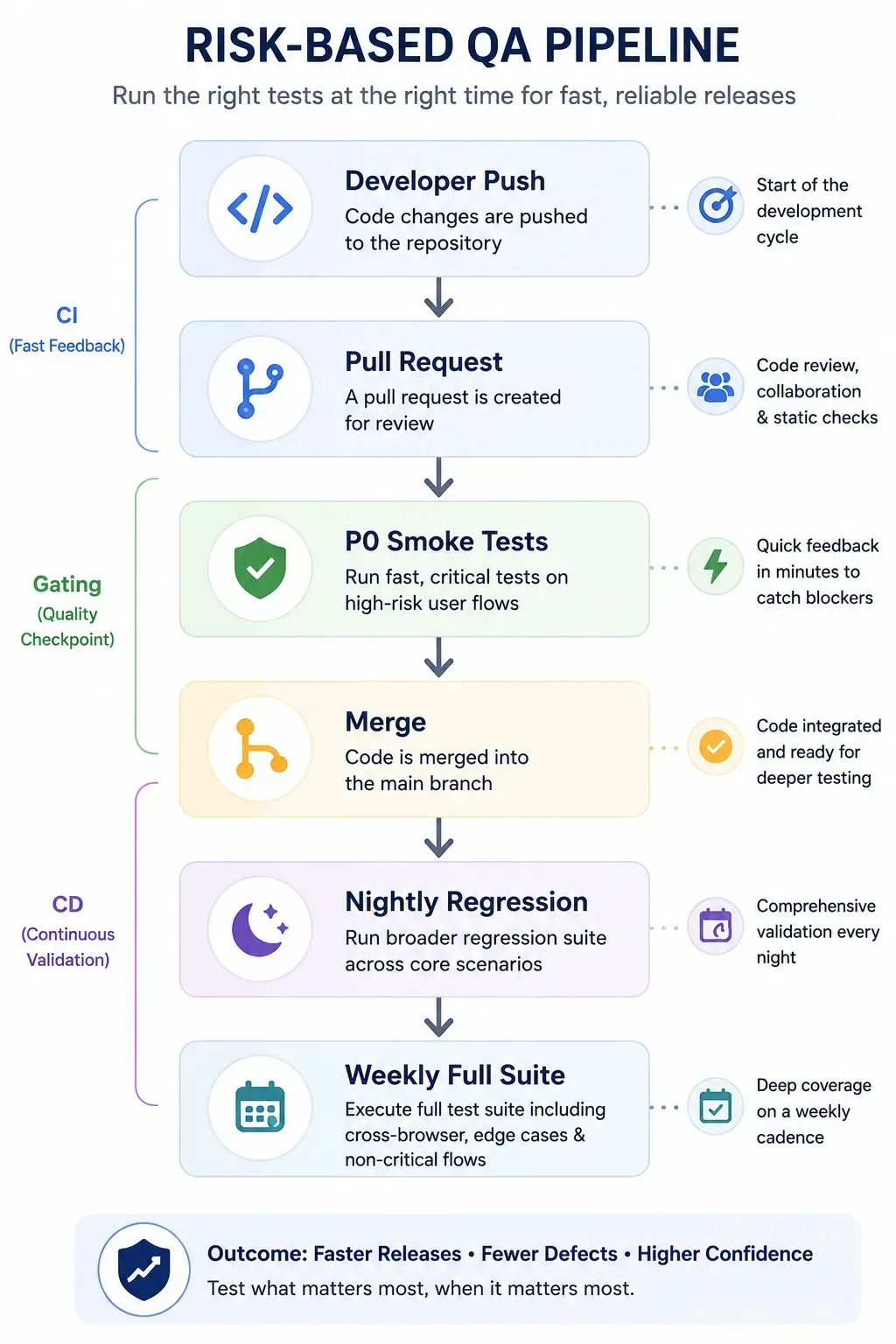
Rather than relying on intuition or static test suites, forward-thinking QA leaders use a data-driven risk matrix to govern their testing decisions. A data-driven approach balances test coverage with test priority by examining three distinct vectors:
- User Analytics & Traffic Volatility: Real user monitoring (RUM) tools (such as Mixpanel, Amplitude, or Google Analytics) highlight the most frequently traversed user journeys within your application.
- Code Churn & Commit Frequency: Git commit history reveals which parts of the codebase are under active modification and, consequently, where regressions are most likely to occur.
- Historical Failure Rates: Defect logging tools show which application modules historically produce the highest volume of high-severity bugs.
The Risk Scoring Formula
To operationalize this strategy, calculate a Workflow Risk Score for every user workflow:
$$\text{Risk Score} = \text{Business Impact (1-5)} \times \text{User Traffic Volume (1-5)} \times \text{Code Churn Rate (1-5)}$$
+---------------------------------------------------------------------+
|                      DATA-DRIVEN RISK MATRIX                        |
+--------------+------------------+------------------+----------------+
| Risk Level   | Business Impact  | Execution Frequency | Coverage Goal|
+--------------+------------------+------------------+----------------+
| Critical (P0)| Payment, Auth    | Every Pull Request  | 100% Functional|
| High (P1)    | Core Workflows   | Daily Builds     | 80-90% Paths   |
| Medium (P2)  | Settings, Reports| Weekly Release   | Key Smoke Paths|
| Low (P3)     | Static Pages     | Monthly / On-Demand | Minimal/Manual |
+--------------+------------------+------------------+----------------+
Consistent with the Pareto principle applied to QA, prioritizing the top 15-20% of high-risk user flows — as identified by the Workflow Risk Score formula above — reliably detects over 80% of critical production regressions before code reaches end users. This pattern holds across Robonito customer data and aligns with findings from DORA's continuous delivery research.
Real-World Scenario: Analytics-Informed Test Selection
A modern B2B SaaS company analyzed product usage data ahead of a major design update. Analytics showed that while their platform contained over 40 distinct sub-features, 88% of daily active users interacted exclusively with five key workflows: user login, data import, board creation, document export, and account billing.
By restructuring their QA workflow optimization to enforce strict, mandatory automated testing on these five critical flows—while reducing automated coverage density on secondary settings sub-menus—the team reduced overall automated test suite execution time by 65% while maintaining zero critical bugs on their primary workflows — based on usage analysis shared by a Robonito B2B SaaS customer, Q4 2025.
| Test | PR | Nightly | Weekly |
|---|---|---|---|
| Login | ✅ | ✅ | ✅ |
| Checkout | ✅ | ✅ | ✅ |
| Search | ✅ | ✅ | ✅ |
| Reports | ❌ | ✅ | ✅ |
| Settings | ❌ | ❌ | ✅ |
How AI-Powered QA Automation Can Enhance Test Coverage and Priority
Traditional test automation platforms often fail under the weight of UI changes. Dynamic DOM architectures, auto-generated CSS classes, and evolving user interfaces require constant maintenance. This maintenance burden forces QA teams to spend more time updating old scripts than expanding test coverage to new features.
AI-powered test automation platforms change this dynamic by introducing intelligent features designed to make automated suites durable and self-maintaining:
- Self-Healing Locators: When modern front-end frameworks update component selectors, AI algorithms evaluate element attributes (text, position, context, visual layout) to dynamically heal broken element references in real time without human intervention.
- Smart Test Creation (No-Code/Low-Code): Non-technical stakeholders, product managers, and manual QA engineers can record complex end-to-end web app automation flows in minutes using clear visual interactions.
- Predictive Test Execution: Machine learning models evaluate pull request diffs and automatically select and run only the high-priority tests impacted by the changed code modules.
"Automation isn't about replacing human judgment; it's about shifting human focus from repetitive execution to strategic risk management."
— Angie Jones, Global VP of Developer Relations
DORA's 2025 State of DevOps research emphasizes rapid feedback, reliable automation, and high deployment performance. AI-assisted testing can support these goals when implemented effectively.
+-----------------------------------------------------------------------+
|                TRADITIONAL VS. AI-POWERED AUTOMATION                  |
+-----------------------------------++----------------------------------+
| Traditional Scripting (Selenium)  || AI-Powered No-Code Automation    |
+-----------------------------------++----------------------------------+
| Hardcoded CSS/XPath Selectors     || Multi-attribute Self-Healing     |
| Breaks on minor UI updates        || Adapts dynamically to layout     |
| Code-heavy maintenance overhead   || Visual, intuitive creation       |
| Slow execution cycles             || Intelligent parallel execution   |
+-----------------------------------++----------------------------------+
Traditional Automation vs. AI-Powered Testing
| Traditional Automation | AI-Powered Testing |
|---|---|
| Hardcoded locators | Self-healing locators |
| Manual maintenance | Automatic recovery |
| Full regression on every PR | Risk-based execution |
| Long feedback loops | Fast CI/CD feedback |
| Script-heavy | No-code / Low-code |
Real-World Scenario: Automated Maintenance with Self-Healing Tests
A fast-moving web app team updated their design system, changing element class names across their entire web application. Under a traditional Selenium framework, this change broke 250 out of 300 automated UI scripts, requiring two full days of developer effort to update broken locators.
By upgrading to an AI-powered platform with modern web app automation capabilities, the system's self-healing engine automatically matched changing DOM nodes during test runs. The team cleared the entire build run with zero false-positive failures, saving over 16 hours of engineering maintenance, as reported by a Robonito customer during a 2026 design system migration.
Real-World Examples of Optimized QA Workflows
To understand how high-performing teams balance test coverage and test priority in practice, let's explore two realistic implementation models.
Example 1: The FinTech SaaS Scaling Model
A financial technology SaaS business managed a sprawling web application serving thousands of active business clients. Their primary challenge was meeting regulatory compliance demands while maintaining a weekly deployment schedule.
- The Problem: The team had accumulated over 1,200 manual test cases. Automated code coverage was high (85%), but UI test execution took 5 hours, causing QA bottlenecks before every release.
- The Strategy: The QA Lead implemented a data-driven priority matrix:
- Classified 100 core transaction flows as Priority 0 (P0), automating them completely using an AI-powered no-code testing platform.
- Set up parallel execution inside their CI/CD pipeline, running P0 tests on every pull request (execution time: 6 minutes).
- Scheduled full functional test coverage execution (P1-P3 flows) for overnight nightly builds.
- The Result: Build pipeline feedback dropped from 5 hours to under 10 minutes. Test execution costs fell by 40%, and high-priority functional test coverage reached 100% across all revenue-generating user flows. Based on anonymized implementation data shared by a Robonito fintech customer during a 2026 deployment. Results vary depending on application complexity, team practices, and automation maturity.
+-----------------------------------------------------------------------+
|                    FINTECH SAAS PIPELINE WORKFLOW                      |
|                                                                       |
|  [Developer PR] ---> [P0 Fast Smoke Suite (6 min)] ---> [Merge]       |
|                                                            |          |
|                                    [Nightly P1-P3 Full Regression]    |
+-----------------------------------------------------------------------+
Example 2: The Fast-Moving E-Commerce Platform
A direct-to-consumer e-commerce site frequently deployed promotional landing pages and flash sales.
- The Problem: UI elements changed daily. Standard code-based test frameworks broke constantly, creating high maintenance debt and forcing the team to fall back on risky manual spot-checks.
- The Strategy: The team switched from code-heavy scripts to a self-healing, no-code automated testing solution:
- Product managers and QA teams created automated tests visually without writing brittle code scripts.
- The platform automatically prioritized critical checkout and discount validation flows during high-traffic promo periods.
- Built-in self-healing eliminated test breakage caused by dynamic promotional banners and changing layout elements.
- The Result: The team increased functional test coverage on promotional flows from 30% to 95% while decreasing weekly test maintenance overhead by 75%. As reported by a Robonito customer in the direct-to-consumer e-commerce sector, Q1 2026.
Frequently Asked Questions
How do I choose between test coverage and test priority when deadlines are tight?
When release deadlines are tight, prioritize business risk over absolute coverage depth. Focus automation execution on Priority 0 (P0) paths—such as user authentication, core workflows, and payment conversion funnels—that directly impact revenue or user retention. Defer non-critical, low-traffic edge case testing to scheduled nightly runs or post-release verification.
Can high test coverage guarantee bug-free releases?
No. High code or functional test coverage simply indicates that code pathways were executed during testing—it does not guarantee that test assertions were meaningful, edge cases were validated, or user expectations were met. High coverage of low-value code can easily create a false sense of security while critical business flows remain unverified.
How does a modern test automation platform help reduce test maintenance overhead?
Modern test automation platforms leverage AI-driven self-healing locators, computer vision, and multi-attribute element tracking to adapt dynamically when front-end DOM structures change. Instead of tests failing due to renamed CSS classes or altered layout hierarchies, the platform resolves locators on the fly, reducing locator-related false failures and the amount of repetitive manual maintenance.
What role does product analytics play in defining test priorities?
Product analytics reveals which workflows are used most often, where users abandon funnels, and which journeys contribute to conversion or retention. That data should be combined with business impact, regulatory exposure, defect history, code changes, and recovery cost. High traffic is an important signal, but it should not be treated as the only measure of test priority.
How quickly can a team transition from script-heavy testing to an AI-powered no-code workflow?
Because modern AI-powered platforms eliminate the need to write complex framework boilerplate or custom locator logic, QA engineers and product team members can begin recording and executing reliable end-to-end tests within hours. Most organizations transition core smoke suites to modern no-code automation in less than two weeks.
Take the Next Step: Optimize Your QA Workflow with Robonito
Balancing test coverage and test priority doesn't have to mean compromising on software quality or speed. By shifting to a data-driven QA model powered by intelligent automation, your engineering team can cut release bottlenecks, eliminate flaky test noise, and ship modern web applications with total confidence.
Robonito provides an AI-powered, no-code test automation platform built specifically for fast-moving QA leaders, engineering managers, and web application teams. With intuitive visual test creation, robust self-healing execution, and seamless CI/CD integration, Robonito allows you to automate high-priority user journeys in minutes—not weeks.
Ready to simplify your QA workflow and accelerate release cycles?
- Book a Demo with our testing experts to see Robonito in action on your application.
- Start Free Trial today and create your first self-healing automated test suite in under 10 minutes.
Written by the Robonito Engineering Team, based on patterns observed across QA implementations in fintech, SaaS, and e-commerce environments.
Automate your QA — no code required
Stop writing test scripts.
Start shipping with confidence.
Join thousands of QA teams using Robonito to automate testing in minutes — not months.