
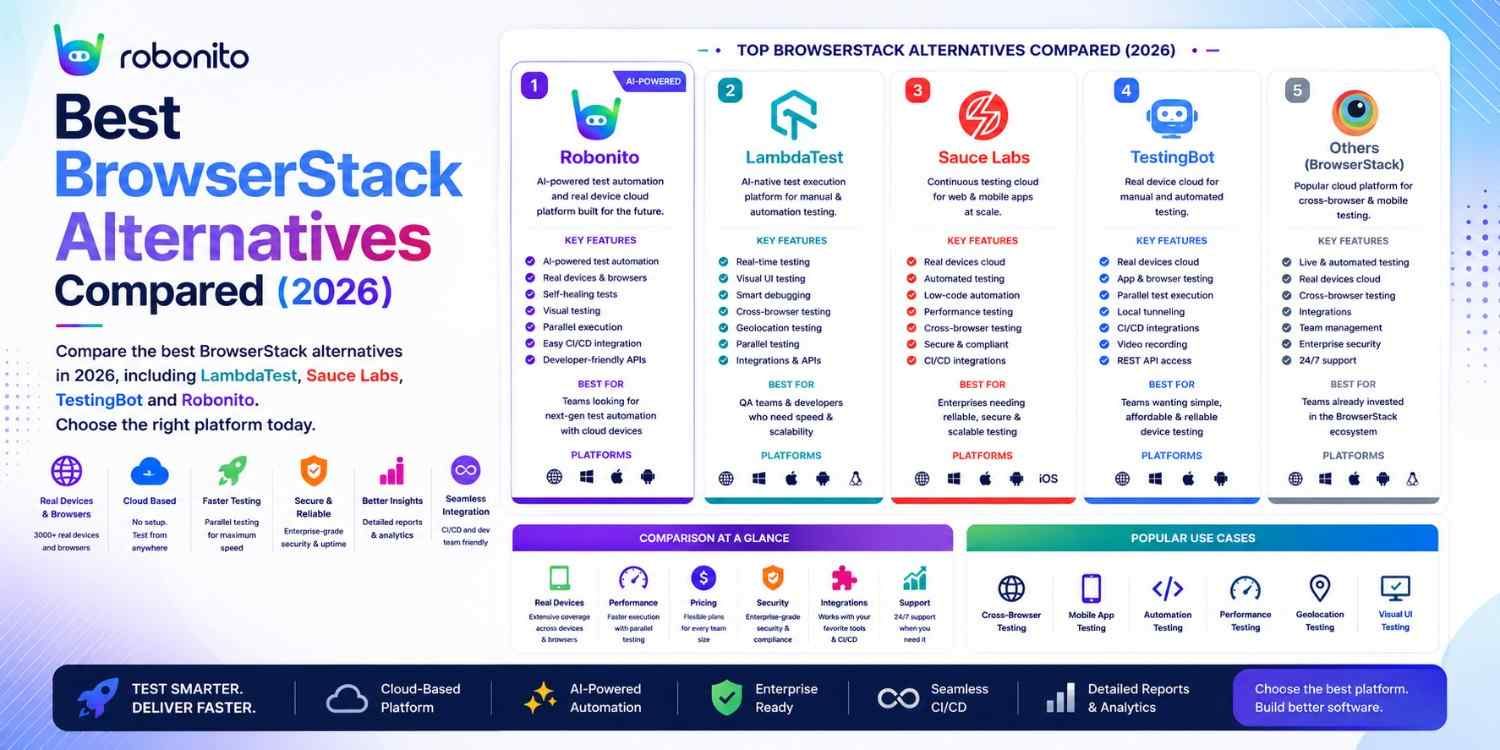
BrowserStack is good. But at $399/month for a team plan, it is also expensive — and several alternatives provide comparable or superior capabilities for specific use cases at a fraction of the cost. This guide covers the 9 best BrowserStack alternatives honestly, with real pricing, genuine limitations, and a decision framework so you know exactly which one fits your team.
By Robonito Engineering Team · Updated May 2026 · 18 min read
Quick stats
| Fact | Source |
|---|---|
| BrowserStack serves over 50,000 customers across 135 countries | BrowserStack |
| LambdaTest costs 40–60% less than BrowserStack for comparable plans | Independent pricing analysis 2026 |
| Safari holds 26% of mobile and 19% of desktop browser share — real device testing matters | StatCounter May 2026 |
| 70% of mobile app crashes occur on devices not in QA test matrices | Firebase Crashlytics 2025 |
| Teams using cloud device testing catch 3× more cross-browser bugs before production | BrowserStack State of Testing 2025 |
Understanding what BrowserStack actually provides
Before evaluating alternatives, it is worth being precise about what BrowserStack does — because different teams use it for very different purposes, and the right alternative depends on which capability you actually need.
BrowserStack's core capabilities:
Live testing — manually interact with your application running in a real browser or real device in BrowserStack's data centre. Useful for visual inspection, manual bug investigation, and design review across devices you do not own.
Automate — run Selenium, Playwright, Cypress, or Appium tests against real browsers and devices in BrowserStack's cloud. Your tests run on real iOS iPhones, real Android phones, and real desktop browsers.
App Automate — run Appium, Espresso, or XCUITest tests against real physical mobile devices. Essential for native app teams who do not want to maintain their own device lab.
Percy — visual regression testing. BrowserStack acquired Percy in 2021, adding pixel-level visual comparison capabilities.
The honest why teams leave BrowserStack: Pricing is the primary reason. BrowserStack's pricing model (per-user or per-minute depending on the plan) becomes significant for teams with high test volumes. Device queue times on popular configurations during peak hours frustrate CI pipelines. And for teams that need only specific capabilities (visual testing, Android-only, AWS-native), specialised tools often provide better ROI.
AI-powered QA automation for web, mobile, API and desktop — zero code
Robonito auto-generates test cases from your user flows, runs them across browsers in CI, and self-heals when your UI changes — covering what BrowserStack runs plus the automation layer that generates what to run. Try Robonito free →
Pricing comparison at a glance
| Platform | Entry paid plan | Team plan | Real devices | Free tier |
|---|---|---|---|---|
| BrowserStack | ~$29/mo | ~$399/mo (5 users) | ✅ 3,500+ | ⚠️ Trial |
| LambdaTest | ~$15/mo | ~$119/mo (5 users) | ✅ 3,000+ | ✅ Free |
| Sauce Labs | ~$49/mo | Custom enterprise | ✅ 2,000+ | ❌ |
| AWS Device Farm | Pay-per-use | $0.17/device-min | ✅ 1,000+ | ✅ (limited) |
| Firebase Test Lab | Pay-per-use | $5/device-hr (physical) | ✅ Android | ✅ (virtual) |
| Kobiton | Custom | Custom enterprise | ✅ | ❌ |
| Applitools | Free tier | Custom enterprise | Via integration | ✅ |
| TestingBot | ~$20/mo | ~$99/mo | ✅ 2,000+ | ✅ |
| Robonito | Free tier | Competitive | Via integration | ✅ |
| Playwright | Free | Free | Via BrowserStack/LT | ✅ OSS |
The 9 best BrowserStack alternatives in 2026
1. LambdaTest — Best value cross-browser testing cloud
lambdatest.com · From $15/month · Free tier available
LambdaTest is the most direct BrowserStack alternative in 2026 — same core capability (real browsers, real devices, cloud execution), significantly lower pricing. For mid-size teams where BrowserStack's pricing has become a concern, LambdaTest typically delivers comparable functionality at 40–60% of the cost.
What LambdaTest provides:
- 3,000+ real browser and device combinations
- Runs Selenium, Playwright, Cypress, and Appium tests without modification — point your existing tests at LambdaTest's grid instead of BrowserStack
- Live interactive testing across browsers and devices
- Smart UI — visual regression testing with AI-powered comparison (included in paid plans)
- Real-time test reporting with video recordings
- CI/CD integration: GitHub Actions, Jenkins, GitLab, CircleCI
Real CI configuration:
## .github/workflows/lambdatest.yml
name: LambdaTest Cross-Browser Tests

on: [push, pull_request]

jobs:
  cross-browser:
    runs-on: ubuntu-latest
    steps:
      - uses: actions/checkout@v4
      - uses: actions/setup-node@v4
        with: { node-version: '20', cache: 'npm' }
      - run: npm ci

      - name: Run Playwright tests on LambdaTest
        run: npx playwright test
        env:
          ## LT_USERNAME and LT_ACCESS_KEY replace local browser execution
          LT_USERNAME: ${{ secrets.LT_USERNAME }}
          LT_ACCESS_KEY: ${{ secrets.LT_ACCESS_KEY }}
          ## Target: LambdaTest Playwright grid
          PLAYWRIGHT_BROWSERSTACK: false
          BASE_URL: ${{ secrets.STAGING_URL }}

      ## Alternative: run existing Selenium tests unchanged
      - name: Run Selenium tests on LambdaTest grid
        run: pytest tests/selenium/
        env:
          LT_USERNAME: ${{ secrets.LT_USERNAME }}
          LT_ACCESS_KEY: ${{ secrets.LT_ACCESS_KEY }}
          SELENIUM_REMOTE_URL: "https://hub.lambdatest.com/wd/hub"
## Existing Selenium tests work with minimal capability changes
from selenium import webdriver

capabilities = {
    "browserName": "Chrome",
    "browserVersion": "latest",
    "LT:Options": {
        "platform": "Windows 11",
        "build": "Regression Suite - v2.2.0",
        "name": "Checkout Flow",
        "username": LT_USERNAME,
        "accessKey": LT_ACCESS_KEY,
        "network": True,  ## Enable network logs
        "console": True,  ## Enable browser console logs
        "visual": True,   ## Enable screenshot on step
    }
}
driver = webdriver.Remote(
    command_executor="https://hub.lambdatest.com/wd/hub",
    options=webdriver.ChromeOptions()
)
Honest limitations: Device inventory slightly smaller than BrowserStack. Some enterprise compliance certifications less mature. Device queue times can be comparable to BrowserStack during peak hours. Support response times sometimes slower on lower-tier plans.
BrowserStack vs LambdaTest — the honest verdict: For most teams, LambdaTest provides 90% of BrowserStack's value at 40–60% of the cost. The 10% where BrowserStack wins: absolute largest device inventory, more mature enterprise compliance (SOC 2 Type II certifications older and more complete), and marginally better real device reliability on the most popular iOS configurations.
Best for: Teams where BrowserStack cost is the primary concern, mid-size teams needing cross-browser cloud without enterprise pricing, teams wanting to cut testing infrastructure costs without sacrificing device coverage.
Pricing: Free tier available. Paid from ~$15/month. Team plans from ~$119/month.
2. Sauce Labs — Best for enterprise compliance and dedicated infrastructure
saucelabs.com · From ~$49/month · No free tier
Sauce Labs is the enterprise-grade cross-browser testing cloud — the option that prioritises security, compliance, and infrastructure isolation over cost. Where BrowserStack and LambdaTest run tests in shared infrastructure, Sauce Labs' enterprise plans provide dedicated virtual machines that are not shared with other customers. This matters for industries where security auditors ask: "Could another customer's test data be accessible in your test environment?"
What makes Sauce Labs different from BrowserStack:
- SOC 2 Type II compliance — older and more comprehensive certification than most competitors
- Dedicated VMs on enterprise plans — isolated infrastructure for security-sensitive testing
- Sauce Visual — AI-powered visual regression testing included
- Extended test retention — test logs and videos retained longer by default
- Broader framework support — Selenium, Playwright, Cypress, Appium, Espresso, XCUITest, Flutter, and Robotium all supported
## Sauce Labs GitHub Actions integration
- name: Run tests on Sauce Labs
  uses: saucelabs/sauce-connect-action@v2
  with:
    username: ${{ secrets.SAUCE_USERNAME }}
    accessKey: ${{ secrets.SAUCE_ACCESS_KEY }}
    tunnelName: github-actions-tunnel

- name: Execute test suite
  run: npm run test:saucelabs
  env:
    SAUCE_USERNAME: ${{ secrets.SAUCE_USERNAME }}
    SAUCE_ACCESS_KEY: ${{ secrets.SAUCE_ACCESS_KEY }}
    SAUCE_TUNNEL_NAME: github-actions-tunnel
Honest limitations: No free tier — requires budget commitment before evaluation. More expensive than LambdaTest and sometimes BrowserStack for equivalent basic functionality. The enterprise features that justify the premium are only relevant for teams with specific compliance requirements.
Best for: Enterprise teams with SOC 2 audit requirements, financial services, healthcare (HIPAA-adjacent use cases), government contractors, any team whose security auditors require dedicated VM isolation.
Pricing: From ~$49/month. Enterprise plans require custom quotes.
3. Robonito — Best AI-powered automation across web, mobile, API, and desktop
robonito.com · Free tier · No coding required
Robonito occupies a fundamentally different position in the cross-browser testing ecosystem than BrowserStack, LambdaTest, or Sauce Labs. Those platforms are device clouds — they provide the infrastructure to run your tests, but you still write the tests yourself. Robonito is an AI-driven QA automation platform — it generates the tests, runs them across browsers, and maintains them automatically.
The distinction that matters:
BrowserStack answers: "Where do I run my tests?" — providing real browsers and devices.
Robonito answers: "What tests should run and how do I keep them working?" — providing AI-generated test cases that execute across all browsers and self-heal when the application changes.
For teams that struggle not with where to run tests but with the overhead of writing and maintaining them, Robonito addresses the root cause rather than the infrastructure layer.
Platform coverage:
Robonito covers:
├── Web — Chrome, Safari, Firefox, Edge (cross-browser, CI-integrated)
├── Mobile Web — real mobile viewports, touch interactions
├── API — REST endpoints, schema validation, auth flows
└── Desktop — web-based desktop apps, Electron applications
How Robonito handles cross-browser testing specifically:
Instead of running a Playwright script across BrowserStack's devices, Robonito's AI generates test cases from recorded user flows, then executes them across its integrated browser matrix. When Chrome renders something differently from Safari, the AI-powered assertion layer validates the expected outcome rather than an exact pixel state — which reduces false positives from legitimate rendering differences between browser engines.
Self-healing across browser updates:
When Chrome releases a new version or Safari changes a default behaviour, tests that relied on specific rendering behaviour can break. Robonito's self-healing detects when expected element states change and updates the test logic automatically — reducing the maintenance overhead that cross-browser testing typically introduces.
Real integration:
## Robonito handles cross-browser execution natively
- name: Run Robonito cross-browser regression
  uses: robonito/run-tests-action@v2
  with:
    api-key: ${{ secrets.ROBONITO_API_KEY }}
    suite: regression
    environment: staging
    browsers: chrome,safari,firefox,edge
    fail-on: critical
Honest positioning: Robonito is the right choice when the goal is comprehensive automated regression across browsers without scripting overhead. It is complementary to BrowserStack-style real device clouds (for native mobile app testing) rather than a pure replacement. Teams testing native iOS and Android apps still need a real device cloud alongside Robonito.
Best for: Teams that want cross-browser web testing covered automatically without writing and maintaining test scripts, QA teams with non-technical members, organisations wanting AI-driven regression across web, mobile web, API, and desktop.
Pricing: Free tier with generous limits. Paid plans competitive — robonito.com/pricing.
BrowserStack vs Robonito
BrowserStack and Robonito solve different testing challenges, which is why many teams use them together rather than treating them as direct replacements.
BrowserStack is primarily a device cloud and cross-browser testing infrastructure platform. It provides access to thousands of real browsers and devices where teams can execute Selenium, Playwright, Cypress, Appium, Espresso, or XCUITest tests.
Robonito focuses on the automation layer. Instead of requiring teams to write and maintain large test suites, it uses AI-powered automation, no-code workflows, and self-healing testing to create, execute, and maintain tests across web, mobile, API, and desktop applications.
Quick Comparison
| Feature | BrowserStack | Robonito |
|---|---|---|
| Real Device Cloud | ✅ Yes | Via integration |
| Cross-Browser Testing | ✅ Yes | ✅ Yes |
| Test Creation | Manual (Selenium, Playwright, Cypress, Appium) | AI-assisted, no-code |
| Test Maintenance | Manual updates required | Self-healing automation |
| Mobile App Testing | ✅ Native iOS & Android devices | ✅ Mobile app automation |
| API Testing | Limited | ✅ Built-in |
| Desktop Testing | Limited | ✅ Supported |
| Visual Workflows | ❌ No | ✅ Yes |
| CI/CD Integration | ✅ Yes | ✅ Yes |
| Best For | Real device infrastructure | AI-powered end-to-end automation |
When BrowserStack Is the Better Choice
Choose BrowserStack when:
- Real iOS and Android device testing is your primary requirement.
- Your team already has a mature Selenium, Playwright, Cypress, or Appium framework.
- You need access to thousands of browser and device combinations.
- Enterprise compliance and device coverage are top priorities.
When Robonito Is the Better Choice
Choose Robonito when:
- Test maintenance consumes too much QA time.
- You want to reduce scripting effort.
- Non-technical testers need to contribute to automation.
- You need automated testing across web, mobile, API, and desktop from a single platform.
- Your team wants AI-powered self-healing instead of manually fixing broken tests after every UI change.
Bottom Line
BrowserStack helps teams run tests on real devices and browsers. Robonito helps teams create, maintain, and execute those tests with significantly less effort. Organizations focused on reducing automation maintenance and accelerating regression testing often choose Robonito to automate web, mobile, desktop, and API testing while using BrowserStack-style infrastructure when extensive real-device validation is required.
4. Applitools — Best for AI-powered visual regression testing
applitools.com · Free tier · Integrates with any framework
Applitools is not a device cloud — it is a visual testing platform. The distinction is important: BrowserStack provides the real browsers and devices to run your tests on; Applitools provides the AI that analyses what your tests' screenshots look like and determines whether any visual changes represent problems.
They are often used together: BrowserStack to run tests on real devices and browsers, Applitools to perform intelligent visual comparison on the screenshots those tests capture.
How Applitools' Visual AI works:
Traditional visual regression captures a screenshot and compares it pixel-by-pixel to a baseline. Any difference — even a 1-pixel shift — fails the test. This produces enormous numbers of false positives: every font rendering difference between Chrome and Safari, every minor layout variation from browser zoom levels, every animation state difference.
Applitools' AI understands the difference between a meaningful visual regression (a broken layout, a missing button, an overlapping element) and an irrelevant rendering variation (sub-pixel font differences between OS versions). This dramatically reduces false positives while catching the visual bugs that matter.
// Playwright + Applitools Eyes — visual testing across browsers
import { test } from '@playwright/test';
import { Eyes, Target } from '@applitools/eyes-playwright';

test.describe('Visual regression — cross-browser', () => {
  let eyes: Eyes;

  test.beforeEach(async () => {
    eyes = new Eyes();
    await eyes.open({
      appName: 'YourApp',
      testName: 'Checkout Visual',
      // Applitools runs this test across all configured browsers
      // (configure in Applitools dashboard or Ultrafast Grid config)
    });
  });

  test.afterEach(async () => {
    await eyes.close();
  });

  test('checkout page renders consistently across browsers', async ({ page }) => {
    await page.goto('/checkout');
    await page.waitForLoadState('networkidle');

    // Applitools captures and compares the full page
    await eyes.check('Checkout page', Target.window().fully());
    // AI determines if differences are visual regressions or normal rendering variations
  });
});
Honest limitations: Applitools does not replace a device cloud for running your tests — it only analyses the visual output of tests you run elsewhere. Pricing can become significant at scale (high screenshot volumes). The AI, while excellent, still occasionally requires manual baseline management.
Best for: Teams where visual regression across browsers is the primary quality concern, design-critical applications, teams that have already had production incidents caused by CSS rendering differences across browsers.
Pricing: Free tier available. Team plans custom-priced based on screenshot volume.
5. AWS Device Farm — Best for AWS-native teams
aws.amazon.com/device-farm · Pay-per-use · From $0.17/device-minute
AWS Device Farm provides real device testing in AWS's infrastructure — making it the natural choice for teams already running on AWS. Everything stays within the AWS ecosystem, IAM handles authentication, test results integrate with CloudWatch, and pricing follows AWS's pay-per-use model rather than monthly subscriptions.
## GitHub Actions with AWS Device Farm
- name: Upload app to AWS Device Farm
  uses: aws-actions/configure-aws-credentials@v4
  with:
    aws-access-key-id: ${{ secrets.AWS_ACCESS_KEY_ID }}
    aws-secret-access-key: ${{ secrets.AWS_SECRET_ACCESS_KEY }}
    aws-region: us-west-2

- name: Create test run on Device Farm
  run: |
    RUN_ARN=$(aws devicefarm create-run \
      --project-arn ${{ secrets.DEVICE_FARM_PROJECT_ARN }} \
      --app-arn ${{ secrets.APP_ARN }} \
      --device-pool-arn ${{ secrets.DEVICE_POOL_ARN }} \
      --test '{"type":"APPIUM_PYTHON","testPackageArn":"${{ steps.upload.outputs.upload_arn }}"}' \
      --query 'run.arn' --output text)
    echo "RUN_ARN=$RUN_ARN" >> $GITHUB_ENV

- name: Wait for test completion
  run: |
    aws devicefarm get-run --arn ${{ env.RUN_ARN }} \
      --query 'run.status' --output text
Honest limitations: Smaller device inventory than BrowserStack or LambdaTest. Web browser testing capabilities less mature than dedicated cross-browser platforms. UI is less polished than purpose-built testing cloud interfaces.
Best for: AWS-native teams wanting device testing within their existing AWS infrastructure and IAM security model, teams already using CodePipeline or CodeBuild.
Pricing: Pay-per-use. Physical device testing from $0.17/device-minute. No minimum commitment.
6. Firebase Test Lab — Best for Android testing in the Google ecosystem
firebase.google.com/products/test-lab · Pay-per-use · Free virtual device tier
Firebase Test Lab is Google's mobile app testing service, tightly integrated with the Android and Firebase ecosystem. It provides both virtual (emulated) and physical Android device testing, with first-class support for Espresso and Robo Test (Google's automated app crawler).
## GitHub Actions with Firebase Test Lab
- name: Upload app and run tests on Firebase Test Lab
  uses: google-github-actions/auth@v2
  with:
    credentials_json: ${{ secrets.GCP_CREDENTIALS }}

- name: Run Espresso tests on Firebase Test Lab
  run: |
    gcloud firebase test android run \
      --type instrumentation \
      --app app/build/outputs/apk/debug/app-debug.apk \
      --test app/build/outputs/apk/androidTest/debug/app-debug-androidTest.apk \
      --device model=redfin,version=30,locale=en,orientation=portrait \
      --device model=oriole,version=32,locale=en,orientation=portrait \
      --timeout 5m \
      --results-bucket gs://your-test-results-bucket
Robo Test — automatic app crawling without writing tests:
## Firebase Robo Test automatically crawls your app without any test scripts
## Just upload the APK and let Google's AI explore it
gcloud firebase test android run \
  --type robo \
  --app app-release.apk \
  --robo-directives text:username=testuser@example.com,text:password=TestPass2026! \
  --device model=sailfish,version=28
Honest limitations: Android-focused — iOS support through integration with BrowserStack rather than native Apple devices. Web browser testing not its strength. Requires GCP account and billing setup. Less intuitive UI than dedicated testing platforms for non-Google-ecosystem teams.
Best for: Android-native apps, teams in the Firebase/GCP ecosystem, teams wanting Google's Robo Test automated crawling for baseline coverage without writing tests.
Pricing: Virtual device testing free (10 tests/day). Physical device testing from $5/device-hour.
7. Kobiton — Best for AI-assisted real device testing with scriptless capabilities
kobiton.com · Enterprise pricing · Real devices
Kobiton differentiates itself from BrowserStack and LambdaTest through its AI-assisted testing features. Beyond providing real devices to run tests on, Kobiton's platform can generate test scripts from recorded manual sessions — reducing the scripting barrier for mobile testing teams.
What makes Kobiton different:
- Scriptless testing — record a manual session and Kobiton generates Appium scripts automatically
- AI-generated insights — identifies flaky elements and suggests more stable selectors
- Device management portal — organisations can manage their own physical device inventory through Kobiton's platform
- Appium compatibility — existing Appium tests work with minimal capability changes
Honest limitations: Enterprise pricing makes it inaccessible for small teams. The scriptless generation is useful but cannot replace purpose-built test frameworks for complex scenarios. Less transparent pricing than BrowserStack or LambdaTest.
Best for: Enterprise mobile teams wanting AI-assisted test generation from recorded sessions, organisations managing their own device inventory.
Pricing: Enterprise pricing — contact Kobiton for rates.
8. Playwright (self-hosted) — Best free alternative for web cross-browser testing
playwright.dev · Free · Open source
Playwright is not a device cloud — it is the testing framework — but it belongs in this list because it eliminates the need for a cross-browser cloud for the majority of web application cross-browser testing.
Why Playwright replaces much of what teams use BrowserStack for on web:
Playwright runs tests natively against Chromium, Firefox, and WebKit on any machine without a cloud subscription. A Playwright test suite configured for three browsers covers Chrome, Firefox, and Safari (via WebKit) in CI for free.
// playwright.config.ts — free cross-browser coverage without any cloud service
export default defineConfig({
  projects: [
    { name: 'chromium', use: { ...devices['Desktop Chrome'] } },
    { name: 'webkit',   use: { ...devices['Desktop Safari'] } },  // Safari equivalent
    { name: 'firefox',  use: { ...devices['Desktop Firefox'] } },
    { name: 'mobile',   use: { ...devices['iPhone 14'] } },       // Mobile Safari
    { name: 'android',  use: { ...devices['Pixel 7'] } },         // Mobile Chrome
  ],
});
## Run cross-browser tests free — no BrowserStack account needed
npx playwright test --project=chromium --project=webkit --project=firefox

## Full cross-browser in CI (GitHub Actions ubuntu-latest)
## Chromium, Firefox, and WebKit all run on Linux in CI for free
When you still need BrowserStack or LambdaTest alongside Playwright:
Playwright's WebKit approximates Safari but is not identical to real Safari on real Apple hardware. For final pre-release validation on real iOS devices, real iPhones via BrowserStack or LambdaTest remain necessary. The practical approach: Playwright for all PR and merge CI (free, fast), BrowserStack/LambdaTest for pre-release real device validation (paid, necessary).
Honest limitations: WebKit is not identical to real Safari. No real mobile device testing — emulation only. No test recording without additional tools.
Best for: Teams wanting cross-browser web testing without paying for a cloud — particularly when combined with a paid platform for pre-release real device validation.
Pricing: Free and open source.
9. TestingBot — Best budget cloud for smaller teams
testingbot.com · From ~$20/month · Free tier available
TestingBot is the most affordable cloud testing platform with real device support. It provides a smaller but functional device inventory, supports Selenium, Appium, and Playwright, and offers live testing alongside automated test execution.
For small startups and individual developers who find BrowserStack expensive and do not need LambdaTest's scale, TestingBot provides a cost-effective entry point.
## TestingBot Selenium integration
from selenium import webdriver

capabilities = {
    'browserName': 'chrome',
    'version': 'latest',
    'platform': 'WIN11',
    'name': 'Checkout Test',
    'client_key': TESTINGBOT_KEY,
    'client_secret': TESTINGBOT_SECRET
}

driver = webdriver.Remote(
    command_executor='https://hub.testingbot.com/wd/hub',
    desired_capabilities=capabilities
)
Honest limitations: Smaller device inventory than BrowserStack or LambdaTest. Less polished UI. Smaller community and slower feature development cadence. Enterprise compliance features limited compared to Sauce Labs.
Best for: Individual developers and small startups needing basic cross-browser cloud coverage at the lowest possible cost.
Pricing: Free tier available. From ~$20/month.
Full comparison: BrowserStack vs alternatives
| Platform | Devices | Web browsers | Visual testing | CI/CD | Compliance | Best for | Pricing |
|---|---|---|---|---|---|---|---|
| BrowserStack | 3,500+ | ✅ | ✅ Percy | ✅ | SOC 2 | All-round leader | ~$29–$399/mo |
| LambdaTest | 3,000+ | ✅ | ✅ Smart UI | ✅ | SOC 2 | Cost-conscious teams | ~$15–$119/mo |
| Sauce Labs | 2,000+ | ✅ | ✅ Visual | ✅ | SOC 2 + dedicated VMs | Enterprise compliance | ~$49/mo+ |
| Robonito | Via integration | ✅ All browsers | ✅ | ✅ Native | — | No-code AI automation | Free+ |
| Applitools | Via integration | ✅ | ✅ Best-in-class | ✅ | — | Visual regression | Free+ custom |
| AWS Device Farm | 1,000+ | Limited | ❌ | ✅ AWS-native | AWS compliance | AWS ecosystem | Pay-per-use |
| Firebase Test Lab | Android focus | Limited | ❌ | ✅ GCP-native | GCP compliance | Android/Firebase | Free virtual + paid |
| Kobiton | Enterprise | ✅ | ✅ | ✅ | Enterprise | AI-assisted enterprise | Custom |
| Playwright | Emulation only | ✅ All engines | ✅ Built-in | ✅ | — | Free web testing | Free |
| TestingBot | 2,000+ | ✅ | Limited | ✅ | Limited | Small teams, budget | ~$20/mo |
Choosing the right BrowserStack alternative
| Your situation | Best choice | Key reason |
|---|---|---|
| BrowserStack cost is too high for similar capability | LambdaTest | 40–60% cheaper, comparable coverage |
| Enterprise SOC 2 compliance, dedicated VMs | Sauce Labs | Strongest compliance posture |
| Want AI-generated tests, not just a device cloud | Robonito | Automation platform, not just infrastructure |
| Visual regression is the primary cross-browser concern | Applitools | Most sophisticated visual AI |
| AWS-native team, want IAM integration | AWS Device Farm | Native AWS ecosystem |
| Android-native app, Google/Firebase ecosystem | Firebase Test Lab | First-class Espresso + Robo Test |
| Enterprise with mobile AI-assisted generation | Kobiton | Scriptless test generation from recordings |
| Free cross-browser web testing | Playwright | Free, covers Chromium + Firefox + WebKit |
| Solo developer or startup, minimal budget | TestingBot | Cheapest entry point with real devices |
Pre-evaluation checklist
Before committing to any BrowserStack alternative:
- Device inventory verified against your actual user analytics (which iOS versions, Android versions, browsers)
- Pricing modelled at your actual test volume — not just the headline entry price
- CI/CD integration tested — does the platform integrate with your specific pipeline?
- Free trial completed against your real application, not a demo
- Compliance requirements confirmed — does your industry require specific certifications?
- Device queue times evaluated during your peak testing hours
- Exit cost evaluated — how difficult is migration if you need to switch later?
- Support tier evaluated for your team's operational criticality
Frequently Asked Questions
What is the best BrowserStack alternative in 2026?
LambdaTest for cost-conscious teams — comparable coverage at 40–60% of the price. Sauce Labs for enterprise compliance (SOC 2, dedicated VMs). Robonito for teams that want automated test generation across browsers, not just a device cloud. Applitools when visual regression is the primary concern. Playwright when free cross-browser web testing is sufficient.
Why do teams look for BrowserStack alternatives?**
Pricing at scale, device queue times during peak hours, geographic latency preferences, and specialised needs (visual testing, AWS-native, Android-only) that purpose-built tools address better. BrowserStack is excellent — the alternatives are worth evaluating when a specific constraint makes a different tool a better fit.
Is LambdaTest better than BrowserStack?
LambdaTest is not categorically better, but it provides 90% of BrowserStack's functionality at 40–60% of the cost for most teams. BrowserStack has a larger device inventory, more mature enterprise compliance, and marginally better real device reliability. For teams where budget is the primary constraint and they do not need BrowserStack's premium enterprise features, LambdaTest is the right choice.
What is the difference between BrowserStack and Applitools?
BrowserStack is a device cloud — it provides real browsers and devices to run your tests on. Applitools is a visual testing platform — it analyses screenshots from your tests using AI to detect visual regressions. They solve different problems and are often used together rather than as alternatives.
Can I test cross-browser for free instead of using BrowserStack?
Yes. Playwright provides free cross-browser testing with native Chromium, Firefox, and WebKit support. For most web application cross-browser testing, Playwright in CI covers the majority of real-world browser compatibility issues without any cloud subscription. BrowserStack or LambdaTest remain valuable for final pre-release validation on real iOS devices.
External references
- BrowserStack Documentation — Official BrowserStack docs
- LambdaTest Documentation — Official LambdaTest docs
- Sauce Labs Documentation — Official Sauce Labs docs
- Applitools Documentation — Official Applitools docs
- AWS Device Farm Documentation — Official AWS docs
- Firebase Test Lab Documentation — Official Firebase docs
- StatCounter Browser Market Share — Live browser usage data
Stop choosing between where to run tests and what tests to run
Robonito handles both — AI-generated test cases from your user flows that run across Chrome, Safari, Firefox, and Edge in CI automatically, with self-healing when your UI changes. Web, mobile web, API, and desktop. Teams using Robonito cut their cross-browser QA cycle from days to hours. Start free at Robonito.com →
Automate your QA — no code required
Stop writing test scripts.
Start shipping with confidence.
Join thousands of QA teams using Robonito to automate testing in minutes — not months.
