
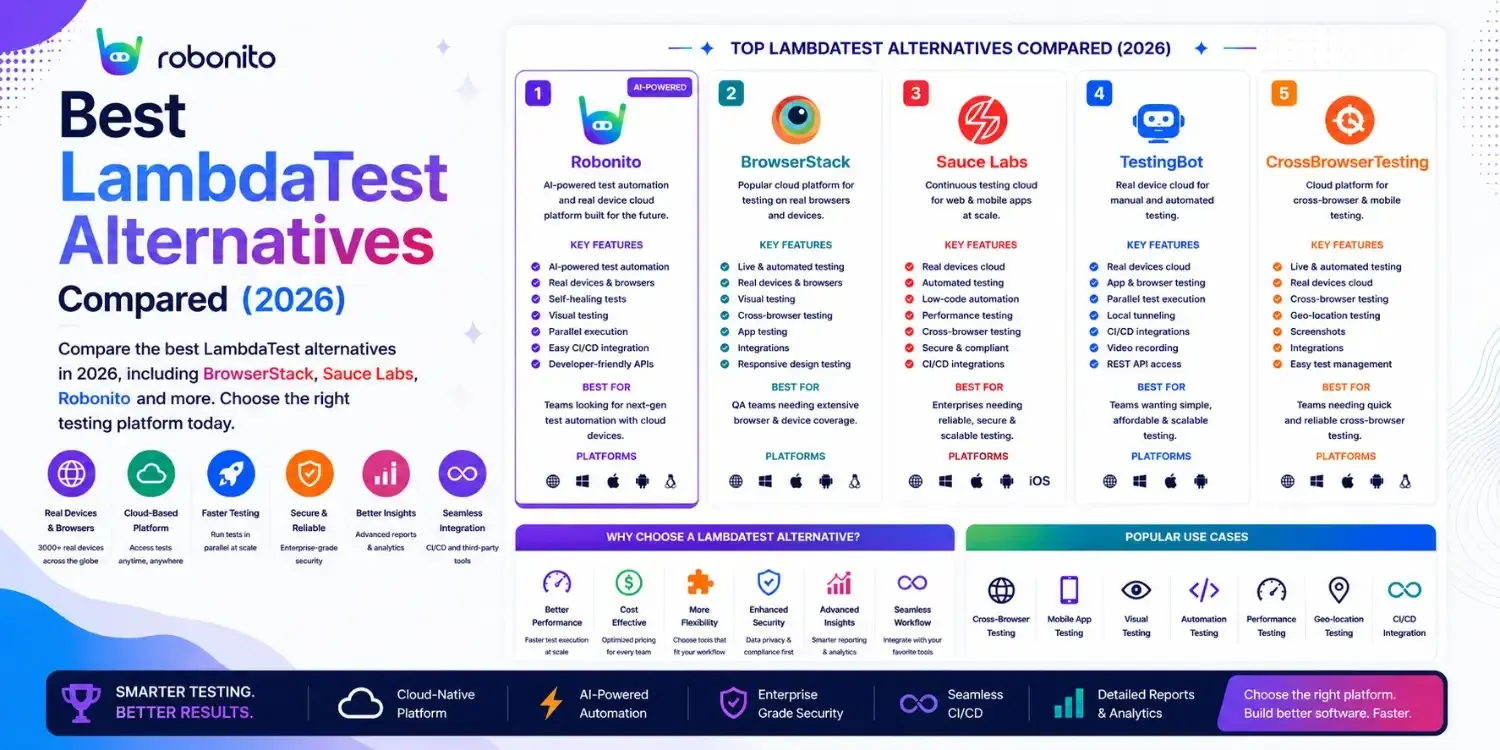
LambdaTest is genuinely good — and for most mid-size teams it remains the best value cross-browser testing cloud available. But "best value" is not "best for everyone." This guide covers the 9 strongest alternatives with honest pricing, the specific reasons teams move from LambdaTest to each one, and working code so you can evaluate them against your real application.
By Robonito Engineering Team · Updated May 2026 · 18 min read
Quick stats
| Fact | Source |
|---|---|
| LambdaTest is used by over 10,000 organisations across 130+ countries | LambdaTest |
| BrowserStack has 40% more device coverage than LambdaTest (3,500+ vs 3,000+) | Device inventory comparison May 2026 |
| Sauce Labs enterprise plans provide dedicated VMs — not available on LambdaTest | Sauce Labs |
| 49% of users experience cross-browser issues monthly — device cloud coverage matters | BrowserStack State of Testing 2025 |
| Playwright provides free cross-browser testing for Chromium, Firefox, and WebKit | playwright.dev |
Why teams move away from LambdaTest — the honest reasons
LambdaTest is an excellent platform for most teams. The reasons teams explore alternatives are not failures of LambdaTest — they are cases where a different tool's specific strengths better fit a specific need.
Reason 1: Device inventory gaps for rare configurations
LambdaTest's 3,000+ device/browser combinations cover the vast majority of real-world usage. But teams with users on older iOS versions (iOS 14, 15), specific regional Android devices (Xiaomi, Oppo), or emerging markets often find BrowserStack's 3,500+ inventory has the specific configuration LambdaTest lacks.
Reason 2: Enterprise compliance requirements
LambdaTest has SOC 2 compliance, but Sauce Labs provides dedicated VMs on enterprise plans — shared infrastructure is not acceptable for some financial services, healthcare, or government teams whose security auditors require isolation guarantees.
Reason 3: AWS or GCP ecosystem integration
Teams heavily invested in AWS infrastructure often prefer AWS Device Farm — IAM authentication, CloudWatch integration, and data never leaving their AWS environment. Firebase Test Lab serves the same role for GCP/Firebase teams.
Reason 4: Visual regression is the primary need
LambdaTest's Smart UI visual testing is functional but not the market leader for visual regression. Teams for whom pixel-perfect cross-browser rendering is the primary quality concern evaluate Applitools, which has the most sophisticated visual AI.
Reason 5: Automated test generation, not just a device cloud
LambdaTest (like BrowserStack and Sauce Labs) provides the infrastructure to run tests — teams still write the tests themselves. Robonito generates and maintains tests automatically. Teams whose primary pain is test maintenance rather than device coverage choose automation platforms over device clouds.
AI-powered QA automation for web, mobile, API and desktop — zero code
Robonito generates tests from your user flows, runs them across all browsers in CI, and self-heals when your UI changes — covering what LambdaTest runs plus the automation layer that creates what to run. Try Robonito free →
Pricing comparison: LambdaTest vs alternatives
| Platform | Free tier | Entry paid | Team plan (5 users) | Enterprise | Real devices |
|---|---|---|---|---|---|
| LambdaTest | ✅ | ~$15/mo | ~$119/mo | Custom | ✅ 3,000+ |
| BrowserStack | ⚠️ Trial | ~$29/mo | ~$399/mo | Custom | ✅ 3,500+ |
| Sauce Labs | ❌ | ~$49/mo | Custom | Custom | ✅ 2,000+ |
| Robonito | ✅ | Competitive | Competitive | Custom | Via integration |
| Applitools | ✅ | Custom | Custom | Custom | Via integration |
| AWS Device Farm | ✅ (limited) | Pay-per-use | $0.17/device-min | AWS billing | ✅ 1,000+ |
| Firebase Test Lab | ✅ virtual | $5/device-hr | Pay-per-use | GCP billing | ✅ Android |
| Kobiton | ❌ | Custom | Custom | Custom | ✅ Enterprise |
| Playwright | ✅ OSS | Free | Free | Free | Emulation |
| TestingBot | ✅ | ~$20/mo | ~$99/mo | Custom | ✅ 2,000+ |
The 9 best LambdaTest alternatives in 2026
1. BrowserStack — Best for maximum device coverage and enterprise compliance
browserstack.com · From $29/mo · Trial available
BrowserStack is the most natural LambdaTest upgrade path — same category of tool (real device cloud), larger inventory, stronger enterprise compliance. If LambdaTest is not covering specific device/OS combinations your analytics show are important to your users, BrowserStack almost certainly has them.
What BrowserStack has that LambdaTest does not:
- 500+ more devices — 3,500+ vs LambdaTest's 3,000+ — particularly more coverage of older iOS versions and regional Android devices
- Percy — integrated visual regression testing (acquired from Percy in 2021) with a more mature AI than LambdaTest's Smart UI
- More mature SOC 2 certification — BrowserStack's compliance history is longer and more documented
- Dedicated Automate Pro plans — higher session concurrency limits at enterprise scale
Real code — migrating from LambdaTest to BrowserStack (minimal change):
## LambdaTest configuration
lt_capabilities = {
    "browserName": "Chrome",
    "version": "latest",
    "platform": "Windows 11",
    "name": "Checkout Test",
    "build": "v2.2.0-regression",
    "username": LT_USERNAME,
    "accessKey": LT_ACCESS_KEY,
}
driver = webdriver.Remote(
    command_executor="https://hub.lambdatest.com/wd/hub",
    options=webdriver.ChromeOptions()
)

## BrowserStack equivalent — same test, different capabilities format
bs_options = {
    "os": "Windows",
    "osVersion": "11",
    "buildName": "v2.2.0-regression",
    "sessionName": "Checkout Test",
    "local": "false",
}
capabilities = {
    "browserName": "Chrome",
    "bstack:options": {
        **bs_options,
        "userName": BS_USERNAME,
        "accessKey": BS_ACCESS_KEY,
    }
}
driver = webdriver.Remote(
    command_executor="https://hub-cloud.browserstack.com/wd/hub",
    options=webdriver.ChromeOptions()
)
## The test code itself is identical — only the Remote URL and capabilities change
## GitHub Actions: switching from LambdaTest to BrowserStack
## Before (LambdaTest):
env:
  LT_USERNAME: ${{ secrets.LT_USERNAME }}
  LT_ACCESS_KEY: ${{ secrets.LT_ACCESS_KEY }}
  SELENIUM_URL: "https://hub.lambdatest.com/wd/hub"

## After (BrowserStack) — only environment variables change:
env:
  BROWSERSTACK_USERNAME: ${{ secrets.BS_USERNAME }}
  BROWSERSTACK_ACCESS_KEY: ${{ secrets.BS_ACCESS_KEY }}
  SELENIUM_URL: "https://hub-cloud.browserstack.com/wd/hub"
Honest limitations: Significantly more expensive than LambdaTest — teams with tight budgets should evaluate whether the additional device coverage justifies 2–3× the cost. For teams using primarily Chrome and Safari on modern iOS/Android, LambdaTest covers these adequately.
Best for: Teams that hit specific device gaps with LambdaTest, enterprises needing the most mature compliance posture, teams wanting integrated Percy visual regression.
Pricing: From ~$29/month. Team plans from ~$399/month (5 users).
2. Sauce Labs — Best for enterprise SOC 2 with dedicated VMs
saucelabs.com · From ~$49/mo · No free tier
Sauce Labs is the compliance-first cross-browser testing platform. Where LambdaTest and BrowserStack run tests on shared infrastructure (your session uses a device that another customer used before you), Sauce Labs' enterprise plans provide dedicated virtual machines — physical isolation that security auditors in regulated industries require.
What dedicated VMs mean in practice:
In shared infrastructure, session data is theoretically isolated but the underlying hardware is not. For healthcare teams handling PHI-adjacent test data, financial services teams with transaction test data, or government contractors with clearance requirements, "theoretically isolated" is insufficient. Dedicated VMs mean your tests run on hardware that no other customer accesses.
Real code:
// Sauce Labs WebdriverIO configuration
const { remote } = require('webdriverio');

const browser = await remote({
  hostname: 'ondemand.us-west-1.saucelabs.com',
  port: 443,
  path: '/wd/hub',
  protocol: 'https',
  capabilities: {
    browserName: 'chrome',
    browserVersion: 'latest',
    platformName: 'Windows 11',
    'sauce:options': {
      username: process.env.SAUCE_USERNAME,
      accessKey: process.env.SAUCE_ACCESS_KEY,
      build: 'Regression Suite v2.2.0',
      name: 'Checkout - Chrome Windows 11',
      // Extended debugging features
      extendedDebugging: true,
      capturePerformance: true,
      recordVideo: true,
      recordScreenshots: true,
    }
  }
});
Sauce Labs Unified Platform — RDC (Real Device Cloud):
// Run Appium tests on real devices in Sauce Labs RDC
capabilities: {
  platformName: 'iOS',
  'appium:deviceName': 'iPhone 15 Pro',
  'appium:platformVersion': '17',
  'appium:app': 'storage:filename=YourApp.ipa',
  'sauce:options': {
    appiumVersion: '2.0.0',
    deviceType: 'phone',
    privateDevicesOnly: true, // Enterprise: use dedicated device pool
    username: SAUCE_USERNAME,
    accessKey: SAUCE_ACCESS_KEY,
  }
}
Honest limitations: No free tier makes evaluation difficult without commitment. More expensive than LambdaTest and sometimes BrowserStack for equivalent basic functionality. The premium features (dedicated VMs, compliance certifications) are only worth the price for teams with genuine compliance requirements.
Best for: Financial services, healthcare, government, and enterprise teams whose security auditors require dedicated VM isolation or specific compliance certifications beyond what LambdaTest provides.
Pricing: From ~$49/month. Enterprise dedicated VM plans require custom quotes.
3. Robonito — Best AI-powered platform for web, mobile, API, and desktop
robonito.com · Free tier available · No coding required
Robonito is not a device cloud — it is an AI-powered end-to-end QA automation platform. This makes it a different kind of LambdaTest alternative: where LambdaTest (and BrowserStack and Sauce Labs) solve the "where do I run tests?" question, Robonito solves the "how do I create, run, and maintain tests across all my platforms?" question.
The distinction teams need to understand:
A device cloud gives you infrastructure. You still write the tests. When your UI changes, you still update the tests. When a new browser version breaks a selector, you still fix the tests.
Robonito generates the tests from your real user flows. Runs them across browsers automatically. Self-heals them when your UI changes. Covers web, mobile web, API, and desktop in one platform.
For teams whose primary pain is test maintenance, not device coverage, Robonito solves the actual problem.
Platform coverage:
Robonito's AI-powered QA covers:

Web Applications
├── Cross-browser: Chrome, Safari, Firefox, Edge
├── AI test generation from recorded user flows
├── Self-healing when UI elements change
└── CI/CD gates: GitHub Actions, GitLab, Jenkins

Mobile Web
├── iPhone SE (375px) to tablet (1024px) viewports
├── Safari for iOS, Chrome for Android
└── Touch interaction validation

API Testing
├── REST endpoint validation
├── Response schema checking
├── Auth flow testing
└── Integration contract verification

Desktop Applications
├── Web-based desktop apps
├── Electron apps
└── Workflow automation
How Robonito complements LambdaTest rather than replacing it:
For teams testing native iOS and Android apps, LambdaTest's real device cloud remains essential — Robonito does not replace physical device testing for native apps. The combination — Robonito for web, mobile web, API, and desktop automation; LambdaTest for native app real device validation — gives teams the broadest coverage with the lowest maintenance overhead.
Real CI/CD integration:
## .github/workflows/full-qa-pipeline.yml
name: Full QA Pipeline

on: [push, pull_request]

jobs:
  ## Robonito handles web + mobile web + API + desktop
  robonito-automation:
    runs-on: ubuntu-latest
    steps:
      - uses: actions/checkout@v4
      - name: Run Robonito full platform tests
        uses: robonito/run-tests-action@v2
        with:
          api-key: ${{ secrets.ROBONITO_API_KEY }}
          suite: regression
          environment: staging
          platforms: web,mobile-web,api
          browsers: chrome,safari,firefox,edge
          fail-on: critical

  ## LambdaTest handles native app real device testing
  lambdatest-native-app:
    runs-on: ubuntu-latest
    needs: robonito-automation
    if: github.ref == 'refs/heads/main'
    steps:
      - uses: actions/checkout@v4
      - name: Run native app tests on LambdaTest real devices
        run: npm run test:native:lambdatest
        env:
          LT_USERNAME: ${{ secrets.LT_USERNAME }}
          LT_ACCESS_KEY: ${{ secrets.LT_ACCESS_KEY }}
Honest limitations: Robonito focuses on web, mobile web, API, and desktop — for native iOS and Android app testing (Swift, Kotlin, React Native), platform-native tools and real device clouds remain necessary. Not a replacement for LambdaTest's real device native app testing capabilities.
Best for: Teams wanting automated test generation across web + mobile + API + desktop without scripting overhead; QA teams with non-technical members; organisations wanting to eliminate test maintenance sprints.
Pricing: Free tier with generous limits. Paid plans — robonito.com/pricing.
LambdaTest vs Robonito
LambdaTest and Robonito address different parts of the software testing lifecycle.
LambdaTest is primarily a cross-browser and real-device testing cloud. It provides access to thousands of browsers, operating systems, and real mobile devices where teams can execute Selenium, Playwright, Cypress, Appium, and other automated tests.
Robonito focuses on the automation layer itself. Instead of requiring teams to write, maintain, and update large test suites manually, Robonito uses AI-powered automation, no-code workflows, and self-healing capabilities to generate, execute, and maintain tests across web, mobile, API, and desktop applications.
Quick Comparison
| Feature | LambdaTest | Robonito |
|---|---|---|
| Real Device Cloud | ✅ Yes | Via integration |
| Cross-Browser Testing | ✅ Yes | ✅ Yes |
| Native Mobile App Testing | ✅ Yes | Mobile automation support |
| Test Creation | Manual scripting | AI-assisted, no-code |
| Test Maintenance | Manual updates | Self-healing automation |
| API Testing | Limited | ✅ Built-in |
| Desktop Testing | Limited | ✅ Supported |
| Visual Workflows | ❌ No | ✅ Yes |
| CI/CD Integration | ✅ Yes | ✅ Yes |
| AI Test Generation | ❌ No | ✅ Yes |
| Best For | Real-device testing infrastructure | End-to-end AI-powered automation |
When LambdaTest Is the Better Choice
Choose LambdaTest when:
- You need access to thousands of real browsers and mobile devices.
- Native iOS and Android application testing is a major requirement.
- Your team already has an established Selenium, Playwright, Cypress, or Appium framework.
- Real-device validation is critical before production releases.
When Robonito Is the Better Choice
Choose Robonito when:
- Test maintenance is slowing down releases.
- Your team wants to reduce scripting effort.
- QA engineers and business users need to contribute without coding.
- You need automation across web, mobile web, API, and desktop applications from a single platform.
- You want AI-powered self-healing and automated test generation.
Bottom Line
LambdaTest helps teams run tests on real browsers and devices. Robonito helps teams create, maintain, and execute those tests with significantly less effort. Organizations focused on reducing automation maintenance, accelerating regression testing, and expanding test coverage often use Robonito as their automation platform while leveraging LambdaTest for real-device validation when needed.
4. Applitools — Best for AI-powered visual regression
applitools.com · Free tier · Integrates with any framework
Applitools is the most sophisticated visual regression testing platform available in 2026. It is not a device cloud — it is a visual AI layer that sits on top of your existing test framework and cloud provider, replacing pixel-by-pixel screenshot comparison with intelligent visual analysis.
Why LambdaTest's Smart UI is not sufficient for all teams:
LambdaTest's Smart UI catches obvious visual regressions — buttons that disappeared, text that changed, elements that overlapped. Applitools' Visual AI understands visual context — it knows the difference between a meaningful visual regression (broken layout, missing element, wrong colour) and an irrelevant rendering variation (sub-pixel font differences between browser versions, minor shadow differences across OS versions).
For design-critical applications — e-commerce product pages, marketing sites, design systems — Applitools' false-positive reduction is a material quality advantage.
// Playwright + Applitools Eyes — visual testing across browsers
import { test } from '@playwright/test';
import { Eyes, Target, Configuration, BatchInfo } from '@applitools/eyes-playwright';

const Batch = new BatchInfo({ name: 'Checkout Visual Regression v2.2.0' });

test.describe('Visual regression — checkout', () => {
  let eyes: Eyes;

  test.beforeEach(async ({ page }) => {
    eyes = new Eyes();
    const config = new Configuration();
    config.setBatch(Batch);
    // Configure Ultrafast Grid — runs on Chrome, Firefox, Safari simultaneously
    config.addBrowser(1280, 800, BrowserType.CHROME);
    config.addBrowser(1280, 800, BrowserType.FIREFOX);
    config.addBrowser(1280, 800, BrowserType.SAFARI);
    config.addDeviceEmulation(DeviceName.iPhone_14, ScreenOrientation.PORTRAIT);
    eyes.setConfiguration(config);

    await eyes.open(page, 'YourApp', test.info().title);
  });

  test.afterEach(async () => {
    const results = await eyes.close(false);
    // Results show diffs across all 4 browser/device configurations
    if (results.status === TestResultsStatus.Failed) {
      throw new Error(`Visual regression detected: ${results.url}`);
    }
  });

  test('checkout page renders consistently', async ({ page }) => {
    await page.goto('/checkout');
    await page.waitForLoadState('networkidle');

    // Applitools captures and AI-compares across all configured browsers
    await eyes.check(
      'Checkout page',
      Target.window().fully()
        .ignoreRegion(page.getByTestId('live-price'))    // Ignore dynamic content
        .ignoreRegion(page.getByTestId('countdown-timer'))
    );
  });
});
Honest limitations: Does not replace a device cloud for running tests — Applitools analyses screenshots, it does not provide the browser infrastructure. Pricing scales with screenshot volume and can become significant for high-frequency testing. Requires setup of the Ultrafast Grid for multi-browser visual comparison.
Best for: Design-critical applications, teams with recurring visual regression bugs across browsers, applications where CSS rendering differences across browsers have caused production incidents.
Pricing: Free tier available. Enterprise pricing scales with screenshot volume.
5. AWS Device Farm — Best for AWS-native teams
aws.amazon.com/device-farm · Pay-per-use · Free virtual device tier
AWS Device Farm is the natural choice for teams running their entire infrastructure on AWS. Authentication via IAM, test results in CloudWatch, no data leaving the AWS environment — for teams with AWS-native stacks, this integration simplicity and security posture is worth the smaller device inventory compared to LambdaTest.
## GitHub Actions with AWS Device Farm — IAM authentication
- name: Configure AWS credentials
  uses: aws-actions/configure-aws-credentials@v4
  with:
    aws-access-key-id: ${{ secrets.AWS_ACCESS_KEY_ID }}
    aws-secret-access-key: ${{ secrets.AWS_SECRET_ACCESS_KEY }}
    aws-region: us-west-2

- name: Upload app to Device Farm
  id: upload-app
  run: |
    UPLOAD_ARN=$(aws devicefarm create-upload \
      --project-arn $PROJECT_ARN \
      --name app.apk \
      --type ANDROID_APP \
      --query 'upload.arn' --output text)

    aws s3 cp app.apk $(aws devicefarm get-upload \
      --arn $UPLOAD_ARN \
      --query 'upload.url' --output text)

    echo "upload_arn=$UPLOAD_ARN" >> $GITHUB_OUTPUT

- name: Schedule test run on real devices
  run: |
    aws devicefarm schedule-run \
      --project-arn $PROJECT_ARN \
      --app-arn ${{ steps.upload-app.outputs.upload_arn }} \
      --device-pool-arn $DEVICE_POOL_ARN \
      --test type=APPIUM_PYTHON,testPackageArn=$TEST_PACKAGE_ARN \
      --execution-configuration jobTimeoutMinutes=30
AWS Device Farm for web browser testing:
## Web browser testing on AWS Device Farm desktop browsers
test_spec = {
    "type": "SELENIUM",
    "testPackageArn": test_package_arn,
    "filter": "checkout_tests",
    "parameters": {
        "BROWSER": "CHROME",  ## or FIREFOX
    }
}
Honest limitations: 1,000+ devices — significantly smaller inventory than LambdaTest (3,000+) or BrowserStack (3,500+). Web browser testing capabilities less comprehensive than dedicated cross-browser platforms. UI less intuitive than LambdaTest for teams without AWS infrastructure expertise.
Best for: AWS-native teams prioritising IAM security integration over device variety, teams where data residency in their own AWS account is a compliance requirement.
Pricing: Physical device testing from $0.17/device-minute. Virtual device testing free (limited). No monthly subscription — pure pay-per-use.
6. Firebase Test Lab — Best for Android testing in Google ecosystem
firebase.google.com/products/test-lab · Pay-per-use · Free virtual tier
Firebase Test Lab gives Android-native teams first-class testing infrastructure in Google's own cloud. Its Robo Test feature — which automatically crawls your app without any test scripts — provides instant baseline coverage with zero test authoring effort.
## Firebase Test Lab — run Espresso tests on real Android devices
gcloud firebase test android run \
  --type instrumentation \
  --app app/build/outputs/apk/debug/app-debug.apk \
  --test app/build/outputs/apk/androidTest/debug/app-debug-androidTest.apk \
  --device model=redfin,version=30,locale=en,orientation=portrait \
  --device model=oriole,version=32,locale=en,orientation=portrait \
  --device model=shiba,version=34,locale=en,orientation=portrait \
  --results-bucket gs://your-firebase-test-results \
  --results-dir regression-run-$(date +%Y%m%d)
## Robo Test — zero-script automated app crawling
gcloud firebase test android run \
  --type robo \
  --app app-release.apk \
  --robo-directives \
    text:com.yourapp:id/email_input=testuser@example.com,\
    text:com.yourapp:id/password_input=TestPass2026!,\
    click:com.yourapp:id/login_button \
  --timeout 3m \
  --device model=oriole,version=32
## Google's AI automatically explores your app and reports crashes
Honest limitations: Android-focused — iOS support weaker and requires integration with other platforms. Web testing not its primary strength. Requires GCP billing setup.
Best for: Android-native apps, Firebase/GCP ecosystem teams, teams wanting Google's Robo Test automated crawling for baseline coverage.
Pricing: Virtual device testing free (10 tests/day). Physical device testing from $5/device-hour.
7. Kobiton — Best for enterprise AI-assisted test generation from recordings
kobiton.com · Enterprise pricing · Real devices
Kobiton sits at the intersection of device cloud and AI test generation — it provides real devices like LambdaTest, plus an AI layer that can generate Appium scripts from recorded manual test sessions. For enterprise mobile QA teams that struggle with the scripting barrier, this combination has meaningful value.
// Generated Appium script from Kobiton recording session
// Kobiton's AI produces this from a manual recording — no manual scripting
const wdio = require('webdriverio');

const opts = {
  port: 4723,
  capabilities: {
    platformName: 'Android',
    'appium:deviceName': 'Samsung Galaxy S24',
    'appium:app': 'kobiton-store:app123456',
    'kobiton:sessionName': 'Generated from recording 2026-05-14',
    'kobiton:username': KOBITON_USERNAME,
    'kobiton:apiKey': KOBITON_API_KEY,
    'appium:automationName': 'UiAutomator2',
  }
};

async function runTest() {
  const client = await wdio.remote(opts);

  // Steps generated by Kobiton AI from recorded session:
  await client.$('~email_input').setValue('test@example.com');
  await client.$('~password_input').setValue('TestPass2026!');
  await client.$('~login_button').click();
  await client.$('~dashboard_heading').waitForDisplayed({ timeout: 10000 });

  await client.deleteSession();
}
Honest limitations: Enterprise pricing — not accessible for small teams or startups. AI-generated scripts are starting points, not production-ready test suites without review. Smaller device inventory than LambdaTest for web browser testing.
Best for: Enterprise mobile teams wanting AI-assisted test generation from recorded sessions, organisations with large QA teams that struggle with Appium scripting complexity.
Pricing: Enterprise pricing — contact Kobiton.
8. Playwright (self-hosted) — Best free web cross-browser alternative
playwright.dev · Free OSS · TypeScript/JS/Python/Java/C#
Before paying for any device cloud for web browser testing, evaluate whether Playwright in CI covers your actual cross-browser needs. For web applications tested across Chromium (Chrome, Edge), Firefox (Gecko), and WebKit (Safari-equivalent), Playwright provides free native cross-browser execution on any CI platform.
// playwright.config.ts — full cross-browser coverage, zero cost
import { defineConfig, devices } from '@playwright/test';

export default defineConfig({
  testDir: './tests',
  retries: process.env.CI ? 2 : 0,
  workers: process.env.CI ? 4 : undefined,
  reporter: [['html'], ['junit', { outputFile: 'results.xml' }]],

  use: {
    baseURL: process.env.BASE_URL || 'http://localhost:3000',
    screenshot: 'only-on-failure',
    video: 'retain-on-failure',
    trace: 'on-first-retry',
  },

  projects: [
    // Desktop browsers — all free, run on ubuntu-latest in GitHub Actions
    { name: 'chromium', use: { ...devices['Desktop Chrome'] } },
    { name: 'webkit',   use: { ...devices['Desktop Safari'] } },
    { name: 'firefox',  use: { ...devices['Desktop Firefox'] } },

    // Mobile viewports — emulation, also free
    { name: 'mobile-chrome',  use: { ...devices['Pixel 7'] } },
    { name: 'mobile-safari',  use: { ...devices['iPhone 14'] } },
  ],
});
## Free cross-browser CI — no LambdaTest or BrowserStack needed
- name: Install Playwright browsers
  run: npx playwright install --with-deps chromium webkit firefox

- name: Run cross-browser tests (free)
  run: npx playwright test
  ## Runs on Chromium, Firefox, AND WebKit in parallel
  ## Cost: $0
When you still need LambdaTest alongside Playwright: Playwright's WebKit is not identical to real Safari on real Apple hardware. For final pre-release validation on actual iPhones, real device testing via LambdaTest remains necessary. The practical two-tier approach: Playwright for all PR and merge CI (free), LambdaTest for pre-release real device validation (paid).
Honest limitations: WebKit approximates Safari but does not perfectly match real iOS Safari. No real device testing — emulation only. No visual testing without additional integration.
Pricing: Free and open source.
9. TestingBot — Best budget cloud for small teams
testingbot.com · From ~$20/mo · Free tier
TestingBot provides the same core capability as LambdaTest (real browser and device cloud, Selenium/Playwright/Appium support) at a lower price point. For solo developers and small startups who find even LambdaTest's pricing stretched, TestingBot provides a functional entry point.
// TestingBot — identical approach to LambdaTest with different credentials
const capabilities = {
  browserName: 'chrome',
  version: 'latest',
  platform: 'WIN11',
  name: 'Checkout Test',
  build: 'v2.2.0',
  key: TESTINGBOT_KEY,
  secret: TESTINGBOT_SECRET
};

const driver = new webdriver.Builder()
  .usingServer('https://hub.testingbot.com/wd/hub')
  .withCapabilities(capabilities)
  .build();
Honest limitations: Smaller device inventory than LambdaTest. Slower feature development. Less reliable uptime on specific device configurations. For teams that can afford LambdaTest, it is meaningfully better. TestingBot is the option when budget is the absolute primary constraint.
Best for: Solo developers, small startups needing basic cross-browser coverage at the lowest possible price.
Pricing: Free tier. From ~$20/month.
Full comparison: LambdaTest vs alternatives
| Platform | Device coverage | Visual testing | Self-healing | No-code | CI/CD | Compliance | Price |
|---|---|---|---|---|---|---|---|
| LambdaTest | 3,000+ | ✅ Smart UI | ❌ | ❌ | ✅ | SOC 2 | ~$15–$119/mo |
| BrowserStack | 3,500+ | ✅ Percy | ❌ | ❌ | ✅ | SOC 2 | ~$29–$399/mo |
| Sauce Labs | 2,000+ | ✅ Visual | ❌ | ❌ | ✅ | SOC 2 + dedicated VMs | ~$49+/mo |
| Robonito | Via integration | ✅ | ✅ AI | ✅ | ✅ | — | Free+ |
| Applitools | Via integration | ✅ Best-in-class | ❌ | ❌ | ✅ | — | Free+ custom |
| AWS Device Farm | 1,000+ | ❌ | ❌ | ❌ | ✅ AWS-native | AWS | Per-minute |
| Firebase Test Lab | Android focus | ❌ | ❌ | ✅ Robo | ✅ GCP-native | GCP | Free virtual |
| Kobiton | Enterprise | ✅ | ❌ | ✅ Recording-AI | ✅ | Enterprise | Custom |
| Playwright | Emulation | ✅ Built-in | ❌ | ❌ | ✅ | — | Free |
| TestingBot | 2,000+ | Limited | ❌ | ❌ | ✅ | Limited | ~$20/mo |
Choosing the right LambdaTest alternative
| Your situation | Best choice | Key reason |
|---|---|---|
| Need BrowserStack's 500 more devices | BrowserStack | Larger inventory, Percy visual |
| Enterprise SOC 2 + dedicated VMs | Sauce Labs | Compliance, VM isolation |
| AI test generation + cross-browser, no code, Enterprise SOC 2 | Robonito | Automation platform + browser coverage |
| Visual regression is the primary cross-browser need | Applitools | Best-in-class visual AI |
| AWS-native, IAM security integration | AWS Device Farm | Native AWS ecosystem |
| Android + Firebase/GCP | Firebase Test Lab | Native GCP, Robo Test |
| Enterprise mobile + AI-generated tests | Kobiton | Scriptless from recordings |
| Free web cross-browser testing | Playwright | Free Chromium + Firefox + WebKit |
| Solo developer, minimal budget | TestingBot | Cheapest entry with real devices |
| Most teams: happy with LambdaTest | LambdaTest | Best value for most mid-size teams |
Pre-evaluation checklist before switching from LambdaTest
- Specific reason for switching documented — which LambdaTest limitation are you solving?
- Device gaps identified from analytics — which specific configurations does LambdaTest miss?
- Compliance requirements confirmed — does your industry mandate dedicated VMs?
- Pricing modelled at actual test volume for the alternative (not just entry price)
- Free trial completed against your real application
- CI/CD integration tested with your existing pipeline
- Migration effort estimated — existing tests need only capability changes for most cloud alternatives
- Exit cost considered — how difficult is switching back if the alternative does not work out?
Frequently Asked Questions
What is the best LambdaTest alternative in 2026?
BrowserStack for maximum device coverage and mature enterprise compliance. Sauce Labs for dedicated VM isolation (enterprise security). Robonito for AI-powered automated test generation across web, mobile, API, and desktop without code. Applitools for sophisticated visual regression. AWS Device Farm for AWS-native teams. The best choice depends entirely on which specific LambdaTest limitation you are solving.
What is the difference between LambdaTest and BrowserStack?
BrowserStack has 500+ more devices (3,500+ vs 3,000+) and a longer enterprise compliance history. LambdaTest is 40–60% cheaper for comparable plans and has a more generous free tier. For most mid-size teams, LambdaTest provides better value. For teams hitting specific device gaps or needing BrowserStack's compliance maturity, BrowserStack justifies the premium.
Is LambdaTest still worth using in 2026?
Yes — LambdaTest remains one of the strongest cross-browser testing platforms available, particularly for cost-conscious teams. Its device coverage handles the vast majority of real-world testing needs at a price that makes it accessible to teams of all sizes. Teams that outgrow LambdaTest typically need BrowserStack's larger inventory or Sauce Labs' compliance features.
Can I test cross-browser for free without LambdaTest?
Yes. Playwright provides free cross-browser testing with Chromium, Firefox, and WebKit natively in CI. LambdaTest also offers a free tier. For real physical device testing (especially real iOS Safari), paid platforms remain necessary. The right free approach depends on whether emulation covers your compatibility requirements.
How hard is it to migrate from LambdaTest to BrowserStack?
Very straightforward — both platforms support the same test frameworks (Selenium, Playwright, Cypress, Appium). Migration requires only changing the Remote URL from hub.lambdatest.com to hub-cloud.browserstack.com and updating the capabilities format. Test logic is identical. Most teams complete the infrastructure change in hours.
External references
- LambdaTest Documentation — Official LambdaTest docs
- BrowserStack Documentation — Official BrowserStack docs
- Sauce Labs Documentation — Official Sauce Labs docs
- Applitools Documentation — Official Applitools docs
- AWS Device Farm Documentation — Official AWS docs
- Firebase Test Lab Documentation — Official Firebase docs
- Playwright Documentation — Official Playwright docs
The LambdaTest alternative that generates tests for you — not just runs them
Robonito is an AI-driven end-to-end QA platform covering web, mobile web, API, and desktop — auto-generating test cases from your user flows, self-healing when your UI changes, and running across all browsers in CI automatically. Teams using Robonito eliminate their test maintenance backlog in the first sprint. Start free at Robonito.com →
Automate your QA — no code required
Stop writing test scripts.
Start shipping with confidence.
Join thousands of QA teams using Robonito to automate testing in minutes — not months.
