
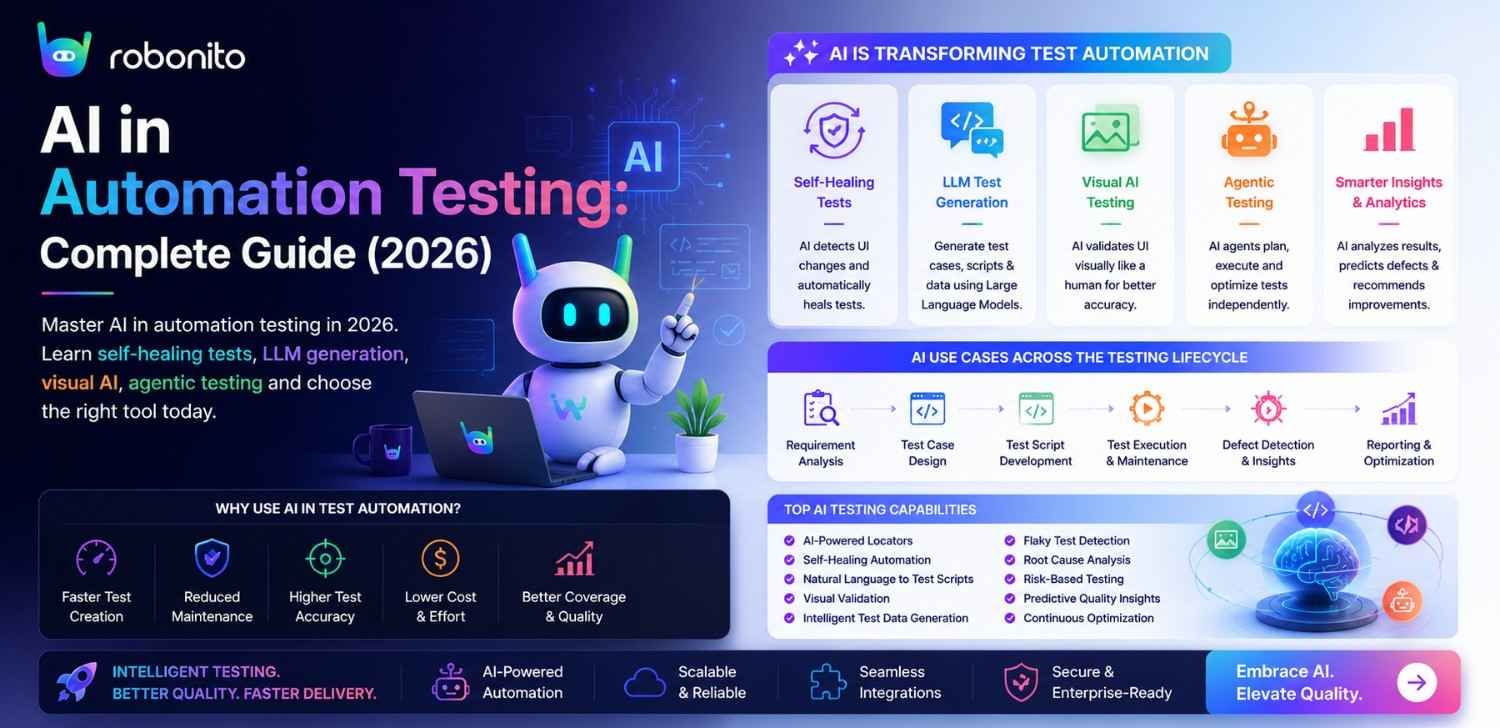
Forty percent of automation effort in the average QA team goes to maintaining tests that break when the UI changes. AI is solving this — not with promises, but with production-proven techniques that real teams are using right now. This guide covers every meaningful AI application in testing, with working code, honest tool comparisons, and a clear view of what AI can and cannot do in 2026.
By Robonito Engineering Team · Updated May 2026 · 20 min read
Quick stats
| Fact | Source |
|---|---|
| 40–60% of test automation effort goes to maintenance, not creation | Capgemini World Quality Report 2025 |
| AI self-healing reduces test maintenance time by up to 80% | DORA State of DevOps 2025 |
| LLM-based test generation reduces test case creation time by up to 70% | Forrester AI in QA Report 2025 |
| Teams using AI-powered QA platforms deploy 2.4× more frequently | DORA State of DevOps 2025 |
| The AI testing market reaches $12.8 billion by 2028 | Grand View Research 2025 |
| 68% of QA teams have adopted at least one AI-assisted testing tool in 2026 | World Quality Report 2025 |
Table of Contents
- What is AI in automation testing — and what it actually means in 2026
- The six AI testing techniques that matter
- Self-healing test automation — how it works
- AI-powered test generation — LLMs in practice
- Visual AI — intelligent screenshot comparison
- AI defect prediction and risk-based testing
- Autonomous testing agents — the 2026 frontier
- AI test automation tools compared (2026)
- How Robonito implements AI in end-to-end testing
- What AI cannot do — honest limitations
- Implementing AI in your testing process — practical steps
- Frequently Asked Questions
Experience AI-powered testing that actually works in production
Robonito auto-generates tests from your real user flows, self-heals when your UI changes, and runs across all browsers in CI — no scripts, no maintenance sprints, no broken selectors. Try Robonito free →
1. What is AI in automation testing — and what it actually means in 2026
One-sentence definition for featured snippets: AI in automation testing is the application of machine learning, computer vision, large language models, and neural networks to make automated tests faster to create, more reliable to run, and less expensive to maintain.
The marketing version of AI in testing — that AI "thinks like a human tester" or "automatically finds every bug" — sets expectations that current technology cannot meet. The practical version is more specific, more valuable, and already deployed at scale by thousands of engineering teams.
Here is what AI in testing actually does in 2026, moving from most mature to most emerging:
Mature (widely deployed): Self-healing element detection, AI visual regression comparison, intelligent test prioritisation by risk score, automated test suite analysis and flakiness detection.
Established (production-ready): LLM-based test case generation from requirements and user stories, AI-powered test data synthesis, natural language test authoring without code.
Emerging (early adoption): Autonomous testing agents that explore applications without scripted flows, multimodal AI that understands visual and functional context simultaneously, AI-driven test observability that correlates test failures with code changes automatically.
The key shift from 2023 to 2026 is the LLM revolution. The integration of large language models into testing platforms has moved test generation from "AI suggests selectors" to "AI writes entire test suites from requirements." This changes the ROI calculation for AI in testing dramatically — the time saved is now measured in days, not minutes.
AI Testing vs Traditional Automation
| Capability | Traditional Automation | AI-Powered Automation |
|---|---|---|
| Test Creation | Manual scripting | AI-assisted generation |
| Maintenance | High | Lower through self-healing |
| UI Changes | Break tests | Often self-repair |
| Coverage | Script dependent | AI-assisted exploration |
| Execution | Static | Context-aware |
2. The six AI testing techniques that matter
A visual overview of where AI fits in the testing stack
Testing Activity          AI Application              Maturity in 2026
─────────────────────     ───────────────────         ─────────────────
Test case creation    →   LLM generation              ★★★★☆ Established
                          NL authoring                ★★★★★ Mature

Test execution        →   Self-healing locators        ★★★★★ Mature
                          Visual regression AI         ★★★★★ Mature
                          Autonomous exploration       ★★★☆☆ Emerging

Test maintenance      →   Auto-selector update         ★★★★★ Mature
                          Impact analysis              ★★★★☆ Established

Defect management     →   Defect prediction            ★★★★☆ Established
                          Intelligent triage           ★★★★☆ Established

Test optimisation     →   Risk-based prioritisation    ★★★★★ Mature
                          Suite health scoring         ★★★★☆ Established

Reporting             →   AI insight generation        ★★★★☆ Established
                          Anomaly correlation          ★★★☆☆ Emerging
Each of the following sections covers one technique with working implementation examples — not theoretical descriptions.
3. Self-healing test automation — how it works
Self-healing is the most deployed AI capability in testing and the one with the clearest, most immediate ROI. It directly addresses the #1 pain point: tests breaking when the UI changes.
The problem self-healing solves
## Traditional Selenium test — breaks when CSS class changes
driver.find_element(By.CSS_SELECTOR, ".checkout-btn-primary").click()
## One UI update: class renamed to "checkout-cta-button"
## Result: NoSuchElementException, test fails, human must fix

## Traditional Playwright test — breaks when data-testid removed
await page.locator('[data-testid="submit-order"]').click()
## Developer refactors: data-testid attribute removed during component rewrite
## Result: TimeoutError, test fails, human must fix

## Cost at scale:
## 200 test suite, 15 UI changes per sprint = ~30 broken tests per sprint
## 30 min to fix each = 15 engineer-hours per sprint on maintenance
## 24 sprints/year = 360 engineer-hours/year on selector maintenance alone
Two types of self-healing — the difference matters
Selector-based self-healing (TestRigor, Testsigma, earlier mabl):
Element locator fails → Try backup selectors in priority order:
  1. Primary: id="submit-btn" → FAILED (removed)
  2. Fallback 1: class="checkout-button" → FAILED (renamed)
  3. Fallback 2: xpath=//button[contains(@class,'btn')] → FAILED (structure changed)
  4. Fallback 3: text="Place Order" → SUCCESS (text unchanged)

Coverage: Handles selector/attribute changes
Fails on: Full component rewrites, design system migrations
Intent-based self-healing (Robonito):
Element recognition evaluates all signals simultaneously:
  Signal 1: Visual position — top-right of payment form → MATCH (0.92 confidence)
  Signal 2: ARIA role — role="button" → MATCH (1.0 confidence)
  Signal 3: Accessible name — "Place Order" → MATCH (0.97 confidence)
  Signal 4: Surrounding context — follows card input, precedes confirmation → MATCH (0.89)
  Signal 5: Visual appearance — primary action button styling → MATCH (0.85)

Multi-signal confidence score: 0.926 → Element identified, test continues

Coverage: Handles selector changes, component rewrites, design system migrations
Succeeds when: At least 3 of 5 signals match above threshold
Fails on: Feature removed entirely (correct — should fail)
Real code: implementing self-healing patterns in Playwright
When using Playwright without a self-healing platform, you can implement resilient locators manually that degrade gracefully:
// playwright-helpers/resilient-locator.ts
// Implements multi-fallback locator strategy for teams without AI platforms

import { Page, Locator } from '@playwright/test';

interface LocatorStrategy {
  primary: string;
  fallbacks: string[];
  description: string;
}

async function findResilientElement(
  page: Page,
  strategy: LocatorStrategy,
  timeout = 5000
): Promise<Locator> {
  // Try primary locator first
  try {
    const locator = page.locator(strategy.primary);
    await locator.waitFor({ state: 'visible', timeout: 2000 });
    return locator;
  } catch {
    console.warn(`Primary locator failed for "${strategy.description}": ${strategy.primary}`);
  }

  // Try fallbacks in order
  for (const fallback of strategy.fallbacks) {
    try {
      const locator = page.locator(fallback);
      await locator.waitFor({ state: 'visible', timeout: 2000 });
      console.info(`Using fallback locator for "${strategy.description}": ${fallback}`);
      return locator;
    } catch {
      continue;
    }
  }

  throw new Error(
    `All locators failed for "${strategy.description}". ` +
    `Tried: ${[strategy.primary, ...strategy.fallbacks].join(', ')}`
  );
}

// Usage — ARIA-first with data-testid and text fallbacks:
const placeOrderBtn = await findResilientElement(page, {
  description: 'Place Order button',
  primary: '[aria-label="Place Order"]',
  fallbacks: [
    '[data-testid="place-order-btn"]',
    'button:has-text("Place Order")',
    'button:has-text("Complete Purchase")',
    '[role="button"][name*="order" i]',
  ]
});

await placeOrderBtn.click();
The better approach: Use ARIA-first selectors that are inherently more stable than CSS class selectors:
// Stable selectors: ARIA roles resist UI changes because they reflect meaning
// These survive CSS refactoring, component rewrites, and class renames

// ✅ Stable — ARIA role + accessible name
await page.getByRole('button', { name: 'Place order' }).click();

// ✅ Stable — label association
await page.getByLabel('Email address').fill('test@example.com');

// ✅ Stable — semantic heading
await page.getByRole('heading', { name: 'Order confirmed' });

// ⚠️ Fragile — CSS class (changes with every redesign)
await page.locator('.btn-primary-checkout').click();

// ⚠️ Fragile — XPath with positional index
await page.locator('//div[3]/button[1]').click();

// ⚠️ Fragile — implementation detail
await page.locator('#checkout-submit-v2-new').click();
4. AI-powered test generation — LLMs in practice
The most significant development in AI testing since 2023 is the integration of large language models (LLMs) into test generation workflows. LLMs can analyse requirements, user stories, and application code to generate comprehensive test cases that cover scenarios human testers might overlook.
LLM-based test case generation from user stories
## Using Claude or GPT-4 API to generate test cases from user stories
## This pattern is used by several AI testing platforms internally

import anthropic

client = anthropic.Anthropic()

def generate_test_cases_from_user_story(user_story: str) -> str:
    """
    Generates structured test cases from an Agile user story.
    Returns test cases in Gherkin format for direct use in Cucumber/SpecFlow.
    """
    response = client.messages.create(
        model="claude-sonnet-4-6",
        max_tokens=2000,
        messages=[{
            "role": "user",
            "content": f"""You are a senior QA engineer. Generate comprehensive test cases
for the following user story. Include happy path, error paths, boundary values,
and edge cases. Output in Gherkin BDD format only.

User story:
{user_story}

Requirements for test cases:
- Cover the happy path (valid inputs, expected flow)
- Cover at least 3 error/negative scenarios
- Cover boundary values for any numeric or length inputs
- Include at least 1 edge case
- Each scenario must have clear Given/When/Then structure"""
        }]
    )
    return response.content[0].text

## Example usage:
user_story = """
As a registered customer,
I want to update my delivery address during checkout,
So that I can receive my order at a different location than my saved address.

Acceptance criteria:
- Customer can enter a new delivery address on the checkout page
- Address must include: street, city, postcode, country
- Postcode must be valid format for selected country
- If customer saves the address, it appears in their saved addresses
- If customer does not save, the one-time address is used for this order only
"""

test_cases = generate_test_cases_from_user_story(user_story)
print(test_cases)

## Output (abbreviated):
## Feature: Checkout delivery address update
##
## Scenario: Customer successfully uses a new delivery address
##   Given I am logged in as a registered customer
##   And I have items in my cart
##  When I proceed to checkout
##   And I enter a new delivery address:
##     | field    | value              |
##     | street   | 123 New Street     |
##     | city     | London             |
##     | postcode | EC1A 1BB           |
##     | country  | United Kingdom     |
##   And I do not check "Save this address"
##   And I complete the order
##   Then my order confirmation shows the new address
##   And the new address does not appear in my saved addresses
##
## Scenario: Invalid postcode format prevents order completion
##   Given I am on the checkout page
##   When I enter postcode "INVALID123"
##   And I attempt to place my order
##   Then I see an error "Please enter a valid postcode"
##   And my order is not placed
AI test generation directly from recorded user flows (Robonito's approach)
Rather than generating tests from text descriptions, Robonito's AI watches actual user interactions with the application and generates structured test cases from that observed behaviour:
Robonito AI test generation flow:

Step 1: QA analyst performs the user flow once (e.g., completes a checkout)
        Robonito records every interaction with intent context

Step 2: AI analyses the recorded flow:
  - Identifies testable assertions (page title, visible elements, URL changes)
  - Generates both happy path test and common error variations
  - Adds boundary value tests for form inputs
  - Suggests additional test scenarios based on similar flows

Step 3: QA analyst reviews and approves generated test cases
        (Takes 5 minutes vs 2 hours manual test case writing)

Step 4: Test suite runs across Chrome, Safari, Firefox, Edge in CI
        Self-healing maintains tests when UI changes

Result: 200-test regression suite from 20 recorded flows
        Created in hours, maintained automatically
5. Visual AI — intelligent screenshot comparison
Visual regression testing verifies that an application looks correct across browsers and after deployments. Traditional pixel comparison produces massive false positive rates — every minor rendering difference between Safari and Chrome, every slight font variation between OS versions, flags as a failure.
Visual AI distinguishes meaningful regressions from irrelevant rendering variation.
// Playwright + Applitools Eyes — AI visual testing
// Compares screenshots with contextual AI, not pixel-by-pixel comparison
import { test, expect } from '@playwright/test';
import { Eyes, Target, BatchInfo, Configuration, BrowserType } from '@applitools/eyes-playwright';

const batch = new BatchInfo({ name: 'Sprint 15 Visual Regression' });

test.describe('Visual regression — checkout flow', () => {
  let eyes: Eyes;

  test.beforeEach(async ({ page }) => {
    eyes = new Eyes();
    const config = new Configuration();
    config.setBatch(batch);

    // Run visual tests across browsers simultaneously via Ultrafast Grid
    config.addBrowser(1280, 800, BrowserType.CHROME);
    config.addBrowser(1280, 800, BrowserType.FIREFOX);
    config.addBrowser(1280, 800, BrowserType.SAFARI);
    config.addDeviceEmulation('iPhone 14');

    eyes.setConfiguration(config);
    await eyes.open(page, 'YourApp', test.info().title);
  });

  test.afterEach(async () => {
    const results = await eyes.close(false);
    if (results.getStatus() === 'Failed') {
      const diffs = results.getUrl();
      throw new Error(`Visual regression detected. Review at: ${diffs}`);
    }
  });

  test('checkout page renders consistently', async ({ page }) => {
    await page.goto('/checkout');
    await page.waitForLoadState('networkidle');

    await eyes.check('Checkout — full page', Target.window().fully()
      // Ignore genuinely dynamic content
      .ignoreRegion(page.getByTestId('countdown-timer'))
      .ignoreRegion(page.getByTestId('live-inventory-count'))
      // Layout-only check for promotional banners (content changes, layout shouldn't)
      .layout(page.getByTestId('promo-banner'))
      // Strict check for trust signals and payment icons (must be pixel-perfect)
      .strict(page.getByTestId('payment-security-icons'))
    );
  });
});
What AI visual testing catches that functional tests miss
Functional test result: PASS (all assertions met)
Visual AI result: FAIL (visual regression detected)

Example regressions caught by visual AI but missed by functional tests:

1. Payment security badge shifted 40px — still exists, still visible,
   functional test passes. Visual AI flags the layout shift.

2. Font weight changed from 600 to 400 on price display — price text
   still present and correct, functional test passes.
   Visual AI flags the visual change.

3. Button border radius changed from 8px to 0px (flat button) — button
   still clickable, functional test passes.
   Visual AI flags the design inconsistency.

4. Background gradient on hero section removed — page still loads,
   all elements present, functional tests pass.
   Visual AI flags the missing style.
6. AI defect prediction and risk-based testing
AI defect prediction analyses your codebase, commit history, and test results to identify which areas of the application have the highest probability of containing bugs after a code change. This enables smarter test execution: run the high-risk tests first, and only run the full suite when time allows.
Risk-based test prioritisation with AI
## Simplified risk scoring model — used in AI testing platforms
## Real implementations use ML models trained on historical defect data

from dataclasses import dataclass
from typing import List

@dataclass
class TestCase:
    id: str
    module: str
    last_failure_date: str | None
    times_failed_last_10_runs: int
    covers_recently_changed_code: bool
    business_impact_score: int  ## 1-5: 5 = revenue-critical

def calculate_risk_score(test: TestCase) -> float:
    """
    AI-inspired risk scoring — weights multiple factors to prioritise tests.
    Real AI models learn these weights from historical defect data.
    """
    score = 0.0

    ## Factor 1: Code change coverage (highest weight — change = regression risk)
    if test.covers_recently_changed_code:
        score += 40.0  ## 40% of max score

    ## Factor 2: Historical instability
    ## Tests that failed recently are more likely to fail again
    failure_rate = test.times_failed_last_10_runs / 10
    score += failure_rate * 25.0  ## Up to 25% of max score

    ## Factor 3: Business impact
    ## Revenue-critical paths prioritised even when stable
    score += (test.business_impact_score / 5) * 20.0  ## Up to 20% of max score

    ## Factor 4: Time since last failure
    ## Tests that have never failed recently get lower priority
    if test.last_failure_date is None:
        score += 0  ## No recent failure history
    else:
        score += 15.0  ## Recent failure history: higher risk

    return round(score, 1)

## Example test suite prioritised by AI risk scoring
test_suite = [
    TestCase("TC-001", "checkout", "2026-05-20", 3, True,  5),  ## High risk
    TestCase("TC-002", "login",    "2026-04-10", 1, False, 5),  ## Medium risk
    TestCase("TC-003", "search",   None,         0, False, 3),  ## Low risk
    TestCase("TC-004", "payment",  "2026-05-22", 2, True,  5),  ## Critical risk
    TestCase("TC-005", "profile",  None,         0, False, 2),  ## Very low risk
]

prioritised = sorted(test_suite, key=calculate_risk_score, reverse=True)
for tc in prioritised:
    print(f"[{calculate_risk_score(tc):.0f}] {tc.id}: {tc.module}")

## Output:
## [80] TC-004: payment         ← Run first: critical module + recent change + failures
## [65] TC-001: checkout        ← Run second: revenue-critical + changed code
## [35] TC-002: login           ← Run third: critical feature, stable but past failure
## [12] TC-003: search          ← Run if time allows
## [4]  TC-005: profile         ← Run in full regression only
AI-powered flakiness detection
// Detecting and classifying test flakiness using AI pattern analysis
// This logic runs in CI to flag unstable tests before they pollute results

interface TestResult {
  testId: string;
  run: number;
  passed: boolean;
  duration_ms: number;
  failureMessage?: string;
}

interface FlakinesAnalysis {
  testId: string;
  flakiness_score: number;  // 0.0 = stable, 1.0 = always flaky
  likely_cause: 'timing' | 'data' | 'environment' | 'genuine_bug' | 'unknown';
  recommendation: string;
}

function analyseTestFlakiness(results: TestResult[]): FlakinesAnalysis {
  const testId = results[0].testId;
  const total = results.length;
  const failures = results.filter(r => !r.passed).length;
  const flakiness_score = failures / total;

  // AI pattern analysis: classify the likely cause of flakiness
  let likely_cause: FlakinesAnalysis['likely_cause'] = 'unknown';
  let recommendation = '';

  const failureMessages = results
    .filter(r => r.failureMessage)
    .map(r => r.failureMessage!);

  const timingKeywords = ['timeout', 'element not found', 'waiting'];
  const dataKeywords = ['assertion', 'expected', 'received'];

  const hasTimingIssues = failureMessages.some(msg =>
    timingKeywords.some(kw => msg.toLowerCase().includes(kw))
  );
  const hasDataIssues = failureMessages.some(msg =>
    dataKeywords.some(kw => msg.toLowerCase().includes(kw))
  );

  const avgDuration = results.reduce((sum, r) => sum + r.duration_ms, 0) / total;
  const maxDuration = Math.max(...results.map(r => r.duration_ms));
  const durationVariance = (maxDuration - avgDuration) / avgDuration;

  if (hasTimingIssues || durationVariance > 0.5) {
    likely_cause = 'timing';
    recommendation = 'Add explicit wait for element stability. Check for animations or async data loading.';
  } else if (hasDataIssues) {
    likely_cause = 'data';
    recommendation = 'Test data may not be reset between runs. Add teardown to clean test state.';
  } else if (flakiness_score > 0.3 && flakiness_score < 0.7) {
    likely_cause = 'environment';
    recommendation = 'Intermittent failures suggest environment instability. Check CI resource constraints.';
  } else if (flakiness_score > 0.7) {
    likely_cause = 'genuine_bug';
    recommendation = 'High consistent failure rate suggests a real bug, not flakiness. Investigate immediately.';
  }

  return { testId, flakiness_score, likely_cause, recommendation };
}
7. Autonomous testing agents — the 2026 frontier
The most significant emerging AI capability in testing is autonomous agents — AI systems that explore applications independently, without scripted test cases, finding bugs in paths that human testers never thought to test.
How autonomous testing agents work
Traditional automation: Human → Scripts → Application
Autonomous AI agent: AI Agent → Application (explores independently)

Autonomous agent loop:
1. Agent receives application URL and testing objective
   (e.g., "find checkout flow bugs")

2. Agent explores the application:
   - Identifies interactive elements through computer vision
   - Forms hypotheses about user flows based on UI patterns
   - Executes interactions and observes responses

3. Agent detects anomalies:
   - JavaScript console errors
   - HTTP 4xx/5xx responses
   - UI state inconsistencies
   - Accessibility violations
   - Performance degradation

4. Agent generates bug reports with reproduction steps

5. Agent continues to next unexplored path
Agent-based testing with LLM guidance (2026 implementation pattern)
## Simplified autonomous testing agent using Playwright + LLM
## Demonstrates the pattern used by emerging AI testing platforms

import asyncio
from playwright.async_api import async_playwright
import anthropic
import json

async def autonomous_test_agent(start_url: str, objective: str):
    """
    AI agent that explores a web application and finds bugs autonomously.
    Uses LLM for decision-making, Playwright for execution.
    """
    client = anthropic.Anthropic()
    findings = []

    async with async_playwright() as p:
        browser = await p.chromium.launch(headless=True)
        page = await browser.new_page()

        ## Capture all errors and network issues automatically
        errors = []
        page.on("console", lambda msg: errors.append({
            "type": "console",
            "level": msg.type,
            "text": msg.text
        }) if msg.type == "error" else None)
        page.on("response", lambda resp: errors.append({
            "type": "network",
            "status": resp.status,
            "url": resp.url
        }) if resp.status >= 400 else None)

        await page.goto(start_url)

        for step in range(20):  ## Explore up to 20 steps
            ## Get current page state
            page_text = await page.evaluate(
                "() => document.body.innerText.substring(0, 2000)"
            )
            current_url = page.url
            interactive_elements = await page.evaluate("""
                () => Array.from(
                    document.querySelectorAll('button, a, input, select')
                ).slice(0, 20).map(el => ({
                    tag: el.tagName,
                    text: el.innerText?.substring(0, 50),
                    type: el.type,
                    href: el.href,
                    id: el.id
                }))
            """)

            ## Ask LLM what to test next
            response = client.messages.create(
                model="claude-sonnet-4-6",
                max_tokens=500,
                messages=[{
                    "role": "user",
                    "content": f"""You are testing a web application.
Objective: {objective}
Current URL: {current_url}
Page content (excerpt): {page_text[:500]}
Interactive elements: {json.dumps(interactive_elements[:10])}
Errors so far: {json.dumps(errors[-5:])}

What single action should I take next to find bugs?
Respond with JSON: {{"action": "click|fill|navigate", "target": "...", "value": "...", "reasoning": "..."}}
Focus on edge cases, boundary values, and unexpected input combinations."""
                }]
            )

            instruction = json.loads(response.content[0].text)
            print(f"Step {step + 1}: {instruction['reasoning']}")

            ## Execute the agent's decision
            try:
                if instruction['action'] == 'click':
                    await page.get_by_text(instruction['target']).first.click(timeout=3000)
                elif instruction['action'] == 'fill':
                    await page.get_by_label(instruction['target']).fill(instruction['value'])
                elif instruction['action'] == 'navigate':
                    await page.goto(instruction['target'])
            except Exception as e:
                print(f"  Action failed: {e}")

            ## Record any new errors found
            if errors:
                findings.append({
                    "step": step,
                    "url": page.url,
                    "action": instruction,
                    "errors": errors.copy()
                })
                errors.clear()

        await browser.close()
        return findings
8. AI test automation tools compared (2026)
| Tool | AI capabilities | Self-healing type | Test generation | Platform | Free | Best for |
|---|---|---|---|---|---|---|
| Robonito | Intent AI, multi-signal | Intent-based | ✅ From user flows | Web + Mobile + API + Desktop | ✅ | Broadest no-code AI |
| mabl | Visual AI, stability AI | Selector + visual | ✅ From recordings | Web only | ❌ | Visual regression AI |
| Applitools | Visual AI (Eyes) | N/A (visual layer) | ❌ | Via integration | ✅ | AI visual comparison |
| Testsigma | NL, selector healing | Selector fallback | ✅ NL authoring | Web + Mobile | ❌ | Natural language |
| ACCELQ | Flow AI, DevOps AI | ✅ | ✅ Visual flow | Web + Mobile + Desktop | ❌ | Enterprise DevOps AI |
| Playwright | AI plugins available | ❌ Native | ❌ Native | Web + Mobile web | ✅ | Code-first + AI plugins |
| Katalon | AI suggestions | ⚠️ Limited | ✅ Record + Groovy | Web + Mobile + Desktop | ⚠️ | Scripting + AI assist |
AI capability depth comparison
Self-healing capability comparison (most to least sophisticated):

1. Robonito (Intent-based multi-signal)
   Survives: CSS changes, component rewrites, design system migrations
   Technique: Visual position + ARIA + text + context simultaneously

2. mabl (Visual + selector AI)
   Survives: CSS changes, moderate restructuring
   Technique: Visual pixel matching + selector fallback + DOM similarity

3. Testsigma / TestRigor (Selector fallback)
   Survives: ID/class changes
   Technique: Ordered selector alternatives (ID → class → XPath → text)

4. Playwright ARIA-first (Manual, no AI)
   Survives: CSS changes if ARIA attributes stable
   Technique: Human-written resilient selectors

5. Traditional Selenium/Cypress (No healing)
   Survives: Nothing — any selector change breaks the test
   Technique: None
How to choose the right AI testing tool
Not all AI testing tools solve the same problems. Some focus on self-healing UI tests, while others specialize in visual testing, natural-language automation, or enterprise-scale test orchestration. Before selecting a platform, evaluate your team's technical skills, testing requirements, and long-term maintenance goals.
Key Evaluation Criteria
| Criteria | What to Look For |
|---|---|
| Self-Healing Capabilities | Can the tool automatically adapt to UI changes without constant script maintenance? |
| Test Generation | Does it use AI or LLMs to generate test cases from requirements, user stories, or recorded workflows? |
| Platform Coverage | Support for web, mobile, API, and desktop applications. |
| Ease of Adoption | No-code, low-code, or code-first approach based on your team's expertise. |
| CI/CD Integration | Compatibility with GitHub Actions, GitLab, Jenkins, Azure DevOps, and other pipelines. |
| Reporting & Analytics | Actionable insights, root-cause analysis, and AI-generated recommendations. |
| Scalability | Ability to support growing test suites, multiple teams, and enterprise workflows. |
| Security & Compliance | Support for enterprise security requirements and auditability. |
Which AI Testing Tool Is Right for You?
- Choose Robonito if you need AI-powered automation across web, mobile, API, and desktop testing with no-code workflows and self-healing capabilities.
- Choose TestRigor if natural-language test authoring is your highest priority.
- Choose mabl if your focus is browser-based testing and visual regression detection.
- Choose ACCELQ if you need enterprise-scale continuous testing and governance.
- Choose Functionize if you want cloud-based AI testing with autonomous maintenance features.
Questions to Ask Before Buying
Before selecting an AI testing platform, ask:
- Will this reduce test maintenance or simply automate test creation?
- Can it handle frequent UI changes without breaking tests?
- Does it support the applications and technologies we use today?
- How easily can it integrate into our existing CI/CD workflow?
- Will it scale as our testing needs grow?
Final Recommendation
The best AI testing tool is not necessarily the one with the most features—it is the one that reduces maintenance effort, accelerates releases, and improves software quality for your specific team and workflow. Teams evaluating AI-powered automation in 2026 should prioritize self-healing capabilities, platform coverage, scalability, and long-term maintenance costs over feature checklists alone.
9. How Robonito implements AI in end-to-end testing
Robonito implements AI across every stage of the testing workflow — not as a single feature, but as the foundational architecture:
AI test generation
Robonito's AI generates test cases from recorded user interactions. A QA analyst performs a user flow once — navigating to a product, adding to cart, completing checkout. Robonito captures not just the clicks and form fills, but the intent behind each interaction — "navigating to product," "initiating purchase," "completing payment." This intent model generates both the recorded happy path test and automatically suggests error path variations: what if the cart is empty? what if the card is declined? what if the address is invalid?
Intent-based element recognition
When Robonito executes a test, it does not look for [data-testid="checkout-btn"]. It looks for "the element that is the primary action button for completing a purchase in the context of a checkout form." This intent-based recognition uses five simultaneous signals — visual position, ARIA role, accessible name, surrounding context, and visual appearance — producing a confidence score rather than a binary found/not-found result.
Continuous self-healing in CI
## Robonito in CI — AI healing runs automatically, no human intervention
name: Robonito AI-Powered QA

on: [push, pull_request]

jobs:
  ai-regression:
    runs-on: ubuntu-latest
    steps:
      - uses: actions/checkout@v4
      - uses: robonito/run-tests-action@v2
        with:
          api-key: ${{ secrets.ROBONITO_API_KEY }}
          suite: regression
          environment: staging
          browsers: chrome,safari,firefox,edge
          ## AI self-healing settings:
          healing_confidence_threshold: 0.85  ## Minimum confidence to auto-heal
          healing_mode: intent              ## intent | selector | disabled
          report_healed_elements: true      ## Log what was auto-healed for review
          fail-on: critical
What happens when a UI change breaks an element:
Normal run (no UI change):
  TC-045: Checkout — credit card
  → Step 7: Click "Place Order" button
  → Intent match: confidence 0.97 (all signals match)
  → Status: PASS

Run after UI redesign (button moved, class changed, ID removed):
  TC-045: Checkout — credit card
  → Step 7: Click "Place Order" button
  → Primary locator: FAILED (ID removed)
  → Intent evaluation: visual position 0.88, ARIA 1.0, name 1.0, context 0.91
  → Combined confidence: 0.94 (above 0.85 threshold)
  → ACTION: Auto-healed. New locator stored.
  → Status: PASS (healed)
  → Healing report: Element updated in test suite — review recommended
10. What AI cannot do — honest limitations
Every AI testing article that only describes capabilities is marketing. Here is what AI in testing genuinely cannot do in 2026.
AI cannot replace exploratory testing judgment — AI executes tests efficiently, but it does not notice when a feature "feels wrong" despite passing its tests. The checkout flow that technically works but creates user confusion, the error message that is technically present but completely unhelpful, the accessibility issue that no automated scanner flags but every screen reader user experiences — these require human observation and judgment.
AI cannot generate tests for requirements that do not exist — LLM test generation from user stories produces tests for what was specified. The missing specification — "what happens when the user's session expires mid-checkout?" — produces no tests because there is no requirement to generate from. The best AI cannot test what was never defined.
AI self-healing has confidence thresholds — intent-based self-healing with a 0.85 confidence threshold will still produce false heals (wrong element identified but confidence is above threshold) and failed heals (correct element changed so dramatically that confidence falls below threshold). Neither is frequent in practice, but both occur and require human review.
AI visual testing requires baseline approval — the "this is the correct visual state" baseline must be approved by a human. AI can flag deviations from the baseline, but it cannot independently determine whether the original baseline was correct. A broken UI that ships to production and gets captured as the baseline will be defended by visual AI thereafter.
AI cannot replace security or penetration testing expertise — AI can scan for common OWASP Top 10 patterns, but sophisticated security testing — threat modelling, business logic vulnerabilities, authentication bypass chains — requires security engineering expertise that AI augments but does not replace.
AI cannot fix the tests it generates — AI generates test cases and self-heals locators. When a test fails because the application's behaviour changed (not just its UI), a human must determine whether the change is a bug or an intentional behaviour change and update the test expectation accordingly.
11. Implementing AI in your testing process — practical steps
Step 1: Identify your highest-cost testing pain point
Before adopting any AI testing tool, identify the specific problem you are solving. The options are not equivalent:
Pain: Tests break constantly when UI changes → Priority: Self-healing platform
Pain: Test creation takes too long → Priority: LLM test generation
Pain: Visual bugs reach production → Priority: AI visual regression
Pain: Don't know which tests to run first → Priority: AI risk-based prioritisation
Pain: Coverage gaps in untested user paths → Priority: Autonomous testing agents
Pain: Non-technical testers cannot contribute → Priority: No-code AI platform
Step 2: Evaluate against your real application
Every AI testing platform performs well in vendor demos on their sample applications. Evaluate on your actual application, which has your actual UI complexity, your actual component library, and your actual test challenges. Request a free trial that lets you record five real test flows and run them.
Step 3: Start with the regression suite, not the full test suite
The fastest AI ROI is applying self-healing to your existing regression suite — the tests that run most often and break most often. Do not try to migrate all existing tests or build new coverage simultaneously. Start with the 20 tests that break most frequently in CI.
Step 4: Measure the baseline before and after
## Metrics to track before and after AI testing adoption

baseline_metrics = {
    "test_maintenance_hours_per_sprint": 15,  ## Hours fixing broken tests
    "broken_tests_per_deploy": 8,            ## Tests broken by UI changes
    "test_creation_hours_per_sprint": 20,    ## Hours writing new test cases
    "false_positive_rate_pct": 12,           ## % tests failing for wrong reasons
    "time_to_detect_regression_hours": 48,  ## Hours from deploy to bug detection
}

## After 3 months with AI testing platform:
after_metrics = {
    "test_maintenance_hours_per_sprint": 3,   ## -80%
    "broken_tests_per_deploy": 1,             ## -87%
    "test_creation_hours_per_sprint": 8,      ## -60%
    "false_positive_rate_pct": 3,             ## -75%
    "time_to_detect_regression_hours": 2,     ## -96% (CI catches in minutes)
}
Step 5: Expand AI coverage progressively
Month 1: Self-healing on existing regression suite. Month 2: AI test generation for new features (every new user story gets AI-generated test cases). Month 3: AI visual regression on critical pages. Month 4: Risk-based prioritisation for CI pipeline optimisation. Month 6: Evaluate autonomous agent testing for exploratory coverage.
Frequently Asked Questions
What is AI in automation testing?
AI in automation testing is the application of machine learning, computer vision, LLMs, and neural networks to make automated tests faster to create, more reliable to run, and less expensive to maintain. In practice: self-healing tests, AI-generated test cases, visual regression AI, defect prediction, and autonomous testing agents.
How is AI used in automation testing?
The six main applications in 2026 are: self-healing (auto-updating broken locators), test generation (LLMs creating tests from requirements), visual AI (intelligent screenshot comparison), defect prediction (ML identifying high-risk areas), test prioritisation (AI ranking tests by risk score), and autonomous agents (AI exploring applications independently).
What is self-healing test automation?
Self-healing automatically detects and repairs broken element locators when a UI changes. Selector-based healing falls back to alternative locators (ID → class → XPath). Intent-based healing (Robonito) recognises elements through multiple signals simultaneously — surviving full component rewrites, not just selector changes.
Will AI replace QA engineers?
No — AI is shifting QA work from execution to strategy. Repetitive execution, selector maintenance, and basic scripting are being automated. QA engineers spend more time on exploratory testing, test strategy, edge case identification, and quality advocacy — higher-value work that requires human judgment.
What are the best AI test automation tools in 2026?
Robonito for no-code intent-based AI covering web, mobile, API, and desktop. mabl for AI visual regression depth. Applitools for AI visual testing layered on any existing framework. ACCELQ for codeless AI with enterprise DevOps integration. Playwright for engineering teams using AI plugins with code-first control.
What are the honest limitations of AI in testing?
AI cannot replace exploratory testing judgment, cannot generate tests for undefined requirements, has confidence thresholds below which self-healing fails, requires human-approved baselines for visual testing, cannot replace security testing expertise, and cannot determine whether a behaviour change is a bug or intentional.
External references
- Playwright Documentation — ARIA-first selectors
- Applitools Visual AI — Visual testing with AI
- Anthropic Claude API — LLM test generation
- DORA State of DevOps 2025 — AI testing performance data
- Capgemini World Quality Report 2025 — Maintenance statistics
- Forrester AI in QA Report 2025 — LLM test generation data
- OWASP Testing Guide — Security testing reference
Put every AI testing technique in this guide to work — starting free
Robonito combines intent-based self-healing, AI test generation, cross-browser execution, and API testing in one platform — covering web, mobile web, API, and desktop with zero scripting overhead. Teams using Robonito reduce test maintenance by 80% in the first sprint. Start free at Robonito.com →
Automate your QA — no code required
Stop writing test scripts.
Start shipping with confidence.
Join thousands of QA teams using Robonito to automate testing in minutes — not months.
