01 / 03
Invisible to assertions
A button that overlaps the footer is still clickable, so the test passes and the customer sees a broken page.
Visual Testing
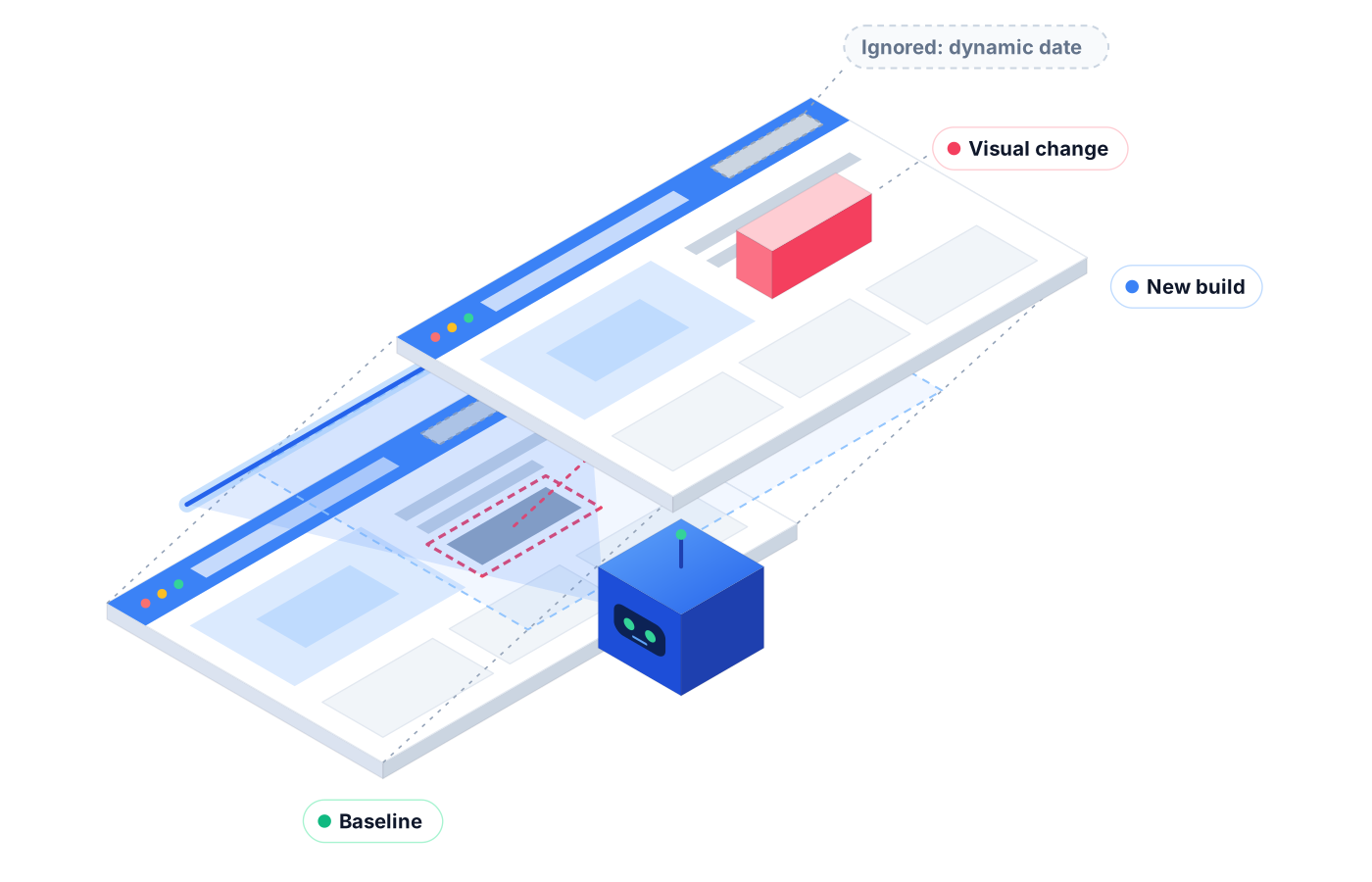
Visual testing catches the bugs that pass every assertion: the overlapping button, the missing icon, the broken layout. Robonito's AI visual verification flags real UI regressions and ignores harmless noise, so your team reviews what matters.
Free forever plan · No code required
Teams that refuse to trade speed for quality ship with Robonito






01The problem
Functional tests check that elements exist and actions work. They don't check that the page looks right.
01 / 03
A button that overlaps the footer is still clickable, so the test passes and the customer sees a broken page.
02 / 03
Simple screenshot comparisons flag every shifted pixel and changing timestamp, and the team learns to ignore them.
03 / 03
Someone clicks through key screens before each release looking for odd spacing, and things slip when they're rushed.
02Capabilities
Robonito's visual verification looks at your UI the way a careful reviewer would, then tells you what changed and whether it matters.
01
The agent checks each screen visually as part of the test, so layout and rendering problems fail the run instead of shipping.
02
Catch overlapping elements, cut-off text, missing images, and broken alignment that a functional check would let through.
03
Harmless differences like minor rendering variation are ignored, so your team isn't buried in false alarms.
04
Add visual checks to the journeys you already test, so one run covers whether the feature works and whether it looks right.
05
Run visual checks across browsers and screen sizes to catch issues that only appear in one environment.
06
Visual failures appear in your reports with the step where they occurred, so a person can confirm whether a change was intended.
03How it works
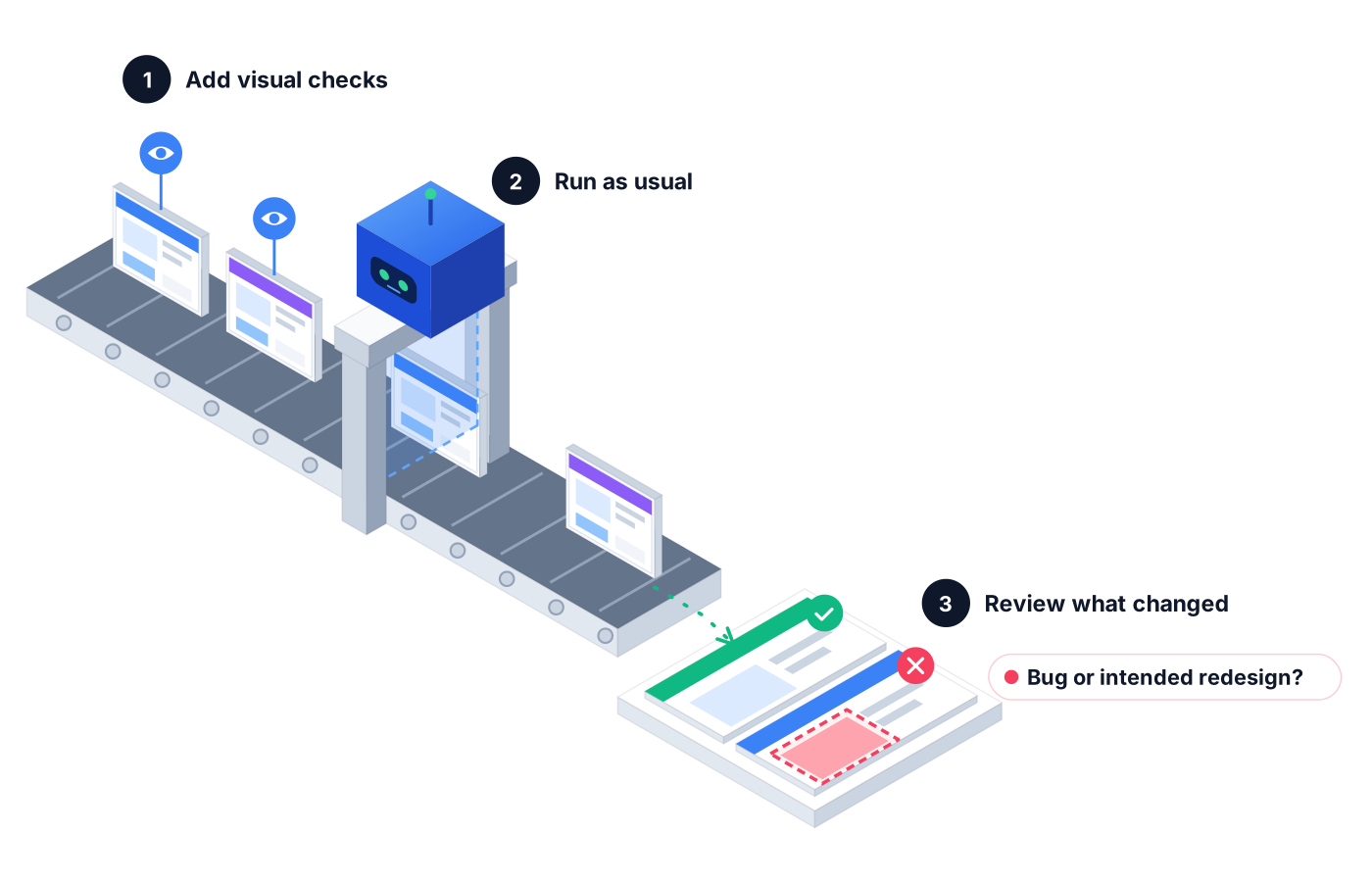
Include visual verification in the journeys where appearance matters most, like checkout, pricing, or dashboards.
Run tests on demand, on a schedule, or from CI/CD. The agent checks how each screen looks alongside how it behaves.
Real regressions are flagged with the step and screen where they appeared. Your team decides whether it's a bug or an intended redesign.
04Use cases
A CSS change pushes a sign-up button under a banner on smaller screens. Every functional test passes; visual verification flags the overlap.
An icon font fails to load on one page. The click still works, but visual testing catches the empty box where the icon should be.
A charting library upgrade renders labels on top of each other. The data is right but the page is unreadable, and the visual check says so.
05Proof in every run
A visual failure is only useful if your team can see it quickly and decide what to do.
See exactly where in the journey the visual issue appeared.
Proof you get: Step-by-step run log with screenshots
The agent describes what looks wrong, so reviewers don't have to hunt for it.
Proof you get: AI summary of the visual change
Visual failures sit next to functional results in the same report.
Proof you get: Execution overview and PDF report
06Ways to start
01
Try Robonito on your own web app with the free-forever plan. No code required, and no time limit.
02
Run a no-obligation proof of concept on your real system. You get clear results and a clear recommendation before you commit.
03
Robonito Professional Services helps with test strategy, migration from existing suites, and rollout across your teams.
Explore Professional Services07FAQ
Visual testing checks that an application's interface looks correct, not just that it works. It catches layout, rendering, and styling problems like overlapping elements or missing images. Robonito uses AI visual verification to flag real UI regressions while ignoring harmless differences, so visual testing adds signal to your release process instead of noise.
AI visual testing judges whether a change is meaningful, while pixel comparison flags any pixel that differs. Pixel diffs often trigger on minor rendering variation, which leads to false alarms. Robonito's AI visual verification focuses on the layout, rendering, and UI regressions a person would notice, and ignores harmless noise.
Visual regression testing checks whether a new release changed how your UI looks in ways you didn't intend. It compares the current appearance with what's expected and flags the differences. Robonito runs these checks as part of your test journeys, so a styling change that breaks a page is caught before it reaches users.
Yes, functional and visual testing answer different questions. Functional tests confirm that actions work and data is correct; visual tests confirm the page looks right. A button can work perfectly while hiding behind a banner. Robonito lets you combine both in the same run, so one result covers behavior and appearance.
Book a demo and our team will show visual verification running on journeys that matter to you, like checkout or sign-up. We'll talk through which screens to cover first and how results fit your release process. You can also start free with web test automation while you explore the rest of the platform.
Platforms & Testing Types
One journey, every major browser, no grid to run
Learn morePlatforms & Testing Types
AI agents test your web app in plain language
Learn morePlatforms & Testing Types
Native, hybrid, and cross-platform Android & iOS
Learn moreAI QA Agents
Full user journeys across web, mobile, API, desktop
Learn moreBook a demo to see AI visual verification on your own app, or start free with web testing today.