You run one command, open Claude Code or VS Code, and type "plan tests for guest checkout". A few minutes later you have a Markdown test plan, a folder of Playwright tests and an agent that offers to fix whichever ones fail.
That's the promise of Playwright Test Agents. It's real, and it's useful. It also raises the question every QA lead asks next: if an AI agent fixes the failing tests, who checks that it fixed the test and not the bug?
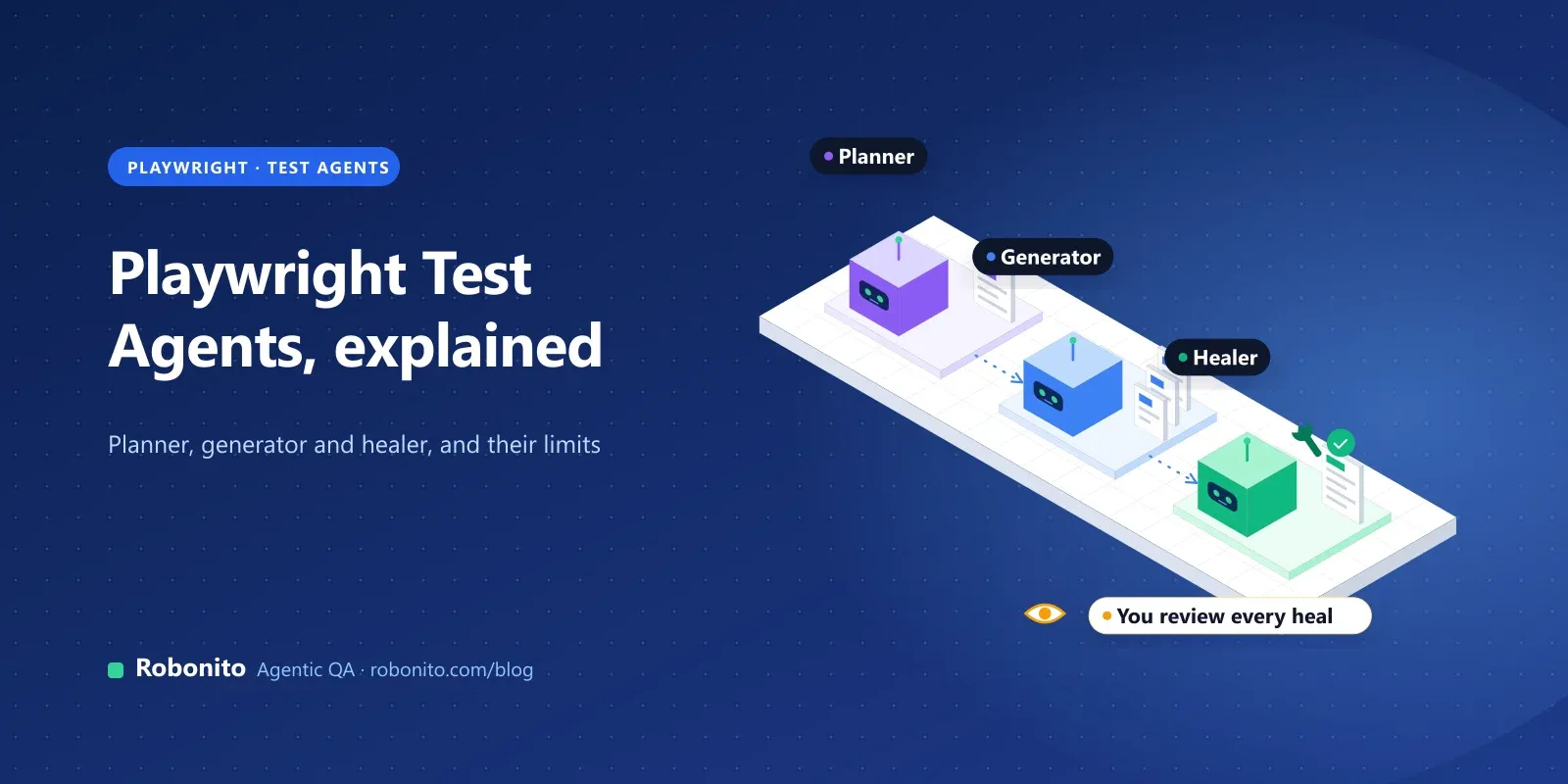
Playwright Test Agents are three AI agent definitions that ship with Playwright: a planner that explores your app and writes a Markdown test plan, a generator that turns the plan into Playwright test files, and a healer that runs failing tests and patches them. You install them with npx playwright init-agents and run them in Claude Code, VS Code, Codex or OpenCode.
This guide explains how each agent works, how to set them up, what the healer can and can't be trusted with, and when a team needs more than three agents in a repository.
Key takeaways
- One command sets them up:
npx playwright init-agents --loop=claude(orvscode,codex,opencode). - The planner needs a seed test that gets the app into a ready state, such as signed in.
- The healer can mark a test as skipped when it decides the feature is broken. Review every healer change before it merges.
- They write and repair Playwright code in your repo. Running, scheduling and reporting at scale is still your job.
What are Playwright Test Agents?
Playwright Test Agents arrived in Playwright 1.56. The Playwright docs describe them as three agents that "can be used independently, sequentially, or as the chained calls in the agentic loop."
| Agent | Input | What it does | Output |
|---|---|---|---|
| Planner | A request, a seed test, optionally a product spec | Explores the running app in a real browser | A Markdown test plan in specs/ |
| Generator | A Markdown plan from specs/ | Writes tests and checks selectors and assertions live against the app | Playwright test files in tests/ |
| Healer | The name of a failing test | Replays the steps, inspects the current UI, patches the test and re-runs it | A passing test, or a skipped one |
Each agent is a set of instructions plus Playwright's MCP browser tools. The AI model is whatever your client uses, so quality depends on the model as well as on Playwright.
How do you set up Playwright Test Agents?
You need an existing Playwright Test project. Then run the command for your client:
npx playwright init-agents --loop=claude    # Claude Code
npx playwright init-agents --loop=vscode    # VS Code with Copilot
npx playwright init-agents --loop=codex     # OpenAI Codex
npx playwright init-agents --loop=opencode  # OpenCode
The command writes the agent definitions into your project. For VS Code, the docs say you need VS Code v1.105 or later for the agentic experience to work properly.
After a run, a typical project looks like this:
.github/                # agent definitions written by init-agents
specs/                  # Markdown test plans from the planner
tests/
  seed.spec.ts          # gets the app into a ready state
  guest-checkout.spec.ts
playwright.config.ts
Two rules save a lot of confusion:
- Regenerate the agent definitions after every Playwright upgrade. The docs say they "should be regenerated whenever Playwright is updated." Assume regeneration replaces the generated files, so keep your own custom instructions somewhere else.
- Commit
specs/with your tests. The plan is the human-readable record of what each test is meant to prove. It's what you'll check the healer's changes against later.
How does the planner work?
The planner opens your app, explores the flow you ask about and writes a plan for one or many scenarios. Before it explores, it runs your seed test, which does all the setup a test needs: opening the right page, signing in, seeding data.
A seed test can be very small. This one is illustrative:
// tests/seed.spec.ts
import { test, expect } from '@playwright/test';

test('seed', async ({ page }) => {
  await page.goto('https://staging.example.com/login');
  await page.getByLabel('Email').fill(process.env.TEST_USER_EMAIL!);
  await page.getByLabel('Password').fill(process.env.TEST_USER_PASSWORD!);
  await page.getByRole('button', { name: 'Sign in' }).click();
  await expect(page.getByRole('heading', { name: 'Dashboard' })).toBeVisible();
});
Then ask for a plan in plain language, for example: "Use the planner agent to create a test plan for applying a discount code at checkout. Cover valid, expired and already-used codes."
The planner saves a Markdown file in specs/. The docs call it "human-readable but precise enough for test generation". It lists scenarios, steps and expected results. Read it before you generate anything. A wrong plan produces confident, wrong tests.
What makes plans better:
- Ask for one flow at a time. "Checkout with discount codes" beats "test the store".
- Give it the rules it can't see. Business rules such as "codes are case-insensitive" or "only one code per order" should be in the prompt or the spec you attach.
- Name the negative cases. Agents cover the happy path well and the edge cases only when asked.
How does the generator turn a plan into tests?
The generator reads the plan and writes Playwright tests. It doesn't just translate text into code. It runs the steps in a browser and checks that selectors and assertions work against the live app.
Generated files point back to their sources with comments, which makes review easier:
// spec: specs/discount-codes.md
// seed: tests/seed.spec.ts
import { test, expect } from '@playwright/test';

test('expired discount code shows an error', async ({ page }) => {
  await page.goto('https://staging.example.com/cart');
  await page.getByLabel('Discount code').fill('SPRING2025');
  await page.getByRole('button', { name: 'Apply' }).click();
  await expect(page.getByText('This code has expired')).toBeVisible();
  await expect(page.getByTestId('order-total')).toHaveText('$120.00');
});
(Illustrative output; your generator's code will differ.)
The docs are upfront that generated tests "may include initial errors" that the healer can then fix. In practice, review three things in every generated test:
- Does each assertion check an outcome, or only that a page loaded? "Order total unchanged" is a real check. "The page is visible" isn't.
- Are the locators role- or label-based? They survive redesigns better than CSS paths. Our Playwright best practices guide covers this in depth.
- Is test data fixed or generated? Hard-coded codes and users break the second time a test runs against a shared environment.
What does the healer actually fix?
When a test fails, you give the healer its name. According to the docs, it:
- replays the failing steps
- inspects the current UI to find equivalent elements or flows
- suggests a patch, such as a new locator, a wait or a data fix
- re-runs the test until it passes or until guardrails stop the loop
The result is "a passing test, or a skipped test if the healer believes that functionality is broken."
That last line is the one to think hardest about.
Can the healer hide real bugs?
Yes, if you let it merge changes nobody reviews. This is the biggest worry testers raise about AI healing, and it's fair. One reviewer on a QA forum described the risk as "an easy always green model".
A test can fail for two very different reasons:
| Failure | Example | Right fix |
|---|---|---|
| The test is out of date | The "Apply" button was renamed "Redeem" | Update the locator. Healing is exactly right. |
| The product is broken | The discount no longer changes the total | Fail the build and file a bug. "Healing" this is hiding it. |
A healer that changes an assertion from $108.00 to $120.00, or skips a test "because the feature looks broken", turns the second case into a green build. The agent isn't being malicious. It was asked to make a test pass.
Guardrails that keep healing honest:
- Healer changes go through pull requests, like any other code. Never let an agent push straight to your main branch.
- Treat locator changes and assertion changes differently. A new locator is usually safe. A changed expected value or a deleted
expectneeds a human who knows the feature. - Fail CI on new skips. A short script can block any pull request that adds
test.skiportest.fixme, or removes assertions, until someone approves it:
# Fails if a pull request adds skipped tests or deletes assertions under tests/
BASE=origin/main
if git diff -U0 "$BASE"...HEAD -- tests | grep -qE '^\+.*\btest\.(skip|fixme)\('; then
  echo "New skipped or fixme tests found. Get a reviewer to approve them."
  exit 1
fi
REMOVED=$(git diff -U0 "$BASE"...HEAD -- tests | grep -cE '^-\s*(await\s+)?expect\(' || true)
if [ "$REMOVED" -gt 0 ]; then
  echo "$REMOVED assertion(s) removed. Get a reviewer to approve them."
  exit 1
fi
- Check changes against the plan. If the healed test no longer proves what its
specs/scenario says, the heal is wrong.
For a wider look at keeping AI agents' test results trustworthy, see why confidence is the real bottleneck in agentic testing.
What's new for Playwright agents since 1.56?
Playwright has added agent features steadily since the test agents launched. From the release notes:
- 1.59: coding agents can run
npx playwright test --debug=cliand explore traces withnpx playwright trace. Agents can also record "agentic video receipts" of what they did. - 1.62: Playwright bundles the Playwright MCP server and
playwright-cli, sonpx playwright mcpandnpx playwright cliwork without separate installs. - 1.64: Playwright MCP supports WebMCP by default.
The Playwright CLI also installs "skills" for Claude Code, GitHub Copilot and Cursor, including one to plan, generate and heal tests. It's a lighter-weight route to the same workflow.
Test Agents vs Playwright MCP vs Playwright CLI: which do you need?
| Test Agents | Playwright MCP | Playwright CLI with skills | |
|---|---|---|---|
| What it is | Predefined planner, generator and healer agents | Browser tools for any MCP client | A command-line tool and skills for coding agents |
| Best for | Building and repairing a Playwright suite in your repo | Exploring, debugging, one-off agent sessions | Coding agents that work in a terminal |
| Output | Plans in specs/, tests in tests/ | Actions, snapshots, optional generated code | Commands and generated tests |
| Set up with | npx playwright init-agents | npx @playwright/mcp@latest (also bundled as npx playwright mcp since 1.62) | npm install -g @playwright/cli@latest |
They aren't rivals. The test agents use Playwright's MCP tools under the hood, and many teams use all three. Our Playwright MCP guide covers MCP setup in Claude Code, Cursor and VS Code in detail.
What do teams report after using them?
The honest picture from early users is mixed:
- Fast first drafts, in principle. A Ministry of Testing member working on small to medium web apps saw the appeal as getting a basic suite running quickly to kick-start automation on a new product (thread).
- Rework is normal. A developer who compared the agents with AI-native platforms advised planning for rework on generated tests (dev.to).
- Results depend on the model. The same plan can produce different tests with different models and on different days.
None of this is surprising for a tool that's only a year old. It does mean the agents speed up writing tests, while owning the suite is still a job for your team.
When should you use Playwright Test Agents?
They're a strong fit when:
- your team already writes Playwright tests in TypeScript and reviews them in pull requests
- you want to add coverage to a web app quickly and can review generated code
- developers own the tests and are happy to run them from your own CI
They're a weaker fit when:
- most of your testers don't read code, so nobody can review what the generator and healer change
- you test native mobile, desktop or API flows, or phone and chat agents, alongside web
- you need run history, video evidence and audit trails for every release
- your bottleneck is running and maintaining hundreds of journeys, not writing the first draft
Where does Robonito fit?
Robonito is an agentic QA platform. Its agents create, run and maintain end-to-end tests, and it covers the jobs that sit around the three Playwright agents rather than replacing Playwright.
- Plain-language test creation. In AI Studio you describe what to test, paste a URL or reference a Jira issue, and the agent works through the app step by step. Testers who don't write TypeScript can build and review tests.
- Healing you can audit. Self-healing adapts steps when labels, layouts or locators change, and every healed step is logged for review. That's the guardrail this post recommends, built in.
- Runs and evidence. Tests run in parallel in isolated cloud workers, from Jenkins, GitHub Actions, GitLab CI, Azure DevOps or CircleCI. Every run keeps video, network traces and an AI root cause for failures.
- More than web. Mobile (Android and iOS), desktop and API testing are on the Pro and Enterprise plans.
- No lock-in. Robonito can generate executable code for your test cases.
Where Playwright Test Agents are the better choice: a developer-owned suite that should live entirely in your repository as Playwright code, with no platform and no extra cost beyond your model's tokens.
For a fuller comparison, see Robonito vs Playwright. Or on a flow you've already planned with the planner agent.
Frequently asked questions
Are Playwright Test Agents free?
Yes. They ship with Playwright, which is open source. You pay for the AI model your client uses, such as Claude Code, Copilot or Codex.
Which Playwright version do the test agents need?
They were introduced in Playwright 1.56. Use a current release and regenerate the agent definitions with npx playwright init-agents after each upgrade.
Do Playwright Test Agents work with Claude Code?
Yes. Run npx playwright init-agents --loop=claude. The docs also list VS Code, Codex and OpenCode loops.
What is the seed test in Playwright Test Agents?
It's a normal Playwright test that sets up everything other tests need, such as signing in. The planner runs it before exploring, and uses it as an example for the tests it plans.
Can the healer agent fix any failing test?
It can fix tests that broke because the UI changed, such as a renamed button or a new layout. If it decides the feature itself is broken, it can mark the test as skipped. Review those changes: a skipped test may be hiding a real bug.
What's the difference between Playwright Test Agents and Playwright MCP?
Playwright MCP gives any MCP-capable AI client tools to drive a browser. Test Agents are three predefined agents that use those tools to plan, generate and heal Playwright tests in your repository.
Can Playwright Test Agents test mobile apps?
Not native apps. They drive browsers, so they can test mobile web with a phone-sized viewport, but native Android and iOS apps need a different tool.
Let the agents draft. Keep the suite trustworthy. Robonito runs your critical journeys on every release, with healing your team can review and evidence for every run. or .